
AR Glasses HDMI to USB C Adapter
4.6Editor score
Play & Charge port
Aluminum housing
Low latency
Discover the top AR glasses HDMI adapters for 2026. Compare 10 models, real ratings, features, and compatibility for seamless gaming and streaming.
AR glasses have revolutionized how we consume media, offering massive virtual screens in a portable form factor. However, many popular devices like gaming consoles and laptops output video via HDMI, creating a compatibility gap for USB-C AR glasses users.
To bridge this gap, HDMI to USB-C adapters are essential tools. We have evaluated ten leading models based on video quality, power delivery, build durability, and broad device compatibility to help you find the right solution.
Each pick highlights specific strengths like 4K support or battery integration. Note that prices and stock fluctuate frequently, so verify current details before purchasing to ensure you get the best value for your setup.
4.6Editor score

4.3Editor score

4.5Editor score
This table provides a side-by-side overview of the top ten adapters, highlighting key specifications like resolution support, power features, and compatibility to help you quickly identify the best fit for your specific hardware needs.


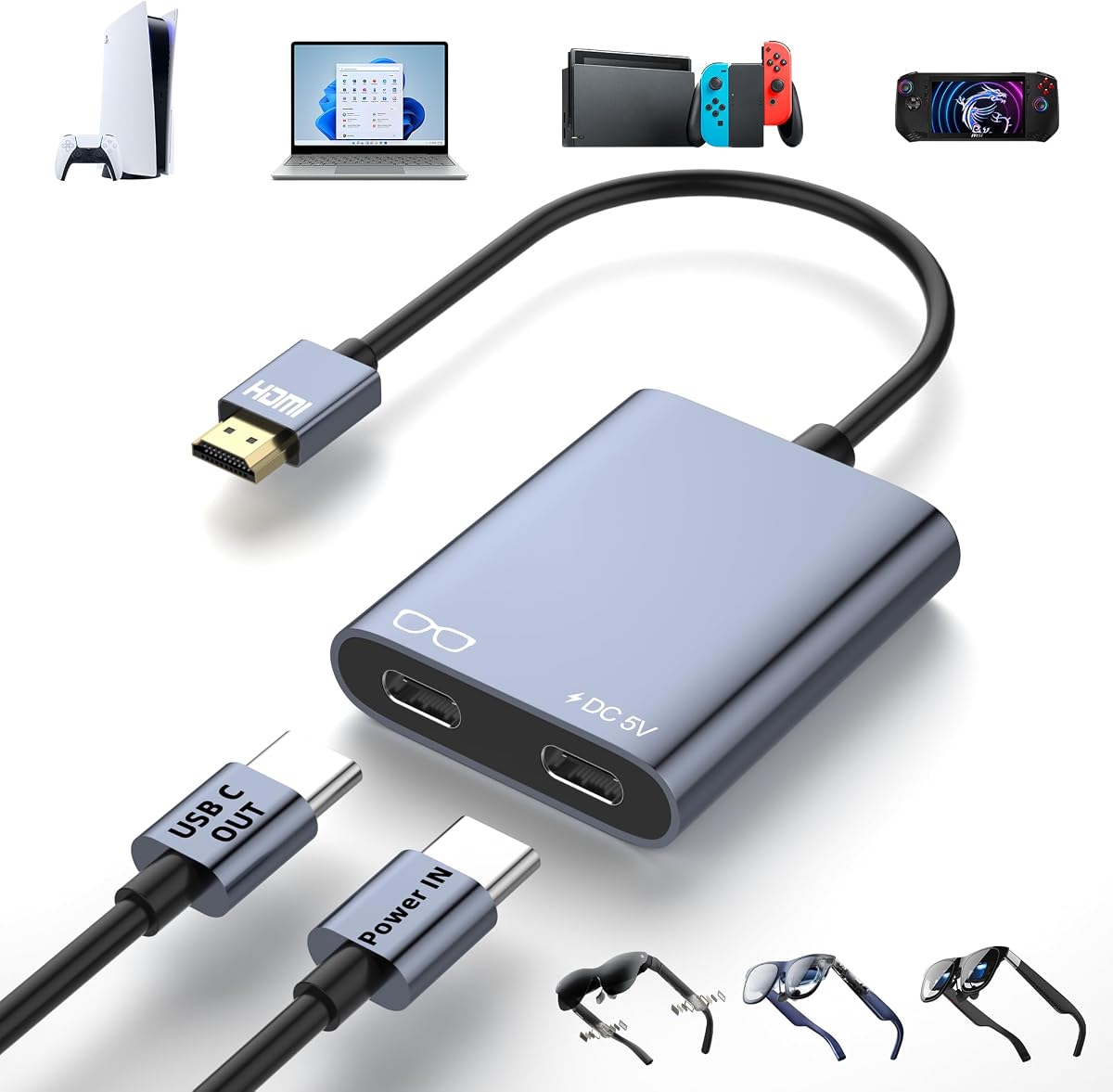


This adapter leads the pack with robust support for 4K at 60Hz and a reliable connection for major gaming consoles. It bridges the gap between HDMI source devices and USB-C AR glasses effectively.
We may earn a commission when you buy through this link, at no additional cost to you.
Its standout feature is the dedicated power output which ensures your glasses remain charged during long sessions. The hub supports brands like Xreal and RayNeo without needing complex setup steps.
Users should be aware of the DHCP requirement on some devices which can cause connection issues if not adjusted. This is a minor software setting that resolves quickly with the right guide.
For gamers who want a straightforward reliable cable solution this hub delivers consistent performance. It balances cost and capability better than many competitors in the current market.
Connect Switch PS5 or Xbox directly to your AR glasses for immersive gaming on a virtual big screen.
The hub offers 10W output to keep your glasses powered so you never run out of battery mid-movie.
We may earn a commission when you buy through this link, at no additional cost to you.
Guermok offers a unique advantage with a significantly longer cable compared to standard adapters. This flexibility is perfect for setups where your source device is far from your seating position.
We may earn a commission when you buy through this link, at no additional cost to you.
The build quality features an aluminum alloy housing that manages heat well during extended use. It also includes a full-function USB-C cable for a complete plug-and-play experience.
Some users may need to switch audio settings on their glasses to ensure sound is passed through correctly. This is a simple step that ensures you get full multimedia enjoyment.
If you need extra reach for your setup this adapter provides the length and quality to handle it. It remains stable and reliable for both gaming and movie watching sessions.
The 4.9ft cable allows more freedom to sit back and relax while keeping your source device out of reach.
Includes a full-function USB-C cable so you have everything you need to connect right out of the box.
We may earn a commission when you buy through this link, at no additional cost to you.
This adapter stands out for its native support of HDR10 which brings richer contrast and vibrant colors to supported sources. It is specifically designed for RayNeo users looking for maximum visual fidelity.
We may earn a commission when you buy through this link, at no additional cost to you.
The ability to accept Lightning inputs makes it unique for iPhone users who want to mirror content directly. This expands the range of source devices beyond just traditional HDMI hardware.
While the price is higher the visual improvements for HDR content are noticeable. Just remember you need an Apple Digital AV Adapter for Lightning devices which is sold separately.
For RayNeo owners who want the best possible image quality this adapter is the top choice. It delivers a true cinema experience with its 201-inch virtual display capabilities.
HDR10 support ensures that colors pop and contrast is deeper for a more realistic viewing experience.
Lightning input support allows you to connect your iPhone easily to project media directly to your glasses.
We may earn a commission when you buy through this link, at no additional cost to you.
This model offers excellent value with a high rating and robust feature set at a budget-friendly price. It supports 4K and 60Hz while providing essential power features for AR glasses.
We may earn a commission when you buy through this link, at no additional cost to you.
The inclusion of a Play and Charge port ensures your device stays powered up during long sessions. This removes the worry of battery drain while enjoying a movie or game.
Its ultra-compact design makes it easy to slip into a pocket for travel. The premium aluminum housing also adds durability despite the low price point.
For those seeking the best balance of cost and performance this adapter is hard to beat. It delivers professional-grade connectivity without the premium cost of branded options.
The Play and Charge port means you get reliable power for your glasses without needing expensive extra accessories.
Despite the low cost it features a premium aluminum alloy that ensures durability and heat dissipation.
We may earn a commission when you buy through this link, at no additional cost to you.
The AIMIBO adapter offers a truly wireless solution which eliminates cable clutter entirely. It includes a large battery so you can stream for hours without needing a power outlet.
We may earn a commission when you buy through this link, at no additional cost to you.
While it supports HDMI output it works best with its wireless transmitter for maximum flexibility. This setup allows you to cast from phones and laptops directly to your AR glasses.
The dual band Wi-Fi ensures a stable connection with minimal lag. It is ideal for users who prioritize convenience and want a clean setup without visible wires.
If you want to break free from wires this adapter provides a robust wireless experience. It is perfect for travel or casual home use where cables are a hindrance.
Cast content directly to your glasses without needing to plug in physical cables to your source device.
A built-in 5000mAh battery provides hours of continuous use so you are not tethered to a wall.
We may earn a commission when you buy through this link, at no additional cost to you.
This adapter is known for its stable connection and consistent performance across various devices. It supports 4K at 60Hz which is ideal for smooth gaming and high-fidelity video playback.
We may earn a commission when you buy through this link, at no additional cost to you.
The power port allows you to keep your glasses charged while watching. This feature is crucial for long sessions where battery drain could interrupt your experience.
It is important to note that this adapter is unidirectional and will not work backwards. Ensure you connect HDMI to source and USB-C to display to avoid signal issues.
For users looking for a reliable no-fuss solution this adapter provides the stability needed for daily use. It is a solid choice for gaming and media consumption.
The advanced chipset ensures a stable connection without flickering or signal dropouts during use.
Low latency performance makes this adapter well suited for real-time gaming without noticeable delays.
We may earn a commission when you buy through this link, at no additional cost to you.
This adapter is exceptionally compact and lightweight making it perfect for travel. It supports 4K at 60Hz ensuring you do not compromise on quality even in a small package.
We may earn a commission when you buy through this link, at no additional cost to you.
The dedicated power input helps prevent black screens that can occur with power-starved converters. It is designed for easy use with no software or drivers required.
Note that the power adapter is sold separately so ensure you have a compatible supply ready. This keeps the package small but adds a step for setup.
For frequent travelers who need a tiny reliable adapter this model is a strong candidate. It fits easily into any pocket while delivering high-quality video performance.
Its ultra-small body slips effortlessly into pockets making it the ultimate travel companion for AR glasses.
Plug and play design means you can start watching or gaming immediately without any configuration.
We may earn a commission when you buy through this link, at no additional cost to you.
This adapter is built with premium aluminum that gives it a sleek professional look. It offers zero delay video which is vital for immersive gaming and movie watching.
We may earn a commission when you buy through this link, at no additional cost to you.
Its ergonomic design is very lightweight and easy to carry around. However the power limit is lower at 5W so check your glasses requirements carefully.
It is not compatible with Meta series devices so verify your hardware compatibility first. For supported devices it provides a stable high-quality connection.
For style-conscious users this adapter combines aesthetics with strong performance. It is a great choice for those who value design in their tech accessories.
The sleek aluminum housing not only looks good but also helps dissipate heat efficiently during use.
Zero delay ensures that what you see on your screen matches your actions in real time.
We may earn a commission when you buy through this link, at no additional cost to you.
This adapter includes a full-function USB-C cable which makes setup straightforward. It supports 4K at 60Hz for smooth video and gaming experiences on your AR glasses.
We may earn a commission when you buy through this link, at no additional cost to you.
The Play and Charge port is a valuable feature that keeps your device powered. The aluminum shell is compact and durable for travel and daily use.
Ensure you have an external power source ready as this adapter requires it to function. Without power the signal will not pass through correctly.
For users wanting a ready-to-use kit with good cable quality this adapter is a solid choice. It delivers consistent performance for movies and games alike.
Includes a full-function USB-C cable so you have everything needed to connect without buying extras.
The power port ensures a steady supply to your glasses preventing interruptions during long sessions.
We may earn a commission when you buy through this link, at no additional cost to you.
This adapter features a built-in 5000mAh battery which means you do not need an external power brick. It powers both your Fire TV Stick and your glasses simultaneously for a clean portable setup.
We may earn a commission when you buy through this link, at no additional cost to you.
The battery provides around 3 hours 40 minutes of continuous use which is great for travel. Its sturdy PC and ABS body ensures it can handle regular use.
The charging time is longer than standard adapters but the convenience of being untethered is worth it. It simplifies your gear significantly when on the go.
For travelers and commuters this adapter offers unmatched convenience and reliability. It removes the need for extra cables and power supplies making it a premium choice.
No external power bricks or messy cables are needed making this the ultimate travel setup for AR glasses.
The built-in battery delivers consistent power to both your source and display for stable performance.
We may earn a commission when you buy through this link, at no additional cost to you.
Selecting the right HDMI to USB-C adapter depends on your specific source devices and desired video quality. Here are key factors to consider before purchasing.
Ensure the adapter supports 4K at 60Hz for the smoothest viewing experience. This is especially important for gaming to avoid screen tearing.
Look for adapters that clearly specify 4K@60Hz support to avoid lower resolution limitations.
Many AR glasses require a dedicated power port to stay charged during use. Check if the adapter includes a 5V power input.
Adapters with built-in batteries offer more freedom but take longer to charge.
Most adapters are unidirectional meaning they only work from HDMI source to USB-C display. Verify the direction before connecting.
Plugging it backward will result in no signal so check the labeling on the device.
Check if the adapter supports your specific brand of glasses like Xreal or RayNeo. Some require DP Mode switching for audio.
Also ensure compatibility with your source device such as PlayStation or Switch models.
Aluminum housings offer better heat dissipation and durability compared to plastic. This helps prevent overheating during long sessions.
Lightweight designs are preferable for travel but ensure the construction is sturdy.
Some adapters do not pass audio to the glasses requiring you to switch modes. Confirm audio compatibility before buying.
External speakers may be needed if the adapter does not support audio on certain displays.
Standard adapters often come with short cables. Consider if you need a longer one for flexibility.
Some bundles include extra cables for better usability.
Look for adapters with clear warranty terms and customer support options. This helps if connection issues arise.
Two-year warranties are common and provide peace of mind.
Connect the HDMI end of the adapter to your source device like a console or laptop. Then plug the USB-C end into your AR glasses or portable monitor.
Attach an external power source to the adapter if required. Without power the adapter may not output a signal.
Keep the adapter in a protective case to prevent damage from dust or drops. Avoid bending the cables excessively to maintain longevity.
Yes, most adapters require an external 5V power source to function correctly. Without it you may experience signal loss or flickering. Check the manual for the recommended wattage.
Most HDMI to USB-C adapters are not compatible with VR headsets like Meta Quest. They are designed for AR glasses and USB-C displays.
You may need to switch your glasses to DP Mode to enable audio transmission. Consult the manual to access the audio settings.
Yes, most adapters support Xbox Series X and PS5. Ensure your console is set to output video properly and has DHCP disabled if required.
Yes, laptops with HDMI output ports can connect. However, ensure your USB-C glasses support video input via DP Alt Mode.
The top adapters support up to 4K at 60Hz. This provides sharp visuals and smooth motion for movies and gaming.
Yes, most adapters require no software or drivers. Simply connect the cables and power to start using.
Flickering is often caused by insufficient power. Ensure you connect a stable power source to the adapter.
The HDMI to USB-C adapter landscape offers great options for all needs. Top picks like the Editor's Choice and Budget pick deliver excellent value.
Prioritize power delivery and resolution support to get the best experience. Ensure your glasses and console are compatible with the adapter.
Always check current prices and stock before purchasing. Prices vary often so timing your purchase can save you money.