
ASUS ROG Hyperion GR701 E-ATX Full-Tower Gaming PC Case
4.6Editor score
Diecast aluminum frame
Tool-free side panel
USB Type-C ports
Discover the top 10 ASUS PC cases with real ratings and expert comparisons. Find the perfect chassis for your build today.
Finding the right chassis is crucial for any custom build. ASUS offers a wide range of cases tailored to different needs and budgets.
We compared ten top models based on airflow, compatibility, and design features. This list covers everything from budget-friendly options to premium towers.
Each pick highlights key strengths and potential trade-offs. Please note that availability and pricing can change frequently.
4.6Editor score

4.8Editor score

4.7Editor score
This side-by-side table helps you compare key specifications across all ten models.


This model stands out as a top choice for builders seeking a high-performance chassis. It holds a solid rating and offers E-ATX support with excellent cooling options.
We may earn a commission when you buy through this link, at no additional cost to you.
The metal chassis features a custom spatter pattern and includes fans with Aura Sync. Its design prioritizes both style and function for gamers.
While it is quite heavy and carries a higher price point, the build quality justifies the investment for serious enthusiasts.
If you need a case that balances aesthetics and cooling for powerful hardware, this is an excellent recommendation.
The case supports up to seven fan-mounting points and large radiators for optimal thermal management.
Ergonomic woven-cotton handles make transporting the case easier and safer.
We may earn a commission when you buy through this link, at no additional cost to you.
The AP201 is an affordable option that does not compromise on cooling. It features a quasi-filter mesh panel and fits into a small footprint.
We may earn a commission when you buy through this link, at no additional cost to you.
Despite its compact size, it supports large radiators and ATX PSUs, making it versatile for many builds.
The main trade-off is the size limit to Micro-ATX, which may not suit everyone.
For budget-conscious users needing efficient airflow in a small package, this case is highly recommended.
Over 57,000 precision-machined holes ensure maximum ventilation.
Secure clip mechanisms allow side panels to be removed easily.
We may earn a commission when you buy through this link, at no additional cost to you.
The Hyperion GR701 offers a premium experience with a sturdy diecast aluminum frame. It supports large cooling systems and features convenient tools.
We may earn a commission when you buy through this link, at no additional cost to you.
Its built-in graphics card holder and storage drawer add significant value for users building high-end systems.
The high cost and weight might be prohibitive for some, but the quality is exceptional.
If you want top-tier materials and features for your ultimate build, this case is worth considering.
Two front panel Type-C ports provide 60W fast charge support.
The frame can support up to 80KG for maximum durability.
We may earn a commission when you buy through this link, at no additional cost to you.
This mid-tower case features a panoramic glass design for an unobstructed view. It divides the chassis into two cooling zones for better thermal control.
We may earn a commission when you buy through this link, at no additional cost to you.
The modular design allows most panels to be removed for easier installation.
While the glass is impressive, it can limit airflow compared to mesh options.
If you prioritize aesthetics and a clean view of your build, this case is a strong choice.
Independent zones for CPU and GPU help prevent heat overlap.
The 10 Gbps Type-C port enables high-speed data transfers.
We may earn a commission when you buy through this link, at no additional cost to you.
The A31 PLUS is built for motherboards with hidden connectors to keep cables tidy. It includes ARGB fans for vibrant lighting.
We may earn a commission when you buy through this link, at no additional cost to you.
Its panoramic design and angled base enhance airflow efficiency and viewing angles.
The lower average rating suggests some potential inconsistencies in quality.
For users seeking a clean look with hidden connectors, this model offers good value.
Optimized for motherboards with hidden connectors to reduce clutter.
Four pre-installed ARGB fans deliver a mesmerizing display.
We may earn a commission when you buy through this link, at no additional cost to you.
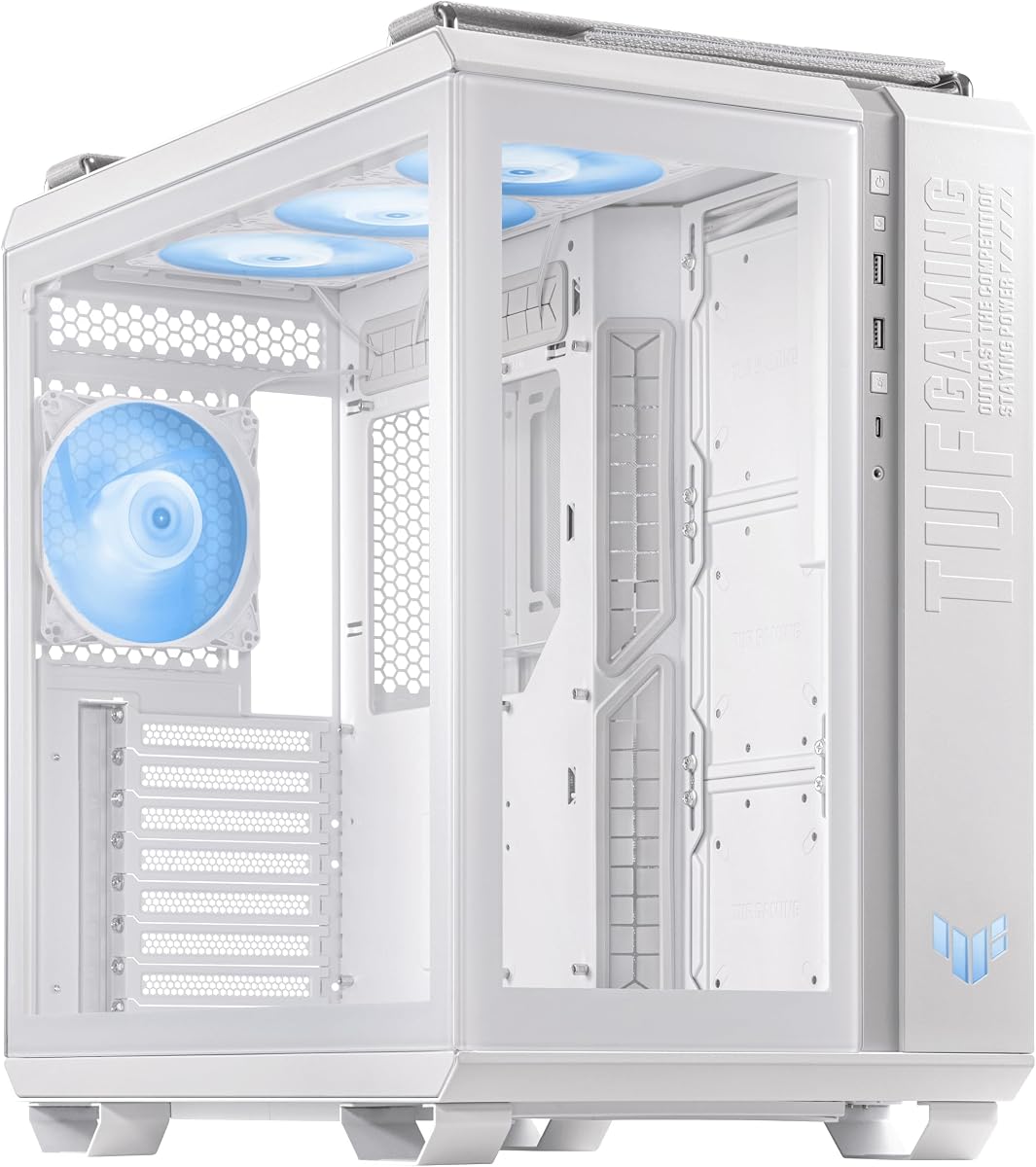
This white edition offers the same robust features as the black version but with a cleaner aesthetic. It supports E-ATX boards and large radiators.
We may earn a commission when you buy through this link, at no additional cost to you.
The metal front panel and carry handles add to its durability.
White cases can show dust and fingerprints more easily, which is a common trade-off.
If you need a white chassis for your build, this is a reliable and stylish option.
Custom spatter pattern enhances the unique look of the case.
Ergonomic handles allow safe transport up to 30Kg.
We may earn a commission when you buy through this link, at no additional cost to you.
The GT301 is a compact mid-tower case with a honeycomb front panel for efficient airflow. It includes a dedicated RGB controller and a headphone hanger.
We may earn a commission when you buy through this link, at no additional cost to you.
This setup is convenient for users who value cable management and lighting control.
The smaller size may limit component choices compared to larger towers.
For those seeking a compact case with strong cooling and RGB features, this is a great fit.
A 6-port hub allows centralized control of your lighting.
The honeycomb design maximizes air intake for better thermal performance.
We may earn a commission when you buy through this link, at no additional cost to you.
The white variant of the GT502 offers a stunning panoramic design with ARGB fans. It features dual chambers for independent cooling zones.
We may earn a commission when you buy through this link, at no additional cost to you.
The 20Gbps Type-C port provides fast connectivity for modern drives.
While beautiful, the glass panels may restrict airflow compared to mesh designs.
For white builds needing both style and performance, this case delivers well.
The front Type-C port supports 20Gbps for fast storage access.
Dual cooling zones ensure CPU and GPU heat do not mix.
We may earn a commission when you buy through this link, at no additional cost to you.
This model supports motherboards with concealed connectors and features a panoramic tempered glass design. It has a high rating for its class.
We may earn a commission when you buy through this link, at no additional cost to you.
The wide compatibility ensures it supports various GPU and radiator sizes.
Glass panels may limit airflow compared to mesh options.
For those wanting a sleek black look with hidden connectors, this is a solid choice.
Supports GPUs up to 380mm and 360mm radiators effectively.
An 8-degree angled base improves viewing and airflow efficiency.
We may earn a commission when you buy through this link, at no additional cost to you.
The GT502 Plus features a dual chamber chassis for independent CPU and GPU cooling. It offers tool-free side panels for easy access.
We may earn a commission when you buy through this link, at no additional cost to you.
The USB 3.2 Gen2 port provides fast data transfer speeds.
The higher price point is balanced by its modular design and cooling capabilities.
For builders needing clean airflow and easy upgrades, this white case is a great option.
Most panels and mounts are removable to ease hardware installation.
The two-chamber design prevents heat from mixing zones.
We may earn a commission when you buy through this link, at no additional cost to you.
Selecting the right case involves balancing size, airflow, and features. This guide breaks down key factors to consider.
Ensure the case supports your motherboard size, whether Micro-ATX or E-ATX. This determines the space available for components.
Always verify the dimensions match your specific motherboard to avoid installation issues.
Look for mesh panels or multiple fan mounts to ensure proper ventilation. Good airflow prevents overheating during intense tasks.
Prioritize models with front and rear fans for optimal thermal performance.
Check the number of PCI slots and drive bays. Your needs for GPUs and storage dictate how much space you require.
Confirm the case can fit your graphics card length and any additional accessories.
Clean builds rely on effective cable routing. Look for extended motherboard trays and ample space behind the panel.
Hidden connectors and tie-down points help maintain a clutter-free interior.
USB Type-C and high-speed USB ports provide convenient access. Ensure the case offers the connectivity your peripherals need.
Front panel layouts vary significantly, so check what is included.
Materials like tempered glass and metal frames enhance durability. The design impacts how the case fits into your setup.
Choose a color and style that matches your system theme.
Tool-free panels and removable components simplify assembly. This saves time and reduces the risk of damage.
A case that is easy to open is easier to upgrade later.
Install your motherboard and GPU first to ensure they fit before adding other components. This prevents unnecessary rework during setup.
Use cable ties to organize wires and prevent airflow blockage. Clean dust filters regularly to maintain cooling efficiency.
Place the case in a well-ventilated area away from direct sunlight. Keep the surrounding environment clean to reduce dust accumulation.
No. While models like the GT501 and GR701 support E-ATX, others like the AP201 are limited to Micro-ATX. Check the product details carefully.
Most models come with pre-installed fans. Some include RGB lighting, while others have standard PWM fans. Always check the specifications for details.
Many cases support large radiators and custom loops. Models like the Hyperion GR701 offer significant support for 420mm radiators. Verify clearance before purchasing.
Dual-chamber designs separate CPU and GPU cooling zones. This helps prevent heat from mixing and improves overall thermal efficiency.
Some cases like the A31 PLUS are optimized for hidden connectors. This feature helps manage cables more effectively for a clean build.
Use a microfiber cloth and gentle cleaning solution. Avoid harsh chemicals that might damage the tempered glass coating or tint.
The ASUS lineup offers cases for every type of builder, from budget to premium. Each model provides distinct strengths like cooling, design, or modularity.
Prioritize airflow and compatibility based on your specific hardware needs. A case that fits your components is the first step to a successful build.
Prices and availability change over time, so verify current details before purchasing. This ensures you get the best value for your investment.