
JOYO MOMIX CAB
4.2Editor score
Direct monitoring with zero latency
Plug and play no drivers
Pocket sized portable design
Discover the top 10 audio interfaces for guitar in 2026. Compare features, ratings, and specs to find the perfect interface for your recording needs.
Finding the right audio interface for your guitar is crucial for capturing pristine tones whether you are recording at home or performing live. A quality interface ensures your signal remains clean and latency free while providing the necessary inputs for your instrument and microphone.
We have compared ten top rated models based on their build quality, conversion fidelity, software bundles, and compatibility with modern operating systems. Our analysis covers everything from pocket sized mobile adapters to robust studio units designed for serious producers and content creators.
Each pick in this list highlights specific strengths such as direct monitoring, high resolution sampling rates, and included digital audio workstation software. Please note that prices and availability may change over time so check the current listings before making your final decision.
4.2Editor score
4.6Editor score

5.0Editor score
This side-by-side comparison highlights the key specifications and unique features of each top rated audio interface to help you choose the best fit for your setup.



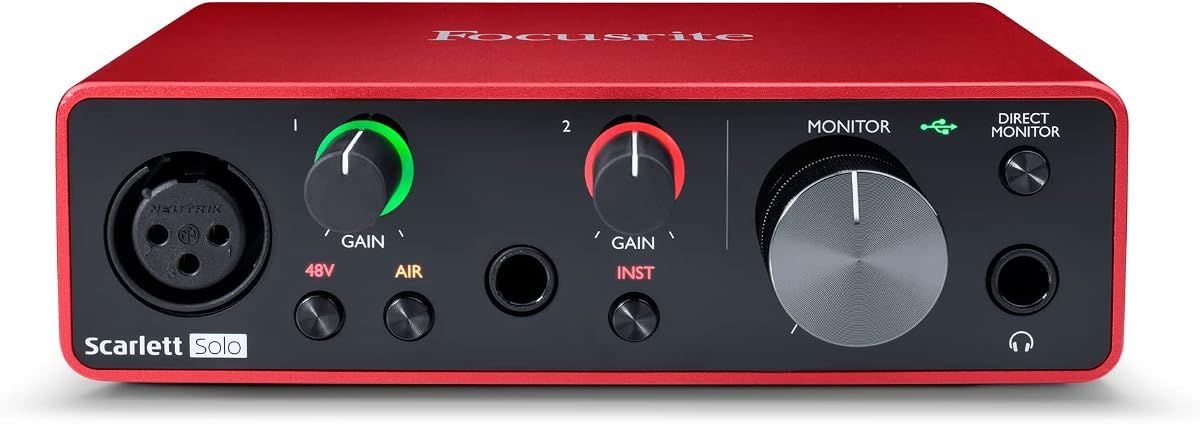
The Focusrite Scarlett Solo 3rd Gen stands out as a top choice for musicians seeking professional recording quality in a compact package. With a robust rating it has become a staple for home studios needing reliable performance.
We may earn a commission when you buy through this link, at no additional cost to you.
Its high performing mic preamps and switchable Air mode ensure that your acoustic and electric guitars sound crisp and clear. The Gain Halos feature helps you find the perfect input level instantly avoiding distortion while recording.
While it lacks some advanced features like loopback found in higher end models the core recording quality is exceptional. For solo artists or podcasters this interface delivers studio standard results without overwhelming complexity.
If you need a reliable interface for home recording that balances performance with simplicity this model is an excellent investment. It provides everything you need to start creating music immediately with included DAW software.
The Air mode switch adds extra brightness and clarity to your recordings making vocals and acoustic instruments shine with a modern polished sound.
These color coded rings around the gain knobs visually indicate when your signal is optimal reducing the guesswork and preventing unwanted clipping during recording.
We may earn a commission when you buy through this link, at no additional cost to you.
The JOYO MOMIX CAB is an ideal solution for guitarists who want to record directly to their phones without the hassle of complex setups. It offers true plug and play convenience for mobile recording.
We may earn a commission when you buy through this link, at no additional cost to you.
Its direct monitoring feature allows you to hear your guitar signal instantly through headphones with zero latency which is essential for recording clean tracks or practicing with backing tracks.
While it does not support real time software processing or amp simulation the simplicity makes it perfect for capturing ideas on the go. The clip on design ensures it stays secure in your pocket or on your strap.
This interface is best suited for mobile musicians needing a quick way to capture riffs or lyrics. Its low cost and ease of use make it a standout choice for beginners or casual creators.
The signal passes straight to your headphones allowing you to hear your instrument in real time while your phone records the audio without any delay.
No batteries or drivers are required just connect your guitar and phone to start recording immediately. It works seamlessly with most iOS and Android devices.
We may earn a commission when you buy through this link, at no additional cost to you.
The M-AUDIO M-Track Duo offers a versatile solution for those needing to record both guitar and vocals simultaneously. It is designed to be a complete toolkit for beginners starting their music journey.
We may earn a commission when you buy through this link, at no additional cost to you.
With two combo inputs you can plug in an instrument and a microphone at the same time. The transparent Crystal Preamps ensure your signal remains clean even when using condenser microphones for vocals.
While the 48kHz resolution is standard for entry level units it is sufficient for most online streaming and basic music production. The included MPC Beats software provides a solid foundation for beat making and arrangement.
If you need flexibility to record multiple sources without breaking the bank this interface is a strong contender. It covers all the basics you need to start producing music at home effectively.
You can connect both a guitar and a microphone simultaneously allowing you to record live performance or band sessions without switching cables.
These preamps are designed to be transparent meaning they amplify your sound without adding unwanted color or noise to your recordings.
We may earn a commission when you buy through this link, at no additional cost to you.
The IK Multimedia iRig USB brings studio quality recording to your iPad and Mac in a compact form factor. It is built specifically for musicians who need to record on the go with modern devices.
We may earn a commission when you buy through this link, at no additional cost to you.
Its universal compatibility ensures you can use it with Mac PC and iPad easily. The direct monitoring feature allows for silent practice while the dedicated Amp out lets you connect to your favorite guitar rig.
Although it is small it supports a complete suite of recording software to get you started. The 24-bit resolution captures detailed audio ensuring your guitar tones sound authentic in your projects.
This interface is perfect for digital nomads and mobile creators who need a lightweight option. Its ability to connect to amplifiers directly adds versatility for live performance scenarios.
The dedicated Amp out jack lets you send your signal to external amps or pedals giving you more tone options than standard interfaces.
With a USB-C cable included it works seamlessly with the latest phones laptops and tablets making it a future-proof choice for mobile recording.
We may earn a commission when you buy through this link, at no additional cost to you.
The MAONO PS22 Lite is designed with content creators and streamers in mind offering high resolution recording at 24-bit/192kHz. It captures every nuance of your performance with impressive clarity and detail.
We may earn a commission when you buy through this link, at no additional cost to you.
Its ProStudio Routing Software opens up possibilities for live streaming with virtual channels and loopbacks. This makes it easier to manage audio sources during broadcasts without needing complex hardware setups.
The interface handles both condenser and dynamic microphones well thanks to its 48V phantom power. It is a great choice if you plan to mix vocal podcasting with guitar recording.
If you are a beginner looking for a tool that simplifies the streaming process this interface offers the right balance. Its plug and play nature ensures you can start creating content immediately.
The included routing software allows you to create multiple audio channels for easy mixing during live streams and recordings.
With a 192kHz sampling rate you get ultra detailed audio quality that is ideal for professional music production and high fidelity streaming.
We may earn a commission when you buy through this link, at no additional cost to you.
The PIYONE 2×2 Interface delivers high-fidelity studio quality recording with 24-bit/192kHz resolution. It is designed to capture crystal clear audio whether you are recording vocals or guitars.
We may earn a commission when you buy through this link, at no additional cost to you.
Its combo XLR and TRS inputs provide maximum flexibility for different gear setups. The illuminated control rings not only look great but also make adjusting gain easier in low light studio environments.
With direct monitoring and loopback functions it is well suited for streamers who need to route audio efficiently. The class-compliant design ensures it works seamlessly with Mac and PC without extra drivers.
This interface is a strong option for those who value audio clarity and modern design. It brings professional features to an accessible price point for aspiring producers and podcasters.
The LED rings on the gain knobs help you see your settings clearly in dark studios adding a professional look to your setup.
No driver installation is required meaning you can plug and play directly into your computer for immediate recording without configuration.
We may earn a commission when you buy through this link, at no additional cost to you.
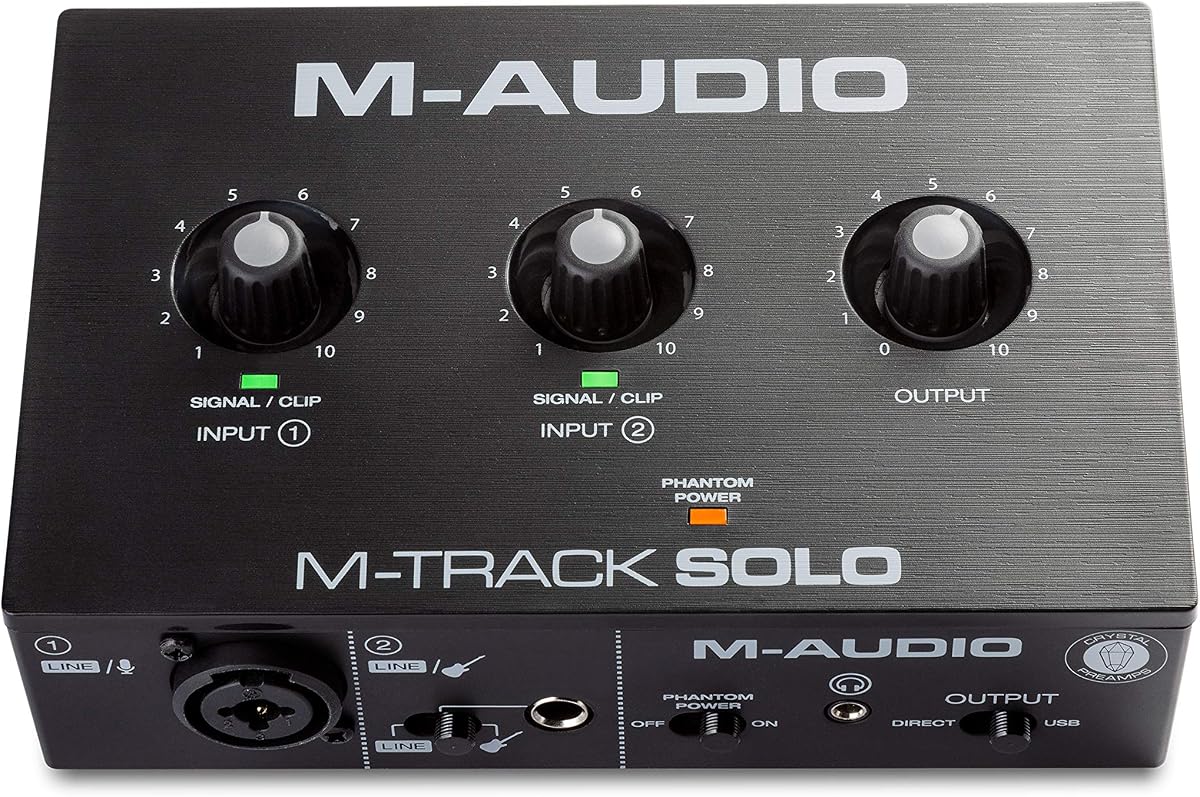
The M-AUDIO M-Track Solo is a compact solution for recording solo artists who need basic inputs for a guitar and a microphone. It delivers pristine 48kHz audio resolution for reliable recording.
We may earn a commission when you buy through this link, at no additional cost to you.
With one combo XLR/Line input and one Line/Instrument input it offers the essential connectivity needed for a simple setup. The included Phantom Power ensures condenser mics work perfectly.
While it has fewer connections than the Duo model it is perfect for podcasters or solo vocalists. The included MPC Beats software helps you start producing tracks right away without additional costs.
If you want a lightweight and budget-friendly interface for basic home recording this is a reliable choice. It covers the fundamentals without unnecessary complexity.
Designed with just the inputs you need it keeps the setup simple and easy to manage on a small desk or laptop rig.
A USB/Direct switch allows you to monitor your performance with zero latency ensuring you can hear your sound clearly while recording.
We may earn a commission when you buy through this link, at no additional cost to you.
The Arturia MiniFuse 1 is a compact recording interface that stands out for its built-in MIDI I/O and USB hub. It is ideal for musicians who want to integrate MIDI gear into their home studio.
We may earn a commission when you buy through this link, at no additional cost to you.
Its Loopback feature allows you to stream audio from your computer back to your microphone making it excellent for content creation and streaming. The high-quality sound ensures your guitar and voice capture perfectly.
With a five-year warranty you can be confident in its build quality and reliability. It includes a vast array of software tools including Ableton Live Lite and Analog Lab Intro to get you started.
If you need to connect MIDI controllers alongside your instruments this interface is a standout choice. Its creative software bundle offers incredible value for producers looking for an all-in-one solution.
This feature lets you send audio from your computer to your mic so you can stream games or videos with commentary easily.
The built-in MIDI inputs allow you to connect keyboards and drum machines directly while the USB hub provides extra ports for your peripherals.
We may earn a commission when you buy through this link, at no additional cost to you.
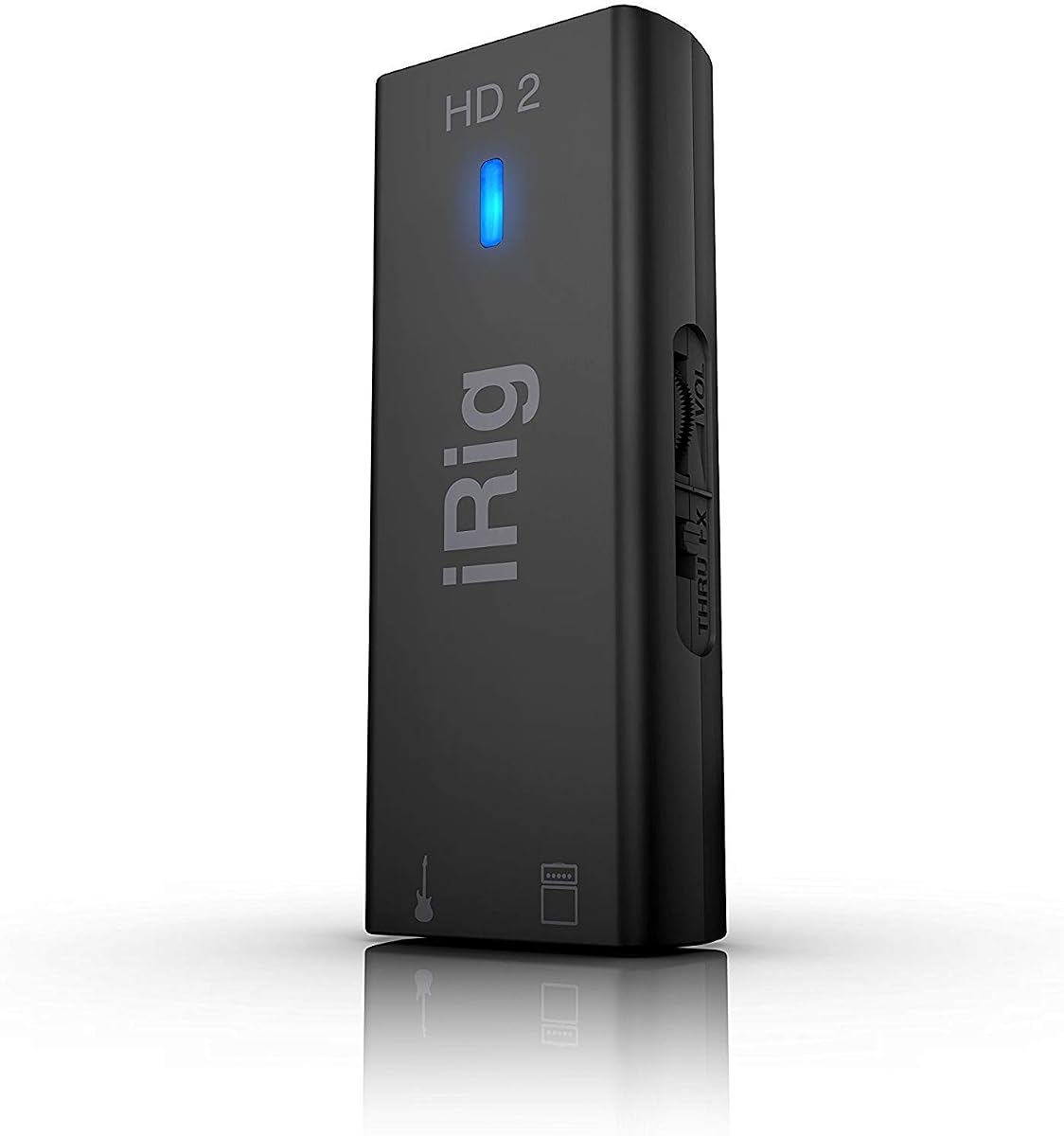
The IK Multimedia iRig HD 2 is renowned for its high-definition audio capabilities allowing you to record at 96kHz. It delivers distortion-free performance ideal for serious mobile recording and practice.
We may earn a commission when you buy through this link, at no additional cost to you.
With an Amp Out jack you can route your signal to your favorite amplifier without adding extra accessories. The FX/Thru switch lets you toggle between processed and direct signals instantly.
Its lightweight design ensures it fits easily in your gig bag or pocket for travel. The exclusive content unlock feature provides access to premium amp models and effects for your recordings.
If you demand top-tier audio quality on your iOS devices this interface is the right fit. It preserves the nuances of your playing ensuring professional sound results on the go.
The 96kHz sampling rate ensures you capture every detail of your guitar playing without any distortion or loss of tone quality.
The dedicated Amp Out jack allows you to connect directly to your amplifier making it easy to practice silently or record through pedals.
We may earn a commission when you buy through this link, at no additional cost to you.
The Fender Quantum HD 2 is a powerhouse designed for professional music production with ultra-high-fidelity 20×24 connectivity. It offers industry-leading MAX-HD mic preamps and 32-bit/192kHz converters.
We may earn a commission when you buy through this link, at no additional cost to you.
With features like Auto Gain and Dual Re-Amp outputs it streamlines your recording workflow allowing you to experiment with tones easily. The included Fender Studio app unlocks authentic amp models.
Its ADAT expansion allows for significant studio growth by adding digital inputs for external gear. This makes it a future-proof investment for serious producers and studios with complex needs.
If you are ready to invest in top-tier studio quality this interface offers unmatched value and performance. It is the ultimate tool for those who need professional clarity and flexibility.
Dual re-amp outputs let you send recorded signals back through physical amps and pedals to explore new tones without re-recording.
The Auto Gain button instantly sets perfect recording levels removing the frustration of manual adjustments and ensuring optimal signal quality.
We may earn a commission when you buy through this link, at no additional cost to you.
Choosing the right audio interface depends on your specific recording needs and budget. Here are the key factors to consider.
Ensure the interface supports your computer's ports such as USB-C or Lightning. Some mobile interfaces only work with specific devices so check compatibility carefully before purchasing.
Look for class-compliant interfaces to avoid driver issues and ensure smooth operation across Mac and PC systems.
Higher sampling rates like 96kHz or 192kHz capture more audio detail which is vital for professional recordings. Standard 48kHz is sufficient for streaming and basic demos.
Aim for at least 24-bit resolution to ensure a wide dynamic range and minimize noise during recording.
Direct monitoring allows you to hear your guitar signal with zero latency which is essential for recording performance and practicing. Check if the interface has a dedicated monitoring switch.
Some interfaces offer both hardware and software monitoring giving you more flexibility depending on your setup needs.
Many interfaces come with DAW software and virtual instruments that can save you money. Ensure the included software meets your production needs before relying on it.
Look for bundles that include amp simulations and effects to enhance your guitar tones without additional plugin costs.
Determine if you need just a guitar input or if you want to record vocals simultaneously. A combo XLR input is necessary for microphones and instruments.
If you plan to record multiple instruments at once choose an interface with at least two inputs for flexibility.
For on-the-go recording choose a compact and durable interface that fits in your bag. Metal enclosures tend to last longer than plastic alternatives.
Consider the power source; bus-powered units are more convenient as they do not require extra power bricks.
If you plan to use condenser microphones for vocals or acoustic guitars ensure the interface supplies 48V phantom power.
This is a standard feature but always verify it is available if you need to power external mics.
Look for features like ADAT or S/PDIF inputs if you anticipate growing your studio setup. These allow you to add digital expansion cards later.
MIDI I/O is also important if you plan to use hardware synthesizers or drum machines in your workflow.
To get started connect your interface to your computer using the provided USB cable. Ensure your interface is powered on and your software detects it before opening your DAW.
Plug your guitar into the instrument input and adjust the gain knob until the indicator shows a healthy signal without peaking. Use headphones to monitor your sound through the headphone output.
Regularly update your interface drivers and firmware to maintain compatibility and performance. Store the device in a dry cool place when not in use to protect its internal electronics.
Most modern interfaces use standard USB-C or USB-A cables. However some mobile interfaces may require specific adapters for Lightning or older ports. Always check the product details for included cables and required adapters to ensure a successful connection.
Many modern interfaces support mobile devices directly so you can record to a phone or tablet without a computer. However for advanced routing and mixing you typically need a host system like a laptop or desktop.
Hi-Z inputs are designed for passive electric guitars and basses to preserve signal strength while Line inputs are for keyboards or effects units. Using the correct input ensures you get the best tone and clarity.
Reduce the buffer size in your audio settings to lower latency but be careful of glitches. Use the direct monitoring feature on your interface to hear your sound without delay through your headphones.
Most major brands are compatible with both systems but always check the specific compatibility list. Class-compliant interfaces work without drivers on both platforms which simplifies setup significantly.
Many compact interfaces are bus-powered via USB but larger studio units often need external power adapters. Check the power requirements before purchasing to ensure you have a suitable power outlet available.
We have reviewed ten top-rated interfaces ranging from budget mobile adapters to premium studio units. Each option offers unique strengths for different needs and budgets.
Prioritize features like direct monitoring and resolution quality based on how you plan to use the interface. The right choice will streamline your workflow and enhance your sound.
Remember that prices and availability can change so always check the latest listings before buying. We hope this guide helps you find the perfect tool to capture your best musical performances.