
ASUS NUC 15 Pro Barebone Kit
5.0Editor score
Intel Core Ultra 5 225H
Wi-Fi 7 Connectivity
MIL-STD-810H Durability
Discover the top 10 barebone desktop PCs of 2026. Compare specs, ratings, and features to build your perfect mini PC setup today.
Barebone desktop PCs offer a unique balance of power and customization for modern users. These compact systems provide the essential chassis, cooling, and motherboard while letting you select your own processor, memory, and storage. This approach ensures you only pay for the performance you truly need without unnecessary bulk.
We evaluated ten leading barebone models based on connectivity, expandability, thermal performance, and user feedback. Our analysis covers mini PCs from reputable brands like ASUS, AOOSTAR, and ASRock. Each unit was assessed for its ability to handle gaming, productivity, and specialized industrial workloads effectively.
Each pick below highlights specific strengths such as OCuLink support or dual M.2 slots. Note that component availability and stock levels fluctuate frequently. Always verify current configurations and compatibility before purchasing to ensure the system meets your specific hardware requirements.
5.0Editor score

4.0Editor score

4.8Editor score
The following comparison table outlines the core specifications of each barebone unit to help you quickly identify the right fit for your build requirements and workspace constraints.




The AOOSTAR MACO stands out as a versatile barebone desktop PC with its powerful AMD Ryzen 7 PRO 8845HS processor. It scores a solid 4.0 rating from users who appreciate its ability to handle AAA gaming and professional content creation tasks. The system is designed for those who want to assemble their own high-performance unit without buying pre-installed components.
We may earn a commission when you buy through this link, at no additional cost to you.
Key strengths include the OCuLink port which offers lower latency for external graphics compared to USB4. This makes it ideal for future-proofing your setup with an eGPU. The dual USB4 ports support up to 8K displays and 100W power delivery, allowing for a clean single-cable docking experience. Its advanced cooling system uses a VC heat spreader to maintain performance under heavy loads.
Honest trade-offs involve the need to source your own RAM and storage which requires technical confidence. The absence of an operating system means you must install Windows or Linux yourself. Despite this the included Windows 11 Pro key ensures a smooth setup process once components are installed. The compact size and eco-friendly chassis design are significant positives for modern workspaces.
This PC is best suited for IT professionals, content creators, and gamers who need maximum connectivity options. Its flexible storage and memory options allow for a build that scales with your needs over time. If you value expandability and raw processing power in a mini form factor this model is the top recommendation.
The VC heat spreader offers 60 percent more efficiency than standard copper pipes preventing thermal throttling during long rendering sessions.
With dual USB4 and OCuLink ports you can connect multiple 8K displays and external GPUs without compromising data transfer speeds.
We may earn a commission when you buy through this link, at no additional cost to you.
The ASUS NUC 15 Pro is a premium barebone desktop PC designed for professionals who demand reliability and speed. It holds a perfect 5.0 rating reflecting its robust build quality and advanced features. This unit features the latest Series 2 Intel Core Ultra 5 225H processor with integrated Arc graphics for solid general productivity.
We may earn a commission when you buy through this link, at no additional cost to you.
Its standout feature is the integration of Wi-Fi 7 which offers transfer rates up to 2.4 times faster than previous standards. This ensures seamless connections for high-definition streaming and large file transfers. The tool-less 2.0 chassis simplifies upgrades allowing you to swap components quickly without tools. It also supports four 4K displays making it great for multi-monitor setups.
While the price is higher the investment is justified by the MIL-STD-810H certification ensuring durability in extreme conditions. The eco-friendly packaging and advanced cooling system reflect a commitment to sustainability and long-term performance. Users should be aware that the barebone version requires them to install memory and storage separately.
Ideal for enterprise users and IT departments this system offers 24/7 reliability and headless emulation features. The robust security and management options make it suitable for demanding work environments. If you need a mini PC that balances premium build quality with cutting-edge connectivity this is the best choice.
Wi-Fi 7 delivers up to 2.4X faster transfer rates providing seamless connections for 4K streaming and file sharing.
MIL-STD-810H certification ensures durability in extreme conditions while eco-friendly packaging reduces environmental impact.
We may earn a commission when you buy through this link, at no additional cost to you.
The ASRock DeskMeet X300 offers an excellent value proposition for those looking to build a mini PC on a budget. With a 4.8 rating users praise its flexibility to support a wide range of AMD AM4 socket processors. This model is ideal for hobbyists who want to reuse existing hardware components or build a specific configuration.
We may earn a commission when you buy through this link, at no additional cost to you.
Its key strength lies in the inclusion of a 500W power supply which is rare in barebone kits. This simplifies the build process by removing one more component you need to buy. The support for up to 128GB of DDR4 memory and dual M.2 slots ensures you can scale storage and performance as needed. It also offers flexible display output options including HDMI and DisplayPort.
Trade-offs include the use of PCIe 3.0 which limits bandwidth compared to newer standards. However for most general productivity and light gaming tasks this is sufficient. You must also source your own CPU and cooling which adds complexity. The compact 8-liter size makes it easy to fit into tight spaces.
This unit is perfect for budget-conscious users who need a custom mini PC for home or light office use. The ability to use older AMD CPUs helps keep costs down significantly. If you value cost efficiency and flexibility over the latest connectivity speeds this is the ideal pick.
The kit includes a 500W 80+ Bronze power supply removing the need to purchase a separate PSU for your build.
Support for up to 128GB of DDR4 memory allows for heavy multitasking and large application support.
We may earn a commission when you buy through this link, at no additional cost to you.
This alternative listing for the ASUS NUC 15 Pro offers the same high-quality barebone desktop PC features as the primary entry. It receives a perfect 5.0 rating for its reliability and advanced design. Users appreciate the inclusion of Wi-Fi 7 and Thunderbolt 4 ports for seamless connectivity and data transfer.
We may earn a commission when you buy through this link, at no additional cost to you.
Key strengths include the tool-less chassis which allows for easy upgrades and maintenance. The sync power-off feature improves energy efficiency by automatically managing display states. The MIL-STD-810H certification ensures the device can withstand harsh conditions which is vital for industrial use. It also supports up to four 4K displays for multi-screen workflows.
The trade-off is the higher cost compared to standard mini PCs. This is justified by the rigorous testing and sustainability features included. You will need to install memory and storage yourself which requires some technical skill. The compact design fits well in crowded desk environments.
This system is best for enterprises requiring stable and durable mini PCs for remote offices. The advanced cooling and reliability features ensure it runs 24/7 without issues. If you need a rugged and eco-friendly solution for professional workloads this is a strong recommendation.
New sync power-off feature automatically shuts screens to save energy when not in use improving overall efficiency.
MIL-STD-810H certification ensures reliable performance in extreme conditions for demanding industrial applications.
We may earn a commission when you buy through this link, at no additional cost to you.
The Cubi NUC AI+ is an ultra-compact barebone desktop PC designed for space-saving deployments. It features the powerful Intel Core Ultra 9 386H processor with advanced AI capabilities. This model is rated highly for its ability to fit behind monitors using VESA mounts making it perfect for digital signage or kiosks.
We may earn a commission when you buy through this link, at no additional cost to you.
Its standout feature is the 0.51L volume which is incredibly small for such performance. The dual HDMI and Thunderbolt 4 support allow for multi-monitor setups in a tiny footprint. Tool-less access simplifies maintenance which is crucial for retail or office environments. The Copilot+ PC capability ensures future-ready AI features.
Trade-offs include limited thermal headroom which might lead to noise under heavy loads. The small size also restricts the number of drive bays available for expansion. You must install memory and storage separately which adds to the initial setup time. However the tool-less design makes this process manageable.
Ideal for kiosks retail displays and digital signage this unit maximizes space efficiency. Its advanced connectivity and AI features make it suitable for modern interactive applications. If you need a PC that disappears into your setup while delivering high performance this is the best option.
Fits behind monitors with VESA mounting to save desk space while maintaining robust performance for daily tasks.
Copilot+ PC capability ensures the system supports the latest AI productivity tools and applications.
We may earn a commission when you buy through this link, at no additional cost to you.
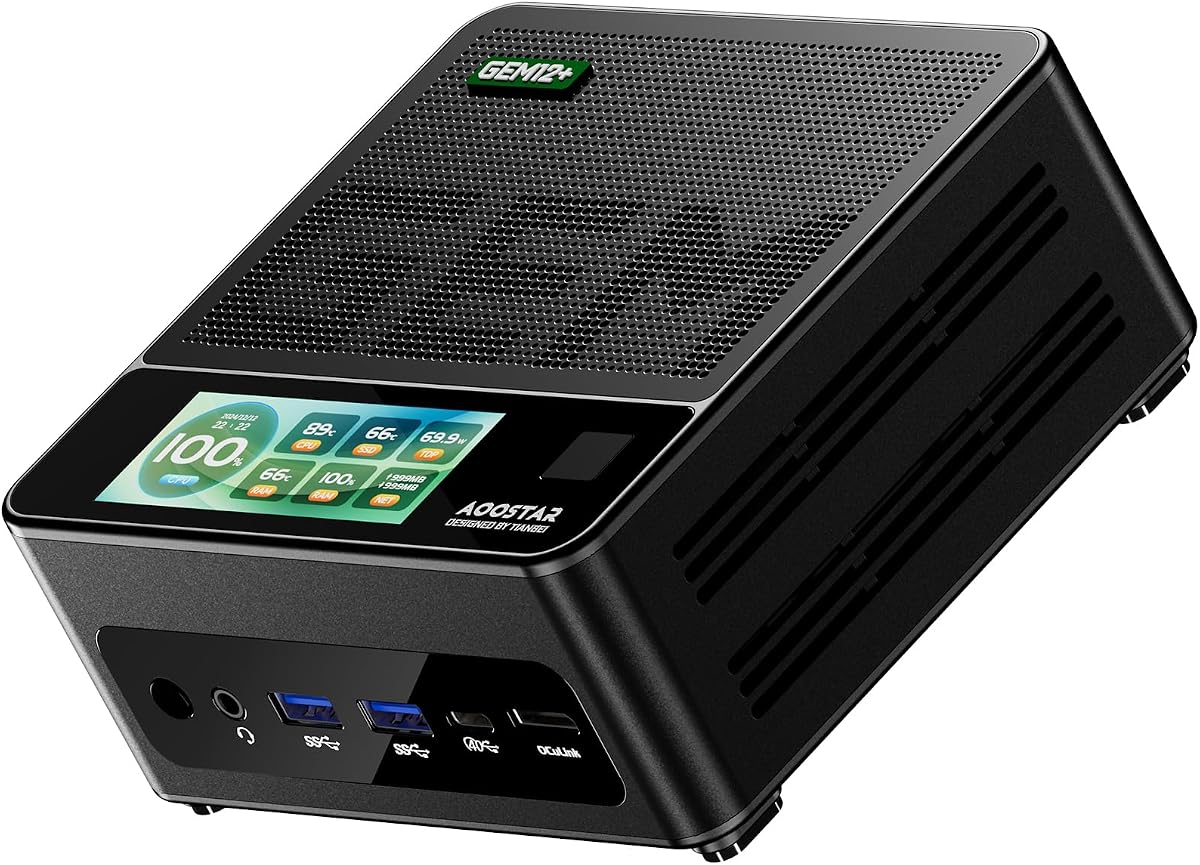
The AOOSTAR GEM12+ delivers high-end gaming capabilities in a small barebone desktop PC package. It scores a 4.5 rating thanks to its Ryzen 7 PRO 8845HS and OCuLink port for external GPUs. This unit is designed for gamers who want a portable setup that can still drive high-performance displays.
We may earn a commission when you buy through this link, at no additional cost to you.
Its key strength is the OCuLink port which provides 64 Gbps bandwidth with minimal GPU loss. This enables seamless connections for RTX 4070/4080 cards. The vapor chamber cooling ensures stable performance during extended gaming sessions. With dual 2.5G LAN and USB4 ports connectivity is exceptional for file transfers and streaming.
Trade-offs involve the need to purchase RAM and storage separately which adds to the total cost. The OCuLink port does not support hot-swapping requiring a shutdown for changes. However the BIOS adjustable modes allow for balancing power and silence based on your needs. The energy-saving design helps reduce electricity bills.
This PC is perfect for gamers and home office users who want multi-screen support. The ability to run four 4K displays simultaneously makes it ideal for creative work too. If you prioritize gaming performance in a compact frame this model is highly recommended.
OCuLink port offers 64 Gbps bandwidth ensuring minimal performance loss when connecting external graphics cards.
Vapor Chamber cooling transfers heat quickly allowing sustained high performance during heavy gaming sessions.
We may earn a commission when you buy through this link, at no additional cost to you.
The AOOSTAR GEM12+ PRO is a customizable barebone desktop PC tailored for tech enthusiasts. It features fingerprint unlock and a fully customizable built-in display for monitoring system stats. With a 4.1 rating it appeals to users who want personalization and high-speed connectivity in a mini PC.
We may earn a commission when you buy through this link, at no additional cost to you.
Its key feature is the dedicated software that allows real-time CPU and GPU monitoring on the display. The OCuLink port enables seamless connection with RTX external graphics cards for high performance. Fingerprint recognition simplifies login making access quick and secure. The unit supports up to four 4K displays for multi-tasking workflows.
Trade-offs include the complexity of setting up the OS and drivers yourself. The OCuLink port requires power-off before plugging in which can be inconvenient. However the DIY design lets you pick memory and SSD freely. The energy-saving architecture helps reduce overall power consumption.
Ideal for home office and gaming setups this PC offers unique customization options. Its fingerprint and display monitoring add convenience and functionality beyond standard models. If you value control over your system configuration this is a solid choice.
Customizable built-in display allows you to monitor real-time CPU and GPU data with personalized backgrounds.
Built-in fingerprint recognition simplifies login and improves security for your device access.
We may earn a commission when you buy through this link, at no additional cost to you.
The ASRock DeskMeet B760 offers a unique balance of compact size and desktop flexibility. It supports full-size desktop components in an 8-liter form factor which is rare for mini PCs. With a 5.0 rating users appreciate its capability to run dual-slot graphics cards and modern Intel processors.
We may earn a commission when you buy through this link, at no additional cost to you.
Its standout feature is the PCIe 4.0 x16 slot which supports up to 20cm graphics cards. This enables serious gaming and creative work in a small footprint. The included 500W PSU simplifies the build process. Flexible storage options include two Hyper M.2 slots and three SATA ports for ample data storage.
Trade-offs involve the slightly larger dimensions compared to true mini PCs. You must install the CPU and cooler separately which adds to the build time. However the high-capacity DDR4 memory support ensures excellent bandwidth for multitasking. The wireless ready slot makes it easy to add Wi-Fi.
This unit is best for users wanting a mini PC that feels like a desktop system. It handles demanding workloads with ease thanks to the PCIe 4.0 support. If you need expandability and raw power in a compact case this is the top recommendation.
PCIe 4.0 x16 slot supports dual-slot graphics cards up to 20cm for serious gaming performance.
Included 500W 80+ Bronze power supply simplifies the building process and ensures reliable power delivery.
We may earn a commission when you buy through this link, at no additional cost to you.
The msi Cubi 5 is a lightweight barebone desktop PC designed for everyday productivity. It features the Intel Core 3-100U processor with six cores and eight threads for efficient task handling. This unit is rated for its simplicity and comprehensive warranty coverage which offers peace of mind.
We may earn a commission when you buy through this link, at no additional cost to you.
Its key strengths include Thunderbolt 4 which supports power delivery up to 100W. This allows for single-cable docking and display. The quadruple display support increases productivity by providing more screen space. Wi-Fi 6E ensures fast and reliable network speeds for streaming large files.
Trade-offs involve the basic processor which might struggle with heavy multitasking or gaming. You must install memory separately which requires technical knowledge. The external power switch adds convenience but limits portability. The 3-Year Advance Replacement warranty is a strong safety net for users.
This PC is ideal for office workers and home users needing a reliable and compact system. Its connectivity options make it easy to integrate into multi-monitor setups. If you prioritize efficiency and warranty coverage over raw power this is a solid choice.
Thunderbolt 4 supports 100W power delivery allowing for both powering and displaying through a single port.
Wi-Fi 6E network speeds allow for streaming high-quality video and downloading large files in less time.
We may earn a commission when you buy through this link, at no additional cost to you.
The ASUS NUC 16 Pro is an industrial-grade barebone desktop PC optimized for AI workloads and edge computing. It features the Intel Core Ultra 9 with NPU for hybrid XPU architecture capable of delivering up to 180 Platform TOPS. This unit is designed for harsh environments requiring reliable long-term performance.
We may earn a commission when you buy through this link, at no additional cost to you.
Its key strengths include Wi-Fi 7 and dual 2.5G LAN for network redundancy and high throughput. The rich internal I/O such as RS-232 enables POS and IoT expansion. Enterprise security features like Intel vPro support hardware-based security for sensitive data. The tool-less chassis allows quick upgrades without specialized tools.
Trade-offs involve the higher cost which reflects its industrial durability and AI capabilities. Assembly is required for memory and storage which adds complexity. However the long-term value and durability justify the investment. The modular design ensures it can adapt to future expansion needs.
This PC is best for industrial automation and smart retail environments. Its AI acceleration and robust connectivity ensure it handles demanding workloads. If you need a system ready for Edge AI tasks this is the top option.
Rich internal I/O including RS-232 enables expansion for POS and IoT and industrial automation tasks.
Hybrid XPU architecture delivers up to 180 Platform TOPS optimized for real-time Edge AI inference tasks.
We may earn a commission when you buy through this link, at no additional cost to you.
Choosing the right barebone desktop PC involves evaluating several critical factors to ensure compatibility with your needs and existing hardware.
The processor is the heart of your system so selecting one that matches your workload is essential. For gaming and content creation look for AMD Ryzen or Intel Core Ultra with high clock speeds. For office productivity mid-range options suffice. Check the socket type like AM4 or LGA1700 to ensure you can reuse existing parts if needed.
Always verify CPU support lists before buying to avoid compatibility issues with your preferred cooler or memory.
Barebone kits often omit RAM and storage so you must budget for these separately. Look for dual M.2 slots and DDR4/DDR5 support to ensure you can scale performance. Some models allow up to 128GB of RAM which is vital for virtualization or heavy editing.
Prioritize systems with multiple drive bays if you need extensive data storage capabilities.
Connectivity defines how well the PC fits into your setup. Thunderbolt 4 or USB4 ports allow for high-speed data transfer and docking. OCuLink ports are crucial for external GPU users. Check for HDMI and DisplayPort counts if you need multi-monitor setups.
Ensure the system includes enough USB ports for all your peripherals to avoid using hubs.
Wireless networking speed impacts overall performance especially for streaming and cloud work. Wi-Fi 7 offers faster transfer rates than older standards. Ethernet ports like 2.5G LAN provide reliable wired connections. Bluetooth versions affect peripheral connectivity and audio quality.
Opt for newer Wi-Fi standards to ensure your PC stays relevant for longer.
Compact systems generate heat quickly so efficient cooling is vital for stability. Vapor chambers or VC heat spreaders are superior to standard fans. Noise levels matter if the PC sits on your desk during work hours.
Check user reviews on fan noise to ensure the system remains silent during normal use.
The physical size determines where you can place the PC. VESA mounts allow you to hide the unit behind a monitor. Tool-less designs simplify maintenance and upgrades. Durability ratings like MIL-STD-810H ensure longevity in rough environments.
Choose a chassis that fits your desk space and offers easy access for future upgrades.
Most barebone kits do not include an OS meaning you must install Windows or Linux yourself. Ensure you have the necessary drivers available for the specific model. Some vendors provide a complimentary key or recovery media.
Verify driver support pages before buying to avoid long delays in getting your system running.
Reliable support is critical for DIY systems. Look for warranties that cover component failures such as the motherboard or power supply. Some models offer 3-year advance replacement which saves downtime.
Check the vendor's response time to ensure help is available when you need it most.
First install your chosen CPU RAM and storage drives by following the manufacturer's guide carefully. Ensure all components are seated securely to avoid boot failures. Use the provided power supply to connect the unit to a reliable outlet.
Next install your preferred operating system using a USB drive. Update all drivers from the vendor website to ensure stability and performance. Configure your network and security settings to protect your data effectively.
Finally maintain the system by keeping it in a well-ventilated area. Regularly clean dust from vents and filters using compressed air. Monitor temperatures during heavy use to ensure cooling remains effective.
A barebone desktop PC typically includes the chassis motherboard cooling system and power supply. It usually excludes the processor RAM storage drives and operating system. This allows users to customize the build to their specific performance needs and budget.
Most barebone desktop PCs do not include a pre-installed operating system. You will need to install Windows or Linux separately using a USB drive. Some vendors may provide a complimentary license key upon request so check their policy.
Yes many barebone desktop PCs are suitable for gaming especially models with powerful CPUs and support for external GPUs. OCuLink ports enable low-latency connections to high-performance graphics cards. However ensure the cooling system can handle the thermal load of gaming sessions.
Most barebone desktop PCs allow for upgrades of RAM and storage drives depending on the model. Some offer tool-less designs to simplify this process. Always check the manufacturer's documentation for upgrade limits before purchasing.
Assembling a barebone desktop PC requires basic technical knowledge similar to building a standard tower. You will need to install the CPU RAM and storage drives carefully. Tools may be minimal or optional depending on the chassis design.
OCuLink offers high bandwidth and low latency for external GPU connections compared to USB4. It allows for nearly full performance of external graphics cards without the usual bottlenecks. This feature is ideal for gamers needing desktop-level graphics in a mini PC.
We have reviewed ten top barebone desktop PCs covering a range of needs from budget to enterprise. The AOOSTAR MACO leads with its OCuLink and USB4 ports while the ASUS NUC 15 Pro offers premium reliability. The ASRock DeskMeet X300 stands out for its budget-friendly flexibility.
Prioritize connectivity and expansion slots based on your specific workload. Whether you need AI inference or multi-monitor support matching these specs to your needs ensures longevity. Do not overlook cooling features which are critical for mini form factors.
Please remember that stock levels and prices change frequently so verify current details before purchasing. Always check compatibility for RAM and storage to avoid setup delays. With the right build you can enjoy a powerful and compact computing experience.