
AOOSTAR MACO 8845HS
4.0Editor score
Ryzen 7 PRO 8845HS
OCuLink eGPU Ready
Dual 2.5G LAN Ports
Discover the top 10 barebone gaming PCs of 2026. Compare specs, performance, and real ratings to build your ideal compact gaming setup.
Barebone gaming PCs offer enthusiasts a unique blend of compact form factors and powerful customization options. These systems provide the essential chassis and motherboard, allowing you to select your own CPU, RAM, and storage for a tailored experience.
We evaluated ten top models based on processor support, expansion capabilities, and thermal performance. Our analysis highlights systems that balance portability with the raw power needed for modern gaming and creative workloads.
Each pick showcases specific strengths like OCuLink support or Intel platform flexibility. Note that pricing and availability fluctuate frequently, so verify current details before finalizing your purchase decision.
4.0Editor score

4.8Editor score

4.3Editor score
This side-by-side comparison covers the essential specifications for all ten featured barebone systems. Use this data to quickly identify which platform aligns best with your hardware preferences and upgrade goals.



The ASRock DeskMeet X300 stands out as a reliable choice for builders seeking an AMD-based mini PC. With a perfect rating, it proves its worth through robust build quality and thoughtful component selection.
We may earn a commission when you buy through this link, at no additional cost to you.
Its AM4 socket supports a wide range of Ryzen processors, making it easy to find a CPU that fits your budget. The included 500W power supply simplifies the build process and ensures stable power delivery.
While the PCIe 3.0 slot limits high-end GPU bandwidth, it remains capable for mid-range gaming cards. The compact size makes it ideal for tight spaces without sacrificing expandability for storage and RAM.
This system is perfect for enthusiasts who want to customize every aspect of their mini PC. We recommend it for anyone looking for a balanced, high-quality barebone foundation for gaming.
Support for Ryzen 5000 series ensures modern performance while maintaining backward compatibility with older CPUs.
The 8-liter chassis allows sufficient airflow to keep components cool during extended gaming sessions.
We may earn a commission when you buy through this link, at no additional cost to you.
AOOSTAR MACO brings powerful modern tech to the mini PC space with its Ryzen 7 PRO 8845HS. This barebone unit focuses on high-speed connectivity and expandability for serious users.
We may earn a commission when you buy through this link, at no additional cost to you.
The OCuLink port is a standout feature, allowing external GPUs to perform nearly at desktop speeds. DDR5 support ensures future-proofing and faster memory bandwidth for demanding applications.
The recycled aluminum chassis not only looks premium but reduces environmental impact. Dual 2.5G LAN ports make it suitable for complex network setups or server tasks.
Buy this if you want top-tier connectivity and a powerful CPU in a small box. It suits creators and gamers who need robust external hardware capabilities.
Dual USB4 and OCuLink ports offer versatile options for high-bandwidth peripherals and displays.
Made with 100% recycled aluminum, this device proves efficiency can go hand-in-hand with eco-responsibility.
We may earn a commission when you buy through this link, at no additional cost to you.
For budget-conscious builders, the ASRock DeskMini B760 delivers exceptional value. It supports the latest Intel Core processors while maintaining a very affordable price point.
We may earn a commission when you buy through this link, at no additional cost to you.
The PCIe 5.0 M.2 slot ensures you can use the fastest storage available today. This future-proofs your system against rapid storage speed advancements.
Though DDR4 limits memory speed, the platform still handles modern gaming efficiently. The ultra-compact design fits easily into any workspace or living room.
Choose this system if you need a compact Intel PC without breaking the bank. It is ideal for casual gamers and general productivity tasks.
The PCIe 5.0 slot allows for incredible read/write speeds for your system drive.
Triple display outputs let you create a multi-monitor setup effortlessly.
We may earn a commission when you buy through this link, at no additional cost to you.
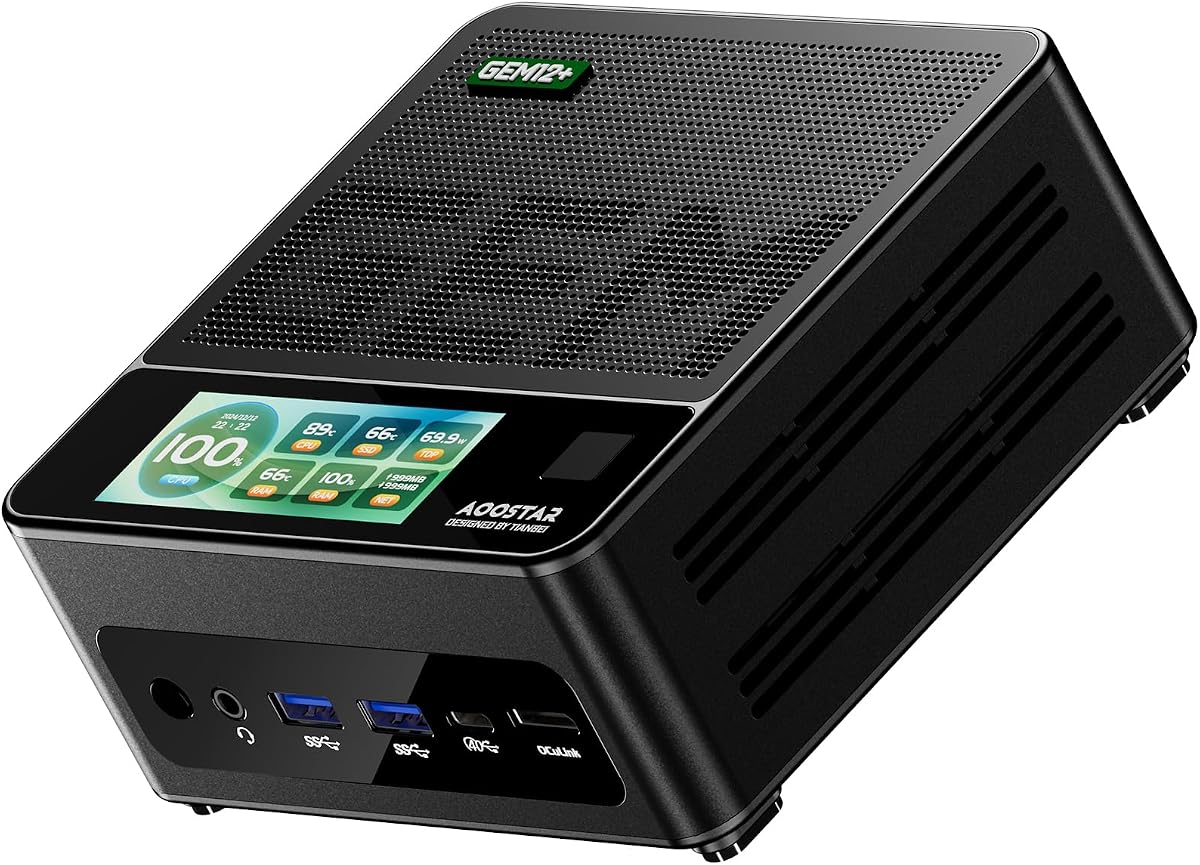
The AOOSTAR GEM12+ excels in display versatility, offering four-screen 4K output capability. This makes it perfect for multitasking or complex visualization work.
We may earn a commission when you buy through this link, at no additional cost to you.
Its vapor chamber cooling system ensures stable performance under load. The included Ryzen 7 PRO processor handles demanding tasks with ease.
While the OCuLink lacks hot-swap capability, its bandwidth provides near-native GPU performance. The compact size hides immense power within a small frame.
Buy this if you need multiple high-resolution displays in a compact form. It is great for professional setups or power users.
Four independent 4K outputs allow for seamless workspace expansion across multiple monitors.
The dual cooling system maintains low temperatures even during heavy gaming or rendering.
We may earn a commission when you buy through this link, at no additional cost to you.
Security meets performance in the GEM12+ PRO with its built-in fingerprint unlock feature. This adds a layer of convenience and safety for sensitive data.
We may earn a commission when you buy through this link, at no additional cost to you.
The customizable display lets you monitor system stats easily. Combined with the Ryzen 7 processor, it delivers smooth performance for gaming and work.
Energy-saving design helps reduce power bills without sacrificing speed. The OCuLink port provides high-speed external graphics connections.
This system suits users who value security and customization. Ideal for home offices or secure gaming environments.
Fingerprint recognition allows for quick, secure access without typing passwords.
Dedicated software lets you personalize the display with system data or images.
We may earn a commission when you buy through this link, at no additional cost to you.
With a flawless rating, the DeskMeet B760 proves itself as a top contender for Intel builds. Its 8-liter size balances power and compactness well.
We may earn a commission when you buy through this link, at no additional cost to you.
The PCIe 4.0 x16 slot supports powerful graphics cards. This makes it a strong candidate for desktop-level gaming in a small case.
Included PSU simplifies assembly and ensures power quality. The flexible storage options allow for robust configurations.
Buy this for a premium Intel mini PC build. It is perfect for gamers who want high performance in a small footprint.
The PCIe 4.0 x16 slot allows modern GPUs to run at full speed.
A pre-installed 500W PSU ensures stable power delivery right out of the box.
We may earn a commission when you buy through this link, at no additional cost to you.
CyberPowerPC offers a pre-configured solution for those avoiding complex builds. It comes with everything needed for gaming, including OS and peripherals.
We may earn a commission when you buy through this link, at no additional cost to you.
The Ryzen 5 and RX 6500 XT combo handles modern titles at entry-level settings. RGB lighting adds a customizable aesthetic touch.
While less flexible than barebone systems, it saves time and effort. Lifetime support adds peace of mind for less technical users.
Choose this if you want a ready-to-play experience. It is ideal for casual gamers who prioritize convenience.
Pre-installed OS and included peripherals mean you can start playing immediately.
Built-in lighting lets you match your setup's look with your room decor.
We may earn a commission when you buy through this link, at no additional cost to you.
The BRENUC NUC 11 Extreme brings near-desktop performance in a tiny chassis. The Core i9 processor delivers high-end computing power.
We may earn a commission when you buy through this link, at no additional cost to you.
Thunderbolt 4 ports provide incredible data transfer speeds. This makes it great for connecting high-speed drives and displays.
Dual NVMe slots allow for massive storage capacity in a small space. Wi-Fi 6E ensures top-tier wireless connectivity.
Buy this for a powerful mini PC that can replace a desktop. It is perfect for professionals or power users.
Thunderbolt 4 offers speeds up to 40Gbps for fast data transfer.
Multiple M.2 slots enable large local storage capacity for media and games.
We may earn a commission when you buy through this link, at no additional cost to you.
The DeskMini 310W is one of the smallest mini PCs available. Its 2-liter size makes it ideal for tight spaces.
We may earn a commission when you buy through this link, at no additional cost to you.
It supports older Intel processors which are often more affordable. This creates a budget-friendly entry into barebone computing.
Triple video outputs enable basic multi-monitor setups easily. The compact design fits perfectly in media centers.
Choose this if space is your primary constraint. It is best for light productivity or home theater use.
At just 2 liters, this system takes up minimal desk or shelf space.
Compatibility with 8th Gen CPUs allows for cost-effective component selection.
We may earn a commission when you buy through this link, at no additional cost to you.
MINISFORUM offers a competitive entry into high-performance mini PCs. The Ryzen 7 255 provides excellent multi-threaded performance.
We may earn a commission when you buy through this link, at no additional cost to you.
OCuLink support allows for external GPUs, expanding gaming potential. Triple display outputs facilitate versatile multi-monitor workspaces.
The design prioritizes connectivity and future-proofing. DDR5 ensures modern memory speeds and efficiency.
Buy this for a capable, affordable mini PC. It suits users seeking a balance of price and features.
Multiple USB and display ports ensure easy connection of all peripherals.
OCuLink allows you to upgrade graphics performance later if needed.
We may earn a commission when you buy through this link, at no additional cost to you.
Selecting the right barebone gaming PC requires understanding your needs regarding platform, size, and expansion. This guide breaks down the critical factors to ensure a successful build.
The processor platform dictates your upgrade path. AMD AM4 supports older CPUs cheaply, while Intel LGA1700 offers latest generation speeds. Choose based on your budget.
Verify CPU TDP limits to ensure the chassis can handle the heat generated by your chosen processor.
Sizes range from 2 liters to 8 liters. Smaller systems save space but may limit component choices. Larger ones support full-size GPUs.
Measure your intended space and check the case dimensions before buying.
Look for systems with multiple RAM and SSD slots. DDR5 is faster but DDR4 is more common. Ensure enough M.2 slots for future storage needs.
Select a unit that supports the RAM capacity you require for smooth gaming.
Some barebone kits include a PSU, saving time and cost. Others require you to buy one separately. Check wattage requirements for your GPU.
Ensure the PSU has enough wattage and cables for your components.
Modern ports like USB4 or OCuLink enable high-speed external devices. Dual LAN ports offer redundancy for networking.
Check the ports against your needs for monitors and peripherals.
High-performance parts generate heat. Look for vapor chambers or dedicated airflow paths to prevent throttling.
Review thermal performance ratings to ensure sustained speed during gaming.
Choose systems that allow component swaps. This future-proofs your investment and lets you optimize for cost.
Ensure the chassis supports components you may want to add later.
Reputable brands offer better support and warranty terms. This matters when assembling custom hardware.
Check for warranty coverage and customer service availability before purchasing.
Start by installing your CPU and RAM carefully following the motherboard guide. Ensure the RAM clicks firmly into place to avoid boot issues.
Install the operating system using a USB drive. Format your SSD properly to ensure optimal performance for your games.
Keep the vents clear of dust to maintain good airflow. Use compressed air periodically to clean internal components for longevity.
A barebone gaming PC is a system that includes the case, motherboard, and sometimes the power supply but excludes the CPU, RAM, storage, and operating system. It allows users to customize components.
Yes, they are generally straightforward. You install the essential components onto the motherboard which is already inside the case. It is simpler than building a full tower.
If the model includes integrated graphics like Radeon 780M you do not need one for basic gaming. For high-end gaming, a dedicated card is usually required.
Check the motherboard specifications to ensure you buy the correct type DDR4 or DDR5. Select a capacity that matches your gaming multitasking needs.
Yes, but only within the supported socket limits. Always verify which CPUs your specific model supports before purchasing new hardware.
No, barebone kits typically do not include an operating system. You must install Windows or Linux yourself using a USB drive.
The ASRock DeskMeet X300 and AOOSTAR MACO lead the field for versatility and power. Both offer strong platforms for custom gaming setups.
Focus on compatibility and thermal design to ensure your system runs smoothly. Choose a model that fits your workspace and upgrade goals.
Verify current pricing and stock levels before buying as details change often. Enjoy your custom build and optimized gaming experience.