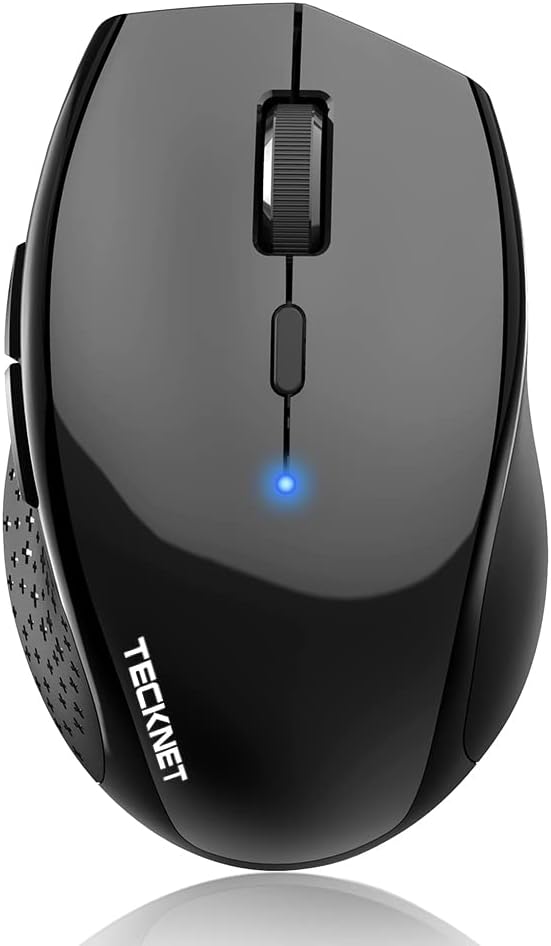
TECKNET Bluetooth Mouse 3200 DPI Wireless
4.3Editor score
6 adjustable DPI levels for precision
Multi-device switching capability
2-year battery life expectancy
Discover the top 10 battery powered Bluetooth mice rated for comfort, battery life, and performance. Compare features and real user reviews to find your ideal wireless mouse.
Finding the right wireless mouse can significantly enhance your daily workflow and comfort levels. A battery powered Bluetooth mouse offers the perfect balance of portability and reliability without the clutter of cables or dongles. These devices connect seamlessly to laptops, tablets, and desktops, providing freedom of movement for professionals and students alike.
We have carefully evaluated ten standout models based on user ratings, battery longevity, ergonomic design, and connectivity options. Our selection includes options from trusted brands like Logitech, TECKNET, Lenovo, and others known for quality peripherals. Each product was analyzed for its specific strengths, ensuring you have a comprehensive view of what is available in the current market.
Each entry in this guide highlights key specifications, pros, cons, and detailed usage scenarios to help you make an informed decision. Whether you need a compact travel companion or a feature-rich office tool, there is a pick here for you. Keep in mind that availability and specific features can vary, so always check the latest details before purchasing.
4.3Editor score

4.5Editor score

4.4Editor score
This side-by-side comparison highlights the core specifications and unique selling points of the top ten battery powered Bluetooth mice available today. By reviewing these details together, you can quickly identify which model aligns best with your specific needs for portability, precision, and comfort.




The Logitech M196 stands out as a top contender for those seeking a reliable and uncomplicated Bluetooth mouse. With a solid 4.5-star rating, it has gained trust among users who value simplicity and portability. Its ability to connect instantly via Bluetooth without requiring a USB receiver makes it an excellent choice for modern laptops and tablets.
We may earn a commission when you buy through this link, at no additional cost to you.
This mouse excels in comfort and versatility. The ambidextrous design ensures that both left and right-handed users can use it comfortably. It features precise optical tracking that works well on a variety of surfaces, ensuring smooth cursor control. The built-in auto-sleep feature helps extend the battery life, offering up to 12 months of use on a single AA battery.
While it lacks some advanced features like side buttons or programmable macros, this simplicity is often a trade-off that users appreciate for a clean, clutter-free desk setup. The use of recycled plastic in its construction is a notable bonus for environmentally conscious buyers. It is an ideal tool for everyday productivity tasks where high-end features are not necessary.
If you are looking for a dependable, cost-effective wireless mouse that works seamlessly across different operating systems, the M196 is a strong recommendation. It fits easily into a bag for travel and pairs quickly with Mac, Windows, or Chromebook devices. For basic navigation and browsing, it delivers consistent performance without unnecessary complications.
Connect in seconds with a reliable Bluetooth connection that requires no dongle or port, ensuring a sleek setup for your laptop or tablet.
The mouse features certified post-consumer recycled plastic in its construction, offering a sustainable choice without compromising on durability or comfort.
We may earn a commission when you buy through this link, at no additional cost to you.
The wegear Bluetooth Mouse is designed for users who prioritize silence and ergonomics in their daily workflow. Boasting a 4.5-star rating, it has become a favorite for those working in shared spaces like offices or libraries. The silent buttons ensure that your clicks do not disturb others around you, making it perfect for late-night work sessions.
We may earn a commission when you buy through this link, at no additional cost to you.
Its ergonomic sculpted grip conforms to your hand's natural contours, providing all-day comfort and reducing strain during extended use. The mouse offers three adjustable DPI levels, allowing you to switch between precise cursor control for detailed work and faster movement for general browsing. It connects easily via Bluetooth 5.0, ensuring a stable and lag-free experience.
Although it is an affordable option, it does not skimp on durability. The left and right buttons are engineered to last up to 3 million clicks, and the scroll wheel is designed to endure 300,000 cycles. The 24-month battery life on a single AA battery means you rarely have to worry about power interruptions during critical tasks.
This mouse is an excellent choice for budget-conscious buyers who want premium features like silent operation and ergonomic design. It works across Windows, macOS, and Android devices, offering wide compatibility. For students and professionals who need a quiet and comfortable mouse without breaking the bank, this model delivers impressive value.
Enjoy seamless performance with silent left, right, and scroll wheel buttons, enabling quiet and efficient work without disturbing others around you.
Switch effortlessly between 800, 1200, and 1600 DPI levels to ensure smooth and accurate movement tailored to your specific daily tasks.
We may earn a commission when you buy through this link, at no additional cost to you.
The TECKNET Bluetooth Mouse offers a powerful combination of features that make it stand out in a crowded market. With a 4.3-star rating, it is praised for its ability to connect to three devices and switch between them instantly. This capability is a game-changer for users who manage multiple computers or devices simultaneously for work or personal projects.
We may earn a commission when you buy through this link, at no additional cost to you.
Its silent click technology ensures library-quiet operation, which is ideal for environments where noise is a concern. The mouse provides precision through six adjustable DPI levels, ranging from 800 to 4800, allowing you to optimize cursor speed for any task. The contoured shape provides comfortable support, making it suitable for long hours of use.
Battery life is another strong point, with an expectation of up to two years on two AA batteries. This long-term reliability reduces maintenance and ensures you can work without frequent interruptions. The 36-month warranty offers additional peace of mind, reflecting the manufacturer's confidence in the product's durability and quality.
If you need a versatile mouse that handles multi-device workflows effortlessly, the TECKNET model is a top choice. It works seamlessly with Windows, macOS, Linux, and Android systems. Whether you are editing documents or browsing the web, its adjustability and quiet performance make it a reliable partner for your digital activities.
Connect to three devices simultaneously and toggle between them instantly with a simple button press, eliminating the need to re-pair constantly.
Tailor your cursor speed with six adjustable DPI levels, optimizing for detailed editing or fast browsing in an instant to suit any task.
We may earn a commission when you buy through this link, at no additional cost to you.
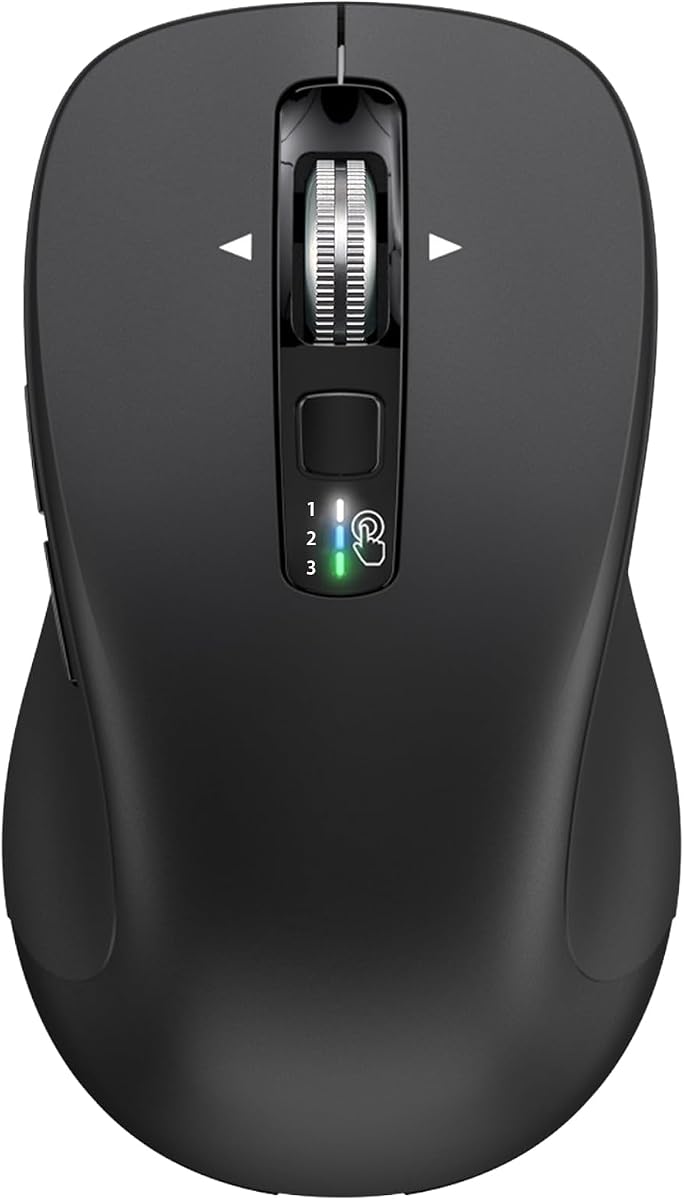
The TECKNET 3-Device Wireless Bluetooth Mouse is built for users who need advanced navigation features. Its standout feature is the 4-way scroll wheel, which allows both vertical and horizontal scrolling. This is particularly useful for professionals working with wide spreadsheets or large design boards where horizontal navigation is frequently required.
We may earn a commission when you buy through this link, at no additional cost to you.
It offers triple connectivity via Bluetooth 5.0/3.0 and a 2.4 GHz wireless receiver, allowing seamless switching between devices. The mouse is designed with ergonomics in mind, featuring an integrated wrist rest that reduces wrist strain by 40%. The soft click keys make it 90% quieter than standard mice, ensuring you stay focused without distracting sounds.
With 6 adjustable DPI levels and a memory function that saves your settings, this mouse adapts to your daily workflow effortlessly. The 24-month battery life ensures longevity, and the left and right buttons are built to withstand 8 million clicks. This durability makes it suitable for heavy daily use in professional settings.
If you are a designer, programmer, or accountant looking for enhanced control and comfort, this mouse is highly recommended. Its wide compatibility with Windows, macOS, and Linux ensures it fits into almost any setup. For those who value horizontal scrolling and ergonomic support, this model delivers exceptional performance and value.
Navigate through wide spreadsheets and long lines of code easily with a 4-way scroll wheel that eliminates repeated scrolling steps.
The natural shape and integrated wrist rest reduce wrist strain significantly, making long work sessions effortless and comfortable for any user.
We may earn a commission when you buy through this link, at no additional cost to you.
The Lenovo WL310 Bluetooth Silent Mouse combines a stylish design with practical features for everyday use. Its ergonomic fit is designed to reduce wrist strain, providing comfort for extended periods on both laptops and desktops. The silent clicks make it a perfect companion for quiet workspaces or late-night projects where noise is unwanted.
We may earn a commission when you buy through this link, at no additional cost to you.
With customizable DPI settings allowing you to switch between 1000, 1200, and 1600 DPI, it offers precise control for gaming, designing, or standard tasks. The Bluetooth 5.0 connectivity ensures a stable and lag-free wireless performance without the need for a USB receiver. This streamlined approach keeps your desk clean and organized.
Its compact and lightweight design makes it easy to carry in a laptop bag, ideal for professionals and students on the move. The grey finish adds a modern touch that complements various devices and settings. Lenovo's reputation for quality ensures that this mouse is built to meet professional standards of durability and efficiency.
For users seeking a balance of portability and comfort, the WL310 is an excellent choice. It works seamlessly with Windows, Mac, and Chromebooks, offering broad compatibility. If you value a sleek design that doesn't compromise on ergonomic support or silent operation, this mouse offers a refined experience for daily digital interactions.
Enjoy noiseless clicks with this wireless mouse, ideal for quiet workspaces, late-night projects, or shared environments where discretion is key.
The ergonomic wireless design fits perfectly in your hand, reducing wrist strain and offering comfort for extended use on various devices.
We may earn a commission when you buy through this link, at no additional cost to you.
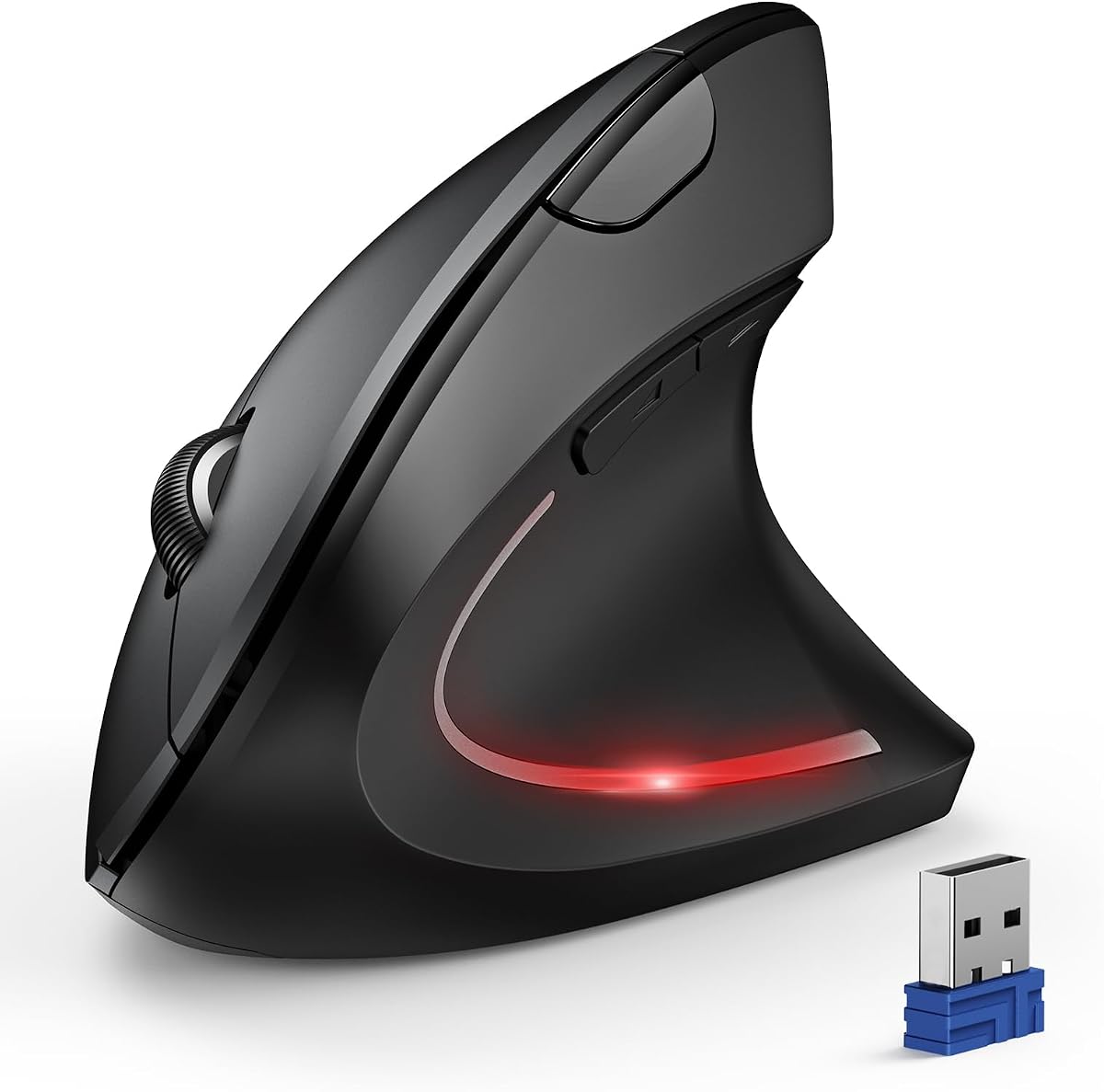
The TECKNET Ergonomic Vertical Mouse is designed specifically to improve wrist health by placing the hand at a near-vertical angle. This design helps reduce pressure and pain on the wrist caused by prolonged inverted mouse usage. It is a thoughtful option for those who experience discomfort with traditional flat mice during long work sessions.
We may earn a commission when you buy through this link, at no additional cost to you.
Equipped with a high-performance chip, this mouse features 6 adjustable DPI levels, ranging from 800 to 4800. This high precision ensures smooth operation on different types of surfaces. It includes silent left and right clicks, allowing for usage in quiet environments like libraries without disturbing others. The LED light indicates the current DPI level clearly.
It supports Bluetooth and 2.4GHz modes, offering flexible connectivity options. The low battery warning ensures you are always aware of power levels, avoiding unexpected interruptions. The 36-month warranty adds a layer of security to your purchase. This mouse is designed for right-handed use, focusing on ergonomic health for the majority of users.
If you spend long hours on a computer and want to protect your wrist health, this vertical mouse is a valuable investment. It is compatible with Windows, Mac, Chrome, and Linux. For those seeking comfort and precision with a focus on ergonomic benefits, the TECKNET vertical design delivers a healthier and more efficient workflow.
The ergonomic design places your palm at a near-vertical angle, reducing pressure and pain on your wrist caused by prolonged mouse usage.
Features 6 adjustable DPI levels up to 4800, ensuring smooth operation on different types of surfaces for varied daily tasks.
We may earn a commission when you buy through this link, at no additional cost to you.
The TECKNET 2-in-1 Wireless Mouse offers versatility through its dual connectivity options. You can use Bluetooth 5.0/3.0 or a 2.4GHz USB receiver, allowing you to switch between two devices instantly. This flexibility is ideal for users who have a mix of devices, such as a laptop with a USB port and a tablet that relies solely on Bluetooth.
We may earn a commission when you buy through this link, at no additional cost to you.
It features 6 adjustable DPI levels up to 4000, providing customizable cursor speed for various tasks. The contoured ergonomic design offers comfort, though it may be better suited for smaller hands. The nano receiver is conveniently stored in the back of the mouse, ensuring you do not lose it when traveling. The 18-month battery life supports long-term use.
Auto-sleep mode extends battery life by activating after 10 minutes of inactivity. While the clicks are audible, the performance is consistent and reliable. The compact size makes it easy to carry in a laptop bag, making it a great travel companion for professionals who need a reliable mouse on the go.
This mouse is a solid choice for those who value connectivity flexibility without paying a premium. It works with Windows, macOS, and Android devices. For users looking for a budget-friendly option that supports multiple connection types, the TECKNET 2-in-1 model offers practical benefits and dependable performance for everyday computing needs.
Use Bluetooth or 2.4GHz USB receiver, storing the adapter in the mouse for a convenient and flexible connection setup without WiFi dependency.
Compact size for travel makes this an ideal portable PC mouse wireless for users who need reliable control on the go.
We may earn a commission when you buy through this link, at no additional cost to you.
The CITLLA Wireless Bluetooth Mouse stands out for its full-size design and versatile connectivity options. It supports both USB and dual Bluetooth connections, allowing users to choose their preferred method or connect to different devices simultaneously. The device switch key helps users quickly switch between multiple devices, enhancing workflow efficiency significantly.
We may earn a commission when you buy through this link, at no additional cost to you.
Productivity is boosted with a premium 4-way metal scroll wheel for fast vertical and horizontal navigation. Five programmable buttons can be customized with shortcuts or macros to streamline your workflow. The rubber side grip is sweat-proof and non-slip, ensuring comfort and control even during intense use sessions. It is compatible with a wide range of devices and operating systems.
Battery life is impressive, offering up to 3 years and 4 months on two batteries. The power control system makes the mouse energy efficient, reducing the need to buy batteries frequently. This longevity ensures that the mouse remains a reliable tool for extended periods without frequent maintenance or replacement interruptions.
If you need a robust mouse for detailed navigation and multi-device workflows, the CITLLA model is an excellent choice. It works seamlessly with Windows, iOS, macOS, and Android. For users who value programmable buttons and a comfortable grip with long battery life, this mouse offers a comprehensive set of features for diverse computing needs.
Boost productivity with a premium 4-way metal scroll wheel for fast vertical and horizontal navigation, making work with large data sets easier.
The rubber side grip is sweat-proof and non-slip, ensuring comfort and control even during intense use sessions for better precision.
We may earn a commission when you buy through this link, at no additional cost to you.
The Lenovo Yoga Bluetooth Silent Mouse is crafted for users who demand both style and utility in their peripherals. With Bluetooth 5.3 technology, it connects reliably to three devices simultaneously, which is ideal for multitaskers. The whisper quiet experience ensures that your workflow remains uninterrupted by clicking noise, making it suitable for professional environments.
We may earn a commission when you buy through this link, at no additional cost to you.
Wrapped in a soft-touch coating, this mouse offers a premium feel that lasts over 1,000 days on a single battery. It has been tested and trusted to uphold Lenovo's high standards, ensuring you receive a quality companion for your demands. The programmable buttons allow you to tailor the mouse to your specific workflow needs efficiently.
Its beautiful design complements a demanding professional life, combining beauty with utility. The mouse is designed for long hours and seamless workflows, ensuring that you stay comfortable and focused. With a battery life of 36 months, you do not have to worry about frequent charging or battery replacement, providing peace of mind for long-term use.
If you are looking for a mouse that combines aesthetics with reliable performance, the Yoga Silent Mouse is a top choice. It supports Swift pairing for non-Yoga devices and tap-to-pair for Yoga PCs. For professionals who crave style and power in their digital tools, this mouse delivers a refined and efficient experience for daily tasks.
This mouse combines beauty with utility, offering programmable buttons and a noise-free experience to complement a demanding professional life.
Equipped with convenient Bluetooth 5.3, it connects to three devices simultaneously with Swift pairing for non-Yoga devices and tap-to-pair for Yoga PCs.
We may earn a commission when you buy through this link, at no additional cost to you.
The Lenovo 350 Wireless Bluetooth Mouse is built for the marathon, not the sprint, offering a battery life of 36 months. Its silent clicks and comfortable design provide focus through long hours, making staying productive simple. With customizable buttons and 3-level DPI up to 2400, it makes easy work of any task requiring precision control.
We may earn a commission when you buy through this link, at no additional cost to you.
Cutting-edge Bluetooth 5.3 technology allows you to switch between two devices effortlessly. It is strong, secure, and seamless across all major platforms. The 5 million click durability ensures that it is a steadfast companion that never quits. Crafted to meet Lenovo's highest standards, it offers quiet reliability and powerful efficiency for all users.
The Breeze Moss design adds a touch of style to your workspace. It provides a calm and controlled rhythm for your daily to-dos. This mouse is an ideal companion for those who want to reduce noise at their desk while maintaining high performance and connectivity across multiple devices easily.
If you need a reliable wireless mouse for long-term use with minimal interruptions, the Lenovo 350 is a strong candidate. It works seamlessly with Windows and Mac systems. For users who prioritize battery life and silent operation without sacrificing connectivity performance, this model delivers a robust and efficient solution for daily work.
With a staggering 36-month battery life, this mouse is built for the marathon, not the sprint, ensuring powerlessly efficient reliability.
Effortlessly switch between two devices with cutting-edge Bluetooth 5.3 technology that is strong, secure, and seamless across all platforms.
We may earn a commission when you buy through this link, at no additional cost to you.
Selecting the right Bluetooth mouse requires considering several factors to ensure it meets your specific needs for comfort, performance, and battery longevity.
Bluetooth connectivity is essential for a cable-free experience, but check if the mouse supports multiple protocols like Bluetooth 5.0 or 5.3 for better stability. Some models also include a 2.4GHz USB receiver option, which can be useful for devices without Bluetooth or for more secure connections.
Look for mice that allow easy switching between devices if you work with multiple computers or tablets. Multi-device switching saves time and keeps your workflow uninterrupted without needing to re-pair constantly.
Since you may use the mouse for hours, ergonomic design is vital to prevent wrist strain and discomfort. Consider shapes that fit your hand naturally, and opt for vertical designs if you experience wrist pain during extended use.
The size and texture of the mouse also matter. Ensure it is lightweight and has a comfortable grip material to avoid slipping during intense use sessions.
Battery life varies significantly between models, ranging from 12 months to over 36 months. Longer battery life means fewer interruptions and lower long-term costs for batteries. Some mice offer auto-sleep features to conserve power when not in use.
Check the type of batteries required. Standard AA or AAA batteries are convenient, but rechargeable options are available for those looking to reduce waste and recurring costs.
If you work in shared spaces, silent click technology is a valuable feature. It reduces noise disturbance to others while maintaining tactile feedback for clicks. Ensure the scroll wheel is also silent if you prefer a completely quiet experience.
Look for models specifically marketed as silent or whisper quiet to ensure you get the noise reduction you need without sacrificing performance or durability.
Adjustable DPI settings allow you to customize cursor speed for different tasks. Higher DPI is useful for large screens and gaming, while lower DPI provides precision for detailed work. Check if the mouse supports multiple levels and easy switching between them.
Programmable buttons can enhance productivity by allowing you to assign shortcuts or macros. Ensure the software for customization is user-friendly and compatible with your operating system for maximum utility.
A durable mouse should withstand daily wear and tear. Look for specifications regarding click lifespan and material quality. Mice with high click counts indicate a robust build that will last longer.
Consider warranty periods as well. A longer warranty, such as 36 months, shows confidence in the product's quality and provides protection for your investment.
Ensure the mouse is compatible with your operating system, whether it is Windows, macOS, or Linux. Some mice may have limited features on certain systems, so checking compatibility details is crucial.
For users with specific devices like tablets or Chromebooks, verify that the mouse supports touch gestures or has a compact design suitable for portable use.
If you travel frequently, a compact and lightweight mouse is essential. Look for designs that fit easily into a laptop bag without adding bulk. Portability also includes the ability to carry it for work or study locations.
Some mice offer integrated storage for USB receivers, ensuring you do not lose them when traveling. This feature adds convenience and ensures you always have the necessary accessories with you.
To pair your Bluetooth mouse, first ensure it is turned on and in pairing mode. Most mice have a dedicated button for pairing; hold it down until an LED indicator flashes. Then, enable Bluetooth on your computer or device and select the mouse from the available devices list to connect.
For optimal performance, keep the mouse surface clean and free of debris. Regularly wipe the bottom sensor with a soft cloth to ensure accurate tracking. If you notice cursor issues, clean the optical sensor gently to maintain smooth movement across the surface.
To maximize battery life, turn off the mouse when not in use if it does not have auto-sleep. Use high-quality batteries to ensure consistent power delivery. Avoid using the mouse in extreme temperatures or humid environments to prevent damage to internal components.
The average battery life varies by model and usage, typically ranging from 12 months to 36 months. Many modern mice feature energy-efficient technologies like auto-sleep modes that extend battery life. It is important to check the manufacturer specifications for expected duration based on daily usage.
Yes, most Bluetooth mice connect directly to devices via Bluetooth without needing a USB receiver. This provides a cleaner setup and is especially useful for laptops without extra USB ports. Some models offer both Bluetooth and USB options for greater flexibility.
Not necessarily. Silent mice use specialized switch mechanisms to reduce noise while maintaining durability. High-quality silent models can withstand millions of clicks comparable to standard mice. It is important to choose reputable brands known for quality construction.
Yes, most Bluetooth mice are compatible with tablets running Android or iPadOS. Ensure your tablet has Bluetooth enabled. Some mice may require specific drivers for full functionality on certain tablet models, but basic navigation works out of the box.
Common reasons include low battery, incorrect pairing mode, or Bluetooth interference on your device. Try turning the mouse off and on again, ensuring it is in pairing mode. Also check if your device has a strong Bluetooth signal or restart the Bluetooth service.
No, not all Bluetooth mice work well on glass surfaces. Standard optical sensors may struggle with transparent or glossy surfaces. If you plan to use your mouse on glass, look for models specifically designed with laser tracking or high-performance sensors.
We have explored a diverse range of battery powered Bluetooth mice, highlighting options that excel in comfort, performance, and battery life. Whether you need a compact travel mouse or a feature-rich workstation tool, our top picks offer reliable solutions for every need.
Prioritize ergonomic design and battery life to ensure long-term satisfaction and productivity. Silent operation and multi-device switching are also key features to consider for modern work environments. Choose the model that aligns best with your daily tasks and budget.
Remember to check current availability and specifications before making a final decision. Technology evolves rapidly, and features can change. Stay informed and select a mouse that will serve you well for years to come.