
archgon Premium Aluminum External USB 3.0 UHD 4K Blu-Ray Writer Super Drive
4.2Editor score
Supports UHD 4K Blu-ray
CNC aluminum body
M-DISC BD-R compatible
Compare the top 10 Blu-ray drives for ripping and playback. See real ratings, specs, and expert picks for Mac and PC users.
Choosing a reliable Blu-ray drive for ripping requires attention to compatibility and speed. You need a device that reads discs consistently and works with your operating system without constant driver issues.
We evaluated ten top-rated external drives based on user feedback and technical specs. Each model offers unique features like USB-C support, M-DISC writing, or ultra-slim portability for travelers.
Every product listing includes verified ratings and key capabilities to help you decide. Prices and availability change often, so check current listings before purchasing to ensure you get the best deal today.
4.2Editor score

4.7Editor score

4.2Editor score
This side-by-side table lets you quickly compare the top features of every drive we reviewed. Look at connectivity options, supported formats, and speed ratings to find your ideal match.


The BUFFALO 6X Portable Blu-ray Drive holds the highest rating at 4.7 stars, making it the top choice for consistent performance. It supports reading and burning BD, DVD, and CD formats with solid 6x speeds for Blu-ray discs.
We may earn a commission when you buy through this link, at no additional cost to you.
Its build quality stands out with a Made in Japan certification and a slim 0.5 inch profile that fits easily in travel bags. The USB 3.2 interface ensures fast data transfer, while the included Type-C adapter adds versatility for newer laptops.
While it lacks UHD 4K support, the drive excels at standard Blu-ray ripping with reliable M-DISC support for archival purposes. Some users may find the price higher than basic models, but the durability and two-year warranty justify the investment.
Buy this drive if you need a dependable tool for ripping and burning regular discs on Mac or PC. It offers excellent portability and long-term data protection without unnecessary complications for daily media needs.
M-DISC technology lets you write data that lasts up to 1000 years, making this drive ideal for archiving important files or home movies securely.
With a 2-year manufacturer warranty and US-based customer support, you get peace of mind knowing help is available if any technical issues arise.
We may earn a commission when you buy through this link, at no additional cost to you.
The archgon Premium Aluminum External USB 3.0 UHD 4K Blu-Ray Writer Super Drive offers premium features with its UHD 4K Blu-ray playback and write capabilities. It is designed for users who need advanced disc reading with a sleek CNC aluminum chassis.
We may earn a commission when you buy through this link, at no additional cost to you.
Its ability to read and write UHD, regular Blu-ray, DVD, and CD makes it a versatile powerhouse for media enthusiasts. The support for M-DISC BD-R ensures long-term storage, and the aluminum body provides durability and better heat dissipation.
However, Mac users cannot play UHD Blu-rays due to lack of compatible software, and PC users must purchase CyberLink PowerDVD for full functionality. This added cost and software dependency can be a trade-off for some buyers.
Choose this drive if you prioritize UHD support and premium build quality for ripping high-resolution content on Windows PCs. It delivers exceptional performance when paired with the right software ecosystem.
The CNC aluminum body not only looks elegant but also helps dissipate heat during extended burning sessions, ensuring stable performance over time.
Supporting M-DISC BD-R allows you to burn archival-quality data that resists temperature, light, and humidity for over 1000 years of storage.
We may earn a commission when you buy through this link, at no additional cost to you.
The 8-in-1 External Blu-ray Drive stands out as a cost-effective solution offering more than just disc reading. With USB-C hub functionality and a card reader, it addresses multiple connectivity needs in one slim package.
We may earn a commission when you buy through this link, at no additional cost to you.
It supports BD, DVD, and CD reading and burning, with dual-layer BD-R DL support up to 50GB. The included USB ports allow you to connect peripherals like keyboards or mice, making it a useful docking hub for laptops.
While it does not support 4K Ultra HD playback, it works well for standard high-definition discs and 3D Blu-ray playback with third-party software. The ultra-slim design fits in laptop bags, perfect for travelers needing extra ports.
Buy this drive if you want a budget-friendly all-in-one device for ripping discs and expanding your laptop's connectivity. It balances functionality with portability without breaking the bank for everyday users.
Equipped with multiple USB ports and a card slot, this drive acts as a hub to connect devices simultaneously, reducing cable clutter and keeping your workspace organized.
Measuring only 5.5 x 5.5 x 0.35 inches and weighing 300 grams, it slips easily into any bag and comes with a case to protect your discs and drive.
We may earn a commission when you buy through this link, at no additional cost to you.
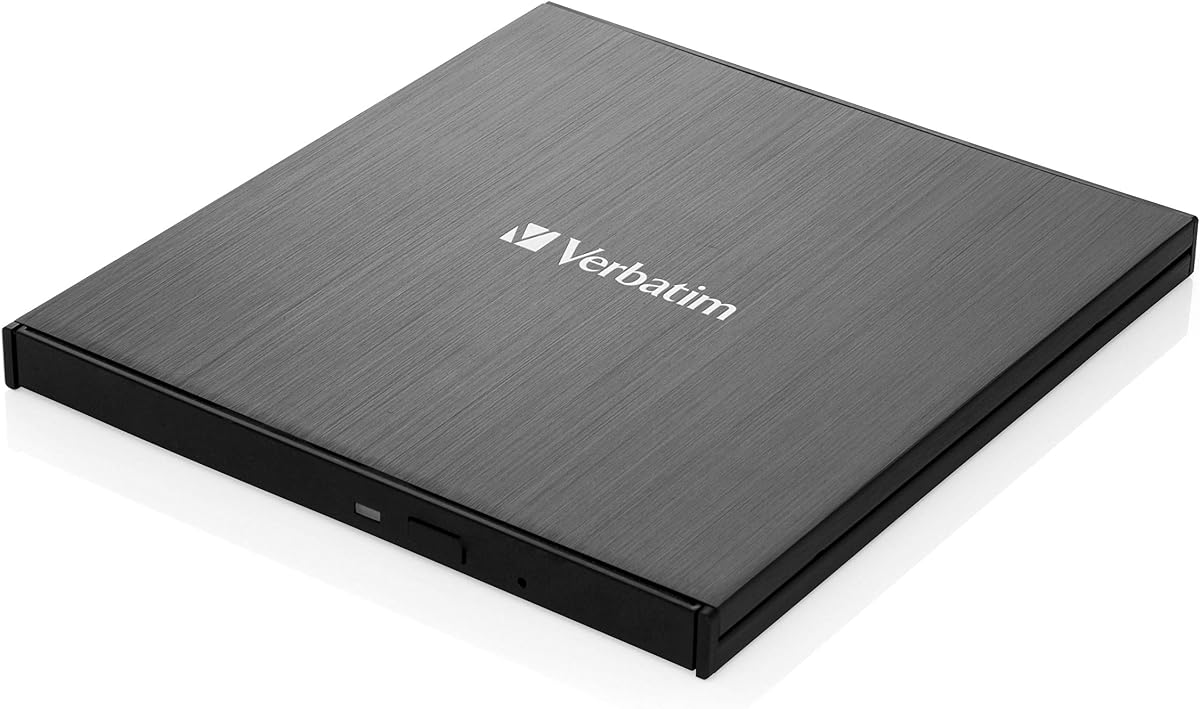
The Verbatim 43889 lecteur de disques optiques Blu-Ray RW Noir provides solid optical drive performance with a trusted brand name. Its primary function is standard Blu-ray reading and writing with a simple black design.
We may earn a commission when you buy through this link, at no additional cost to you.
Users appreciate its consistent burn quality and reliability for everyday media tasks. The standard optical reader handles common disc formats without complications, making it a straightforward choice for basic ripping needs.
However, detailed feature specifications are less visible compared to modern drives, and the price point is relatively high for a basic unit. It may lack advanced connectivity options found in newer models.
Consider this drive if you value brand reliability over extra features. It works well for those who need a no-fuss Blu-ray burner for occasional use.
Verbatim has a long history in storage media, and this drive continues that tradition with dependable performance for burning and reading standard optical discs.
Focused on core Blu-ray RW capabilities, it delivers consistent results for users who do not need premium features like 4K support or multiple USB ports.
We may earn a commission when you buy through this link, at no additional cost to you.
The External blu ray Drive USB CD/DVD Drive for Laptops is engineered to deliver high-definition 3D Blu-ray experiences. Its plug and play setup makes it simple to connect without complex driver installations.
We may earn a commission when you buy through this link, at no additional cost to you.
Users can enjoy stunning clarity from movies thanks to its strong error correction capabilities and low noise operation. The slim profile and scratch-resistant matte finish make it an attractive option for home and office use.
However, some Windows 11 installations may face compatibility issues, and it is not compatible with tablets or Chromebooks. For desktop PCs, connecting to back ports is recommended for stable power supply.
Choose this drive if you want affordable 3D Blu-ray playback and standard ripping support. It suits users who need a reliable and portable solution for their laptops or desktops.
Unlock the power of high-definition entertainment by reading 3D Blu-ray discs, offering a unique viewing experience with stunning visual clarity on compatible monitors.
Designed for simplicity, the drive connects via standard USB without drivers, drawing power directly from the computer for a hassle-free experience across major operating systems.
We may earn a commission when you buy through this link, at no additional cost to you.
The Dainty External Blu ray Drives Player features a dual USB power design to ensure stable disc reading and writing even when connected to laptops with weak power sources. It supports high-speed USB 3.0 connections for fast data transfer.
We may earn a commission when you buy through this link, at no additional cost to you.
Its strong error correction capability helps maintain smooth playback without interruptions. The drive handles BD, DVD, and CD formats, with support for up to 100GB BD-RX for high-capacity storage needs.
Some users might find the rating score slightly lower compared to top competitors, and the need for an extra power cable can add to cable management complexity. Still, its performance remains solid for standard use.
Buy this drive if you need a reliable burner with extra power support for consistent results. It is a good fit for users seeking balanced functionality at a reasonable price point.
The additional USB power cable ensures smooth disc reading and burning by preventing interruptions caused by insufficient power, especially when using mobile laptops.
Supporting BD up to 100GB and dual-layer DVDs allows you to store large media files or backups efficiently on a single disc.
We may earn a commission when you buy through this link, at no additional cost to you.
The External Blu-ray Drive Portable Blu-ray Player CD DVD Burner focuses on ultra-slim design and portability. It offers seamless playback for standard discs, making it perfect for travelers who need lightweight hardware.
We may earn a commission when you buy through this link, at no additional cost to you.
Its embedded data cable reduces the risk of losing wires, and USB 3.0 and Type-C connectors ensure compatibility with modern and older laptops. This makes it ideal for on-the-go media playback.
However, this model can read but not burn Blu-ray discs, which limits its utility for ripping or backup tasks. User ratings are lower, possibly reflecting these limitations compared to full burners.
Choose this drive if you prioritize weight and simplicity for movie playback. It is best for users who only need to watch existing discs without burning or ripping requirements.
The embedded cable design simplifies organization, ensuring you never lose the connection cable when traveling or working from different locations.
Featuring a brushed texture shell and ultra-slim profile, this drive fits easily in any laptop bag, making it your best companion for work or vacation.
We may earn a commission when you buy through this link, at no additional cost to you.
The External Blu Ray CD DVD Drive offers a 5-in-1 solution with an SD/TF card slot and two USB ports, expanding your computer's connectivity. It reads and writes BD, DVD, and CD discs efficiently.
We may earn a commission when you buy through this link, at no additional cost to you.
Users appreciate the embedded cable design and low power consumption. The plug and play setup works instantly on Windows, Mac, and Linux, making it versatile across different operating systems.
While it handles standard high-definition discs well, it does not support 4K Ultra HD playback. Additionally, Chrome OS and tablet compatibility are limited, which may affect some users.
Buy this drive if you need a compact hub with extra ports for transferring files and media playback. It balances functionality and portability for home or office use.
Combining Blu-ray reading, USB hubs, and SD card slots into one device solves the problem of insufficient ports and simplifies file transfers from cameras or phones.
With no drivers needed, you can simply plug in the device and start reading discs or files instantly. This convenience makes it easy for anyone to use.
We may earn a commission when you buy through this link, at no additional cost to you.
The ASUS SBW-06D5H-U BDXL External Ultra Slim Blu-ray and MDisc Burner delivers advanced storage capabilities with its support for BDXL discs up to 100GB. It is perfect for large data backups or media collections.
We may earn a commission when you buy through this link, at no additional cost to you.
USB 3.1 connectivity ensures rapid data transfer, and the M-DISC support allows for durable long-term storage. The ultra-slim design and two included cables add to its user-friendly appeal.
The premium price may be a consideration for budget-conscious buyers, but the high rating reflects its reliability. Some users may find fewer detailed reviews available for this specific model.
Choose this drive if you need high-capacity BDXL burning with proven durability. It suits professionals or enthusiasts who require reliable storage solutions for large files.
Supporting BDXL discs up to 100GB means you can store massive amounts of data on a single disc, reducing the number of discs needed for backups.
M-DISC technology uses a rock-like data layer for permanent storage lasting up to 1000 years, ensuring your most important files remain safe for generations.
We may earn a commission when you buy through this link, at no additional cost to you.
The LG 6X WP50NB40 Ultra Slim Portable Black Blu-ray Burner stands out for its bundle that includes a 100GB BDXL disc and Cyberlink burning software. This package offers immediate value for users wanting to start burning right away.
We may earn a commission when you buy through this link, at no additional cost to you.
Its 6x write speed is standard for optical drives, and M-DISC support ensures long-term data durability. The slim design and trusted LG reputation provide confidence in build quality and performance.
USB 2.0 is slower than modern USB 3.0 standards, which may slow down large file transfers. Despite this, the included software and disc provide significant added value to the purchase.
Buy this drive if you want a bundle that includes software and a high-capacity disc. It is a convenient option for users new to ripping and disc burning.
Included Cyberlink burning software lets you start writing discs immediately without buying additional programs, saving time and money for new users.
A 100GB BDXL disc is included in the package, providing ample space to back up large media collections or important data without extra purchases.
We may earn a commission when you buy through this link, at no additional cost to you.
Finding the right Blu-ray drive for ripping involves balancing features like speed, connectivity, and software support. Use this guide to compare key factors before making your final decision.
Speed determines how fast you can rip discs or burn data. Look for drives with 6x or higher Blu-ray read speeds to reduce waiting times.
Higher speeds improve efficiency but may generate more heat. Ensure your drive has good heat dissipation features for long-term stability.
Modern drives offer USB 3.0 and USB-C ports for fast data transfer and compatibility with new laptops. Check your ports to avoid needing adapters.
USB 3.0 provides 5Gbps bandwidth, while USB 2.0 is slower. Always prefer newer connections for reliable performance and faster ripping.
Ensure the drive supports your operating system whether Windows, Mac, or Linux. Some drives may not play UHD Blu-rays on Mac systems.
Drivers should ideally be plug-and-play to minimize setup hassle. Verify manufacturer support pages to confirm compatibility with your OS version.
Most drives do not include playback or ripping software by default. You will likely need to install third-party software like CyberLink PowerDVD or VLC.
Some premium bundles include burning software, which saves extra costs. Check product listings carefully to see if software is included or optional.
Aluminum or sturdy plastic housings improve heat dissipation and lifespan. M-DISC support is a premium feature that ensures long-term archival storage.
Look for manufacturers with good warranties and customer support. A 1 to 2-year warranty can protect your investment against hardware issues.
Slim drives with embedded cables or carrying cases are ideal for travelers. Lightweight designs make it easy to carry the drive anywhere without bulk.
Consider whether the drive needs external power or runs solely from USB. Drives with dual USB cables offer stability for laptops with weaker ports.
BDXL support lets you burn discs with up to 100GB capacity. This is useful for backing up large media libraries on a single disc.
M-DISC technology provides a rock-like layer that resists environmental damage. It is the best choice for permanent data storage lasting over 1000 years.
Budget drives cost less but may lack extra features like multiple USB ports or high-speed performance. Premium drives offer better durability and UHD support.
Evaluate what features you truly need before buying. Sometimes a mid-range model with solid ratings offers the best balance of price and performance.
Connect the drive to your computer using the included USB cable. If your device needs extra power, plug in the additional USB power cable for stable performance.
Install the required playback or ripping software recommended by the manufacturer. This ensures your drive can read high-definition discs without errors.
Keep discs clean and handle them by the edges to avoid scratches. Store your drive in its case when not in use to protect it from dust and impact.
Yes, most external Blu-ray drives do not include ripping or playback software. You will need to install third-party software like CyberLink PowerDVD, Leawo, or VLC to access content on discs.
Most drives are compatible with Mac for standard Blu-ray and DVD playback. However, UHD 4K Blu-ray playback is limited on Mac due to software constraints.
USB-C is the newer connector shape while USB 3.0 refers to transfer speed. Many modern drives include both options for maximum flexibility and faster data transfer.
No, most external Blu-ray drives are not compatible with tablets TVs or smartphones. They are designed for laptops desktops and PCs with proper operating systems.
M-DISC support lets you burn data that is designed to last up to 1000 years. It uses a durable rock-like layer to protect your files from environmental damage over time.
No only premium models like the archgon drive support 4K Ultra HD. Most standard drives are limited to regular Blu-ray resolution and cannot play UHD discs.
The BUFFALO 6X stands out as the top overall choice due to its high ratings and M-DISC support. It balances reliability and performance well for most users needing a durable drive.
If you need premium UHD playback, the archgon Premium Aluminum drive delivers exceptional quality despite its higher price. Budget-conscious buyers may prefer the 8-in-1 hub drive for added connectivity.
Always verify current prices and availability before purchasing since listings change regularly. Choosing the right drive ensures smooth ripping and long-term media enjoyment.