
Kasa Smart Light Bulbs
4.5Editor score
Full Color Changing
No Hub Required
Energy Monitoring
Discover the top 10 smart bulbs for Google Home. Compare features, ratings, and voice control options to find the perfect lighting solution.
Finding the right smart bulbs for your Google Home setup can transform how you interact with your living space. These devices offer seamless voice control, color changing options, and energy efficiency that traditional lighting simply cannot match. Whether you want to set a mood or automate your daily routine, the right bulb makes it effortless.
We have carefully analyzed the latest models available on the market to bring you a curated list of the most reliable options. Each product was evaluated based on compatibility, feature set, user ratings, and overall value. Our goal is to help you navigate the crowded smart home landscape with confidence and clarity.
Every pick in this guide highlights specific strengths and potential limitations so you can make an informed decision. We include detailed comparisons and expert insights to ensure you get the best performance for your needs. Please note that availability and offers may change, so verify details before purchasing.
4.5Editor score

4.6Editor score

4.5Editor score
This side-by-side comparison allows you to quickly assess the key specifications and capabilities of each top contender. We have organized the data to highlight differences in connectivity, color options, and special features so you can spot the best fit for your home.



The Govee Smart Light Bulbs stand out as a top contender for users seeking extensive customization. With a rating of 4.6, these bulbs offer 16 million colors and preset scenes that adapt to your mood seamlessly. They integrate smoothly with Google Home for hands-free operation.
We may earn a commission when you buy through this link, at no additional cost to you.
One of the most compelling features is the music sync capability, which allows the lights to change color and brightness based on sounds detected by your phone. This creates an immersive experience for parties or entertainment sessions. The app also supports group control, simplifying daily setups.
While highly versatile, users should note that these bulbs do not support 5GHz WiFi networks, which might limit connectivity in some homes. Additionally, the music sync requires microphone permissions on your phone. Despite these minor limitations, the overall performance is robust.
This product is ideal for individuals who want to create dynamic lighting environments without complexity. Whether you are hosting a party or setting a relaxing scene, these bulbs deliver excellent value. We recommend them for anyone prioritizing creative control.
Customize your space with millions of colors and scene modes to match any occasion.
Use simple voice commands via Google Home to turn lights on or off instantly.
We may earn a commission when you buy through this link, at no additional cost to you.
Kasa Smart Light Bulbs offer an excellent balance of features and affordability for smart home enthusiasts. Rated at 4.5, these bulbs provide 16 million colors and auto white adjustments to match natural light patterns. They work directly with Google Home for convenient voice control.
We may earn a commission when you buy through this link, at no additional cost to you.
A key advantage is the energy monitoring feature, which lets you track real-time usage to drive down consumption without losing quality. The bulbs are remote controllable via the free Kasa smart app, allowing you to dim or change colors from anywhere. They require no hub, making setup straightforward.
The main limitation is the reliance on 2.4GHz WiFi, which is common but may require router adjustments if your network defaults to 5GHz. Additionally, using the Kasa app is necessary for initial setup. However, for the price point, these bulbs deliver significant value.
These are perfect for budget-conscious users who still want premium features like color changing and remote access. They are especially useful for households looking to monitor energy use while enjoying smart lighting benefits. We suggest this for first-time smart bulb buyers.
Get a wide range of colors and automation features without a high upfront investment.
Monitor your usage in real time to optimize efficiency and reduce electricity bills.
We may earn a commission when you buy through this link, at no additional cost to you.
Linkind Smart Light Bulbs are designed for reliability, featuring a dual Wi-Fi and Bluetooth connection for uninterrupted control. With a solid rating, these bulbs allow you to connect via Bluetooth when Wi-Fi is off. They support voice commands through Google Home and offer extensive color options.
We may earn a commission when you buy through this link, at no additional cost to you.
The Bluetooth backup feature solves connectivity gaps in areas with poor Wi-Fi coverage. Users can enjoy quick setup and instant responses without lag. The AiDot app provides 104 preset scenes and music sync capabilities that enhance gatherings and daily life. Group control lets you manage multiple bulbs simultaneously.
One consideration is that initial setup requires 2.4GHz Wi-Fi, and physical dimmer switches are not compatible. You must adjust brightness via the app or voice. Despite this, the reliability and speed make these a strong choice for modern homes.
If you value consistent connectivity and fast performance, these bulbs are worth considering. They are particularly well-suited for larger homes where Wi-Fi signals might be inconsistent. We recommend them for users who prioritize stable control.
Enjoy seamless control even when your Wi-Fi goes down thanks to Bluetooth backup.
Choose from over 100 preset scenes or create your own with the AiDot app.
We may earn a commission when you buy through this link, at no additional cost to you.
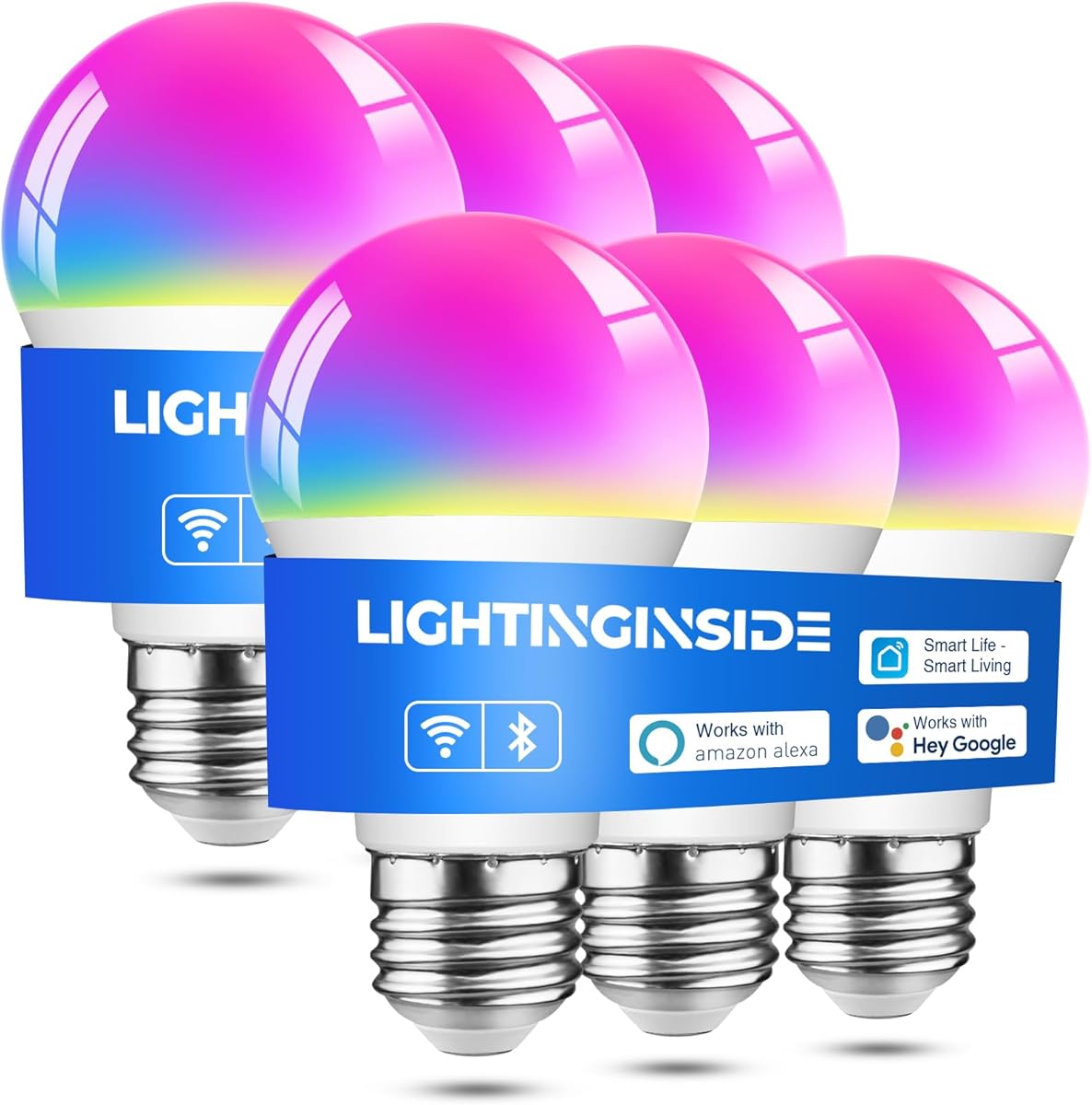
Lightinginside Smart Light Bulbs promise a hassle-free experience with their upgraded second-generation BLE and Wi-Fi dual-channel chip. These bulbs are rated for reliable performance and allow local control even if Wi-Fi drops. They integrate with Google Home for hands-free command execution.
We may earn a commission when you buy through this link, at no additional cost to you.
The setup process is up to three times faster than previous models, saving you time during installation. The intelligent switch between BLE and Wi-Fi ensures you stay connected remotely or locally. Automated lighting features like biorhythm plans in the SmartLife app add convenience to your routine.
The main drawback is that initial pairing requires both 2.4GHz Wi-Fi and BLE, which might be tricky on some networks. Also, advanced features rely on the SmartLife app ecosystem. Nonetheless, the speed and reliability make them a practical option.
These bulbs are ideal for users who want a straightforward setup without sacrificing core smart features. They are great for replacing multiple bulbs at once due to the value pack size. We suggest them for quick and efficient home upgrades.
Get your lights up and running in minutes with the faster setup technology.
Control your lighting from anywhere using the SmartLife app when away from home.
We may earn a commission when you buy through this link, at no additional cost to you.
DAYBETTER A19 E26 Smart Light Bulbs offer a robust set of features for mood lighting with Wi-Fi and Bluetooth support. These bulbs deliver 800LM brightness and allow you to switch between RGB and white modes easily. They work seamlessly with Google Home for voice control.
We may earn a commission when you buy through this link, at no additional cost to you.
The music synchronization feature lets the bulbs dance to the beat detected by your phone's microphone. You can also set schedules and group multiple bulbs for synchronized effects. The DayBetter app provides access to various preset scenes for holidays or daily routines.
Users should note that these bulbs are not compatible with Matter or SmartLife apps, which might limit integration options. Additionally, physical dimmer switches are not supported. However, the feature set remains compelling for the price.
This product is excellent for those looking to create vibrant atmospheres for parties or relaxation. The ease of pairing and voice control make it user-friendly. We recommend it for creative lighting enthusiasts.
Sync your lights to music for a dynamic visual experience during gatherings.
Manage multiple bulbs together for consistent effects throughout a room.
We may earn a commission when you buy through this link, at no additional cost to you.
Philips Hue Essential Smart LED bulbs are synonymous with premium smart lighting quality. They offer millions of colors and a library of preset scenes designed by lighting experts. With a rating of 4.5, these bulbs support seamless integration with Google Home for voice commands.
We may earn a commission when you buy through this link, at no additional cost to you.
The smooth dimming feature allows you to adjust brightness from full down to 2% using the Hue app. This level of control helps achieve the perfect level of lighting for any task. You can expand your setup by adding a Hue Bridge to unlock advanced features.
The main drawback is the higher price point and the fact that the Hue Bridge is not included for full functionality. However, the core features work well without it. The build quality and ecosystem support justify the investment for many.
If you are building a high-end smart home ecosystem, these bulbs are a top choice. They provide reliability and a refined user experience. We suggest them for users seeking the best in smart lighting.
Access scenes crafted by professionals to instantly transform your environment.
Grow your system with Hue products for added security and content syncing.
We may earn a commission when you buy through this link, at no additional cost to you.
Linkind Smart Light Bulbs focus on delivering high-quality white light suitable for various activities. They tune from warm white to cool daylight, with a high CRI that restores true colors. These bulbs are compatible with Google Home for hands-free control.
We may earn a commission when you buy through this link, at no additional cost to you.
The CRI greater than 90 ensures that furniture and decor look their best under these lights. They also offer local Bluetooth control when Wi-Fi is down. Scheduling functions help automate energy-saving routines by adjusting brightness based on time of day.
The limitation is that these bulbs provide white light only, lacking RGB color options. Also, they require the AiDot app for integration. Despite this, the focus on quality makes them a strong option for functional lighting.
These are ideal for spaces like kitchens or offices where color accuracy and eye comfort matter. The energy efficiency and lifespan add to the value. We recommend them for practical and comfortable lighting.
Enjoy natural-looking light that enhances the beauty of your home's interior.
Switch between warm and cool tones to match your specific task or mood.
We may earn a commission when you buy through this link, at no additional cost to you.
OREiN Matter Smart Light Bulbs leverage the Matter protocol for seamless interoperability across multiple systems. They allow simultaneous operation across Google Home, Apple Home, and SmartThings. This certification ensures robust security and future-proofing.
We may earn a commission when you buy through this link, at no additional cost to you.
Users can easily pair the bulbs using a Matter QR code and integrate them into their preferred apps. The bulbs support music sync and over 16 million colors for dynamic lighting. High CRI values contribute to superior visual quality in rooms.
The only constraint is the reliance on 2.4GHz Wi-Fi, which is standard but requires network awareness. Additionally, traditional dimmer switches are not recommended. Overall, the flexibility of Matter makes these bulbs a smart choice.
If you have a mixed ecosystem of devices, these bulbs offer the best bridge. They simplify control and enhance security. We recommend them for forward-thinking smart home users.
Connect effortlessly to different platforms without worrying about vendor lock-in.
Benefit from standard cryptographic algorithms that protect your data and devices.
We may earn a commission when you buy through this link, at no additional cost to you.
Linkind Matter Smart Light Bulbs are certified for the Matter platform, enabling integration into one control system. They work with Google Home and other major assistants for voice control. These bulbs offer 16 million colors and preset scenes for various occasions.
We may earn a commission when you buy through this link, at no additional cost to you.
The ability to control them directly via the AiDot app or Matter hubs eliminates the need for multiple apps. This flexibility is great for users with different smart devices. Music sync adds a dynamic layer to your entertainment setup.
These bulbs are limited to 2.4GHz Wi-Fi and may require specific app usage for advanced settings. Still, the broad compatibility is a strong advantage. The quality and color accuracy are commendable.
For households using multiple platforms, these bulbs provide a unified solution. They are easy to set up and offer extensive customization. We suggest them for comprehensive home automation.
Streamline your smart home experience by avoiding app switching hassles.
Turn your home into a mini party venue with synced music lighting.
We may earn a commission when you buy through this link, at no additional cost to you.
Kasa Smart Light Bulbs provide a reliable solution for essential lighting needs with soft white tones. They are dimmable from 1% to 100%, giving precise control over brightness. Google Home integration allows you to command them with voice easily.
We may earn a commission when you buy through this link, at no additional cost to you.
Energy monitoring helps you drive down consumption by tracking real-time usage. The bulbs require no hub and connect directly to Wi-Fi. The Kasa app offers scheduling and remote control for added convenience.
While these bulbs lack color-changing capabilities, their focus on white light suits general home use. The brand is trusted by millions, ensuring quality and support. The price point remains attractive for multi-packs.
Choose these if you prefer a straightforward, no-fuss smart lighting experience. They are perfect for replacing standard bulbs with smart functionality. We recommend them for practical, everyday use.
Adjust brightness from subtle to full light to suit any moment.
Monitor your usage to manage costs without sacrificing performance.
We may earn a commission when you buy through this link, at no additional cost to you.
Selecting the right bulbs involves considering compatibility, features, and design needs to ensure a seamless integration with your existing setup.
Ensure that the bulbs you choose explicitly state compatibility with Google Home or Google Assistant. Most modern smart bulbs support this, but some may require specific hubs or apps to bridge the connection. Without this, voice commands will not work, which defeats the purpose of smart lighting.
Look for direct support in the product description to guarantee hands-free operation via voice.
Smart bulbs typically connect via Wi-Fi, Bluetooth, or both. Wi-Fi allows for remote access from anywhere, while Bluetooth provides local control if the internet is down. Some models use both to ensure uninterrupted control regardless of network status.
Check if the bulb requires a hub or if it connects directly to your router for easier setup.
If you want vibrant atmospheres, opt for RGB bulbs that offer millions of colors. For functional lighting, tunable white options allow you to shift from warm to cool tones. Brightness is measured in lumens, and 800 lumens is generally a standard equivalent for a 60W bulb.
Decide whether you need color variety or focused white light for your specific room needs.
Each brand usually has its own app for control and automation. Check if the app is intuitive and offers features like scheduling, energy monitoring, or preset scenes. Some bulbs support Matter, allowing them to work across different platforms like Apple Home or SmartThings.
Verify that the app works well with your operating system to ensure smooth user experience.
Dimming capabilities are crucial for setting moods. Ensure the bulb supports app-based dimming since traditional physical dimmer switches often cause issues. Look for smooth dimming ranges that allow for subtle adjustments from 1% to 100%.
Prioritize models that offer granular brightness control for maximum versatility.
For entertainment and parties, music sync features let the lights react to sound detected by your phone. This adds an interactive layer to your lighting. However, note that this usually requires microphone permissions on your device.
Consider this feature only if you plan to use the lights for gatherings or immersive media.
Smart bulbs are generally more energy-efficient than incandescent ones. Some models include energy monitoring features to help track real-time usage. Look for low wattage draws relative to brightness to ensure you save on electricity.
Choose bulbs with high efficiency ratings to reduce long-term costs.
Check the estimated lifespan of the bulbs, often ranging from 15,000 to 25,000 hours. Higher build quality ensures fewer replacements. Some brands also offer warranties for added peace of mind against manufacturing defects.
Invest in brands with positive user feedback regarding durability and reliability.
Start by screwing the smart bulb into your E26 socket securely. Download the manufacturer's app on your smartphone and follow the setup instructions to connect to your 2.4GHz Wi-Fi network. Once paired, link the bulb to your Google Home app for voice control.
Use the Google Home app to assign the bulb to a specific room and customize settings like brightness and color. Create scenes that combine multiple bulbs for a single command. Schedule the lights to turn on or off automatically to match your daily routine.
To maintain performance, avoid physical dimmer switches as they can cause flickering or damage. If connectivity issues arise, try resetting the bulb and re-establishing the connection. Regularly check for firmware updates in the app to ensure optimal operation.
Most of the bulbs listed are hub-free and connect directly to your Wi-Fi. However, some advanced systems like Philips Hue may benefit from a bridge for extra features. Always check the specific product details before purchasing to be sure.
You can use them with a regular on/off switch, but physical dimmer switches are generally not compatible. Using dimmers may cause flickering or buzzing. It is better to control brightness through the app or voice commands.
Almost all smart bulbs require a 2.4GHz Wi-Fi connection. They do not support 5GHz networks for setup. If your router combines bands, you may need to separate them during installation to ensure connection.
Yes, if the bulb connects via Wi-Fi and not just Bluetooth, you can control it remotely. You will need to be logged into the same app account on your phone to access the settings while away.
Smart bulbs are LED-based and are generally more energy-efficient than incandescent bulbs. Some models include energy monitoring to help you track usage. Using them for lighting without leaving them on unnecessarily saves power.
Most of the supported apps allow you to group bulbs for simultaneous control. This lets you turn on all living room lights with a single command or scene. Check the app features for grouping capabilities during setup.
We have highlighted the top options ranging from budget-friendly picks to premium ecosystems. Each product offers unique strengths like music sync, Matter compatibility, or robust white lighting. Consider your specific needs when selecting the right model for your space.
Prioritize compatibility and ease of setup to ensure a smooth experience with Google Home. The right choice depends on whether you want vibrant colors or simple automation. Balancing features with your budget is key to satisfaction.
Always verify the current status and features before finalizing your purchase. Lighting technology evolves, and checking the latest details ensures you get the best value. We hope this guide helps you light up your home effectively.