
Geemarc Ampli550
4.1Editor score
Up to 55dB TrueSound amplification
Talking caller ID and keypad features
95dB loud ringer with strobe light
Discover the top captioned telephones for hearing impaired users. Compare features, ratings, and real user feedback to find the perfect device for clear communication.
Finding the right communication device is essential for those with hearing loss. Captioned telephones offer a unique solution by displaying real-time text during calls. This ensures you never miss a word during important conversations with family or doctors.
We compared ten leading models based on caption accuracy, sound amplification, and ease of use. Our analysis focuses on features that matter most to seniors and hearing impaired individuals. Each product offers distinct advantages depending on your specific needs.
Each pick highlights key strengths, potential drawbacks, and ideal use cases. Prices and availability can change frequently, so check current listings before purchasing. We aim to provide clear guidance to help you choose the best phone for your home.
4.1Editor score

4.3Editor score
4.3Editor score
This side-by-side comparison highlights the unique specifications of each model. You will see how features like amplification levels, captioning capabilities, and display types vary across the lineup. Use this table to quickly identify which phone meets your specific hearing needs.


The Hamilton CapTel 2400iSPNBT stands out as the top choice for those needing visual support during calls. It combines a large touchscreen with real-time captioning to ensure you catch every word. With a 4.3 rating users appreciate the clarity it brings to daily communication.
We may earn a commission when you buy through this link, at no additional cost to you.
This device offers both auto and assisted captioning modes depending on your preference for human oversight. The sound amplification goes up to 40dB which helps those with moderate hearing loss. Customizable caption sizes and tone controls allow you to tailor the experience to your comfort.
While the internet requirement might be a hurdle for some the clarity it provides is unmatched. The need to register with a service provider adds a step but ensures compliance with FCC rules. These trade-offs are minor compared to the confidence it builds during phone calls.
Anyone struggling to understand voices over the phone will find this device transformative. It is ideal for seniors who want to stay connected without missing important details. We recommend this model for those who prioritize text support alongside audio amplification.
The large touchscreen displays captions as you speak allowing you to read along instantly.
Adjust caption size and tone to match your personal hearing preferences and comfort levels.
We may earn a commission when you buy through this link, at no additional cost to you.
The Geemarc Ampli550 is designed for those who need maximum volume and visual alerts. It delivers up to 55dB of amplified sound which is significantly louder than standard phones. Its 4.1 rating reflects strong user satisfaction with its robust build and clear audio output.
We may earn a commission when you buy through this link, at no additional cost to you.
Features like talking caller ID and keys make it accessible for users with low vision too. The 95dB ringer ensures you hear even when the room is noisy or you are in another room. Emergency buttons allow quick access to critical contacts when needed most.
Lacking captioning services might be a drawback for those who rely on text. The premium price reflects its specialized hardware but it does not replace a captioned phone. However for pure sound amplification it performs exceptionally well for severe hearing loss.
Choose this if your primary need is volume rather than text support. It suits seniors who struggle with soft ringer or soft speech from callers. This model is a strong investment for auditory clarity and safety at home.
With up to 55dB amplification and a 95dB ringer this phone ensures you hear every call.
Talking keys and bright strobes make dialing and alerts easy for visually impaired users.
We may earn a commission when you buy through this link, at no additional cost to you.
The Captel MDL 200 provides a straightforward solution for basic captioned phone needs. It focuses on delivering essential functionality without complex menus or extra tech. While specific ratings are not available its reputation suggests reliability for daily household calls.
We may earn a commission when you buy through this link, at no additional cost to you.
This model includes standard captioning that aligns with common service providers. It is a good choice for users who want simplicity over advanced capabilities. The corded design ensures a stable connection which reduces dropouts during important conversations.
Advanced features like large touchscreens or amplification controls are not present here. You may need to rely on external speakers if volume becomes an issue. Despite these limits it serves as a functional tool for staying connected visually.
Consider this for users who just need captions without extra frills. It fits well in homes where the setup must be quick and easy. For those prioritizing affordability this model offers a solid starting point.
The interface avoids complexity making it easy for seniors to learn and use daily.
It connects to standard captioning networks ensuring consistent text during incoming calls.
We may earn a commission when you buy through this link, at no additional cost to you.
The Clarity AltoPlus targets users needing high amplification with certification for reliability. It offers up to 53dB of sound boost and includes outgoing speech amplification. This dual approach helps both hearing the caller and making your voice clearer to them.
We may earn a commission when you buy through this link, at no additional cost to you.
Ergonomic controls cater to users with arthritis or limited dexterity. A large backlit screen and talking keypad make navigation easier in low light. The neckloop jack provides flexibility for those who use hearing aids with telecoils.
Unlike some top picks it does not include captioning features for reading calls. Battery backups are an optional accessory so power outages might interrupt service. Still the sound quality and certification make it a strong contender for amplification.
Pick this if you prioritize certified amplification over text support. It works well for moderate to severe hearing loss in quiet environments. Users who value clear audio and physical ease of use will find it beneficial.
TIA-4953 certification ensures the device meets strict standards for hearing loss support.
Outgoing speech amplification ensures your voice is heard clearly by the other caller.
We may earn a commission when you buy through this link, at no additional cost to you.
The Serene Innovations SI-CL-65 combines HD audio with cordless convenience for seniors. It aims to deliver clear sound while allowing you to move around freely during calls. While specific details are scarce it is marketed for ease of use by older adults.
We may earn a commission when you buy through this link, at no additional cost to you.
Features like talking caller ID assist those who struggle to read small numbers. The cordless handset removes the restriction of staying near a base unit. This is helpful for users who prefer answering calls from the garden or bedroom.
Without captioning capabilities it relies entirely on audio quality for success. The range of the cordless signal might vary depending on home size and obstacles. These limitations are typical for cordless models but should be considered.
This option suits those who need mobility over text support. It is a good choice for households where movement during calls is common. Prioritize this if HD audio and cordless freedom are your main goals.
The cordless handset allows you to take calls from anywhere within your home range.
HD technology helps reduce static and background noise for cleaner voice transmission.
We may earn a commission when you buy through this link, at no additional cost to you.
The VTech SN5147 offers a hybrid system with both corded base and cordless handset. This ensures reliability during power outages while providing mobility for daily use. With a 4.0 rating users value its balance of features and ease of use.
We may earn a commission when you buy through this link, at no additional cost to you.
Photo speed dial allows one-touch calling with pictures of family members. Visual flash alerts ensure you notice calls even if volume is low. The answering machine includes slow playback which helps users process messages better.
It does not support captioning which limits its utility for hard of hearing text users. The combination of features might be overwhelming for those needing extreme simplicity. Still the robocall blocker is a modern benefit for peace of mind.
Select this for households needing both mobility and reliability. It is excellent for seniors who want to see photos of contacts to. Choose this if you need visual alerts and call blocking along with amplification.
The corded base keeps working during outages ensuring you never miss important emergency calls.
Speed dials with photos make it easier to identify and call loved ones quickly.
We may earn a commission when you buy through this link, at no additional cost to you.
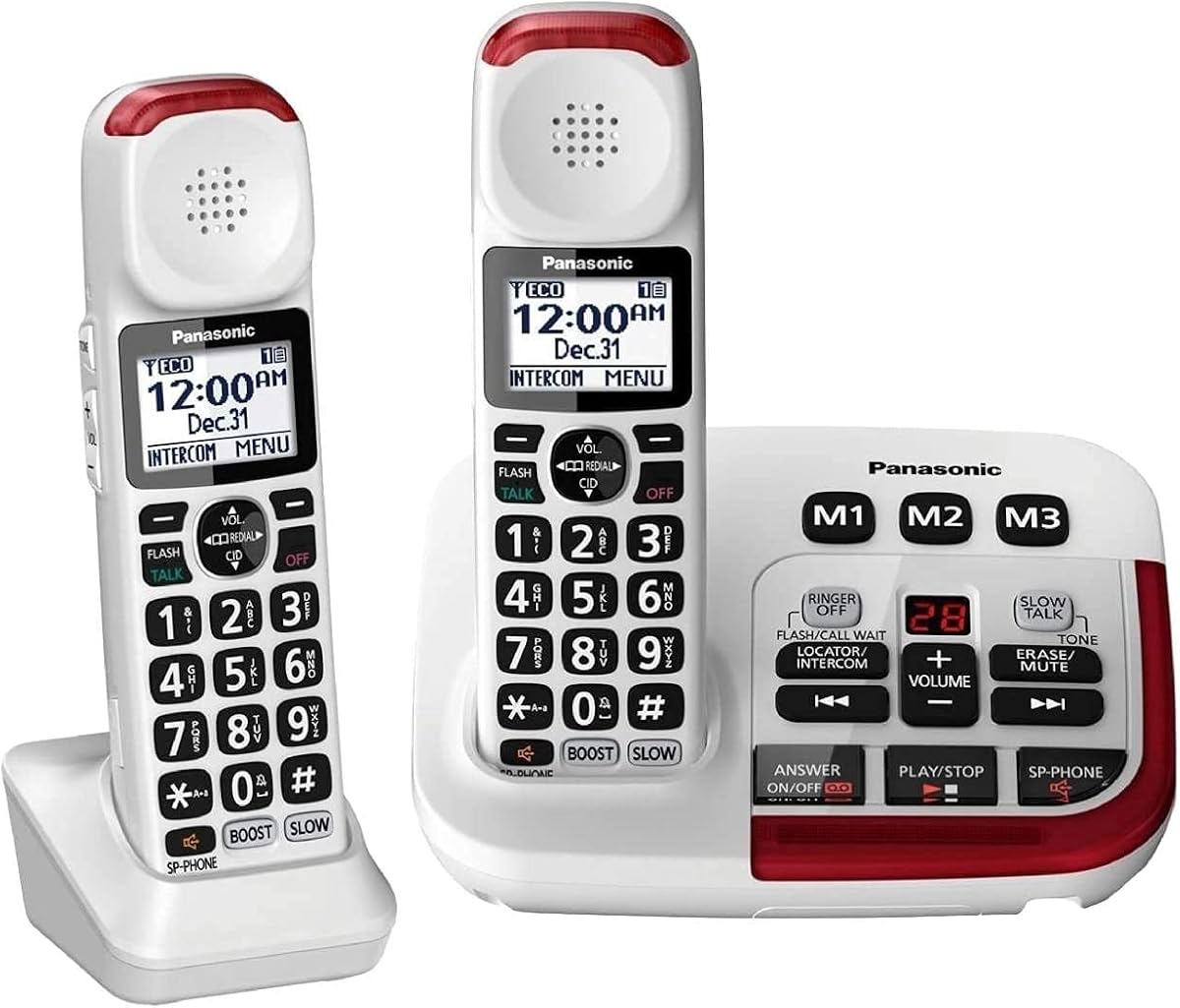
The Panasonic KX-TGM420W set delivers strong audio with a 40dB volume booster. It is designed for seniors who need loud clear calls without complex settings. A 4.3 rating shows users are happy with its performance and ease of setup.
We may earn a commission when you buy through this link, at no additional cost to you.
Slow Talk slows down voice messages so you can understand every word. Noise reduction helps filter background sounds for a better conversation experience. Visual ringers and large backlit displays make checking status simple for everyone.
Lack of captioning means you rely solely on sound for call content. The system can be expanded but initial setup might be tricky for non tech savvy users. Despite this the audio quality remains solid for daily use.
This set is great for families needing multiple handsets at a good price. It works well where clear sound is the top priority. Choose this if you need expandability and voice message support.
This feature slows speech in real time helping you catch every word clearly.
Suppression of background noise ensures clearer and more comfortable conversations.
We may earn a commission when you buy through this link, at no additional cost to you.
The SWISSVOICE Premium 3355 focuses on visual identification with photo memory buttons. It includes an extra handset which is useful for multi-story homes. The large buttons are ideal for users with unsteady hands or low vision.
We may earn a commission when you buy through this link, at no additional cost to you.
A 90dB ringer ensures calls are heard clearly across the house. Hearing aid compatibility allows seamless use with existing hearing devices. The call block feature helps reduce unwanted interruptions from telemarketers.
User ratings suggest it may have some limitations in usability or sound quality. It might lack the clarity of higher rated models in noisy environments. These factors should be weighed against its unique photo features.
This phone is a good choice if you rely on images to find contacts. It suits homes where visual cues are more helpful than text or complex menus. Consider it for its generous handset inclusion and photo dialing.
Photo buttons let you see who you are calling just by looking at the phone.
Compatibility with hearing aids ensures seamless integration with your current devices.
We may earn a commission when you buy through this link, at no additional cost to you.
This version includes two cordless handsets which offers broader coverage in larger homes. It shares the same 40dB volume booster and visual ringers as the single set model. A 4.3 rating reflects satisfaction with the complete package and audio quality.
We may earn a commission when you buy through this link, at no additional cost to you.
The visual LED ringers on both units help you notice calls at a glance. The answering machine records messages with clear playback. You can expand up to six handsets if your household grows.
It does not support text captioning so reliance is on auditory clarity. The added cost of the second handset might be a consideration for small homes. However for families the value is high due to the extra device.
Select this if you need multiple handsets for shared access. It is ideal for families wanting consistent sound quality across rooms. Choose this for its expandability and included answering machine.
Expand up to six handsets to ensure everyone has easy access to a phone.
Bright red LED ringers on base and handsets ensure you never miss a call.
We may earn a commission when you buy through this link, at no additional cost to you.
This landline phone offers a strong 100dB ringer that ensures you hear calls even in noisy rooms. It is designed for seniors needing loud audio and simple dialing. A 3.9 rating indicates mixed feedback but generally positive for volume.
We may earn a commission when you buy through this link, at no additional cost to you.
Photo speed dial lets you store family pictures for quick one-touch calls. The LED flash alert helps those with visual or hearing impairments notice ringing. Hearing aid compatibility ensures the device works well with assistive tools.
It does not suit profound hearing loss which might require specialized captioning. The simple design might lack advanced features like answering machines or cordless options. Still for basic volume and ease it serves its purpose well.
Pick this if you need a simple loud desk phone. It is great for seniors who value speed dial and basic alerts. Choose this for its high volume ringer and straightforward interface.
The 100dB ringer is loud enough to be heard clearly even in busy rooms.
Use photos to store numbers making it easy to reach family with one touch.
We may earn a commission when you buy through this link, at no additional cost to you.
Choosing the right phone depends on your specific hearing needs and lifestyle. This guide outlines the most important factors to consider before making a decision.
Captioned telephones provide real-time text on a screen so you can read what the caller is saying. This is crucial if you struggle with spoken words due to hearing loss. Look for devices that offer both auto and assisted modes for better accuracy.
Ensure the device supports the captioning service you prefer. Some models require specific service plans or registration to function properly.
Amplified phones boost incoming sound to help you hear voices more clearly. Models vary from 40dB to over 90dB of gain depending on your loss severity. Check if the device also amplifies your outgoing speech for better two-way communication.
Look for adjustable volume controls and tone settings so you can customize the sound to your comfort.
A large bright display is essential for reading captions or seeing caller IDs. Touchscreens offer easier navigation for some users but physical buttons can be simpler. Ensure the font size can be adjusted if you have vision issues too.
Opt for backlit screens so you can read them easily in low light conditions.
A loud ringer ensures you know when a call comes in. Many hearing impaired users benefit from visual flashers or vibrating alerts in addition to sound. This is especially helpful if you have hearing aids or cochlear implants.
Check for strobe lights or flashing LEDs that accompany the ringing sound.
Hearing aid compatibility prevents feedback and ensures clear audio when using assistive devices. Look for certifications or mentions of compatibility with neck loops or telecoils. This feature ensures seamless integration with your existing hearing tech.
Verify if the phone supports standard audio jacks for headsets or neck loops.
Simpler interfaces reduce frustration especially for seniors or those with arthritis. Large buttons clear icons and talking menus are valuable additions. Avoid devices with complex menu structures unless you are tech savvy.
Look for models with emergency buttons or quick dial features for peace of mind.
Some captioned phones require internet or Wi-Fi to function properly. Corded models work during power outages but cordless models offer mobility. Check if the phone has battery backup to ensure calls are not missed during outages.
Consider whether you need a corded base or a hybrid system for flexibility.
Features like speed dial photo dial and call blocking add convenience and safety. An answering machine with slow playback can help you process messages better. Evaluate which features are necessary for your daily routine.
Extra handsets and expandability are important for larger households.
Start by connecting the phone to a power outlet and internet connection if required. Follow the setup guide to register with a captioning service if applicable. Ensure the volume is set to a comfortable level before your first call.
Practice using the dialing features and speed memory slots to make quick calls. Adjust caption size and audio settings to fit your personal preferences. Take time to familiarize yourself with visual alerts and emergency buttons.
Keep the device clean by wiping it with a dry cloth regularly. Avoid exposing it to moisture or extreme temperatures. If issues arise consult the manual or contact support for guidance on troubleshooting.
Most captioned telephones require an internet connection to transmit real-time text. Without it the captioning features may not function. Some models work as standard phones but captions need data.
Many models are designed to be hearing aid compatible. Look for features like neck loop jacks or telecoil support. This ensures clear audio without feedback.
Amplified phones can offer up to 55dB or more gain compared to standard 5dB. This means calls are significantly louder and clearer for those with hearing loss.
For severe loss look for high amplification and captioning features. Basic phones might not provide enough volume or clarity. Specialized models are better suited for extreme needs.
Captioning services are often provided free of charge by telecom providers. However setup and hardware costs may vary. Check with your phone company for current options.
Corded models typically work during power outages if they have no internet requirement. Cordless units usually rely on base units that need power. Check your specific model for backup options.
Some systems support multiple handsets up to six units. Check the specs for expandability before buying. This allows family members to have their own devices.
Most manufacturers offer setup guides and customer support. Retailers may also provide in-home installation services. Contact your provider for assistance if you get stuck.
We reviewed ten models offering a range of features from captioning to amplification. The Hamilton CapTel 2400iSPNBT leads with its large touchscreen and real-time text support. It sets a high standard for clarity and accessibility.
Prioritize features that match your hearing needs such as volume boost or visual alerts. Some users may prefer simple setups while others need advanced captioning. Your comfort and safety are the most important factors.
Always check current prices and availability before purchasing. Prices can change and some models may go out of stock. Use this guide to narrow your choices and find the best fit for your home.