
ANJANK Wireless Charging Station with Alarm Clock
4.3Editor score
5-in-1 magnetic wireless charging
Integrated digital alarm clock and night light
Compatible with Apple Watch and AirPods
Discover the top 10 charging docks for multiple smartwatches and devices. Compare features, ratings, and compatibility to find the perfect organizer for your tech.
Finding the right charging dock for multiple smartwatches and gadgets can transform your daily routine. A good organizer keeps cables tidy, protects devices, and ensures everything is powered up when you need it most.
We compared ten top-rated charging stations based on port count, build quality, smart features, and user reviews. Each pick offers unique strengths for home, office, or travel needs.
Each review highlights key specs, pros, cons, and ideal use cases. Prices and availability change frequently, so check current listings before purchasing to confirm compatibility with your specific devices.
4.3Editor score

4.6Editor score

4.3Editor score
This side-by-side comparison highlights key specs across all ten top-rated charging stations. From power output to port variety and special features, find which model matches your device ecosystem.


This 100W charging station earns top honors for its versatility and power. With ten ports and smart cooling technology, it keeps your devices safe and powered up efficiently.
We may earn a commission when you buy through this link, at no additional cost to you.
Its standout feature is the combination of adjustable dividers and a smart cooling fan. The dividers accommodate even large tablets with protective cases, while the fan auto-activates to prevent overheating during heavy use.
The only trade-offs are its size and the potential fan noise in quiet environments. However, these are acceptable sacrifices for a unit that can charge ten devices simultaneously without clutter.
Ideal for families or home offices, this dock replaces multiple wall chargers and keeps your workspace tidy. It is a reliable choice for anyone needing high-capacity charging with safety features.
The built-in fan and ventilation system protect against overheating, ensuring safe charging even when all ten ports are in use.
Adjustable dividers let you customize slot widths, making it easy to charge larger devices without removing protective cases.
We may earn a commission when you buy through this link, at no additional cost to you.
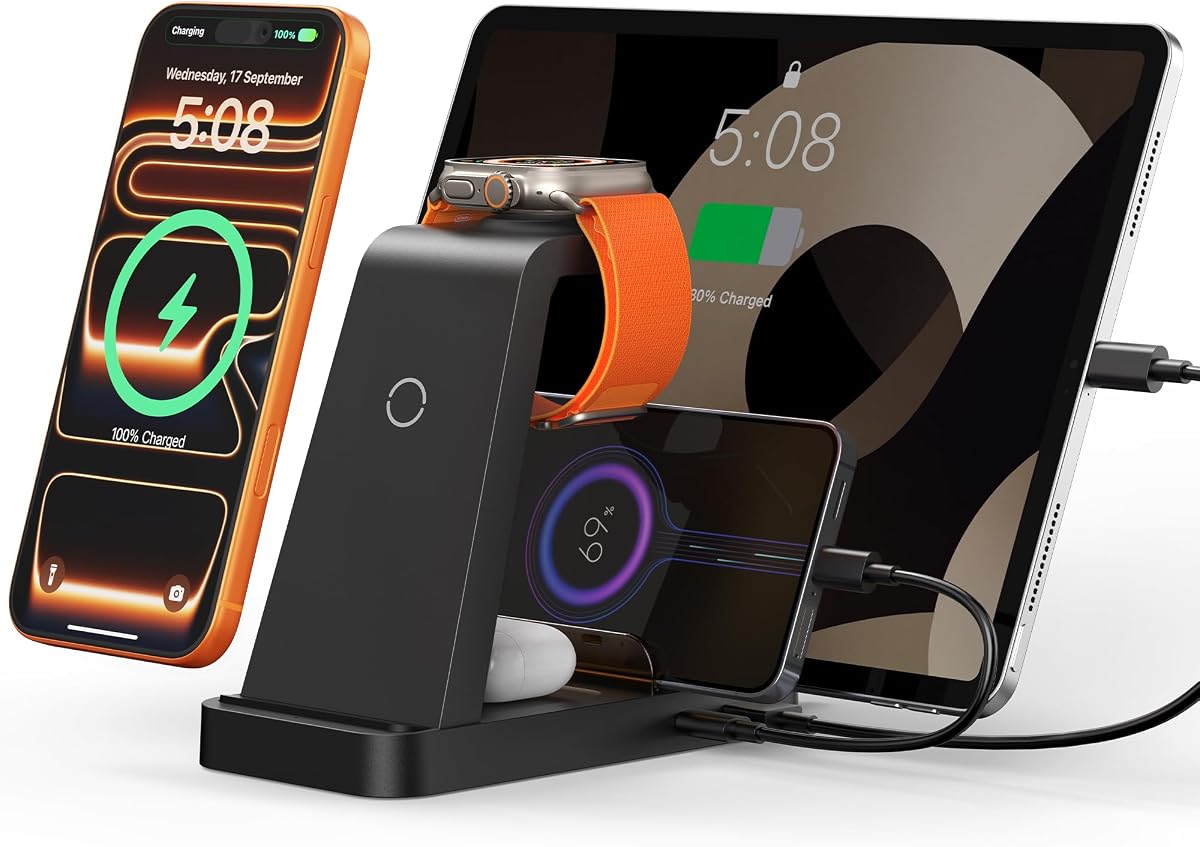
This premium wireless dock blends charging with bedside functionality. It features an alarm clock and night light alongside magnetic charging for Apple devices.
We may earn a commission when you buy through this link, at no additional cost to you.
Its design focuses on the nightstand experience. The adjustable brightness and alarm clock replace separate gadgets, while the magnetic dock ensures your iPhone and Watch charge without cable fumbling.
However, it lacks compatibility with Android devices, limiting its use for mixed-device households. Additionally, some versions do not include the power adapter, requiring a separate purchase.
For Apple users who want a unified bedside station, this dock offers unmatched convenience. Its multi-functionality makes it a standout premium choice for modern bedrooms.
The combination of alarm clock, night light, and wireless charging consolidates three essential items into one sleek unit.
MagSafe-compatible magnetic charging ensures your phone stays perfectly positioned for efficient wireless power transfer.
We may earn a commission when you buy through this link, at no additional cost to you.
This bamboo charging station offers excellent value for those who prioritize aesthetics and simplicity. Its natural look blends seamlessly into any room decor.
We may earn a commission when you buy through this link, at no additional cost to you.
The magnetic base and cable-hiding compartment make setup easy and keep your desk clutter-free. With five USB ports and a dedicated watch stand, it handles a variety of everyday devices.
While it lacks the power output of higher-end models, its durability and eco-friendly build are strong advantages. Regular cleaning keeps the bamboo looking new over time.
Perfect for households seeking an affordable, stylish solution, this dock keeps your devices organized without breaking the budget. It is a smart pick for casual daily use.
The natural bamboo finish adds warmth and elegance to your workspace, making it more than just a functional dock.
The large base compartment neatly hides power strips or USB hubs, maintaining a clean and organized look.
We may earn a commission when you buy through this link, at no additional cost to you.
This high-power station delivers massive energy for multiple devices, with 320W output and ten versatile ports. It is designed for busy households with many gadgets.
We may earn a commission when you buy through this link, at no additional cost to you.
Key features include smart chips that detect devices to adjust charging current safely. The anti-slip design and wide slots ensure even large laptops or tablets charge securely.
Its bulk may limit placement options, and using original cables is essential for safety. However, the included cables reduce initial setup costs significantly.
Best for power users needing fast, simultaneous charging for many devices, this dock replaces multiple adapters. It is a practical investment for families with varied tech needs.
With 320W total power, this station can charge power-hungry devices like laptops alongside phones and tablets simultaneously.
Advanced smart chips detect device types and adjust current to prevent overcharging and ensure long-term safety.
We may earn a commission when you buy through this link, at no additional cost to you.
This upgraded bamboo station improves on earlier models with a stronger magnetic base and dedicated watch dock. It keeps your devices secure and easily accessible.
We may earn a commission when you buy through this link, at no additional cost to you.
The bamboo material offers durability and elegance, while the magnetic design allows for easy assembly. It fits well in living rooms or kitchens where aesthetics matter.
Note that it requires separate power adapters and cables. However, the 12-month QA service ensures peace of mind if issues arise.
Ideal for users seeking a reliable, natural-looking organizer, this station balances form and function. It is a solid choice for those who value sustainable materials.
The stronger magnetic base ensures the unit stays assembled and secure, even when devices are added or removed.
A 12-month QA service provides support and reliability, ensuring customer satisfaction post-purchase.
We may earn a commission when you buy through this link, at no additional cost to you.
This bamboo organizer offers a clean, minimalistic approach to device management. It can hold up to eight devices with a magnetic base for easy setup.
We may earn a commission when you buy through this link, at no additional cost to you.
The inclusion of six cables is helpful, though the lack of a power adapter means you must supply your own. Its natural look suits modern, minimalist desks.
While the rating is lower than some competitors, its design and simplicity appeal to many users. Regular maintenance keeps the bamboo in good condition.
Best for those who prefer simple styling and are willing to supply their own adapters, this dock provides functional organization with a touch of elegance.
The natural design blends well in modern settings, providing discreet storage without cluttering the visual space.
Magnetic base components snap together quickly, reducing setup time and enhancing portability when needed.
We may earn a commission when you buy through this link, at no additional cost to you.
This compact 50W station is perfect for small desks or travel. It offers six ports and a watch holder, making it versatile for mixed device setups.
We may earn a commission when you buy through this link, at no additional cost to you.
Its size is a major advantage for portability, while silicone pads protect devices from scratches. Multiple safety features guard against overheat and short circuits.
Power output is modest compared to higher-end models, so charging speeds may be slower for multiple devices. However, its affordability makes it accessible.
Ideal for travelers or small households, this dock keeps essentials charged without taking up much space. It is a cost-effective solution for daily charging needs.
Its compact dimensions allow it to fit in luggage or backpacks, making it perfect for trips or small workspaces.
Built-in safety features and silicone pads ensure devices are charged safely and protected from physical damage.
We may earn a commission when you buy through this link, at no additional cost to you.
This travel-focused wireless station folds flat and is lightweight. It charges up to three devices simultaneously, making it ideal for trips.
We may earn a commission when you buy through this link, at no additional cost to you.
The indicator lights and 18W adapter ensure efficient charging, while the foldable design saves bag space. It is perfect for hotel rooms or offices on the go.
Wireless charging may be slower than wired, and case thickness limits compatibility. However, its portability makes it a standout for travelers.
Best for frequent travelers needing a compact charging solution, this dock ensures essentials stay powered. It is a convenient tool for keeping tech ready anywhere.
The folding mechanism reduces bulk significantly, allowing it to slide easily into carry-ons or laptop bags.
No cables are required for compatible devices, simplifying charging while traveling and reducing clutter.
We may earn a commission when you buy through this link, at no additional cost to you.
This five-port station is highly versatile for standard devices. It includes seven cables and smart detection, ensuring efficient charging without extra purchases.
We may earn a commission when you buy through this link, at no additional cost to you.
The dividers keep devices stable, and a power switch allows quick control. Its affordability makes it accessible for families and small offices.
It lacks USB-C ports, which may be a drawback for newer devices. However, its simplicity and value make it a strong option for many.
Ideal for users with mostly USB-A devices, this dock provides practical organization. It is a reliable choice for keeping phones and tablets powered.
Seven cables are provided upfront, reducing the need for additional purchases and streamlining setup.
An on/off power switch lets you cut power instantly without unplugging the unit.
We may earn a commission when you buy through this link, at no additional cost to you.
This wireless dock focuses on Apple users with a 5-in-1 design. It includes a 36W adapter and air vents for safe, efficient charging.
We may earn a commission when you buy through this link, at no additional cost to you.
Charging speeds are fast for Apple devices, and FCC certification ensures safety. Its compact design fits well on nightstands or desks.
Case removal may be necessary for optimal performance. However, for Apple users, it simplifies charging multiple devices with a single adapter.
Best for Apple households, this dock reduces cable clutter and keeps devices powered. It is a practical, safety-focused choice for Apple users.
Designed specifically for Apple products, this station ensures compatibility and fast charging for iPhones, Watches, and AirPods.
Multiple air vents and FCC certification provide reliable cooling and protection during extended charging sessions.
We may earn a commission when you buy through this link, at no additional cost to you.
Choosing the right dock involves assessing your device count, charging speed needs, and available space.
Count your devices to ensure the dock supports all of them simultaneously. Check if your smartwatch and phones use USB-C, Lightning, or wireless charging to match the dock's ports.
Prioritize docks that offer enough compatible ports for your current and future devices.
Higher wattage allows faster charging across multiple devices. For power-hungry gadgets like tablets, look for docks with strong PD (Power Delivery) ports.
Ensure the total wattage can handle your most demanding device without slowing others.
Materials like bamboo or flame-retardant ABS ensure longevity. A solid base prevents sliding and protects your desk from scratches.
Durable construction extends the dock's lifespan and keeps devices safe.
Built-in dividers and cable holders keep your workspace tidy. Docks with included cables save time and money on accessories.
Look for models with adjustable or removable dividers for flexibility.
Overheat, overcurrent, and short-circuit protection are essential for long-term device safety. Cooling fans or vents help dissipate heat during use.
Always verify FCC or CE certification to ensure electrical safety.
Choose a design that matches your decor. Bamboo docks offer a natural look, while sleek plastic ones fit modern setups.
Aesthetics matter for docks placed in living rooms or bedrooms.
If you travel frequently, consider lightweight, foldable docks. Compact designs fit easily in bags for charging on the go.
Portable docks are ideal for hotel rooms or offices outside the home.
Balance cost with features. Longer warranties and responsive customer service add value to higher-priced models.
Read warranty terms carefully to ensure support for potential defects.
Place the dock on a flat, stable surface away from direct sunlight or heat sources to ensure safe operation and ventilation.
Plug the power adapter directly into a wall outlet and secure all cables into the dock before placing devices. Check that each device is properly aligned.
Clean the dock periodically with a dry cloth. Remove dust from ports and vents to maintain cooling efficiency and charging performance.
Many docks support universal USB-C or USB-A ports that work with Samsung, Fitbit, and other brands. Check if your smartwatch uses a specific connector before buying to ensure compatibility.
Some models include cables for all devices, while others require you to supply your own. Review product descriptions to confirm cable inclusion before purchasing.
Some reduction in individual device speed may occur as power splits across ports. Docks with higher total wattage and smart distribution minimize this issue.
Choose docks with built-in cooling fans or vents. Avoid placing them in enclosed spaces, and unplug when not in use to maintain safety.
Most wireless docks require cases to be thin, usually under 5mm. Thick or metal cases may block charging signals, so test before placing your phone.
Most docks have a fixed number of ports, so plan for your future needs before buying. Some models offer expansion via USB hubs if additional ports are needed.
Regularly dust ports and vents, and check for loose cables. Keeping the surface clean and dry extends the dock's life and performance.
Look for safety certifications and overcharge protection. Many modern docks automatically stop charging when devices are full, making overnight use safe.
The top 10 charging docks offer diverse options for every user, from power-packed multi-port units to sleek wireless designs for Apple ecosystems.
Prioritize power, compatibility, and safety when making your final choice. Consider your device count and space requirements before purchasing.
Prices change frequently, so verify current listings and warranty details before ordering. With the right dock, keeping all your devices powered and organized becomes effortless.