
HP DeskJet 2955
3.7Editor score
HP AI formatting
3 month ink trial
Compact design
Finding an affordable all in one printer can be tricky when you need reliability without breaking the bank. Home users and small offices often look for devices that handle printing, scanning, and copying efficiently while keeping costs low. This guide explores ten budget friendly models that deliver solid performance for everyday tasks.
We compared these printers based on real user ratings, key features like wireless connectivity, and overall value. Each model offers different strengths such as fast speeds, mobile printing, or included ink trials. Our analysis helps you understand which features matter most for your specific printing needs and home setup.
Every pick in this list highlights what makes that model stand out among cheaper options. You will see detailed breakdowns of pros, cons, and technical specs to guide your choice. Keep in mind that pricing and availability can change, so check current listings before buying to ensure the best deal.
3.7Editor score

4.2Editor score

4.3Editor score
As an Amazon Associate we earn from qualifying purchases.
This side by side comparison shows the key specs for all ten budget printers. See how they differ in print speed, connectivity, and special features like OLED displays or ink trials to help you decide quickly.



The Canon PIXMA TS6520 stands out as a top rated choice for home users seeking an affordable all in one printer. With a 4.2 star rating, it delivers crisp vibrant prints using a 2 cartridge hybrid ink system that keeps text sharp and colors vivid for everyday documents.
We may earn a commission when you buy through this link, at no additional cost to you.
Its standout feature is the 1.42 inch OLED display which lets you monitor ink levels and adjust settings at a glance. The device supports automatic 2 sided printing to save paper and uses dual-band Wi-Fi for stable connections across your home or office workspace.
While the printer is compact and stylish, the ink cartridges can be expensive over time compared to tank systems. There is also no auto document feeder which limits handling for multi-page scanning tasks but this trade-off keeps the upfront cost low.
This model is ideal for families or small offices needing reliable printing and scanning without high initial costs. If you value a clear display and efficient paper use, the TS6520 offers exceptional value and functionality for standard home needs.
The OLED screen shows ink levels and status clearly making setup easy for all users.
Automatic double-sided printing reduces paper use and speeds up document handling quickly.
We may earn a commission when you buy through this link, at no additional cost to you.
The HP DeskJet 2955 is designed for basic home printing with a focus on affordability and smart features. Its 3.7 star rating reflects solid performance for everyday tasks like to-do lists and letters while offering a 3 month Instant Ink trial included.
We may earn a commission when you buy through this link, at no additional cost to you.
HP AI optimizes print formatting by removing unwanted web content so layouts stay clean. The printer includes dual-band Wi-Fi for reliable connections and a 60-sheet input tray for standard document handling without frequent reloading.
Print speeds are modest at 7.5 ppm black and 5.5 ppm color which may lag for bulk jobs. The LCD panel is small compared to other models but works for basic settings and is simple to navigate for most users.
This printer suits households needing a compact, eco-friendly device with smart AI tools. The included ink trial helps lower early costs making it a smart budget pick for casual printing and home use.
AI tools remove extra web content for cleaner prints without wasting paper or ink.
Three months of free ink delivery helps new users save money during initial setup.
We may earn a commission when you buy through this link, at no additional cost to you.
The Canon PIXMA TR7120 blends premium features with an accessible price point for home workers. With a 4.3 star rating it offers crisp vibrant prints and handles multi-page documents easily thanks to its auto document feeder for scanning and copying.
We may earn a commission when you buy through this link, at no additional cost to you.
Its 1.42 inch OLED display provides clear status updates and quick adjustments while dual-band Wi-Fi ensures stable mobile printing. The printer supports automatic 2-sided printing to reduce paper waste and handles borderless photos for creative tasks.
The main drawbacks are the higher upfront cost and ongoing ink expenses typical of cartridge printers. However the convenience of the ADF and premium display make it worth the investment for users needing more than basic printing.
This model is perfect for hybrid workers who need efficient handling for reports and creative work. If you value quick setup and smart features the TR7120 delivers high performance in a compact stylish design.
The auto document feeder speeds up scanning and copying for longer documents.
The screen shows ink levels clearly making maintenance easy and intuitive.
We may earn a commission when you buy through this link, at no additional cost to you.
The Canon PIXMA TS3720 is a simple all-in-one printer ideal for basic home tasks and schoolwork. It earns a 4 star rating with fast setup and easy ink changes using only two cartridges to start printing quickly.
We may earn a commission when you buy through this link, at no additional cost to you.
Features include a 1.5 inch LCD screen for basic control and dual-band Wi-Fi for stable connection. You can print directly from mobile devices using the Canon PRINT app or AirPrint and support borderless photos up to 5×7 inches.
Limitations include single-sided printing only which uses more paper and lacks an ADF for scanning multi-page items. These trade-offs keep the price low but limit efficiency for frequent document handling needs.
This printer works best for casual users needing occasional printing and photo tasks. Its reliable Wi-Fi and compact design make it a solid budget-friendly pick for home offices.
Connect to Wi-Fi in minutes without a computer for fast device pairing.
Create banners and borderless photos with easy-to-use online software.
We may earn a commission when you buy through this link, at no additional cost to you.
The HP DeskJet 4355 offers more features than basic models with a 35-sheet auto document feeder for easy scanning. It has a 3.5 star rating and includes HP AI tools to optimize print layouts and a 3-month Instant Ink trial.
We may earn a commission when you buy through this link, at no additional cost to you.
Print speed reaches 8.5 ppm black which is faster than many budget options. The dual-band Wi-Fi ensures reliable connectivity and a 60-sheet input tray handles daily documents without constant reloading.
The color rating is modest and the LCD panel is small limiting advanced adjustments. However the ADF adds real value for handling multi-page tasks and the AI tools reduce wasted paper on emails.
This printer is good for users needing a balance of speed and document handling. If you often scan or copy reports the ADF makes it a practical choice for home office use.
The ADF speeds up copying and scanning for multi-page documents.
Smart tools remove extra web content to keep prints clean and efficient.
We may earn a commission when you buy through this link, at no additional cost to you.
The Canon PIXMA TR4720 includes a built-in fax for home users needing legacy communication. It has a 3.9 star rating and supports borderless photos up to 8.5×11 inches while offering Alexa for smart notifications and reorder.
We may earn a commission when you buy through this link, at no additional cost to you.
An auto document feeder and 100-sheet tray handle larger tasks efficiently. Wireless setup is easy and mobile printing works with the Canon PRINT app for quick access from phones.
Print speeds are decent but color documents are slower at 4.4 ipm. The fax function adds bulk and price but remains useful for specific home office workflows and document needs.
This printer suits households or offices needing fax and scanning in one device. If you require document handling and alerts the TR4720 provides reliable functionality with modern features.
Alexa notifies you when ink runs low and can reorder automatically.
The 100-sheet tray reduces refills and handles more jobs.
We may earn a commission when you buy through this link, at no additional cost to you.
The Brother Work Smart 1360 delivers fast printing speeds up to 16 pages per minute for black documents. With a 3.8 star rating it offers cloud app connections like Google Drive and Dropbox via a 1.8-inch color display.
We may earn a commission when you buy through this link, at no additional cost to you.
It includes a 20-sheet ADF for quick scanning and a 150-sheet paper tray for high volume. Mobile printing uses the Brother Connect app to monitor ink and navigate menus easily.
This model lacks automatic duplex printing so paper use is higher for double-sided needs. The price is higher than basic models but the speed and tray capacity support heavier workloads.
It is ideal for busy home offices needing quick output and cloud connectivity. If you print many single-sided reports and want fast setup the 1360 offers strong value.
Print up to 16 ppm black for fast document processing.
Connect to Drive or Dropbox directly for easy printing.
We may earn a commission when you buy through this link, at no additional cost to you.
The Canon PIXMA TS4320 focuses on eco-friendly features with automatic 2-sided printing and EPEAT Silver certification. It has a 4 star rating and delivers sharp text and vivid colors using a hybrid ink system for documents and photos.
We may earn a commission when you buy through this link, at no additional cost to you.
Dual-band Wi-Fi provides stable connections and mobile printing works with AirPrint and Mopria. The compact design fits any workspace and supports borderless photos up to 8.5×11 inches.
Limitations include a basic LCD panel and no ADF for multi-page tasks. However the automatic duplex and eco credentials make it a great choice for reducing paper waste at home.
This printer suits eco-conscious users needing simple setup and quality prints. If you value environmental certifications and paper saving the TS4320 is a smart budget pick.
2-sided printing cuts paper use and speeds up document workflows.
EPEAT Silver certification helps reduce environmental footprint.
We may earn a commission when you buy through this link, at no additional cost to you.
The HP DeskJet 2855e is built for simple home printing with 2.4 GHz Wi-Fi and a 3-month Instant Ink trial. It has a 3.6 star rating and includes HP AI tools to format web pages cleanly without wasting ink.
We may earn a commission when you buy through this link, at no additional cost to you.
Print speeds are 7.5 ppm black and 5.5 ppm color which handle casual use well. The 60-sheet tray keeps refills low and the HP app makes mobile scanning easy.
Limitations include no 5 GHz support which may affect stability on busy networks and slower color output. These trade-offs keep the cost low but limit performance for heavier print loads.
This printer is good for light users needing basic connectivity and ink trials. If you want a compact device for letters and lists the 2855e offers practical convenience.
AI removes unwanted web content for cleaner prints.
Print and scan from your phone with the HP app.
We may earn a commission when you buy through this link, at no additional cost to you.
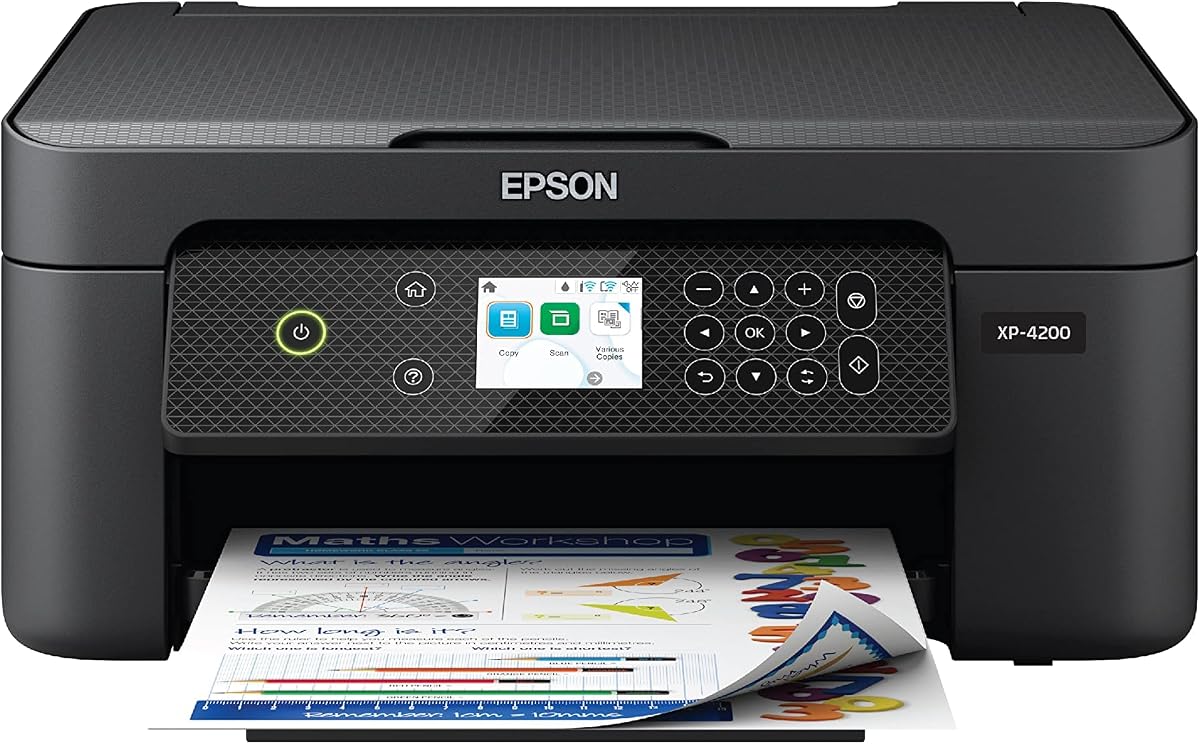
The Epson XP-4200 supports voice-activated printing through Alexa and uses Micro Piezo Heat Free technology for reliability. It has a 3.8 star rating and features individual ink cartridges so you only replace what runs out.
We may earn a commission when you buy through this link, at no additional cost to you.
A large 2.4-inch display simplifies navigation and mobile printing works with the Epson Smart Panel app. Automatic 2-sided printing helps save paper and you can create searchable PDFs with included software.
This model only works with genuine Epson ink so using alternatives may void warranty. Duplex speeds are modest but the voice control and individual ink offer unique convenience for home users.
It suits households wanting hands-free printing and flexible ink replacement. If you prefer voice commands and detailed controls the XP-4200 delivers practical functionality.
Use Alexa to print quickly without using your device.
Replace only the color you need to save on ink.
We may earn a commission when you buy through this link, at no additional cost to you.
Choosing the right budget all in one printer depends on your specific needs. Consider these factors to balance cost with performance and features.
Look for models offering at least 7 ppm for black text to ensure reasonable wait times. Quality varies by brand so check reviews on sharpness for both documents and photos.
Wi-Fi is essential for mobile printing. Dual-band support ensures stable connections on busy networks. USB options are useful for direct computer access.
An ADF simplifies multi-page scanning and copying. If you handle reports or receipts often this feature saves significant time compared to manual feeding.
Many budget printers include a 3-month ink trial which reduces early costs. Check cartridge prices as these add up quickly compared to the initial device price.
Larger displays like OLED make navigating menus easier. A small LCD limits quick adjustments but keeps the price lower for basic users.
Automatic double-sided printing saves paper and reduces waste. Check if the printer includes this as a standard feature or if it requires manual flipping.
Apps allow remote printing and scanning from phones. Look for models that support AirPrint or Mopria for broad device compatibility without extra software.
Models with EPEAT or ENERGY STAR certification help reduce environmental impact. This matters for users focused on green choices and long-term sustainability.
Set up your printer in a stable location with good airflow. Avoid direct sunlight which can damage internal components over time and use a flat surface for smooth operation.
Connect to your network using the app or LCD panel. Keep firmware updated for better security and compatibility with modern operating systems.
Clean the paper tray regularly to prevent jams. Replace cartridges only when the indicator shows low ink to avoid drying out the printheads unnecessarily.
Yes many budget models handle everyday documents and photos well. Reliability varies by brand and usage so choose models with strong reviews for consistent performance.
Several models include a 3-month trial to reduce early costs. After the trial a subscription or pay per print fee applies unless canceled in the app.
Yes all models support wireless printing via mobile apps. Check compatibility with AirPrint or Mopria for broad device support without needing extra software.
Single-sided prints only on one side while duplex prints on both. Automatic duplex saves paper but costs more upfront so consider your printing volume.
Most models work with both macOS and Windows systems. Ensure you download the latest drivers from the manufacturer to avoid connection issues.
You need Wi-Fi for mobile and wireless printing but USB connections work offline. Some smart features like ink ordering require internet access only.
The Canon PIXMA TS6520 and DeskJet 2955 offer top value for different home needs. Each model brings unique strengths like OLED displays or AI tools to enhance your printing experience.
Prioritize features that match your workflow whether it is ADF support or eco certifications. Understanding your needs helps avoid overspending on unused capabilities.
Prices and promotions change frequently so check current listings before buying. Review these options again for the latest deals and warranty details before making your final choice.