
VEIKK VK1200 V2
4.3Editor score
Full-laminated anti-glare glass
Single-cable USB-C connectivity
Two battery-free pens included
Finding an affordable pen display that delivers professional quality can be challenging. This guide reviews ten highly rated options that balance cost with performance. We focus on essential features like pressure sensitivity, screen size, and color accuracy to help you choose wisely.
Our team analyzed real user feedback, technical specifications, and expert opinions to curate this list. We considered compatibility, build quality, and included accessories to ensure value for money. Each product offers unique strengths tailored to different creative needs and budget constraints.
Every selection includes verified ratings and direct links for your convenience. Note that prices fluctuate frequently due to market demand and promotions. We recommend checking current listings before purchasing to secure the best deal available for your specific requirements today.
4.3Editor score

4.4Editor score

4.5Editor score
As an Amazon Associate we earn from qualifying purchases.
This side-by-side comparison highlights the key specifications of all ten models reviewed. It helps you quickly identify differences in screen size, pressure levels, and connectivity options to find the perfect match for your workflow.




The XP-PEN Artist12 stands out as a top choice for beginners and intermediates seeking quality without breaking the bank. It offers a 11.6-inch HD display with accurate colors and a responsive pen. Its robust feature set includes customizable keys and broad software compatibility. This model balances performance and price exceptionally well for digital artists. Most users report a smooth experience right out of the box.
We may earn a commission when you buy through this link, at no additional cost to you.
Its 8192 pressure sensitivity ensures precise control over line weight and shading. The battery-free stylus eliminates downtime for charging, making it ideal for long sessions. The slim touch bar allows quick zooming and scrolling without interrupting workflow. Compatibility extends to major creative apps like Photoshop and Illustrator. This versatility makes it a practical tool for various creative tasks.
While it lacks a built-in stand, the price reflects its cost-effective design. The non-standalone nature means you need a computer to use it. Some users may need extra adapters for laptops without HDMI ports. These limitations are minor considering the overall performance and affordability. They do not significantly detract from its core value proposition.
Ideal for students and hobbyists, this tablet delivers professional results at an entry-level price. Its reliability and support make it a safe investment for digital art. We recommend it for anyone starting their journey into digital illustration. You will appreciate its responsive screen and comprehensive feature set immediately.
Works seamlessly with Photoshop, Illustrator, SAI, and other popular creative applications for maximum flexibility.
Includes a programmable touch bar and shortcut keys to streamline your creative workflow efficiently.
We may earn a commission when you buy through this link, at no additional cost to you.
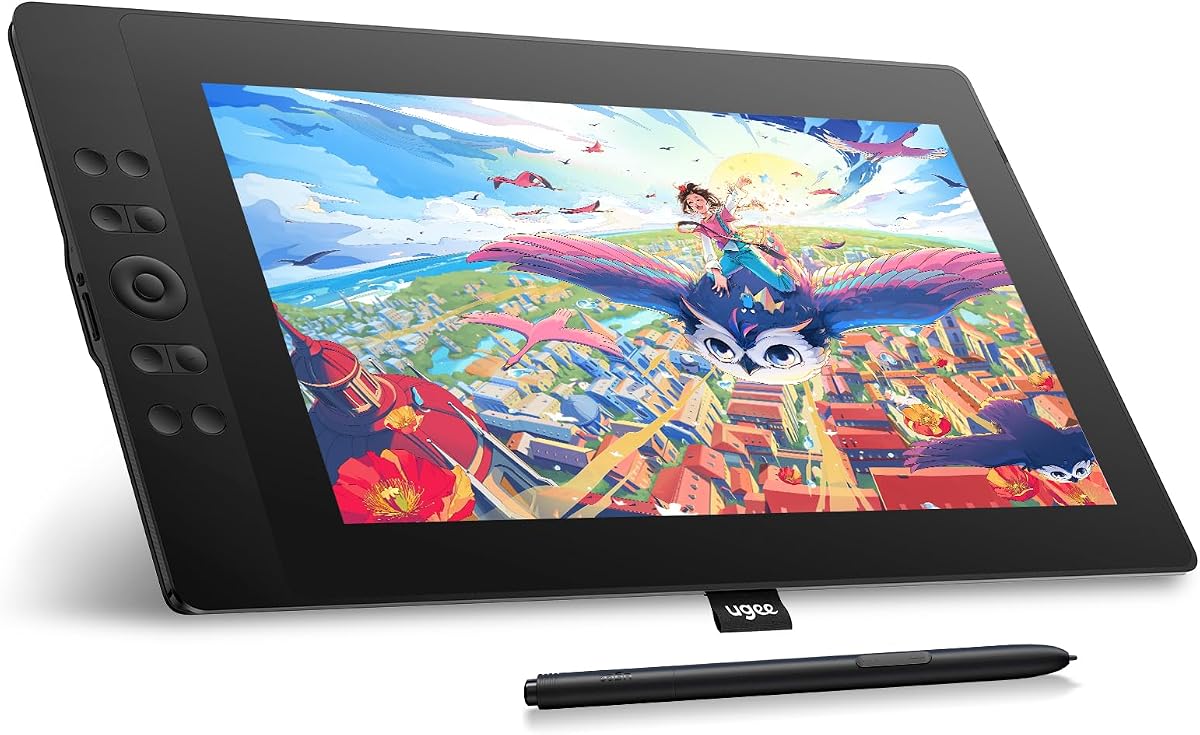
The VEIKK VK1200 V2 offers exceptional value with its full-laminated screen technology. This design minimizes parallax for a more accurate drawing experience. It features 8192 pressure levels and tilt recognition for natural strokes. The single-cable USB-C connection simplifies setup significantly. Users appreciate the included extras like multiple pens and nibs.
We may earn a commission when you buy through this link, at no additional cost to you.
Its anti-glare glass provides a paper-like texture for comfortable drawing. The compact design makes it portable for on-the-go creativity. Tilt function allows for dynamic shading techniques in supported software. The customizable shortcut keys enhance productivity during intensive work. This tablet is a strong contender for budget-conscious artists.
Some users may face initial driver setup challenges depending on their system. The reliance on a connected computer limits standalone usage scenarios. While affordable, it may lack some premium build nuances of higher-end models. However, these factors are outweighed by its core performance and price point. It remains a reliable choice for daily use.
Perfect for students and hobbyists, this model delivers solid performance without overspending. Its inclusion of accessories adds immediate value to your creative toolkit. We recommend it for those prioritizing screen quality on a budget. You will find its responsive stylus and clear display highly satisfying.
Seamlessly integrates glass and screen to reduce parallax and improve cursor accuracy significantly.
Single USB-C cable transmits data, power, and video signals for hassle-free connection.
We may earn a commission when you buy through this link, at no additional cost to you.
The HUION Kamvas 13 Gen 3 sets a new standard for affordable premium displays. It features advanced Canvas Glass 2.0 for reduced glare and enhanced accuracy. With 16384 pressure levels, it offers precise control for detailed work. The dual dial system streamlines creative workflows significantly. Color accuracy is exceptional with factory calibration reports included.
We may earn a commission when you buy through this link, at no additional cost to you.
Its 99% sRGB coverage ensures vibrant and true-to-life colors. The USB-C single cable connection simplifies setup for modern laptops. Tilt support and side buttons on the pen further enhance usability. This model is ideal for professional illustrators needing reliability. The included stand supports comfortable viewing angles during sessions.
The higher price reflects its superior build and advanced technology features. Some users might need additional adapters for specific laptop setups. While not standalone, it excels in desktop environments. These minor drawbacks are justified by the performance gains. It is a worthy investment for serious creators.
Professionals and advanced hobbyists will appreciate its refined touch and color fidelity. This tablet bridges the gap between budget and high-end displays effectively. We recommend it for those seeking top-tier features at a mid-range price. You will benefit from its ergonomic design and responsive performance.
Delivers 99% sRGB and Rec.709 gamuts with factory calibration for consistent results.
Customizable dials allow quick access to brush size and zoom functions efficiently.
We may earn a commission when you buy through this link, at no additional cost to you.
The GAOMON PD1161 offers a reliable platform for digital artists seeking simplicity. Its matte film provides a natural paper-like feel on the display. Eight shortcut keys on the side enhance workflow efficiency greatly. The battery-free pen ensures uninterrupted creative sessions. It is well-suited for beginners and students.
We may earn a commission when you buy through this link, at no additional cost to you.
With 8192 pressure levels, it handles dynamic line weights effectively. The compact design makes it easy to store and transport. Compatibility covers most major creative software suites. Users appreciate its straightforward setup process. It is a practical tool for digital note-taking too.
Connectivity requires both HDMI and USB ports which may need adapters. The build is functional but lacks premium aesthetics of high-end models. While the screen is good, color accuracy may vary slightly. These limitations are acceptable given the competitive price point. It serves well as a secondary display.
Recommended for hobbyists needing a dependable secondary display. Its ease of use makes it friendly for new digital artists. We suggest it for those prioritizing function over form. You will find its responsive pen and clear display adequate.
Pre-installed matte film reduces glare and mimics traditional paper texture.
Eight programmable side keys allow quick access to essential functions.
We may earn a commission when you buy through this link, at no additional cost to you.
The Artisul D16 offers a larger canvas for expansive creative work. Its 15.6-inch screen provides ample space for detailed illustrations. The full-laminated design ensures precise cursor positioning. A quick dial adds unique workflow convenience. This refurbished model offers significant savings without sacrificing quality.
We may earn a commission when you buy through this link, at no additional cost to you.
Pressure sensitivity allows for nuanced strokes in supported apps. The stand supports multiple angles for ergonomic comfort. It handles professional software like Photoshop and Corel Painter well. The anti-glare film protects the screen while reducing reflections. Users report high satisfaction with its condition.
Availability may be limited due to refurbishment stock levels. Warranty terms for refurbished units might differ from new items. While affordable, it requires standard HDMI and USB connections. These factors should be weighed against the substantial savings. It remains a viable option for space-conscious users.
Ideal for designers needing more screen real estate. The larger size accommodates complex projects better. We recommend it for those seeking high quality at a lower cost. You will appreciate its responsive display and versatile stand.
15.6-inch active area provides ample space for detailed digital illustrations.
Adjustable quick dial allows for brush size and scroll adjustments efficiently.
We may earn a commission when you buy through this link, at no additional cost to you.
The UGEE UE16 excels in color accuracy with a 143% sRGB gamut. This feature ensures vibrant and lifelike artistic outputs. It includes 16K pressure sensitivity for highly responsive strokes. Four color space options cater to different project needs. The tablet supports Android for flexible connectivity.
We may earn a commission when you buy through this link, at no additional cost to you.
Its full-laminated screen reduces parallax for accurate drawing. The scroll wheel enhances control over zooming and brush sizes. Battery-free stylus ensures uninterrupted creative sessions. Users praise the tactile feedback from physical shortcut keys. It is a strong choice for digital painters.
Cable management can be slightly complex with multiple connections. Driver software may require updates for optimal performance. Some users report occasional calibration needs out of the box. Despite this, the color accuracy justifies these small inconveniences. It is a capable tool for professionals.
Perfect for illustrators prioritizing color fidelity and precision. The larger screen aids in detailed artwork creation. We recommend it for those needing high color accuracy. You will appreciate its vivid display and sensitive stylus.
143% sRGB and four color spaces deliver exceptional color reproduction.
16K pressure levels ensure smooth and precise line transitions.
We may earn a commission when you buy through this link, at no additional cost to you.
The VEIKK VK1200 provides a straightforward introduction to pen displays. It features 8192 pressure levels for standard creative tasks. Tilt function adds a layer of realism to strokes. The included artist glove and nibs offer immediate readiness. This model is ideal for students.
We may earn a commission when you buy through this link, at no additional cost to you.
Six shortcut keys allow quick access to common tools. The 11.6-inch screen offers a balanced workspace. Connectivity is standard via HDMI and USB. Users appreciate the comfortable design of the pen. It is a solid tool for everyday sketching.
Compared to higher-tier models, it lacks advanced pressure levels. Stand options are basic and may require separate purchase. While good for entry-level, it may limit growth for pros. These factors make it a transitional tool for learners. It is reliable for consistent use.
Recommended for beginners wanting an affordable start. Its user-friendly design reduces the learning curve. We suggest it for hobbyists and students. You will find its essential features sufficient for most tasks.
Includes extra pens nibs and glove for immediate out-of-box use.
Tilt function allows for natural shading and artistic expression.
We may earn a commission when you buy through this link, at no additional cost to you.
The RubensTab T11 Pro stands out as a standalone device. It eliminates the need for external computer connections entirely. A built-in battery supports up to five hours of usage. Pre-installed apps make it ready for immediate creation. Its compact size ensures high portability.
We may earn a commission when you buy through this link, at no additional cost to you.
It features a responsive pen-free stylus for natural drawing. Multi-touch functionality supports intuitive zooming and panning. The screen offers vibrant colors for digital art. It is versatile for note-taking and meetings too. This model offers freedom from desk setups.
Battery life is moderate and may require frequent recharging. The screen is smaller than most pen displays in this guide. Performance depends on internal specs which are limited. These limitations are trade-offs for its standalone capability. It is great for travel and mobility.
Ideal for mobile artists needing a portable canvas. Its independence from computers makes it unique. We recommend it for sketching on the go. You will appreciate its freedom and convenience.
No external device needed for instant creative access anywhere.
5800mAh battery provides hours of continuous work without power source.
We may earn a commission when you buy through this link, at no additional cost to you.
The VEIKK VK1200V2 brings upgraded pressure sensitivity to a budget model. Its 16K levels offer finer control than standard options. The full-laminated screen improves accuracy and reduces parallax. Two pens provide backup options for users. It is a strong value for its feature set.
We may earn a commission when you buy through this link, at no additional cost to you.
Color coverage is enhanced with 120% sRGB for vibrancy. Tilt support adds versatility to brush strokes. Lightweight construction makes it easy to transport. It supports a wide range of software platforms. Users find it effective for daily illustration work.
Driver updates may be needed for full compatibility. The lack of an included stand requires additional purchase. While powerful, it relies on connected PC performance. These factors are minor given the hardware upgrades. It is a practical choice for budget users.
Recommended for artists needing advanced sensitivity without high cost. The upgrades make it competitive with pricier models. We suggest it for those valuing pressure precision. You will find its responsive pen highly capable.
Upgraded 16384 pressure levels ensure precise and smooth strokes.
120% sRGB gamut delivers rich and accurate color reproduction.
We may earn a commission when you buy through this link, at no additional cost to you.
The XPPen Artist 12 Pro Lite offers a streamlined experience for creators. Its full-laminated display minimizes parallax effectively. A customizable red dial adds a unique control option. Tilt support enhances the natural feel of strokes. It is well-suited for digital painting.
We may earn a commission when you buy through this link, at no additional cost to you.
The 3-in-1 cable reduces adapter needs for connection. Compatibility covers major OS platforms widely. Users appreciate the intuitive layout of keys. It balances performance with user-friendly features. This model serves well for both home and office use.
Pressure levels are standard compared to high-end alternatives. Tilt range may be restricted for specific artistic needs. While good for general use, it lacks premium edge cases. These trade-offs are acceptable for most casual users. It remains a reliable daily tool.
Ideal for general digital artists and illustrators. Its ergonomic design supports comfortable long sessions. We recommend it for those valuing usability. You will find its responsive display and dial helpful.
Programmable red dial offers quick access to zoom and brush settings.
3-in-1 cable design connects to computers without extra adapters.
We may earn a commission when you buy through this link, at no additional cost to you.
Selecting the right pen display involves balancing technical specs with personal needs. This guide highlights essential factors to consider before purchasing.
Screen size impacts your workspace comfort and detail level. Larger screens like 15.6 inches offer more room for complex projects while smaller 11.6 inch models are portable. Resolution affects image clarity so aim for at least Full HD 1920×1080 for crisp visuals.
Choose a size that fits your workspace and portable needs.
Pressure sensitivity determines how well the pen captures line variations. Standard 8192 levels work well for most art but 16384 levels provide finer control. Higher levels help with natural shading and detailed illustration work significantly.
Look for at least 8192 levels for smooth creative workflows.
Accurate colors are vital for digital artists aiming for print or web. Gamut coverage like sRGB or Adobe RGB ensures your display matches final outputs. 99% sRGB or higher is ideal for professional color-critical tasks.
Prioritize higher gamut coverage for reliable color representation.
Most budget tablets require HDMI and USB connections to computers. Newer models offer single cable USB-C for simpler setup. Check your computer's ports to ensure compatibility before buying.
Ensure your computer supports the required connection types.
Battery-free pens are convenient for long sessions without recharging. Tilt support allows for dynamic brush strokes like traditional brushes. Check for included nibs and ergonomic grip designs in the package.
Select a model with a comfortable battery-free stylus.
Verify support for your operating system whether Windows Mac or Linux. Ensure it works with your favorite creative applications like Photoshop or Krita. Most brands offer drivers for multiple platforms but check specifics.
Confirm system and software compatibility before purchasing.
Durability depends on materials like metal bodies or reinforced frames. Included accessories such as stands, gloves, and extra nibs add value. A good warranty protects against manufacturing defects and issues.
Consider build materials and included extras for long-term use.
Price ranges vary widely based on features and brand reputation. Define your budget and prioritize must-have features over extras. Refurbished models can offer high performance at lower costs.
Set a realistic budget aligned with your feature needs.
Start by installing the latest drivers from the manufacturer's website. Proper driver installation ensures all shortcut keys and pen pressure work correctly. Restart your computer after installation to apply changes.
Use the included artist glove to prevent smudges and improve comfort. A glove reduces friction and keeps your hand clean while drawing. It also helps you glide smoothly across the screen surface.
Keep the screen clean with a soft microfiber cloth regularly. Avoid harsh chemicals that might damage the anti-glare coating. Store the pen safely in its holder to protect the tips from damage.
Most models require a computer connection to function. However some standalone options like the RubensTab T11 Pro work independently. Check product specifications to confirm if it is standalone or requires a PC.
Yes most brands offer macOS drivers for compatibility. Ensure your Mac OS version meets the minimum requirement usually 10.12 or later. Check the product page for specific Mac support details.
Budget tablets often feature 8192 pressure levels which is standard. Higher-end options may offer 16384 levels for finer detail. Both levels are sufficient for most artistic and design tasks.
Many manufacturers support Linux distributions like Ubuntu or Fedora. You may need to install open-source drivers for full functionality. Verify compatibility on the manufacturer website before purchasing.
Most include a basic adjustable stand in the package. Some models may require an additional purchase for a stand. Check the box contents or product description to confirm.
Use a dry microfiber cloth for regular cleaning. Avoid liquid sprays directly on the screen. If needed lightly dampen the cloth slightly but never spray directly.
Most come with a one-year limited warranty for defects. Some brands offer extended support for registered products. Review warranty terms on the official website before buying.
Some basic functions work plug-and-play but drivers enable full features. Shortcut keys and pressure sensitivity typically require drivers. Always install the latest version for best performance.
Our top picks include the XP-PEN Artist12 for overall value and the VEIKK VK1200 V2 for budget efficiency. The HUION Kamvas 13 Gen 3 offers premium features for those willing to spend slightly more. Each choice delivers a unique balance of performance and affordability.
Prioritize screen size and pressure sensitivity based on your workflow needs. Compatibility and connectivity are crucial to avoid setup issues. Always check current listings to ensure the best deal for your budget.
Remember that prices change frequently so act quickly when you find a deal. We hope this guide helps you find the perfect tool for your creative projects.