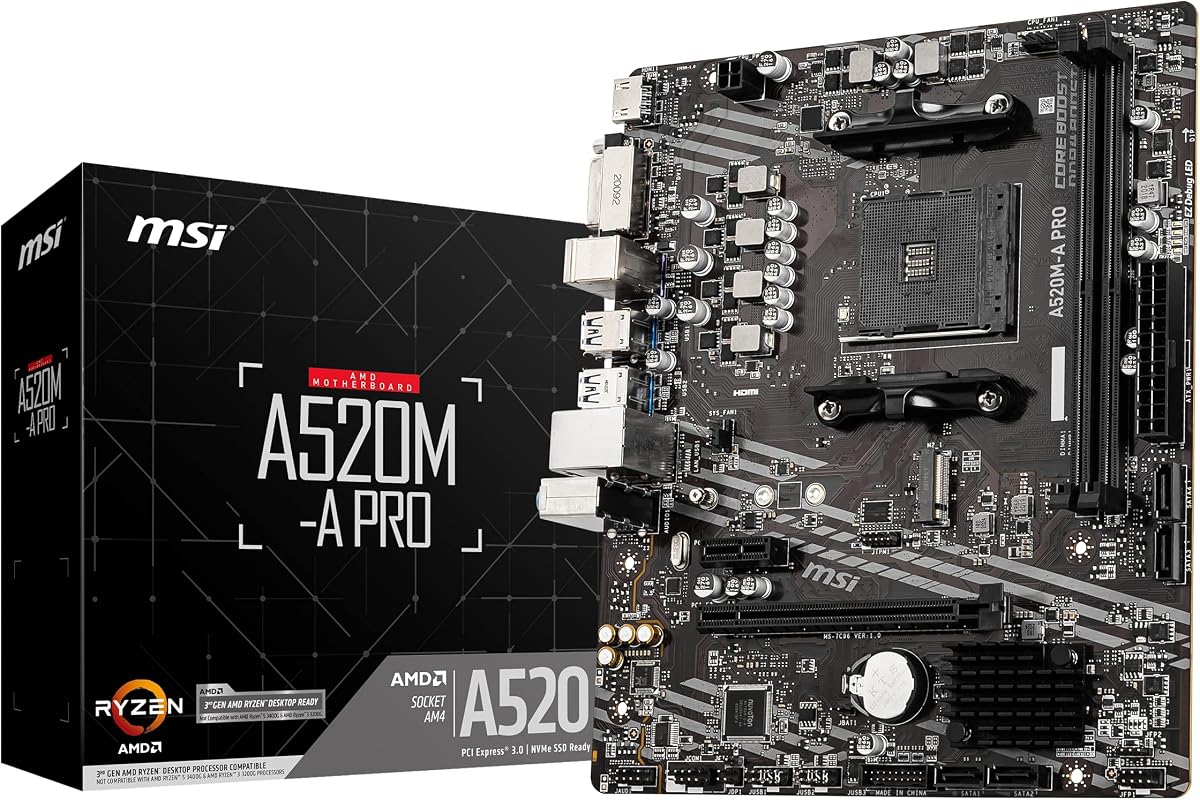
MSI A520M-A PRO
4.5Editor score
Affordable Price Point
Turbo M.2 Support
Audio Boost Technology
Discover the top 10 cheap motherboard options for 2026. Compare features, ratings, and specs to find the best budget-friendly board for your PC build.
Finding a reliable cheap motherboard does not mean compromising on performance or stability. Modern budget boards offer essential features like PCIe 4.0 support, robust power delivery, and extensive connectivity options that cater to both gamers and everyday users seeking value.
We compared ten top-rated models based on user ratings, technical specifications, and real-world performance data. Our analysis covers diverse chipsets including AMD B550, A520, and Intel H610 to ensure you find the right match for your specific processor and budget constraints.
Each pick highlights key strengths such as overclocking capabilities, thermal design, and connectivity ports. While prices fluctuate frequently, these selections represent the best value propositions currently available in the market for builders looking to maximize their hardware investment without overspending.
4.5Editor score

4.4Editor score

4.5Editor score
This side-by-side comparison highlights the critical specifications across all ten selected models. Use this table to quickly assess socket types, memory support, storage options, and key connectivity features before making your final decision.




The GIGABYTE B550M K stands out as the top recommendation for budget builders seeking modern features without breaking the bank. With a strong rating from users and a compact micro-ATX form factor, it delivers exceptional value for Ryzen users looking to upgrade or build anew.
We may earn a commission when you buy through this link, at no additional cost to you.
Its digital 3+3 VRM design ensures stable power delivery to compatible processors including the popular Ryzen 5000 series. The inclusion of PCIe 4.0 support means you can take full advantage of the latest GPUs and NVMe SSDs, while dual M.2 slots provide ample high-speed storage options.
While it lacks integrated wireless connectivity, the robust selection of USB ports and Gigabit Ethernet make up for it in wired environments. The Q-Flash feature simplifies BIOS updates, ensuring compatibility with newer CPUs without needing to install them first.
This board is ideal for gamers and productivity users who prioritize raw performance and expansion over aesthetic RGB lighting. If you need a reliable foundation for a mid-range system, this model offers the best balance of price and capability on the market today.
The 3+3 phase power design uses digital controllers to reduce heat and improve voltage stability under load.
Two M.2 slots allow for dual high-speed NVMe drives without sacrificing SATA ports for additional HDDs.
We may earn a commission when you buy through this link, at no additional cost to you.
For owners of older Intel systems, this H61 motherboard offers a surprisingly affordable path to keep a PC running. Despite its age, users rate it highly for basic office tasks and light media consumption where budget is the primary constraint.
We may earn a commission when you buy through this link, at no additional cost to you.
It supports second and third-generation Core processors alongside Xeon options, allowing for cheap upgrades in existing towers. The addition of an M.2 interface enables NVMe boot drives even on this legacy chipset, providing a noticeable speed boost over traditional SATA storage.
Performance limitations are expected given the DDR3 memory support and older PCIe standards. However, for non-gaming use cases, these constraints are negligible. The included HDMI port ensures you can connect to modern monitors without extra adapters.
This board serves a niche audience looking to refurbish old hardware at minimal expense. If you are rebuilding a family computer or a basic workstation, this model delivers maximum utility for the lowest possible price point.
Designed for Intel 2nd and 3rd gen processors, offering a cost-effective upgrade path for older systems.
Includes a converted M.2 slot to support faster NVMe SSDs despite the older chipset architecture.
We may earn a commission when you buy through this link, at no additional cost to you.
MSI continues to dominate the budget segment with the A520M-A PRO, offering essential features for modern AMD builds. Its high user rating reflects a balance of dependability and cost that appeals to first-time builders and upgradeers alike.
We may earn a commission when you buy through this link, at no additional cost to you.
While it operates on PCIe 3.0, it still supports current-gen Ryzen 5000 processors effectively. The Turbo M.2 slot ensures your primary storage runs at optimal speeds, and the Audio Boost system enhances sound quality for multimedia consumption without extra hardware.
The absence of PCIe 4.0 might matter to extreme enthusiasts, but for most users, the performance difference is negligible in real-world usage. The compact micro-ATX design fits easily into small cases, making it perfect for space-saving desktops.
This model is the go-to choice for anyone needing a functional, modern board without unnecessary extras. If you are building a budget gaming PC or office workstation, this MSI board provides a stable platform that gets the job done efficiently.
Audio Boost technology delivers studio-grade sound quality for an immersive gaming and media experience.
Compatible with AMD Ryzen 5000 and 4000 series processors, ensuring a long upgrade path for your build.
We may earn a commission when you buy through this link, at no additional cost to you.
ASRock brings impressive specs to the budget segment with this B550M-HDV model. Rated highly for its stability and feature set, it bridges the gap between entry-level and mid-range boards effectively for most home users.
We may earn a commission when you buy through this link, at no additional cost to you.
The 6-power phase design offers better stability than many competitors in this price range. Combined with PCIe 4.0 readiness, this board supports high-performance GPUs and storage drives. It also includes HDMI, DVI-D, and D-Sub outputs for maximum monitor compatibility.
Memory speeds up to 4733MHz are supported out of the box, allowing for responsive system performance. Full Spike Protection adds a layer of safety against surges on USB, audio, and LAN ports, which is rare for boards at this price point.
Ideal for users needing multiple display connections or specific legacy monitor types. If you want modern speeds and solid power delivery without paying a premium, this ASRock option is a smart purchase for budget-conscious enthusiasts.
Six-phase power design with premium chokes ensures steady voltage delivery for stable CPU performance.
Triple video outputs include HDMI and D-Sub, making it easy to connect various older and newer monitors.
We may earn a commission when you buy through this link, at no additional cost to you.
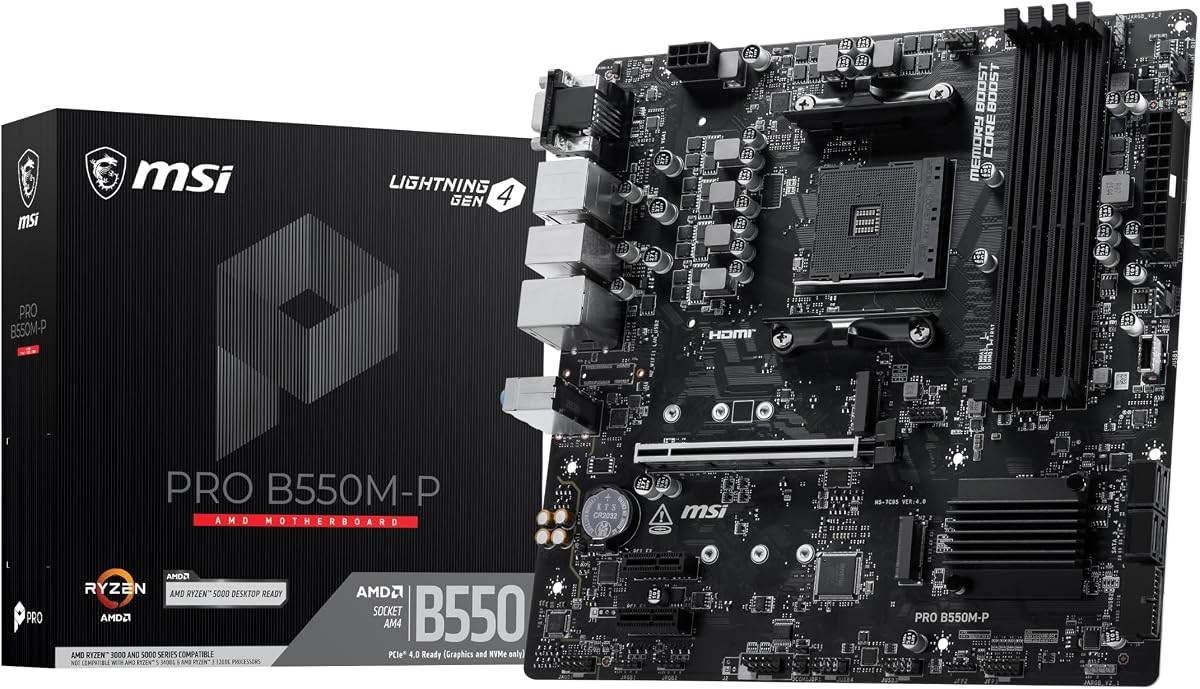
The MSI PRO B550M-P focuses on storage and stability with its unique cooling and power features. With a strong focus on performance tuning, it appeals to users who want a clean, functional board for serious workloads.
We may earn a commission when you buy through this link, at no additional cost to you.
Two M.2 connectors—one Gen4 and one Gen3—provide excellent storage flexibility. Steel Armor protects the PCIe slot physically, and Core Boost technology ensures the CPU receives optimized power delivery. Frozr AI Cooling helps manage temperatures dynamically.
Memory overclocking up to 4400+ MT/s allows for tuning system responsiveness. While it lacks wireless connectivity, the wired LAN and USB options are sufficient for most desktop environments. The audio system provides clear sound for gaming and multimedia.
This board is a great fit for users building a compact workstation or a silent gaming PC. If storage speed and thermal management are your priorities, this PRO series model offers robust tools to handle demanding tasks effectively.
Frozr AI Cooling automatically adjusts fans based on system temps to maintain optimal thermal performance.
DDR4 Memory Boost supports overclocking up to 4400+ MT/s for faster data transfer and application loading.
We may earn a commission when you buy through this link, at no additional cost to you.
This ProSeries model stands out by integrating wireless capabilities directly into a budget-friendly B550 board. Users praise its comprehensive connectivity and solid build quality, making it an ideal choice for those who want fewer peripheral cables.
We may earn a commission when you buy through this link, at no additional cost to you.
The Flash BIOS Button allows updates without installing a CPU, saving time during setup. Premium thermal pads and thickened copper improve heat dissipation compared to standard boards. Audio Boost delivers immersive sound suitable for high-fidelity gaming environments.
Triple video outputs support multiple monitor setups even without a dedicated graphics card. While the price is slightly higher than non-WiFi models, the added convenience often justifies the cost for remote workers or gamers without Ethernet access.
Perfect for users needing reliable wireless performance alongside wired speed. If you value ease of setup and modern connectivity features, this MSI board offers a complete solution that reduces the need for extra dongles or adapters.
Built-in Wi-Fi and Bluetooth eliminate the need for separate network cards or USB adapters in your build.
Flash BIOS Button lets you update the firmware easily even if you have no CPU or memory installed.
We may earn a commission when you buy through this link, at no additional cost to you.
The Gaming X V2 represents the high-end of the budget spectrum with exceptional power and design features. It is widely regarded as a premium choice for gamers who demand stability and modern connectivity options in a mid-range package.
We may earn a commission when you buy through this link, at no additional cost to you.
Its 10+3 digital power phase design handles overclocking and high-core CPUs effortlessly. The integrated I/O shield simplifies installation, while Front USB-C support ensures compatibility with modern peripherals without needing adapters. Q-Flash Plus enables BIOS updates with zero hardware installed.
RGB Fusion allows for lighting customization across compatible components, creating a cohesive visual aesthetic. GbE LAN and Bluetooth 5.3 ensure fast, stable network connections for gaming and media streaming. The BIOS interface is refreshed for intuitive navigation.
This board is ideal for serious gamers and streamers who need reliable performance under heavy loads. If you are willing to spend slightly more for top-tier build quality and features, this model delivers premium reliability and flexibility.
Digital Twin 10+3 phase power delivery ensures consistent voltage and reduced heat under demanding workloads.
Integrated I/O shield and Q-Flash Plus technology streamline the PC building process significantly for beginners.
We may earn a commission when you buy through this link, at no additional cost to you.
This compact V2 model is designed for small builds where space is at a premium. It retains essential Gigabyte quality while stripping back unnecessary features to keep costs low and dimensions manageable for smaller cases.
We may earn a commission when you buy through this link, at no additional cost to you.
Supporting two DDR4 slots helps reduce costs and space usage without sacrificing speed. The inclusion of HDMI and D-Sub outputs ensures compatibility with a wide range of monitors and projectors. USB 3.2 Gen 1 ports provide fast data transfer rates.
While the reduced slot count limits future RAM upgrades, it is sufficient for most entry-level systems. The straightforward design makes BIOS navigation simple and reliable. It is a functional board that gets the basics right for budget builds.
Best suited for home theater PCs or compact office workstations. If you need a small board that fits standard micro-ATX cases and supports modern Ryzen CPUs, this Gigabyte option offers a reliable and space-efficient solution.
MatX format makes this board ideal for compact cabinets and medium-sized builds with limited space.
HDMI and D-Sub ports allow for versatile monitor setups without needing extra adapters or cables.
We may earn a commission when you buy through this link, at no additional cost to you.
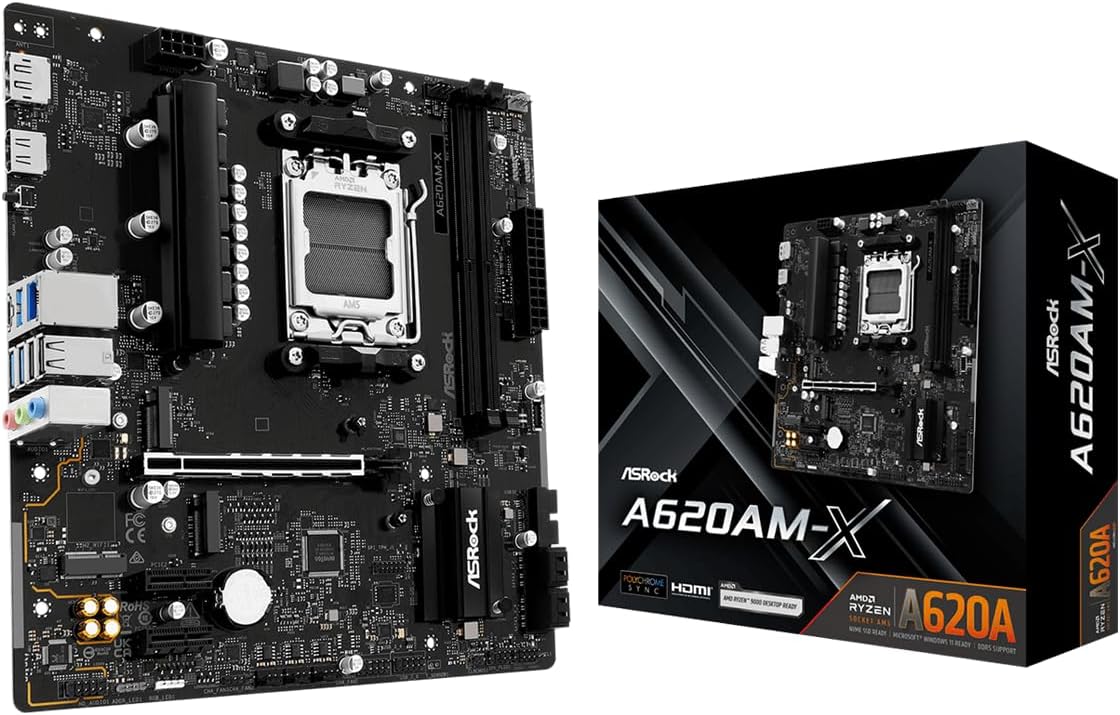
This A620 model brings the future to budget builders by supporting the latest AM5 platform and DDR5 memory. It offers exceptional value for those who want to invest in next-generation technology without paying flagship prices.
We may earn a commission when you buy through this link, at no additional cost to you.
With support for overclocked DDR5 speeds up to 8000+, this board delivers incredible memory performance. The 2.5G LAN ensures fast network throughput for streaming and downloads. Two M.2 slots provide plenty of high-speed storage space for modern gaming libraries.
BIOS Flashback support simplifies updates, making it easy to maintain compatibility with new CPUs. While AM5 memory is pricier, this board ensures your system remains viable for years to come. It balances cutting-edge specs with budget-friendly construction.
Ideal for forward-thinking builders planning long-term upgrades. If you want a modern foundation that supports the latest AMD processors and memory standards, this ASRock board is an excellent entry point into the AM5 ecosystem.
Supports Ryzen 9000 and 8000 series processors for a long-term upgrade path without changing the motherboard.
DDR5 support enables overclocked speeds up to 8000MHz, offering significant bandwidth improvements over DDR4.
We may earn a commission when you buy through this link, at no additional cost to you.
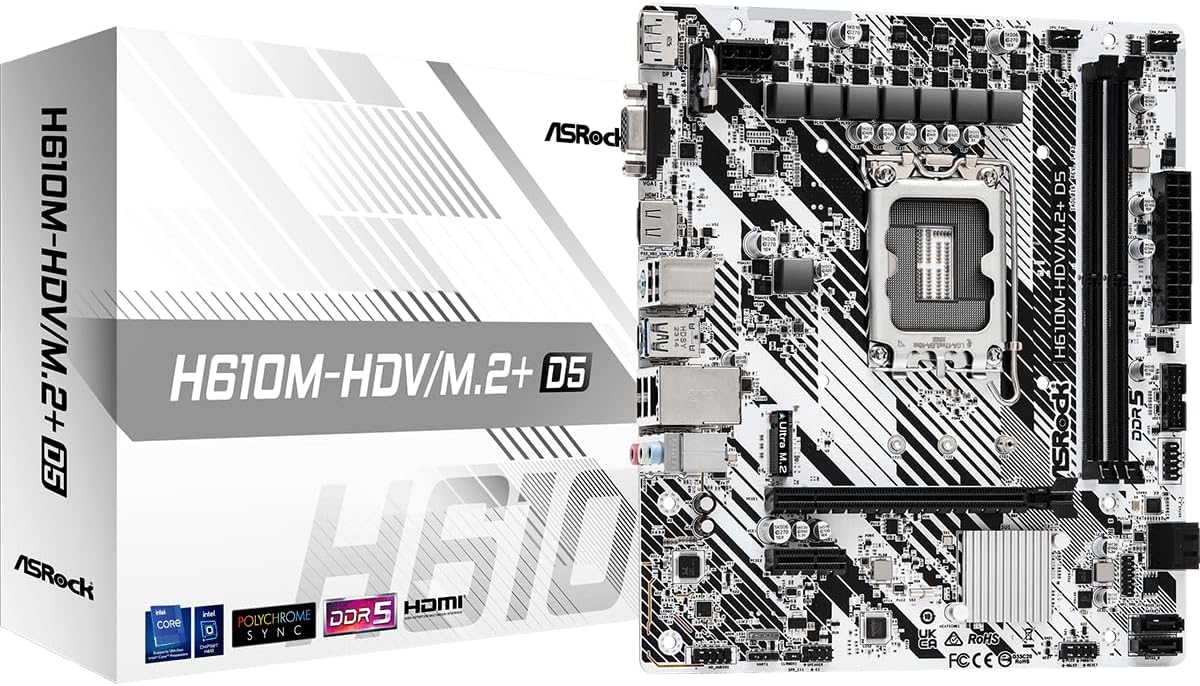
For Intel users, this H610 board brings DDR5 support to the budget segment. It enables builds based on 12th, 13th, and 14th Gen processors at a lower cost point than standard B-series boards while still supporting modern memory standards.
We may earn a commission when you buy through this link, at no additional cost to you.
It includes a PCIe 4.0 x16 slot for modern graphics cards and multiple video outputs like HDMI and DisplayPort. The inclusion of D-Sub ensures compatibility with older monitors if needed. Compact micro-ATX dimensions fit well into smaller desktop towers.
While the H610 chipset has limitations on CPU overclocking, it works perfectly for stock configurations. The SATA and storage options remain flexible for various drive types. It provides a functional platform for office work or gaming on a budget.
Best for those needing an Intel platform with DDR5 capabilities at an entry price. If you want to use modern Intel CPUs and memory without overspending, this ASRock board offers a capable and stable foundation for your next PC.
Supports 14th and 13th Gen Intel Core processors for a broad range of modern desktop builds.
Multiple display ports including HDMI and D-Sub provide flexibility for connecting various monitor types.
We may earn a commission when you buy through this link, at no additional cost to you.
Selecting a budget motherboard requires balancing cost with essential features to ensure longevity and performance. This guide outlines the critical factors to consider before finalizing your purchase.
The CPU socket type is the most critical decision factor. Ensure the board supports your current or intended processor generation, such as AM4 for AMD or LGA 1700 for Intel. Mismatched sockets mean the CPU cannot install or function.
Always check the manufacturer's CPU support list to confirm compatibility before buying, especially for budget boards that may require BIOS updates.
DDR5 support provides higher bandwidth than DDR4 but comes at a higher cost. Evaluate whether you need the speed boost for your workload or if DDR4 suffices for general computing tasks. Budget boards often limit the number of RAM slots.
Select a board with enough DIMM slots for your intended capacity and ensure it supports the speed of the RAM you plan to purchase.
VRM phases determine how well the board can supply stable power to the CPU. Higher-end budget boards often feature more phases for better stability under load. Insufficient VRMs can lead to overheating or throttling.
Look for a board with adequate power phases and cooling for your chosen CPU model to ensure reliable long-term performance.
M.2 slots offer faster storage speeds compared to traditional SATA drives. Some budget boards provide only one slot which may limit storage expansion. Verify if the M.2 slots support PCIe 4.0 for future-proofing your build.
Choose a board with enough storage connectors to meet your needs without needing extra expansion cards immediately.
USB ports and networking capabilities are vital for peripheral connectivity. Ensure there are enough rear ports for your devices and consider if onboard WiFi or Bluetooth is necessary. Lack of these features may require buying separate adapters.
Check the rear I/O panel carefully to confirm all essential connection types are available natively on the motherboard.
Micro-ATX boards fit more cases than full ATX and save money by removing extra PCIe slots. Ensure your case supports the chosen form factor and has enough room for cable management. Smaller boards may have fewer headers for fans.
Verify your case specifications before purchasing to avoid fitting issues or missing mounting holes during assembly.
Reputable brands offer better BIOS support and component quality which affects reliability. Budget models may have thinner PCBs and cheaper capacitors but still perform well. Check the warranty length and support availability for peace of mind.
Stick to well-known manufacturers to ensure you have access to drivers and support when issues arise.
Install your motherboard on a flat, non-conductive surface. Connect the CPU, RAM, and power before placing the board into the case to simplify component mounting and testing.
Update the BIOS immediately using the provided utilities if new hardware support is required. Keeping firmware current ensures stability and security for all connected components.
Maintain airflow inside your case to prevent heat buildup on the VRMs and chipset. Regular dust removal and checking fan speeds prolong the lifespan of your budget build.
Most cheap motherboards do not include built-in WiFi or Bluetooth, requiring a separate card or USB adapter for wireless connectivity. However, some models like the MSI PRO-VDH WiFi include these features which saves extra money and space.
Upgrading to DDR5 requires a new motherboard with a compatible socket such as AM5 or LGA 1700. DDR4 boards cannot use DDR5 memory due to physical slot differences and signal requirements.
More VRM phases provide smoother power delivery reducing heat and throttling under heavy CPU loads. For budget builds with unlocked CPUs, higher phase counts help maintain stability and performance consistency.
M.2 NVMe SSDs are significantly faster than SATA SSDs especially for boot times and large file transfers. Most modern budget boards include at least one M.2 slot for your primary operating system drive.
Micro-ATX boards are ideal for compact builds as they save space without sacrificing essential features. They fit in many cases designed for standard ATX boards but offer fewer expansion slots.
Budget boards often feature basic audio codecs that are sufficient for casual gaming and video watching. Dedicated audio cards are only needed for audiophiles or professional recording setups.
We have reviewed ten distinct options ranging from legacy rebuilds to modern DDR5 platforms. The GIGABYTE B550M K stands out as our top pick for its perfect blend of value and essential features for AMD users.
Your specific needs dictate the best choice whether that is compact size, storage speed, or wireless connectivity. Consider your CPU and future upgrade plans carefully before committing to a specific chipset or socket type.
Prices and stock fluctuate frequently so check current availability before purchasing. Use this guide to find a reliable foundation that maximizes your budget for the best possible PC experience.