
Computer Speakers USB Powered
4.1Editor score
Loud and crisp sound
Plug and play setup
Unique column design
Discover the top 10 best cheap PC speakers for budget shoppers. Compare ratings, features, and real reviews to find affordable audio for your desktop or laptop.
Finding quality audio on a budget is easier than ever with the latest generation of affordable desktop speakers. Whether you need clear sound for work calls or immersive audio for gaming, there are excellent options available that do not break the bank.
This guide compares ten highly rated models based on user feedback, technical specifications, and overall value. We looked at sound quality, build durability, connectivity options, and ease of setup to curate a list that meets diverse needs and preferences.
Each pick highlights specific strengths like bass performance, space-saving design, or USB convenience. Please note that product availability and pricing can change frequently, so verify the latest details before making your final purchase decision.
4.1Editor score

4.4Editor score

4.6Editor score
This side-by-side comparison highlights the key specifications and unique selling points of each model to help you quickly identify the best fit for your specific desktop setup and audio requirements.




The Amazon Basics Stereo 2.0 Speakers stand out as a reliable option for users seeking clear audio without a high cost. With a strong user rating, these speakers deliver balanced sound suitable for both media consumption and professional tasks.
We may earn a commission when you buy through this link, at no additional cost to you.
Key strengths include the integrated bottom radiator which enhances bass response significantly compared to similar budget models. The USB power ensures no need for additional adapters, while the metal finish provides a sleek look that resists scratches.
Trade-offs involve the relatively simple design which may lack the visual flair of gaming-focused units. However, the focus on function over form ensures consistent performance, making these a practical choice for home offices.
Anyone needing dependable desktop audio should consider this model first. It offers the best combination of price, performance, and durability, ensuring your sound setup remains effective without financial strain.
The bottom radiator design actively amplifies low frequencies, providing a fuller sound experience that is rare at this price tier.
Users benefit from immediate functionality since the system recognizes the speakers instantly upon USB connection without driver installation.
We may earn a commission when you buy through this link, at no additional cost to you.
These compact speakers deliver impressive volume and clarity for their tiny footprint. Designed for desktops with limited space, they offer a crisp sound profile that remains distortion-free even at higher volumes.
We may earn a commission when you buy through this link, at no additional cost to you.
The standout feature is the column-shaped design which saves desk space while directing sound efficiently. Users appreciate the plug-and-play nature as well as the durable matte finish on the metal panel.
While build quality relies on plastic it remains sturdy enough for daily office use. The lack of premium materials keeps the cost low, but the acoustic performance remains competitive with more expensive models.
For shoppers prioritizing pure volume and minimal footprint this is an ideal choice. It provides essential audio enhancement for laptops and desktops without cluttering the workspace or budget.
The vertical column layout ensures that these speakers occupy minimal desk real estate, making them perfect for cramped workstations.
Connection is seamless with just two cables required for power and audio, allowing you to start listening within minutes.
We may earn a commission when you buy through this link, at no additional cost to you.
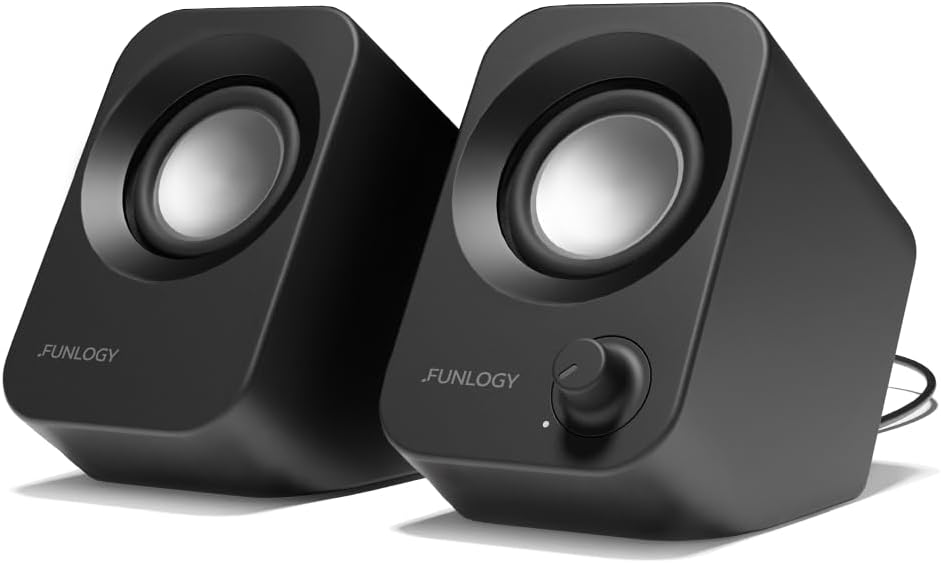
FUNLOGY brings Japanese quality to the budget category with a speaker engineered for optimal sound projection. The unique 30-degree tilt aims audio directly at your ears, improving clarity and immersion without moving the unit.
We may earn a commission when you buy through this link, at no additional cost to you.
Performance is bolstered by dual 48mm drivers and passive radiators that ensure balanced mids and highs. The inclusion of gold-plated connections reduces signal noise, maintaining audio integrity during use.
A potential drawback is the need for separate power and audio cables, which can add slight cable management complexity. However, the improved sound quality and ergonomic benefits often outweigh this minor inconvenience.
Listeners who value precise sound staging should choose this model. It is particularly suitable for users who spend long hours at their desk and want comfort and quality in equal measure.
The 30-degree upward angle ensures that sound waves travel directly to the listener, reducing the need for high volume.
Recognized with a VGP award, this speaker delivers high-end materials and finish that resist wear and tear effectively.
We may earn a commission when you buy through this link, at no additional cost to you.
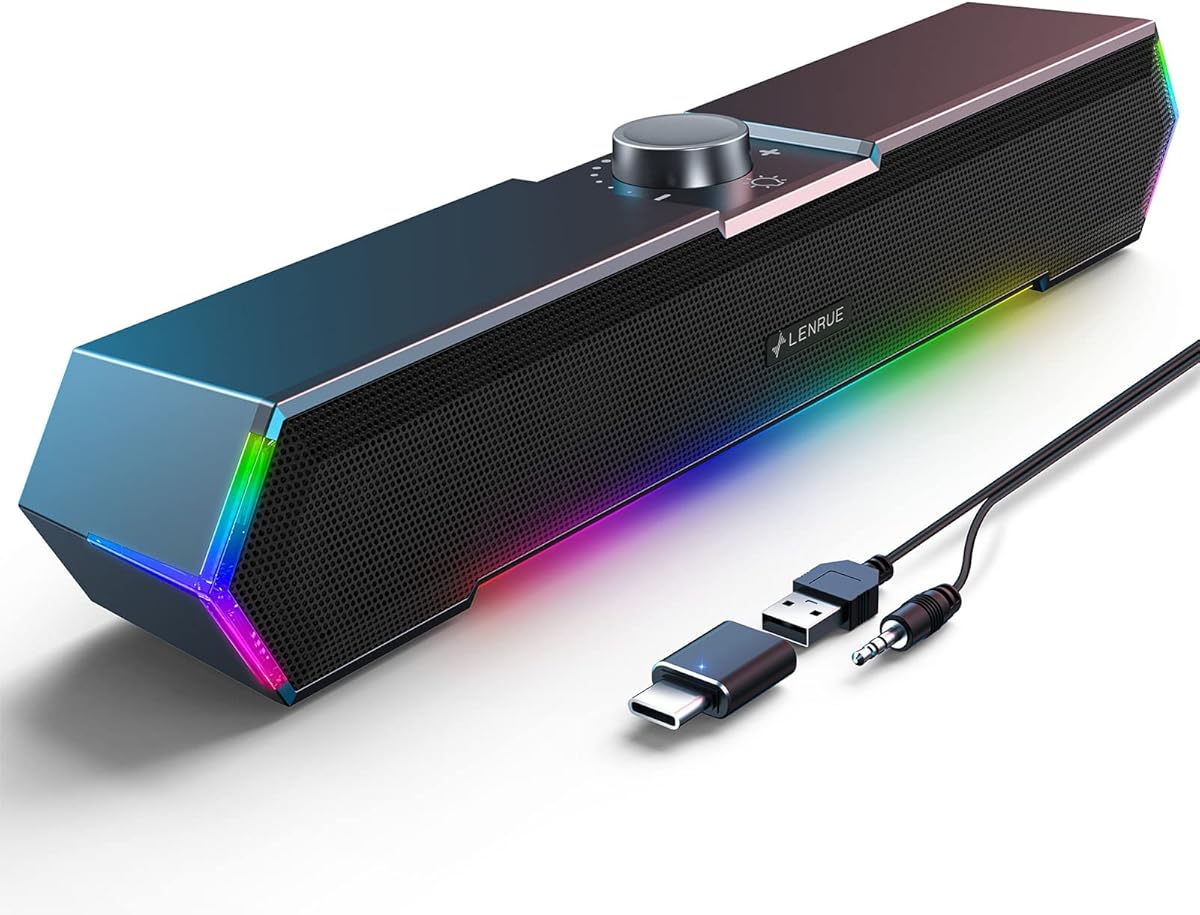
This soundbar is designed to integrate seamlessly with your monitor, freeing up valuable desk surface. The adaptive channel switching ensures stereo balance is maintained even if the unit is flipped or rotated.
We may earn a commission when you buy through this link, at no additional cost to you.
Bass performance is surprisingly robust thanks to dual passive radiators and magnetic drivers. Users find the touch controls intuitive for quick adjustments, enhancing the overall user experience during gaming or media playback.
Compatibility is broad including support for USB-C devices via an included adapter. This flexibility makes it a strong candidate for modern laptops that lack traditional USB-A ports.
If you want to maximize desk space while keeping great audio this is the top choice. It is especially practical for multi-monitor setups where peripheral clutter is a major concern.
By mounting directly to the monitor the speakers eliminate the need for separate speaker stands or surface placement.
A built-in sensor detects the orientation of the soundbar to automatically swap left and right channels correctly.
We may earn a commission when you buy through this link, at no additional cost to you.
Compactness defines this model, making it ideal for portable setups or dorm rooms. The lightweight design allows for easy transport while maintaining reliable audio performance for casual listening.
We may earn a commission when you buy through this link, at no additional cost to you.
A unique feature is the included headphone jack which adds versatility if you need to switch between speakers and personal listening. The front-mounted volume knob offers quick access without software adjustment.
Sound quality is clean but lacks the power needed for large rooms due to lower wattage. This limitation is acceptable for the form factor, making it a pragmatic choice for private listening.
Users needing a travel-friendly audio solution will find this model suitable. It balances portability with decent sound quality, ensuring you never go without audio support on the go.
The integrated headphone jack allows for seamless switching between speaker output and private listening without extra dongles.
Drawing power solely from USB means these speakers add minimal load to your system, which is great for battery-powered laptops.
We may earn a commission when you buy through this link, at no additional cost to you.
This soundbar is engineered to work flawlessly across different operating systems without requiring specific drivers. It offers a unified audio solution for households or offices with mixed device environments.
We may earn a commission when you buy through this link, at no additional cost to you.
The single cable design simplifies desk clutter by combining power and audio transmission. Dual high-excursion drivers provide a wider dynamic range, ensuring detailed sound across various media types.
While the enclosure is plastic it remains solid and well-engineered for daily use. The passive radiator helps maintain depth in the audio, preventing the sound from becoming flat during playback.
Anyone seeking a universal speaker that just works should choose this unit. It reduces technical headaches and provides consistent performance, making it a reliable background choice for any setup.
The drivers is designed to recognize audio output on Windows, Mac, Linux, and ChromeOS immediately upon connection.
Using a single USB cable for both functions significantly reduces wire clutter on your work surface.
We may earn a commission when you buy through this link, at no additional cost to you.
The G11 model adds a visual flair to your desk setup with its angular dynamic lighting effects. This feature complements the clear stereo sound making it a favorite among gamers who value ambiance.
We may earn a commission when you buy through this link, at no additional cost to you.
Audio quality benefits from four large amplifier IC horns that ensure distortion-free playback. The touch controls for lights add a modern interface element that feels premium despite the budget-friendly price.
One limitation is the fixed lighting feature which some users might find distracting in dark rooms. However, the ability to toggle it on and off easily mitigates this concern for most daily routines.
Gamers wanting a setup that looks as good as it sounds will love this choice. It delivers immersive audio and style without requiring complex configuration or high costs.
The dynamic touch lights react to your interaction adding a gaming atmosphere that enhances the overall viewing experience.
High-quality amplification ensures that sound remains crisp and free from static noise during startup or shutdown.
We may earn a commission when you buy through this link, at no additional cost to you.
This model focuses on adding vibrant RGB lighting to your workspace while maintaining functional audio output. It serves as an excellent entry point for those wanting customizable lighting effects.
We may earn a commission when you buy through this link, at no additional cost to you.
Dual high-fidelity drivers deliver a balanced sound profile suitable for background music and media. The inline volume control is conveniently placed to avoid constant system navigation during use.
While the build is basic the slim design fits easily into small corners. The lighting cycle adds a modern touch to any desk which is a key selling point for younger users.
Users seeking a colorful addition to their desk should consider this option. It provides a fun aesthetic upgrade without compromising on core audio quality or ease of use.
The seven color cycle allows you to personalize your desk environment to match your mood or decor style.
The slim profile ensures that the speakers can tuck away neatly under monitors without taking up much space.
We may earn a commission when you buy through this link, at no additional cost to you.
Designed for straightforward performance this speaker prioritizes clear audio output without extra features. It delivers reliable sound for video calls and streaming with minimal setup requirements.
We may earn a commission when you buy through this link, at no additional cost to you.
The glued cable design keeps wires organized and prevents tangling on your desk. This practical feature is often overlooked but significantly improves the tidiness of your workspace daily.
Sound quality is enhanced by 2x3W technology that ensures loudness without distortion. The anti-slip pads keep the units stable, preventing accidental movement during use.
Users who want a plug-and-play solution without fuss will appreciate this model. It is a dependable choice for offices or home desks where simplicity is valued over complex controls.
Cables are permanently joined to reduce clutter, ensuring a cleaner look even when devices are moved or rearranged.
High-quality anti-slip foot pads ensure the speakers stay firmly in place even on smooth desk surfaces.
We may earn a commission when you buy through this link, at no additional cost to you.
Creative Pebble 2.0 is widely praised for its innovative design and excellent audio performance relative to size. It consistently ranks high in user satisfaction due to its immersive sound quality.
We may earn a commission when you buy through this link, at no additional cost to you.
The 45-degree angled drivers project sound directly towards the listener improving clarity and soundstage. Passive radiators on the back enhance bass, delivering rich low-end frequencies typically absent in small speakers.
While it uses a single USB cable for power and audio some users prefer dedicated audio jacks. However this design choice streamlines the setup and reduces desk clutter effectively.
Listeners seeking a premium experience on a budget should buy this unit. It offers the best overall performance and design in this roundup making it a top recommendation for quality seekers.
The angled drivers ensure that audio hits your ears directly creating a more immersive listening experience.
Rear passive radiators work in tandem with drivers to boost low frequencies without needing external amplifiers.
We may earn a commission when you buy through this link, at no additional cost to you.
Selecting the right speakers involves understanding power, connectivity, and design factors that align with your specific workspace needs.
Most budget speakers use USB power which simplifies setup by drawing energy from your computer. This eliminates the need for wall outlets but may limit maximum volume compared to mains-powered units.
Look for speakers that draw sufficient wattage for your listening needs without overloading your USB port.
Check if the speaker requires a 3.5mm audio jack in addition to USB power. Models with USB-C adapters offer better compatibility with modern laptops and tablets.
Adequate connectivity ensures you can use the speakers across different devices without constant cable swaps.
Compact units save desk space but may sacrifice sound depth. Larger speakers often provide better bass but require more room. Assess your desk footprint before buying.
Choose a size that balances audio performance with the physical space available in your workspace.
Inline knobs or front controls allow quick volume adjustments without touching your computer. This convenience is vital for users who frequently change audio levels.
Opt for models with accessible physical controls to enhance usability during daily tasks.
Focus on drivers and passive radiators which indicate better bass response. Reading user reviews can reveal real-world audio performance beyond marketing claims.
Prioritize models that mention clear highs and mids for balanced sound across different content types.
Materials like metal finish or sturdy plastic extend the lifespan of your speakers. Scratch-free bases prevent desk damage and ensure stability.
Invest in models with proven build quality to avoid frequent replacements and maintain long-term value.
Reputable brands often offer 1-year to 18-month warranties which provide peace of mind. A solid warranty indicates manufacturer confidence in the product's reliability.
Always check the warranty terms before purchasing to ensure protection against defects.
Design choices like RGB lights or sleek finishes complement your setup style. While subjective, a speaker that matches your decor improves the overall workspace look.
Select a design that fits your personal taste without compromising functional needs.
Plug the USB connector into an available port on your computer to supply power. If an AUX cable is included connect it to the audio output jack for sound transmission.
Adjust the volume using the inline knob or software settings. Start at a low level and increase gradually to protect your ears and equipment from sudden loud blasts.
Keep the speakers clean by dusting them with a soft cloth. Avoid liquid cleaners and store them in a dry place when not in use to ensure longevity.
Most models in this list are plug-and-play and do not require specific drivers. They work immediately after connecting to the USB port and audio jack. However, ensure your system audio drivers are up to date for optimal performance.
Yes all listed speakers are compatible with laptops that have standard USB and audio ports. Some models even include USB-C adapters for newer devices. Just verify your laptop outputs audio via the selected port.
Many of these speakers provide clear sound and low latency which is beneficial for gaming. Models with enhanced bass and stereo separation offer a more immersive experience. Check reviews for specific gaming performance feedback.
Most models require both USB for power and AUX for audio. Some newer models use a single USB cable for both but verify before buying. Without the correct connections sound will not output properly.
Loudness varies by model but most budget speakers reach comfortable listening levels. For small rooms they are sufficient but might struggle in large halls. Users report they are loud enough for office and home use.
Many vendors offer warranties ranging from 18 months to 1 year. This protects against manufacturing defects. Always check the specific product page for the exact terms before purchasing.
If your phone has a headphone jack and USB power you can connect these speakers. USB-C phones may need an adapter. It is best for desktop use but mobile use is possible with adapters.
Yes most USB speakers work with macOS automatically. Ensure the volume settings on your Mac are set correctly. Some models may require selecting the USB audio device in Sound Preferences.
This guide highlights the Amazon Basics Stereo 2.0 as the top pick for general users due to its balanced sound and value. For those prioritizing design the Creative Pebble 2.0 offers premium features at an affordable price.
Consider your specific needs like desk space and connectivity when making a choice. Whether you want bass or simplicity there is a model here to suit your setup effectively.
Remember to check current prices and availability before purchasing as these can fluctuate. Investing in the right speakers now ensures clear audio for your tasks without straining your budget.