
Kiwee KB-M3-02
4.6Editor score
Dual 2.5Gbps ports per unit
Plug and play setup
Supports up to 16 nodes
Compare the top 10 coax to Ethernet adapters for 2026. Read expert reviews on MoCA 2.5 and G.hn models for gaming and streaming.
Finding the right coax to Ethernet adapter can transform your home network by leveraging existing wiring. These devices turn old coaxial cables into high-speed Ethernet links, eliminating dead zones and boosting reliability for streaming and gaming without new wiring.
We analyzed ten top-rated adapters based on speed, compatibility, and real user feedback. Our comparisons cover MoCA 2.5 kits, G.hn solutions, and specialized PoE options to help you pick the best match for your internet provider and setup needs.
Each review highlights key strengths, limitations, and ideal use cases so you can decide confidently. Keep in mind that product features and availability change often, so verify current specs before purchasing to ensure compatibility with your specific coax infrastructure.
4.6Editor score

4.4Editor score
4.6Editor score
This table provides a quick side-by-side view of the top ten adapters. Compare key specs like max speed, port type, and compatibility to find the model that fits your home network needs.


The ScreenBeam ECB7250K02 is our top pick for those seeking maximum speed and reliability. It leverages bonded MoCA 2.5 to push up to 2.5 Gbps over your existing coax, beating many Wi-Fi setups easily.
We may earn a commission when you buy through this link, at no additional cost to you.
Its standout feature is the full kit inclusion, which means you get two adapters, coax and Ethernet cables, and even splitters. This makes it incredibly easy to get started without hunting for extra parts. The 2.5Gbps ports ensure your devices run at full gigabit+ speeds.
While most users see huge improvements, some report issues if they have a DOCSIS 3.1 modem with frequency overlap. Checking with your ISP first can avoid this. Also, note that it is not compatible with DirecTV or satellite networks, which limits its use in some homes.
If you need the fastest wired connection without drilling walls, this kit is ideal. It is perfect for gamers and 4K streamers who want stability. Just confirm your ISP supports MoCA 2.5 to get the best experience.
The bonded MoCA 2.5 standard ensures you get the full bandwidth your ISP offers, ideal for large file transfers and high-res streaming.
Every cable and adapter you need is included, so you can set up a whole-home network in under thirty minutes.
We may earn a commission when you buy through this link, at no additional cost to you.
The Kiwee KB-M3-02 stands out with its dual 2.5GbE ports on each adapter, allowing multiple devices to connect at full speed from one coax drop. This is a rare feature that solves the common issue of running extra switches.
We may earn a commission when you buy through this link, at no additional cost to you.
Users appreciate the plug and play simplicity. Just connect the coax and Ethernet cables, and the network auto-configures in seconds. The 2.5Gbps speed handles multiple 4K streams and gaming simultaneously without lag.
It works with most major ISPs and routers, but ensure your coax wiring is interconnected. The main trade-off is that it is not for satellite systems, and you may need to add a PoE filter for optimal security.
For homes with many wired devices, this dual-port design is a game-changer. It saves space and cost by removing the need for extra switches. It is a smart choice for tech-savvy users wanting top performance.
Two ultra-fast Ethernet ports per unit let you connect a PC and TV without needing a separate switch.
No complex setup is required as the adapters auto-negotiate and create a stable network instantly.
We may earn a commission when you buy through this link, at no additional cost to you.
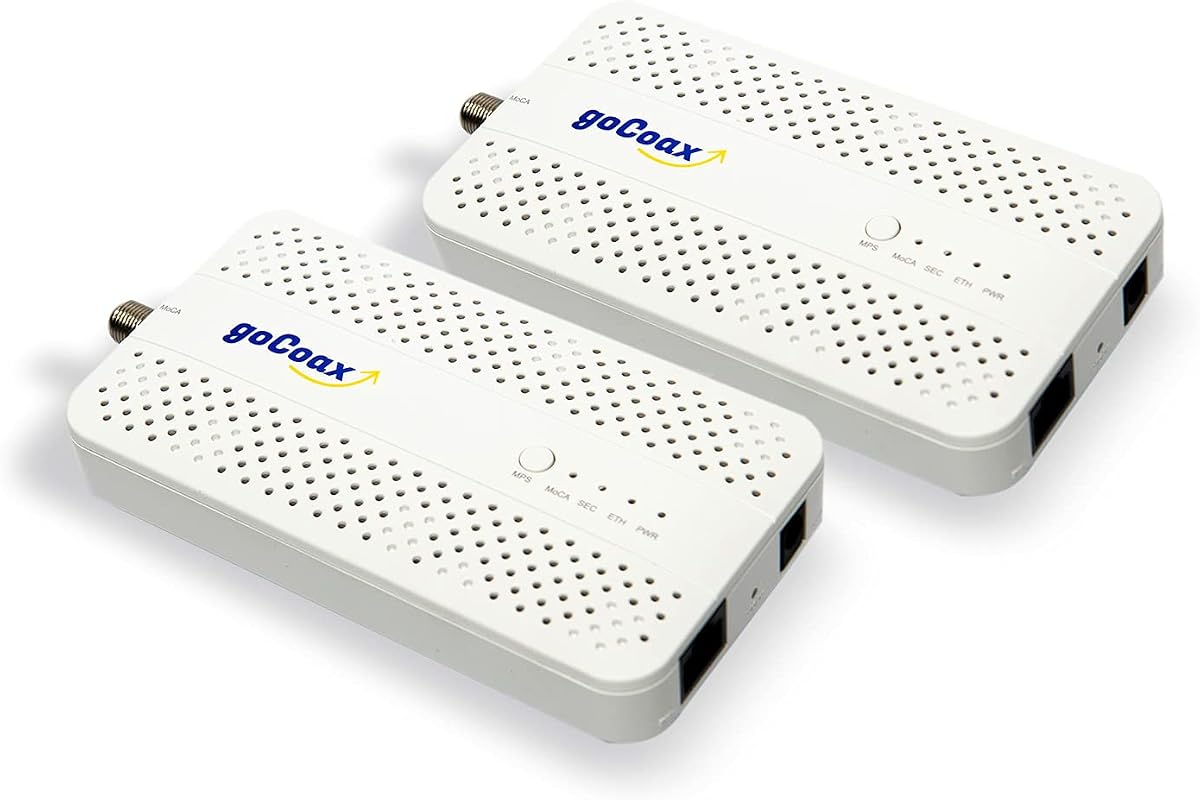
The goCoax MA2500D offers top-tier MoCA 2.5 speeds at a budget-friendly price. It delivers full 2.5 Gbps through a dedicated Ethernet port, making it a great alternative to expensive router upgrades.
We may earn a commission when you buy through this link, at no additional cost to you.
Gamers will love the under 3ms latency, which is significantly better than typical Wi-Fi. It also supports up to 16 nodes, so you can extend the network to many rooms with coax outlets easily.
Installation is straightforward with included cables, but you must verify your home has interconnected coax wiring. It does not work with satellite systems, and a separate PoE filter is recommended for best performance.
This kit is perfect for those wanting premium speeds without the premium price tag. It bridges the gap between basic Wi-Fi and full Ethernet runs. If you want fast wired internet with minimal hassle, this is a solid pick.
Low latency ensures your competitive gaming feels responsive without lag spikes caused by wireless interference.
Compatible with Comcast, Spectrum, and Cox, making it easy to use for most cable internet subscribers.
We may earn a commission when you buy through this link, at no additional cost to you.
The TRENDnet TMO-313C2K is designed for reliability and compliance. It meets NDAA and TAA standards, making it ideal for government and enterprise projects that require secure networking solutions.
We may earn a commission when you buy through this link, at no additional cost to you.
Performance-wise, it delivers consistent 2.5Gbps speeds with improved packet error rates. This ensures high-quality 4K streaming and stable video calls. Its compact design fits easily into tight spaces like entertainment centers.
Users report solid performance, but like others, it is not compatible with satellite TV systems. You must have existing coax wiring and a router with MoCA support to use it effectively.
This adapter is a robust choice for secure networks needing wired reliability. If compliance is a priority or you want a trusted brand, this kit delivers. It is also a great fit for small offices needing extra Ethernet ports.
NDAA and TAA compliance ensures the hardware meets strict security standards for government installations.
The small housing design keeps your setup tidy and blends well in home or office environments.
We may earn a commission when you buy through this link, at no additional cost to you.
The Hitron HTEM5 is a solid mid-range option for expanding your network. It delivers up to 2.5 Gbps over coax and works well with major ISPs like Comcast and Verizon Fios.
We may earn a commission when you buy through this link, at no additional cost to you.
Users appreciate the complete kit that includes all necessary cables. Setup is easy, but you must ensure your coax is interconnected, not isolated by satellite wiring. Technical support is also a nice touch for tricky installations.
While it is not compatible with AT&T Fiber or satellite TV, it covers most cable and fiber use cases well. Just verify your coax outlets work together before ordering.
This adapter is a good choice for homes wanting reliable wired connections without extra cost. If you have a complex setup, Hitron offers support to help. It balances performance and price effectively for many users.
Free technical help is available to resolve any wiring or configuration issues you might face during setup.
Everything you need is included, from power adapters to coax and Ethernet cables, for immediate use.
We may earn a commission when you buy through this link, at no additional cost to you.
The LNOVISION PoE Converter is built for surveillance upgrades. It allows you to send IP data and power over old RG59 or RG6 coax cables, perfect for converting CCTV systems without rewiring.
We may earn a commission when you buy through this link, at no additional cost to you.
It offers 100Mbps bandwidth, which is sufficient for most camera feeds. The industrial design includes a heat sink for reliability, and it requires no complex configuration. However, it is limited to point-to-point connections.
Unlike MoCA adapters, this tool is not for home internet. It is niche for security installers. You must use a PoE switch or injector, and avoid using it with multiple devices on one line to prevent interference.
If you need to upgrade an analog camera system, this adapter is a smart pick. It saves time and costs on wiring. Just ensure your setup is simple point-to-point to get the best results.
Specifically designed for camera systems, it bridges the gap between old coax and new IP tech.
Delivers both data and power through the same coax, simplifying installations for security cameras.
We may earn a commission when you buy through this link, at no additional cost to you.
The Nexuslink GCA-1200-KIT is designed for homes with unused coax outlets. It uses G.hn tech to turn dark cables into a 1.2Gbps network, ideal for fiber internet users who want wired stability without MoCA conflicts.
We may earn a commission when you buy through this link, at no additional cost to you.
Installation is simple with the included adapters. Just connect one near your router and the other near your device. It works best when coax lines are not shared with active cable TV signals.
This kit offers lower latency than Wi-Fi but slower speeds than MoCA 2.5. It is a safe choice if your ISP does not support MoCA. Always verify that the coax is dark before buying.
If you have fiber internet and dark wires, this kit is a fantastic solution. It provides a secure, stable link without interference. Just confirm your wiring is truly unused to get the full benefit.
Perfect for turning dead outlets into active Ethernet ports without running new wires or using Wi-Fi.
Uses G.hn standards to ensure stable data transmission over older coaxial wiring easily.
We may earn a commission when you buy through this link, at no additional cost to you.
The Kiwee KB-M3-03 combines MoCA 2.5 speeds with PoE+ power. It sends 30W over the Ethernet port, letting you power access points or cameras without extra power cables.
We may earn a commission when you buy through this link, at no additional cost to you.
This is ideal for Wi-Fi 6E/7 setups that need wired backhaul. The 2.5Gbps speed ensures no bottlenecks, and the low latency helps gaming too. Just plug in coax and Ethernet, and it works instantly.
While it is pricier, the ability to power devices saves on wall outlets and extra adapters. It works with most ISPs but requires coax wiring. Make sure your setup supports PoE+ devices fully.
For modern smart homes, this adapter simplifies device power. It is a great choice for offices or large homes needing remote power. Just check your device wattage needs before buying to stay within limits.
Delivers power and data together, reducing clutter and need for extra outlets near devices.
Ideal for extending Wi-Fi 6E or 7 access points with reliable wired connections easily.
We may earn a commission when you buy through this link, at no additional cost to you.
The TRENDnet TMO-312C is a budget-friendly single adapter for adding one Ethernet port via coax. It delivers 1Gbps speeds, which is enough for most HD streaming and general browsing tasks.
We may earn a commission when you buy through this link, at no additional cost to you.
It supports 16 nodes and includes a 3-year warranty, showing TRENDnet's confidence. The compact design fits anywhere, and setup is simple. Just note that it is for 1Gbps networks, not 2.5Gbps.
This is a good add-on for existing MoCA networks needing extra ports. It is not for satellite systems, so check your wiring. If you just need one extra wired drop, this saves money.
For simple upgrades, this single unit is efficient. It is reliable and backed by support. If you need more ports, consider buying multiple units, but this works well for occasional use.
Ideal for adding one extra Ethernet port without buying a full kit when you only need one drop.
Backed by a 3-year manufacturer warranty for peace of mind and long-term reliability.
We may earn a commission when you buy through this link, at no additional cost to you.
The ScreenBeam ECB6200S02 is an add-on adapter for expanding your MoCA network. It delivers 1Gbps speeds and is a cost-effective way to add more wired ports if you already have a starter kit.
We may earn a commission when you buy through this link, at no additional cost to you.
It supports up to 16 nodes, making it great for multi-room setups. Setup is simple with included cables, but you need existing MoCA 2.0 infrastructure. It is not for satellite or AT&T networks.
While it is slower than MoCA 2.5, it offers good value for upgrades. It is perfect for extending a network without buying a full new system. Just ensure your router supports MoCA.
For existing users needing extra ports, this is a practical choice. It adds flexibility at a low cost. Check your current setup compatibility first to ensure it will work with your network.
Ideal for adding extra nodes to your current MoCA setup without starting from scratch.
Affordable price for one adapter when you already have a starter kit and just need more ports.
We may earn a commission when you buy through this link, at no additional cost to you.
Selecting the right coax to Ethernet adapter requires understanding your home wiring and internet needs. This guide breaks down the key factors to consider for a smooth purchase.
MoCA is the standard for cable internet homes and provides speeds up to 2.5Gbps. G.hn is better for dark coax or fiber internet setups to avoid signal interference. Always check your ISP support before choosing.
Your coax outlets must be interconnected to work with adapters. If your home was wired for satellite TV, the lines may be isolated, preventing adapters from functioning. Verify connectivity with your ISP.
Look for adapters with 2.5Gbps ports to match modern gigabit plans. Some budget models offer 1Gbps which is sufficient for basic use but limits future upgrades. Match the port to your router speed.
Single port units save space but need switches for multiple devices. Dual port adapters like the Kiwee KB-M3-02 reduce clutter. Choose based on how many devices you need wired at each drop.
Most adapters work with major cable providers but exclude satellite systems like DirecTV. AT&T Fiber may conflict with MoCA signals. Confirm with your ISP which standards they support for best results.
Complete kits include coax and Ethernet cables, saving you from buying them separately. This ensures quality cables that match the adapter standards. Always check what is included in the box.
Some models offer PoE+ to power devices like cameras. This removes the need for extra outlets at remote locations. If you need power, look for adapters with built-in PoE support.
Reputable brands like TRENDnet offer multi-year warranties and tech support. This can save you hassle if wiring issues arise. Check the warranty terms before purchasing online.
To set up, connect the coax adapter to your wall outlet and the other to your router. Plug in the Ethernet cables and power adapters, then wait for the network to auto-configure.
Ensure the adapters are placed near power outlets and not blocked. Check that your coax wiring is continuous by testing the LED indicators on the units for a solid link.
For optimal performance, install a PoE filter at your main entry point to prevent signal leakage. Restart the adapters occasionally to refresh the network and maintain speed.
Most adapters are not compatible with satellite TV wiring. Providers like DirecTV often isolate coax lines, preventing signal flow. If you have satellite, ask your provider to reconnect your coax network.
MoCA 2.5 offers speeds up to 2.5Gbps while 2.0 maxes at 1Gbps. Both support many nodes but 2.5 is future-proof for higher internet speeds. Choose 2.5 if your router and plan support it.
No, you can use your existing wiring. Most adapters support standard RG6 cables. Ensure the cables are intact and connected to a splitter for best signal performance without replacing them.
Check your ISP website or call support to ask about MoCA compatibility. Most cable providers support it but fiber like AT&T may not. Always verify before buying to avoid compatibility issues.
No, most are plug and play with no software needed. They auto-negotiate network settings. Just connect the cables and power, and the network will configure itself instantly.
Most adapters have one Ethernet port but you can use a switch to add more. Some models offer dual ports. Check the specs to see if extra ports are included or needed.
Yes, they offer lower latency and higher stability than Wi-Fi. This reduces buffering and lag during streaming. Wired connections are also more secure and immune to wireless interference.
A PoE filter prevents signal leakage at the main entry point. It is recommended for security and performance. Check if your ISP needs one for optimal MoCA network function.
We reviewed ten top coax to Ethernet adapters ranging from budget units to premium 2.5Gbps kits. The ScreenBeam ECB7250K02 stands out for speed while the goCoax MA2500D offers great value for gamers.
Your choice depends on your ISP support and coax setup. MoCA 2.5 is ideal for cable users needing speed. Verify wiring compatibility and consider add-on options for extra ports.
Prices change often so check current listings before buying. Confirm your ISP details to avoid compatibility issues and ensure your home network runs fast and reliably.