
Calibrite Display Plus HL
4.0Editor score
Measures up to 10000 nits
Advanced video standards support
Validation tools included
Compare the top 10 colorimeters for monitor calibration. Real ratings, specs, and honest reviews to help you choose the best tool for accurate color.
Accurate color is essential for photographers and video editors who need their screens to match reality. A good colorimeter measures display output to correct shifts and ensure consistency across devices. Choosing the right tool depends on your workflow, display type, and budget constraints.
We evaluated ten leading calibration tools based on sensor accuracy, software capabilities, and ease of use. Our analysis considers modern display technologies like OLED and Mini LED alongside traditional LCD panels. Each product offers unique strengths for different creative needs.
Each pick highlights key features, real-world performance, and ideal use cases for various professionals. Prices and availability fluctuate frequently, so always check the latest offers before purchasing. These selections represent the current best options available in the market today.
4.0Editor score
4.5Editor score

4.0Editor score
This side-by-side comparison highlights key specifications and capabilities across all ten selected colorimeters to help you make an informed decision.


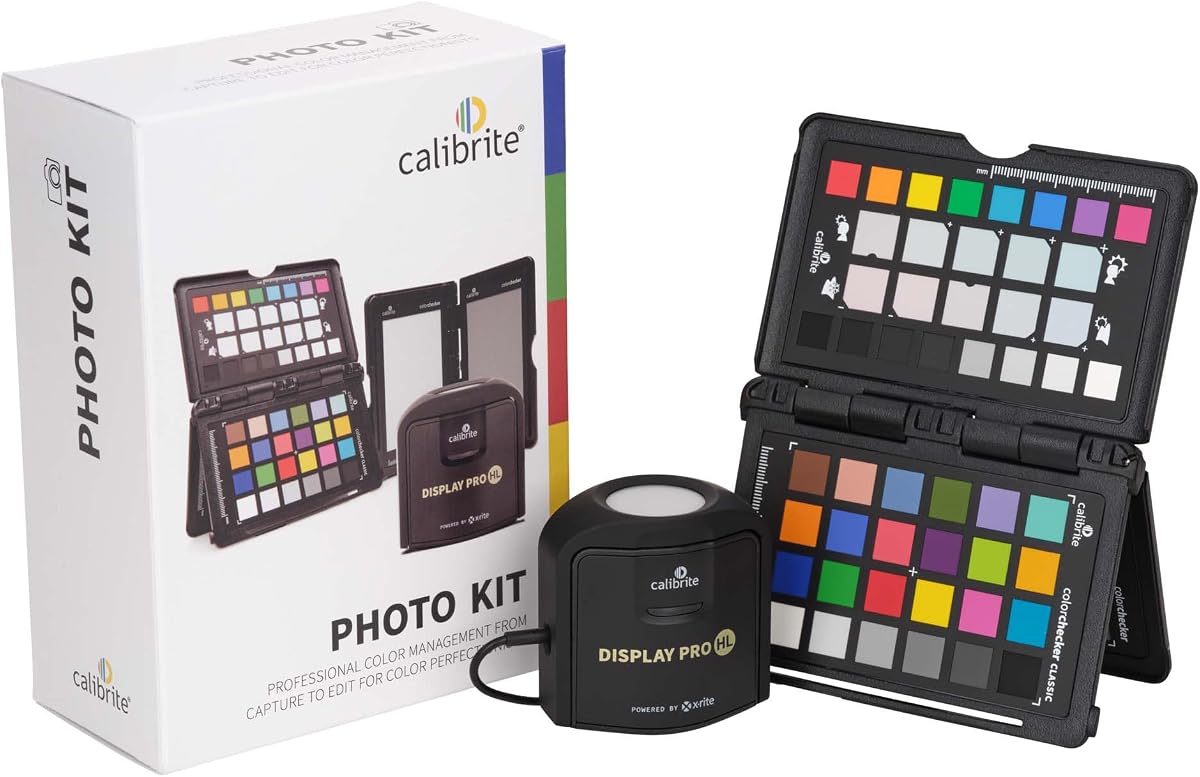
The Calibrite Photo Kit stands out as a comprehensive solution for photographers who need consistent color from capture to print. It includes the Display Pro HL colorimeter and the ColorChecker Passport Photo 2, rated highly for its workflow integration and professional results.
We may earn a commission when you buy through this link, at no additional cost to you.
Its standout quality is the ability to create custom camera profiles for RAW workflows alongside accurate monitor calibration. The Display Pro HL sensor handles modern displays like mini LED and Apple XDR, ensuring what you edit matches your final output precisely.
While the kit offers extensive features, some users may find the software setup slightly involved compared to simpler tools. However, the control and consistency gained are well worth the extra initial setup time for serious photographers.
Photographers seeking a complete capture-to-edit workflow should choose this kit. It reduces guesswork and ensures color accuracy across sessions, locations, and changing lighting conditions with professional confidence.
Combining camera profiling and monitor calibration creates a seamless process that reduces color guesswork and maintains reliable results across all stages of production.
The Display Pro HL calibrates and profiles modern laptop and desktop displays for photo editing, supporting mini LED OLED and Apple XDR panels.
We may earn a commission when you buy through this link, at no additional cost to you.
The Calibrite Display Plus HL is a specialized tool designed for video professionals working with HDR and ultra-bright displays. It features an advanced HL sensor capable of measuring up to 10000 nits, ensuring accurate calibration for high-dynamic-range content.
We may earn a commission when you buy through this link, at no additional cost to you.
Its key strength lies in its support for video standards like Rec.709 and BT.1886, helping maintain tonal detail and accurate monitoring across production pipelines. The PROFILER software offers extensive customization for white point, gamma, and contrast ratio.
While exceptional for high-end workflows, this device is more specialized than general-purpose colorimeters. Users with standard SDR displays may not fully utilize its advanced luminance capabilities, though the accuracy remains high.
Video editors and colorists working with HDR or super-bright displays should prioritize this tool. It helps maintain consistent highlights and clean blacks for reliable grading decisions.
Measures ultra bright displays up to 10000 nits for accurate calibration of HDR capable monitors.
Professional validation tools help you trust the result including Quick Check Profile Validation and Uniformity Check.
We may earn a commission when you buy through this link, at no additional cost to you.
The Calibrite Display 123 offers an accessible entry point for those needing reliable monitor calibration without complexity. It features a guided 1 2 3 software workflow that makes the process fast and approachable for photographers and creators.
We may earn a commission when you buy through this link, at no additional cost to you.
Its simplicity is a major strength, helping users achieve more accurate color without complicated settings. The device supports up to two displays, allowing for consistent color across a multi-screen workspace at a lower cost.
While it lacks some advanced features found in premium models, it delivers solid performance for photo editing and general creative work. The before and after check feature ensures users can confirm improved accuracy easily.
Creators seeking a straightforward and affordable calibration solution should consider this device. It balances ease of use with the necessary accuracy for consistent viewing sessions.
Guided 1 2 3 workflow makes calibration fast and approachable helping photographers and creators achieve more accurate color.
Calibrates up to 2 monitors for matching color across a multi screen workspace ideal for photo editing and creative setups.
We may earn a commission when you buy through this link, at no additional cost to you.
The datacolor Spyder Calibrator is a versatile tool designed to modern digital workflows with OLED and mini-LED displays. It offers fast calibration in about 90 seconds and includes an ambient light sensor to adjust settings based on room conditions.
We may earn a commission when you buy through this link, at no additional cost to you.
Its DevicePreview feature simulates how photos look on other devices, providing valuable context for creators. The software is intuitive enough for novices yet customizable for professionals requiring specific gamma or white point adjustments.
Some users note the software can be demanding on system resources during profiling. However, the speed and adaptability make it a strong choice for those working in changing environments.
Users needing quick calibration and environment-aware adjustments will appreciate this tool. It ensures consistent starting points for viewing and editing across various operating systems.
Exclusive DevicePreview Beta feature simulates what your photos can look like on other devices on your own calibrated screen.
Ambient light sensor tracks/measures room light so you adjust your display brightness and contrast to ideal levels.
We may earn a commission when you buy through this link, at no additional cost to you.
The Calibrite Creator Kit is designed for hybrid shooters needing consistent color across both photography and video production. It combines the Display 123 colorimeter with the ColorChecker Passport Video 2 for comprehensive workflow control.
We may earn a commission when you buy through this link, at no additional cost to you.
Its strengths include helping set accurate white points and match multiple cameras on set. The Display 123 provides a simple profiling workflow, ensuring editors trust on-screen color when grading or delivering work.
While some may prefer separate purchases, the kit offers excellent value for creators working across disciplines. The integration between tools reduces trial-and-error corrections and improves efficiency.
Videographers and photographers seeking reliable color standards across platforms should choose this kit. It supports consistent results from on-set capture through final post-production.
Passport Video 2 helps set accurate white point verify exposure and match multiple cameras on set.
Built for content creators who want dependable color management this kit reduces trial-and-error corrections.
We may earn a commission when you buy through this link, at no additional cost to you.
The Calibrite ColorChecker Display Pro is optimized for consistent color profiling across different display types and projectors. It features a rotatable diffuser arm that serves as a stand for table-top projector profiling and ambient light measurement.
We may earn a commission when you buy through this link, at no additional cost to you.
Its optical design ensures high repeatability on the same display and across different types, making it reliable for venues and studios. The built-in tripod mount facilitates projector profiling in larger settings.
Users should note the software compatibility and licensing requirements vary. While excellent for its specific use case, it may not be the primary choice for standard monitor calibration only.
Professionals needing projector and display consistency should consider this tool. It provides accurate and repeatable results with versatile mounting options.
Conveniently integrated tripod mount for projector profiling in larger venues and rotatable diffuser arm for table top use.
Optical design allows for high repeatability on the same display and across different display types for more consistent color profiling.
We may earn a commission when you buy through this link, at no additional cost to you.
The Datacolor Spyder5PRO is designed for serious photographers needing accurate calibration to match prints. It offers room light monitoring to determine optimal monitor brightness, ensuring shadow detail and highlights are visible.
We may earn a commission when you buy through this link, at no additional cost to you.
Its Display Analysis feature allows evaluating and comparing the performance of all laptop and desktop monitors quickly. Calibration takes only about five minutes, making it efficient for routine maintenance.
While newer models exist, the Spyder5PRO remains a reliable choice for those on a budget or needing proven accuracy. The before and after evaluation helps focus on details important to the user.
Photographers who value print accuracy and monitor consistency will appreciate this tool. It reduces waste in the print-edit-print cycle with confidence.
Room light monitoring determines optimal monitor brightness so you see fine shadow detail and highlights in your photos.
Display Analysis feature lets you evaluate and compare the performance of all of your laptop and desktop monitors.
We may earn a commission when you buy through this link, at no additional cost to you.
The ASUS ProArt CaliContrO is a 3-in-1 colorimeter that combines monitoring with Display OSD control and ASUS Dial features. It supports hardware and software calibration to keep long-term color accuracy and consistency.
We may earn a commission when you buy through this link, at no additional cost to you.
It measures up to 10000 nits for precise HDR calibration and includes a 5-way navigator for intuitive Display OSD control accessible within hand reach. The reversible USB-C connection ensures effortless and quick connectivity.
While feature-rich for ASUS monitor users, feedback suggests potential limitations in broader compatibility. Those deeply integrated into the ASUS ecosystem may find it highly convenient for daily workflows.
ASUS ProArt users seeking integrated calibration and control should explore this option. It combines professional calibration with hardware adjustments in one device.
3-in-1 multiple function with Colorimeter Display OSD control and ASUS Dial features for precise control.
Integrated colorimeter both with Hardware and Software Calibration via ASUS exclusive software tool to keep long-term color accuracy.
We may earn a commission when you buy through this link, at no additional cost to you.
The Datacolor Spyder4Pro is a fourth-generation colorimeter with double-shielded color filters for closer match to CIE color standards. It calibrates multiple displays with a single sensor, improving long-term stability by up to 26%.
We may earn a commission when you buy through this link, at no additional cost to you.
Its ReCAL feature makes it quick and easy to recalibrate your display to compensate for changes over time. The automated color and brightness calibration simplifies the process for users.
While newer models offer enhancements, the Spyder4Pro remains reliable for standard calibration tasks. The improved consistency between units reduces variability for professional workflows.
Those seeking an entry-level professional tool with proven stability will find this suitable. It balances affordability with essential calibration features.
The fourth-generation Spyders have double-shielded color filters for even closer match to CIE color standards.
The ReCAL feature makes it quick and easy to recalibrate your display to compensate for changes over time.
We may earn a commission when you buy through this link, at no additional cost to you.
The Datacolor Spyder X Pro is marketed as an ideal tool for first-time users needing accurate color. It features a groundbreaking lens-based color engine providing a higher level of accuracy and significantly more precise screen color detail.
We may earn a commission when you buy through this link, at no additional cost to you.
Its wizard workflow with 12 predefined calibration targets simplifies advanced color accuracy for non-experts. SpyderProof functionality allows before-and-after evaluation using your own images to verify results clearly.
While easy to use, the software may require initial learning for advanced customization. However, the room-light monitoring and automatic profile changing ensure consistent results with minimal manual intervention.
First-time users or casual professionals seeking reliable and simple calibration will appreciate this tool. It ensures accurate color for photographic images with confidence.
Groundbreaking lens-based color engine provides a higher level of color accuracy for multiple monitors.
Spyder X Pro is so intuitive you don't have to be a color expert. It features quick and easy single-click calibration and wizard workflow.
We may earn a commission when you buy through this link, at no additional cost to you.
Choosing the right colorimeter depends on your specific display technology, workflow requirements, and budget. This guide outlines key factors to consider.
Modern displays like OLED, mini LED, and high-brightness HDR screens require colorimeters capable of measuring higher luminance and accurate color shifts. Check if the device supports these technologies before purchasing.
Ensure the colorimeter explicitly lists compatibility with your monitor type to avoid calibration errors.
Software quality significantly impacts calibration results. Look for intuitive wizards, preset targets, and advanced controls for gamma white point and contrast ratio if needed.
Choose tools with user-friendly interfaces and support for your operating system.
High-quality sensors ensure consistent readings over time and across different displays. Look for double-shielded filters or advanced optical designs that reduce measurement variability.
Prioritize devices with proven accuracy to maintain reliable color workflows.
Ambient light sensors measure room lighting to adjust monitor brightness and contrast appropriately. This ensures your edits remain accurate under changing lighting conditions.
Select colorimeters with integrated light sensors for adaptive calibration.
Multi-monitor setups require tools capable of calibrating multiple screens consistently. Check if the software supports matching colors across different displays.
Choose solutions that simplify calibration for dual or triple monitor workspaces.
Some colorimeters include additional tools like color checkers for camera profiling or video targets. Consider if a complete kit fits your workflow better than a standalone device.
Integrated kits can save time and ensure consistency from capture to output.
Prices vary significantly based on features and professional capabilities. Determine your budget and identify which features are essential versus optional for your needs.
Invest in tools that offer long-term reliability and software updates.
Faster calibration processes reduce downtime and encourage regular recalibration. Look for devices that offer quick calibration times without sacrificing accuracy.
Prioritize ease of use to maintain consistent color management habits.
To calibrate your monitor, place the colorimeter on the screen center and ensure no ambient light hits the sensor. Follow the software instructions to begin the profiling process.
Calibrate your display at least once a month or after significant changes in lighting or hardware. Regular maintenance ensures consistent color accuracy over time.
Store your colorimeter in its protective case when not in use. Clean the sensor gently with a soft cloth to avoid dust or scratches that could affect readings.
It is recommended to calibrate your monitor every 30 to 60 days depending on usage intensity. Frequent changes in lighting or hardware may require more regular checks to maintain color accuracy.
Yes, many colorimeters support calibrating multiple displays. Check software capabilities to ensure your chosen tool can handle your specific multi-monitor setup effectively.
Most colorimeters include necessary software for basic and advanced calibration. However, professionals may benefit from specialized tools that offer more detailed control and validation.
Calibration adjusts your monitor to standard settings while profiling creates a custom ICC profile for accurate color output. Both are essential for precise color management.
Yes, ambient light can influence sensor readings. Many modern colorimeters include ambient light sensors to compensate and ensure accurate results regardless of room conditions.
OLED displays require colorimeters capable of measuring higher brightness and specific color characteristics. Ensure your tool explicitly supports OLED technology for optimal results.
Common targets include D65 white point and gamma 2.2 for standard workflows. Choose presets matching your industry standards or specific project requirements.
Yes, colorimeters are reusable across different monitors as long as they support your display technology. Each monitor will need individual calibration profiles for best accuracy.
The top picks offer solutions for different needs: the Calibrite Photo Kit for comprehensive workflows, Display Plus HL for HDR displays, and Display 123 for budget-conscious creators.
Prioritize tools matching your display technology and desired control level to ensure accurate and consistent color across your work.
Always verify current prices and availability as they fluctuate frequently. Invest in a reliable colorimeter to protect your creative output quality.