
Fosmon Fast Charging for Xbox Controller Charger Station Dock
4.5Editor score
5280mWh battery capacity
SGS certified safety
Dual charging slots
Discover the top 10 Xbox controller charging stations compared by real ratings. Find the best dock for your Series X, S, or One controller with detailed specs.
Finding a reliable controller charging station for Xbox is essential for gamers who want uninterrupted play. Whether you own a Series X or One, a good dock keeps your power ready without constant battery swaps.
We compared ten top-rated stations based on battery capacity, charging speed, safety features, and design. Each product offers unique benefits like LED indicators, magnetic contacts, or high-capacity packs for extended sessions.
This guide details every pick with pros, cons, and real user ratings. Note that prices and availability change frequently, so check the links for the latest offers before making your final choice.
4.5Editor score

4.6Editor score

4.4Editor score
Here is a side-by-side comparison of all ten products to help you quickly identify the best fit for your specific gaming setup and needs.



This upgraded station holds the top spot with its massive 6200mWh batteries that promise 18-25 hours of play. It features unique X-shaped LED indicators that show status without blinding you in dark rooms. The system is built with safety certifications to protect your gear from overcharging or short circuits.
We may earn a commission when you buy through this link, at no additional cost to you.
The key strength is the sheer endurance these batteries provide. You can game for nearly two full days on one charge cycle. Additionally, the station includes four battery covers ensuring fit for both Xbox One and Series X|S models. The 4-5 hour charge time is reasonable given the high capacity.
While the batteries are large, they are not installed in a controller for testing. Also, compatibility is limited to official Microsoft controllers rather than third-party clones. These are acceptable trade-offs for the reliability and safety features offered in this dock.
Anyone looking for extended play without interruptions should buy this station. It balances high capacity with safety well. We recommend it for players who need reliable power for long gaming sessions or multiplayer nights.
With 6200mWh capacity, you get up to 25 hours of play per charge cycle without needing to swap batteries mid-game.
The station includes multi-protection systems against over-charge, over-current, and overheating to safeguard your controllers.
We may earn a commission when you buy through this link, at no additional cost to you.
The Fosmon dock offers a budget-friendly way to charge two controllers at once with impressive battery capacity. Its 5280mWh batteries last 40-45 hours per charge, which is outstanding for the price. SGS certification ensures safety standards are met consistently.
We may earn a commission when you buy through this link, at no additional cost to you.
It stands out for its smart charging board that stops charging automatically when batteries are full. This feature helps preserve battery health. The station also serves as a storage house for controllers keeping them organized. LED indicators show the status clearly for each slot.
It is not compatible with the Xbox Elite 2 controller which limits use for some users. The design is standard and lacks extra lighting features found in pricier options. These downsides are minor compared to the reliability and value it offers.
Gamers on a budget seeking long battery life will find this dock ideal. It avoids the need for disposable AA batteries which saves money over time. We recommend it for casual gamers who need dependable charging without high costs.
Enjoy up to 45 hours of playtime on a single charge thanks to the high capacity NiMH batteries.
Built with an intelligent charging board that provides overheating and short circuit protection for peace of mind.
We may earn a commission when you buy through this link, at no additional cost to you.
The PowerA Solo stand is a reliable single-unit dock officially licensed by Xbox for Series X|S and One wireless controllers. It includes a 1100 mAh rechargeable battery plus necessary cables. The simplicity makes it easy to integrate into any setup without clutter.
We may earn a commission when you buy through this link, at no additional cost to you.
Its main strength is the official licensing which ensures quality and compatibility. It eliminates the need for costly disposable replacement batteries. The package includes battery doors and a 3.3ft USB cable so you are ready to use immediately. A two-year limited warranty adds confidence.
It only handles one controller at a time so it is not for multiplayer households needing multiple docks. The battery capacity is standard compared to larger packs. These limitations are acceptable if you only need to charge your main primary controller.
Players wanting a simple officially licensed solution should choose this stand. It is perfect for single player setups where a spare controller is not always needed. We recommend it for those who prioritize brand reliability and compact footprint.
Officially licensed for Xbox Series X|S with a two-year limited warranty for guaranteed compatibility and quality.
Includes one 1100 mAh rechargeable battery, two battery doors, and a USB charging cable for immediate setup.
We may earn a commission when you buy through this link, at no additional cost to you.
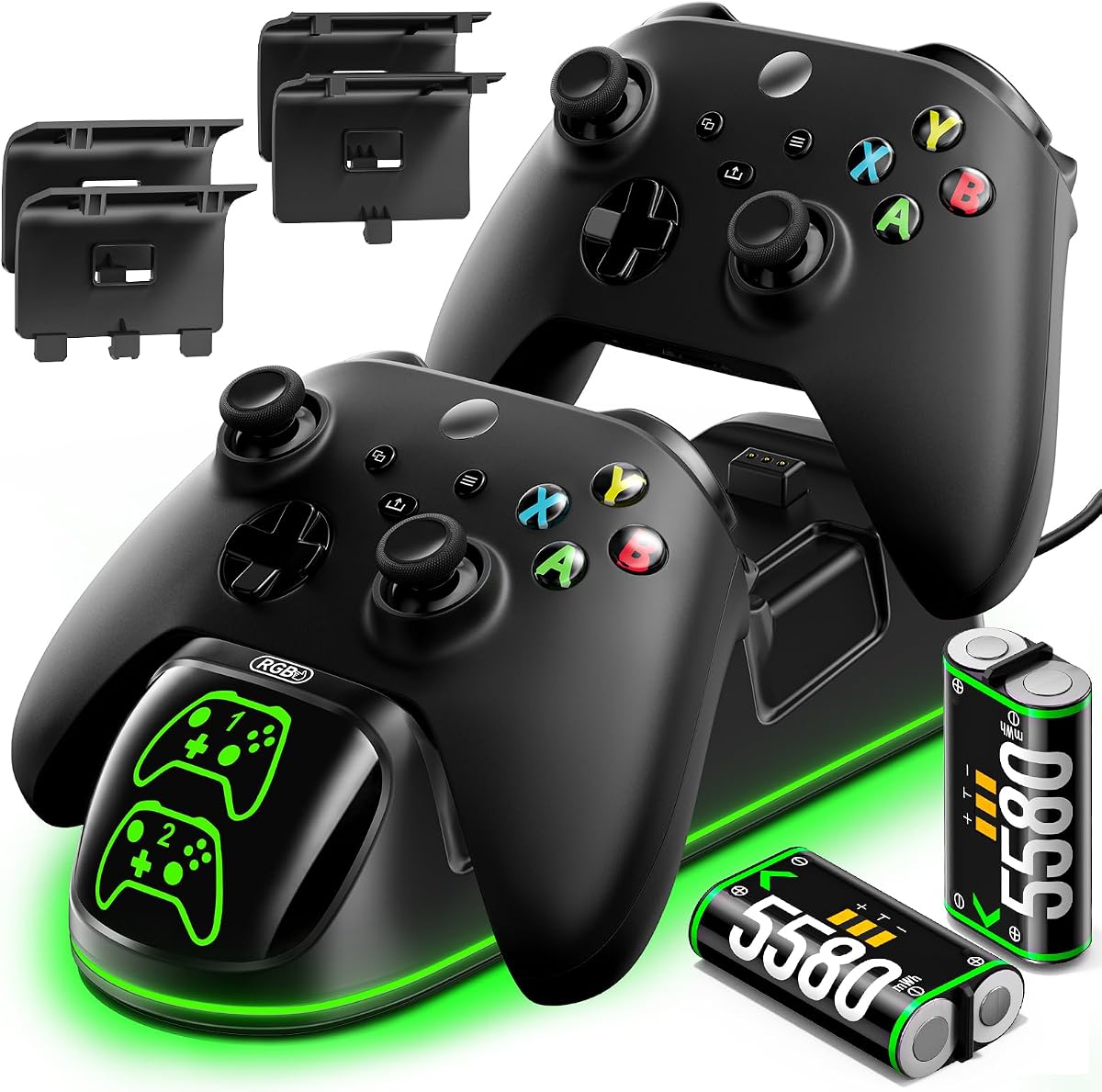
The OlVO charger is notable for its fast charge time of under 2.5 hours for two controllers simultaneously. It includes 5580mWh batteries offering around 20 hours of playtime. A perfect 5.0 rating shows users are highly satisfied with performance and ease of use.
We may earn a commission when you buy through this link, at no additional cost to you.
Its speed is the key advantage allowing you to quickly swap batteries between sessions. The NiMH packs are reliable replacements with over 3000 recharge cycles. LED indicators make it clear when charging is complete. The kit includes covers for both One and X|S models.
Installation requires observing battery polarity carefully which may confuse some users. It is not compatible with Xbox 360 or third-party controllers. These constraints are standard for specialized docks but worth noting if you own older hardware.
Gamers who need to recharge quickly will appreciate this OlVO dock. It is ideal for competitive players or parents managing multiple kids. We recommend it for those who value fast turnaround times and high cycle durability.
The dock charges two controllers simultaneously in under 2.5 hours for minimal downtime between matches.
Rechargeable NiMH batteries can be recharged over 3000 times for long-term use and eco-friendly benefits.
We may earn a commission when you buy through this link, at no additional cost to you.
The 8BitDo dock uses magnetic secure charging to align controllers automatically without fiddling. It is officially licensed and designed to look like part of the Xbox system with sleek black aesthetics. An LED shows amber when charging and white when full.
We may earn a commission when you buy through this link, at no additional cost to you.
The magnetic feature ensures secure contacts every time reducing connection issues. Its seamless design complements the controller well. It comes with one 1100 mAh battery and two doors so you have everything needed. Storage compartments help keep cables tidy.
It is not a multi-battery charger but rather a dock that uses the controller battery. This may limit users wanting separate spare packs. The light adjustment can be useful but is not critical. These trade-offs balance style and function well.
Gamers wanting a clean setup that blends with official gear should choose this dock. It suits those who value design over extra battery capacity. We recommend it for single user setups prioritizing aesthetics.
Magnetic secure charging aligns contacts perfectly every time for reliable power transfer without cables.
Designed to complement Xbox's first-party controllers with a sleek black finish and light adjustment.
We may earn a commission when you buy through this link, at no additional cost to you.
This charger station stands out with a robot helmet inspired aesthetic on the front that adds a fun element to gaming setups. It includes two 5520mWh batteries for extended gameplay and a USB C cable for fast charging. LEDs show red for charging and green when full.
We may earn a commission when you buy through this link, at no additional cost to you.
The design helps you stay informed with clear status lights that can be turned off to reduce distraction. The bottom battery compartment keeps spare batteries organized preventing them from being lost. The 4-hour charge time is efficient for the capacity.
The unique look might not match all gaming themes. The controllers are not included so you must have them separately. These points are minor compared to the storage convenience and fast charging speed it provides.
Players wanting a fun and functional dock will enjoy this robot-inspired station. It suits those who appreciate design flair alongside utility. We recommend it for gamers who value organized storage and quick charging.
Robot helmet-inspired aesthetic adds a bit of superhero momentum to your game atmosphere.
The bottom battery compartment is ingeniously designed for convenient battery storage ensuring you never misplace spares.
We may earn a commission when you buy through this link, at no additional cost to you.
The Nyko station is a well-known accessory brand that offers dual drop and charge docking for Series X and One controllers. It includes 1100 mAh batteries for about 15 hours play per charge. The stand features green LED lights and an extra USB port for other devices.
We may earn a commission when you buy through this link, at no additional cost to you.
Its main advantage is the extra USB port allowing you to plug in other peripherals easily. The drop and charge design makes it quick to start charging without fumbling with cables. The LED lights indicate charging status clearly.
Battery capacity is lower compared to premium models so playtime is shorter. The rating is slightly lower than competitors which suggests potential variations in quality. These are acceptable for users needing multiple device connectivity on one dock.
Gamers who need to charge multiple devices including controllers will find this Nyko station useful. It suits those needing a hub rather than just a charger. We recommend it for streamers or multi-device setups.
Includes an extra USB port for additional device charging besides your controllers.
Dual drop and charge dock design lets you place controllers easily without cable mess.
We may earn a commission when you buy through this link, at no additional cost to you.
This Pulse Red stand matches the exact high-quality material and color of your Pulse Red Xbox Series X controller. It features a magnetic contact system ensuring a perfect charge every time without manual alignment. You can use one hand navigation while the controller is docked.
We may earn a commission when you buy through this link, at no additional cost to you.
The aesthetic match is its main strength creating a seamless look on your desk. The magnetic design prevents accidental dislodging during charging. It is officially licensed by Microsoft Xbox so quality is trusted. This model allows easy dashboard access while charging.
Availability is limited to the Pulse Red color which may not suit all setups. It uses a standard battery capacity like other single dock stands. These limits are minor if you already own matching gear.
Gamers with specific color setups should choose this stand to maintain style consistency. It is ideal for collectors who value aesthetics. We recommend it for owners of Pulse Red Series X controllers.
Manufactured with the same exact high-quality material and color as your Pulse Red Xbox Series X controller.
Ergonomically engineered to allow one hand navigation through your Xbox dashboard while the controller is on stand.
We may earn a commission when you buy through this link, at no additional cost to you.
The Razer Universal stand offers premium features with quick charge capability for all Xbox controllers except Elite 2. It uses a magnetic contact system for secure charging and matches official controller colors for a clean setup. You can navigate dashboards with one hand while docked.
We may earn a commission when you buy through this link, at no additional cost to you.
Its universal compatibility makes it future proof as you upgrade consoles. The fast charge time reduces downtime to under 3 hours. The durable material and striking colors ensure it looks premium on any desk. The ergonomic design supports comfortable use.
It is the most expensive option on this list and does not include extra battery packs. Some may prefer standalone battery kits over controller batteries. These trade-offs are acceptable for those valuing premium build quality and speed.
Gamers seeking high-end design and speed will appreciate this Razer stand. It suits those wanting a setup that looks and performs professionally. We recommend it for users prioritizing aesthetics and convenience.
Able to fully charge your controller in under 3 hours to get you back to gaming fast.
Magnetic contact system ensures your controller stays connected during charging without interruption.
We may earn a commission when you buy through this link, at no additional cost to you.
This station offers a unique feature with 9 RGB lighting modes including 2 multi-color and 7 single-color options. It includes 6200mWh battery packs for 25-30 hours of play. The safety protection automatically adjusts output power to prevent overcharging.
We may earn a commission when you buy through this link, at no additional cost to you.
The lighting enhances your gaming atmosphere and adds a visually immersive experience. Battery endurance is top tier matching the highest capacity on this list. It works with all major Xbox models from One to Series X|S. Long-pressing switches control the lights independently.
RGB lights may be distracting for some players preferring a simple look. The cost is higher than basic docks. These are subjective factors depending on personal preference for customization.
Gamers who love customizing their setup will love these RGB features. It suits those who enjoy visual flair alongside high battery life. We recommend it for players prioritizing atmosphere and endurance.
Stunning RGB lighting enhances your immersive gaming atmosphere and elevates your overall gaming experience.
Automatically adjusts output power to prevent overcharging and provide comprehensive protection for your controller.
We may earn a commission when you buy through this link, at no additional cost to you.
Choosing a station requires evaluating battery capacity, charging speed, compatibility, safety, and aesthetics to match your gaming needs.
Battery capacity determines how long you can play before needing a recharge. Higher capacity like 6000mWh provides up to 30 hours whereas standard 1100mAh offers around 15 hours. Evaluate how long your gaming sessions typically last before deciding on capacity.
Prioritize high capacity if you play in long uninterrupted blocks.
Charging speed affects how quickly you can return to play after a session. Faster docks under 3 hours are ideal for competitive players while standard 4-5 hour rates work for casual use. Look for quick charge labels if downtime is a concern.
Choose faster charging to minimize waiting between gaming sessions.
Ensure the station fits your specific controller model. Most support One, X, S and Series X and S models but some exclude Elite 2 or third-party clones. Check product details to confirm your exact controller type is supported.
Always verify compatibility before buying to avoid returns.
Safety features like overcharge and short circuit protection are critical for protecting expensive gear. Docks with certification like SGS ensure consistent quality. Look for auto stop charging to prevent overheating.
Prioritize safety certifications to protect your investment.
Design elements like LED indicators or RGB lighting enhance the visual experience. Magnetic docks offer sleek looks while color-matched stands maintain setup consistency. Choose styles that complement your existing gaming environment.
Select designs that fit your personal aesthetic preferences.
Some docks include storage compartments for spare batteries or USB ports for other devices. If space is limited, a compact dock may be better than one with extra features. Consider how much extra gear you need to organize.
Look for docks that help organize your setup efficiently.
Warranty coverage protects against defects and ensures customer support availability. Official licenses often include better warranty terms than third-party brands. Check the duration of warranty when comparing products.
Choose products with clear warranty terms for peace of mind.
Prices vary widely from basic stands to premium docks with advanced lighting. Determine how much you are willing to spend for battery life and features. Balance cost against the value of convenience and safety.
Set a budget range before shopping to narrow choices effectively.
First place the station on a flat stable surface near a power source. Connect the USB cable to the dock and plug the other end into a wall adapter or console USB port.
Second place your controller into the charging slot ensuring contacts align. If using magnetic docks simply snap the controller into place. The LED indicators will show charging status.
Third keep the station clean and avoid placing liquids near it. Regularly wipe down the charging contacts with a dry cloth to maintain good connection and prevent corrosion over time.
Most stations included in this list come with rechargeable battery packs included in the box. However single controller docks may require you to use existing batteries. Always check the product details to confirm what is included before buying.
Yes most charging docks allow you to play while connected. However some models require the controller to be removed from the dock for gameplay. Check the specific product details to confirm this feature before purchasing.
Rechargeable batteries in these docks can last for thousands of cycles often over 2000 or 3000 times. This lifespan is much longer than disposable batteries meaning you may not need to replace them for years of regular use.
Many stations support Elite Series 1 controllers but some exclude Elite 2. Always verify compatibility with your specific Elite model in the product description to ensure a proper fit and charging function.
Safe stations include auto stop charging features that prevent overcharging once batteries are full. You can leave them plugged in without worrying about damage but unplugging saves energy if you rarely charge overnight.
Some docks work with third-party controllers while others only support official Microsoft units. The product descriptions specify this detail so check compatibility carefully if you use non-Microsoft controllers.
We reviewed ten top stations offering features from massive battery life to RGB customization. Our top pick delivers high capacity and safety while budget options provide great value.
Prioritize battery life and safety features when choosing to ensure reliable long-term use for your gaming sessions. Match the dock style to your setup for best integration.
Always check current prices and availability before buying as offers change frequently. Use the links provided to find the latest deals for your chosen station today.