
Cooler Master HAF II 500
4.8Editor score
Oversized Mighty40 Cooling System
Split-level Cable Management
Dual-Mode GPU Holder
Finding the right cooling computer case is essential for maintaining optimal performance and extending the lifespan of your hardware. Proper airflow ensures that heat generated by your CPU and GPU is efficiently expelled, preventing thermal throttling during intense gaming sessions or demanding workloads.
We compared ten top-rated cases based on their airflow design, fan configurations, and user feedback. Each model offers unique features like modular layouts, panoramic glass panels, or specialized chamber designs to maximize cooling efficiency while keeping noise levels in check.
Every selection in this guide highlights specific strengths and trade-offs to help you choose wisely. While prices can fluctuate over time, the performance characteristics and build quality remain consistent, ensuring you invest in a solution that meets your long-term needs.
4.8Editor score
4.8Editor score

4.6Editor score
As an Amazon Associate we earn from qualifying purchases.
This side-by-side comparison outlines the key specifications of each case to help you quickly identify which model aligns with your cooling and aesthetic preferences.




The Lian Li V100 earns its spot as the top pick by delivering outstanding airflow and build flexibility right out of the box. With a 4.8 rating from users, it balances premium features like 4 pre-installed ARGB fans with practical design choices that simplify the build process.
We may earn a commission when you buy through this link, at no additional cost to you.
Its integrated 26-LED ARGB strip and daisy-chain fan connectivity provide vibrant visuals without cluttering the setup. The tool-less side panels make accessing components effortless, while the support for GPUs up to 420mm ensures you can install high-end hardware without fit issues.
While it lacks a front USB-C port, which is a notable omission for newer motherboards, the rest of the I/O panel is functional and accessible. The hydraulic bearings ensure quiet operation even at high speeds, maintaining a pleasant acoustic environment during use.
This case is ideal for gamers and content creators who want a reliable, well-ventilated chassis with a strong foundation for customization. It strikes the right balance between performance, aesthetics, and user-friendly design for most ATX builds.
The fan speed reaches up to 1800 RPM with max airflow of 61.47 CFM, ensuring efficient heat dissipation.
Tool-less mechanisms allow quick access for upgrades or cleaning without needing screwdrivers.
We may earn a commission when you buy through this link, at no additional cost to you.
The Cooler Master HAF II 500 stands out with its unique oversized cooling system featuring two 220mm intake fans and a massive 180mm rear exhaust. This design prioritizes raw airflow performance, making it perfect for systems with high thermal output that need aggressive cooling.
We may earn a commission when you buy through this link, at no additional cost to you.
The split-level cable management system not only keeps wires organized but also creates dedicated space for oversized rear exhaust fans. The MasterRail mounting system supports various fan and radiator sizes, giving builders significant flexibility in configuring their cooling solution.
While the price is higher than many alternatives, the build quality and thermal performance justify the investment for enthusiasts. The main drawback is its large size, which may not fit well in smaller desks or cases, but its cooling capacity is unmatched.
Recommend this case to users who need to cool power-hungry components and value superior airflow above all else. It delivers premium thermal results with innovative hardware features designed for top-tier performance.
Two 220 x 40 mm fans provide exceptional airflow volume to reduce thermal throttling.
Split-level design optimizes space, improving airflow and visual tidiness simultaneously.
We may earn a commission when you buy through this link, at no additional cost to you.
The NZXT H5 Flow offers an excellent entry point for builders seeking reliable cooling without breaking the bank. Its compact mid-tower footprint fits well in smaller spaces, while the perforated PSU shroud and mesh panels ensure adequate airflow for standard hardware.
We may earn a commission when you buy through this link, at no additional cost to you.
Built-in pre-installed fans provide solid out-of-the-box performance, and the ultra-fine mesh on panels helps filter dust without restricting airflow. The case features wide channels and hooks for effortless cable routing, keeping the interior tidy and functional.
While it may lack the extensive RGB options or large radiator support found in more expensive cases, it excels in simplicity and value. The design prioritizes efficient airflow and clean looks, making it a practical choice for basic gaming setups.
Ideal for budget-conscious users who want a no-fuss case that does the job well. Its balance of price, performance, and easy assembly makes it a smart choice for first-time builders.
Perforated shroud enables optimal intake from two 120mm fans for balanced cooling.
Effortless cable management tools simplify setup and improve interior organization.
We may earn a commission when you buy through this link, at no additional cost to you.
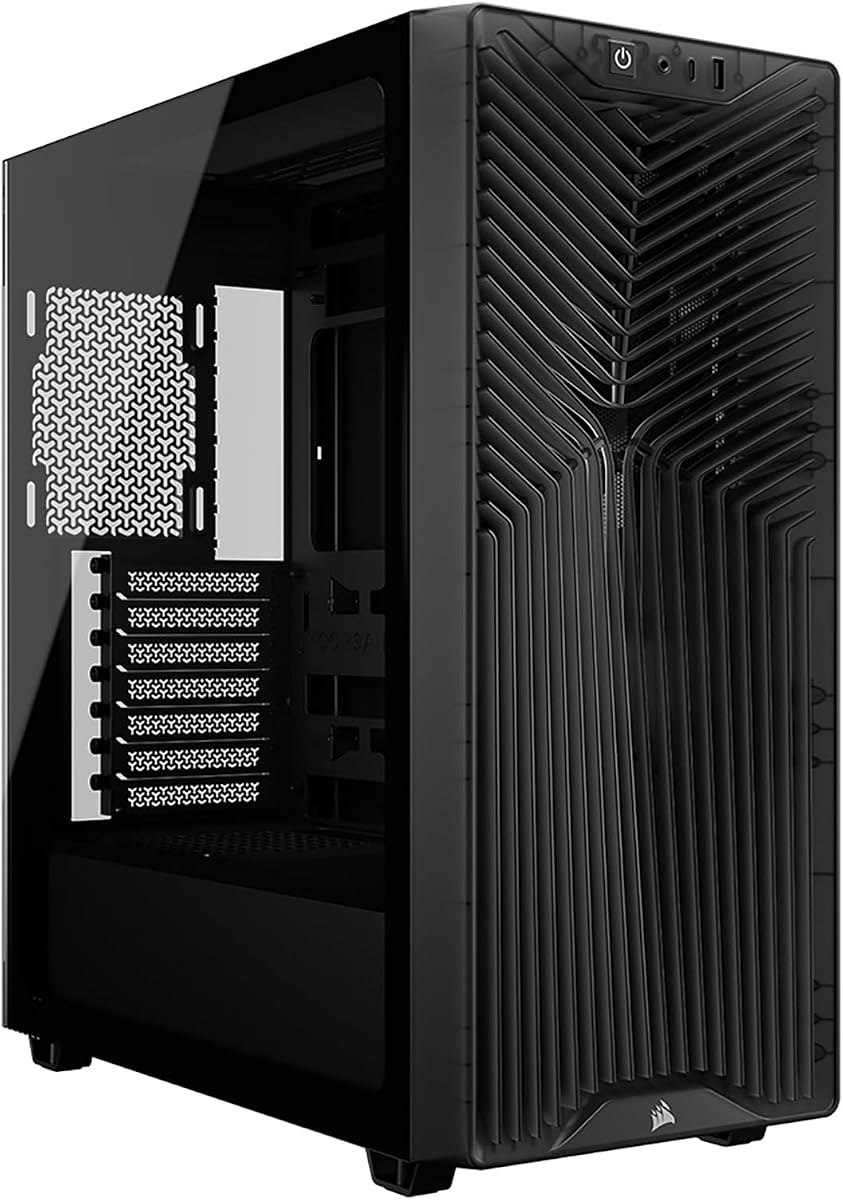
The CORSAIR 4000D RS introduces a groundbreaking FRAME modular system that allows users to customize and upgrade case components like the motherboard tray and front I/O panel. This flexibility is perfect for enthusiasts who plan to evolve their setup over time.
We may earn a commission when you buy through this link, at no additional cost to you.
With three high-performance RS ARGB PWM fans and a 3D Y-pattern airflow panel, the case delivers strong cooling out of the box. The InfiniRail mounting system provides unmatched flexibility in positioning fans to target specific hotspots in your build.
The clean lines or turbo cooled option with removable side panels lets you choose between aesthetics and maximum airflow. However, swapping components might involve extra costs or complexity compared to standard cases, which could deter casual users.
This case is best suited for builders who value modularity and advanced cooling features. It sets a new standard for customizable PC cases and offers a future-proof design for dedicated hardware enthusiasts.
Revolutionary design lets you upgrade trays and I/O panels as your needs change.
Multi-point mounting ensures precise fan placement for optimized thermal performance.
We may earn a commission when you buy through this link, at no additional cost to you.
The Antec Flux Pro is a full-tower beast designed for powerful workstation builds that need extensive cooling and component capacity. Its combination of metal, glass, and wood materials adds a premium aesthetic touch alongside functional engineering.
We may earn a commission when you buy through this link, at no additional cost to you.
With six pre-installed PWM fans and multi-directional vents, it supports up to 12 fans simultaneously for extreme airflow. The innovative iShift PSU mount and CPU/GPU dual temperature display provide unique utility features for monitoring and layout management.
The large chassis supports simultaneous installation of 420mm and 360mm radiators, making it ideal for custom loop cooling setups. However, its size and weight may make moving it difficult, requiring ample room and careful placement.
Choose this case if you need maximum space for high-end workstations or servers. It balances style with serious thermal performance and offers room for even the most ambitious cooling configurations.
Six included fans and support for up to 12 fans provide exceptional thermal headroom.
iShift mount and temperature display enhance monitoring and layout efficiency.
We may earn a commission when you buy through this link, at no additional cost to you.
The MSI MAG Forge 321R focuses on gaming aesthetics and performance with a strong emphasis on airflow and lighting customization. It supports up to 11 fans and includes ARGB fans that sync with MSI Mystic Light for a unified visual experience.
We may earn a commission when you buy through this link, at no additional cost to you.
The vented front panel and mesh designs ensure optimal ventilation, while the magnetic dust filter on top simplifies regular cleaning. The bundled 1 to 6 ARGB LED control board gives you flexible options for connecting and managing your lighting.
While the glass side panel looks great, it may require frequent wiping to stay clear of smudges. The LED control board adds extra steps to setup but rewards you with detailed lighting customization options.
Perfect for gamers who prioritize RGB and clean airflow in their builds. It offers a robust combination of thermal capacity and visual flair tailored for modern gaming rigs.
1 to 6 LED control board provides multiple ways to decorate and sync your rig.
11 fan support and vented panels ensure superior system ventilation.
We may earn a commission when you buy through this link, at no additional cost to you.
The CORSAIR 3200D RS prioritizes acoustic comfort while maintaining strong cooling potential with pre-installed RS fans known for quiet operation. Its smoke-tinted panels provide a subtle look that reduces visual distractions while still letting you see inside.
We may earn a commission when you buy through this link, at no additional cost to you.
With room for nine 120mm fans, you have significant expansion options if you need to scale up cooling. The built-in GPU Anti-sag Stabilization Arm helps support heavy graphics cards, preventing strain on the PCIe slot and maintaining build integrity.
Reverse-connector motherboard support is a modern convenience that keeps cables hidden for a cleaner look. However, the tinted glass reduces visibility compared to clear panels, which may matter if you have a showpiece interior build.
This case suits users who value a quiet and clean setup without sacrificing cooling capacity. Its practical features and low noise make it ideal for office or home workstations that need to run silently.
RS fans deliver continuous airflow with minimal noise during operation.
Built-in shroud and reverse-connector support keep cable management tidy.
We may earn a commission when you buy through this link, at no additional cost to you.
The CORSAIR AIR 5400 RS features an innovative triple-chamber design that isolates the CPU, GPU, and PSU to prevent heat from one component affecting others. This separation ensures each part of your system operates at optimal temperatures.
We may earn a commission when you buy through this link, at no additional cost to you.
Airflow ducts on the bottom fan array accelerate airflow through narrow channels without increasing fan speed, reducing noise while improving cooling efficiency. The panoramic glass side offers an impressive view of your build without compromising thermal management.
Although the price is premium compared to standard mid-towers, the unique design and performance justify the cost for high-end builds. Managing cables in a multi-chamber setup might take more time but yields superior results.
Choose this case if you want cutting-edge cooling architecture combined with show-stopping visuals. It delivers top-tier performance for enthusiasts and gamers who demand both form and function.
Separate chambers prevent heat generated by CPU from affecting other components.
Innovative duct design increases airflow velocity without added fan noise.
We may earn a commission when you buy through this link, at no additional cost to you.
The CORSAIR AIR 5400 LX offers the same innovative triple-chamber thermal design as the RS but adds enhanced RGB integration for users who prioritize lighting and visual appeal. It features isolated CPU cooling chambers and panoramic glass for a striking look.
We may earn a commission when you buy through this link, at no additional cost to you.
Airflow ducts boost cooling efficiency by accelerating air through targeted channels. This allows you to run fans at lower speeds for reduced noise while still maintaining excellent thermal performance.
The RGB features add to the overall premium feel but require compatible motherboard headers for full control. This case sits at the higher end of the price spectrum but offers unique engineering not found elsewhere.
Ideal for enthusiasts who want a showpiece PC that performs exceptionally well. Its combination of RGB, thermal isolation, and airflow design makes it a standout for custom builds.
Full spectrum color control enhances both visibility and aesthetics for builds.
Separate CPU and GPU chambers ensure each component cools efficiently.
We may earn a commission when you buy through this link, at no additional cost to you.
The MONTECH XR Panoramic stands out with its wood-grain I/O area that adds a warm accent to the black chassis. It features panoramic front and side glass panels to showcase your GPU and cooling setup in a clean modern display.
We may earn a commission when you buy through this link, at no additional cost to you.
Three pre-installed ARGB PWM fans provide a ready cooling layout, and reverse-blade side fans ensure you see the illuminated faces instead of frames. The case fits high-end hardware comfortably with generous clearances for GPU and CPU coolers.
While the wood accent is a distinctive style choice, it may not appeal to everyone looking for a purely modern look. Still, the combination of good airflow and unique aesthetics makes it a compelling option for specific tastes.
Choose this case if you want a unique visual accent along with solid performance. It delivers good cooling for gaming builds and offers a distinctive design that stands out on a desk.
Wood-grain I/O adds a warm accent to the chassis design.
Reverse-blade fans display illuminated faces to interior for cleaner look.
We may earn a commission when you buy through this link, at no additional cost to you.
Selecting the right cooling computer case requires considering several key factors that influence thermal performance, noise levels, and build convenience. This section breaks down what to look for to ensure you make an informed decision.
Airflow design determines how efficiently air moves through the case to dissipate heat. Look for mesh panels, vented front designs, and large ventilation openings that reduce resistance and allow smooth air passage.
Prioritize cases with optimized intake and exhaust paths to prevent heat buildup around critical components.
The number and type of fans included significantly impact cooling performance. Pre-installed PWM fans allow better control over speeds and noise, while support for multiple fan mounts gives flexibility for future upgrades.
Aim for cases that include high-quality fans and offer room to expand your cooling setup as needed.
If you plan to use liquid cooling, check how large radiators the case can support. Larger radiators like 360mm or 420mm provide better cooling for high-performance CPUs and GPUs.
Ensure the case explicitly supports your desired radiator size at front or top positions to avoid fit issues.
Features like tool-less panels, cable management hooks, and built-in shrouds simplify the assembly process. These conveniences save time and help maintain a clean, organized interior after installation.
Choose cases with user-friendly design elements to make your build experience smoother and more enjoyable.
Check GPU length and CPU cooler height limits to ensure your hardware fits comfortably. High-end graphics cards can be quite large, and oversized coolers may not fit in compact cases.
Verify clearance specifications match your planned components to avoid compatibility problems after purchase.
Effective dust filters help keep the interior clean and maintain airflow efficiency over time. Magnetic filters or easily removable screens make regular cleaning straightforward and less intrusive.
Look for cases with accessible filters on front and top panels to maintain long-term performance.
Noise levels matter if you use your PC in quiet environments. Cases with optimized airflow paths allow fans to run slower while maintaining cooling, reducing overall noise output.
Review fan noise ratings and airflow efficiency to balance thermal performance with acoustic comfort.
Consider RGB lighting options, glass panel styles, and additional features like GPU support arms or digital displays. These elements enhance the visual appeal and usability of your setup.
Select a design that matches your personal taste and functional requirements for the best overall experience.
To maximize cooling efficiency, ensure all fans are oriented correctly with intake and exhaust paths aligned. Regularly check fan rotation and clean dust filters to maintain unobstructed airflow throughout the system.
Manage cables carefully using the provided channels and ties to prevent blockages that could disrupt air movement. Keeping wires tidy improves both airflow and aesthetics without needing extra accessories.
Periodically inspect dust accumulation on fans and radiators, especially if you live in dusty environments. Simple cleaning with compressed air keeps the system running smoothly and extends component life significantly.
A balanced setup typically includes at least three intake fans and one or two exhaust fans for proper airflow. This configuration ensures fresh air enters consistently while hot air is expelled effectively.
Mesh panels allow significantly better airflow than solid designs, reducing heat buildup inside the case. They are preferred for gaming or high-performance builds where cooling efficiency matters most.
Stock fans are often adequate for standard setups, but upgrading can improve airflow or reduce noise. Consider upgrades if you run demanding workloads or prefer quieter operation during use.
Remove magnetic or slide-out filters regularly and clean them with compressed air or a soft brush. This prevents dust buildup from restricting airflow and maintains optimal thermal performance.
Many modern mid-towers support 360mm radiators at the front or top, so check your specific case specs. It is usually feasible but depends on motherboard clearance and PSU size.
Case color has minimal impact on cooling compared to airflow design and fan quality. Darker finishes may absorb more heat from ambient light but do not significantly alter internal temperatures.
The ten cases reviewed offer diverse solutions for cooling needs ranging from budget-friendly options to premium designs with advanced features. The Lian Li V100 stands out for overall value while the Cooler Master HAF II 500 excels in raw performance.
Prioritize airflow design and component compatibility over flashy aesthetics to ensure your system runs cool and stable. Features like tool-less access and dust filtration also contribute to a smoother user experience.
Remember to check current stock and prices as availability fluctuates frequently. Selecting the right case today ensures reliable thermal management and satisfaction for years to come.