
NEWDERY Cooling Fan for Nintendo Switch 2 Dock
4.0Editor score
Dual-fan cooling system
6-card game slot included
RGB light modes customization
Discover the top cooling fans for Nintendo Switch dock. Compare features, ratings, and performance to keep your console cool during long gaming sessions.
Keeping your Nintendo Switch cool during extended gaming sessions is crucial for performance. A good cooling fan for the dock helps prevent overheating, reduces noise, and extends the lifespan of your console by ensuring efficient heat dissipation.
We compared ten top-rated cooling fans based on fan speed, design, compatibility, and user feedback. Our analysis covers models for the original dock, OLED, and newer versions to help you find the perfect fit for your setup.
Each product in this guide offers unique features like adjustable speeds, LED displays, or extra USB ports. While prices vary, all options aim to enhance your gaming experience. Note that availability and costs may change over time.
4.0Editor score

4.6Editor score

4.4Editor score
The table below provides a side-by-side overview of key specifications for each cooling fan. Use this to quickly compare features like fan count, power source, and special additions such as game slots or LED displays.




This cooling fan ranks first due to its comprehensive features and high user satisfaction. With a 4.6 rating, it offers a digital LED display showing both fan speed and temperature. This level of transparency ensures you know exactly how well your console is being cooled.
We may earn a commission when you buy through this link, at no additional cost to you.
The adjustable speed range from 510 RPM to 6000 RPM allows you to balance noise and cooling power. Below 2400 RPM it operates nearly silently. The fixed pad includes sponges that prevent scratches and keep the unit stable between the console and dock base.
While the fan can be noisy at maximum speed, this is typical for high-performance cooling. The Micro USB power is straightforward connecting it between the HDMI and power cords. The package also includes joystick caps which add extra value to the purchase.
Anyone seeking reliable temperature monitoring and customizable cooling should choose this model. It is ideal for long sessions where overheating is a concern. The lifetime warranty further supports its quality and durability for daily gaming use.
The LED display provides immediate feedback on airflow efficiency. This helps you adjust settings based on current console heat levels.
The included fixed pad has sponges on both sides. This prevents the console from getting scratched during installation and use.
We may earn a commission when you buy through this link, at no additional cost to you.
This dual-fan cooling stand is designed specifically for the newer Switch 2 dock. It operates automatically at full speed when connected. The 3-stage adjustment lets you customize cooling intensity. This ensures efficient heat dissipation during heavy gaming.
We may earn a commission when you buy through this link, at no additional cost to you.
Beyond cooling it offers significant utility with 6 card slots and 3 USB ports. You can store game cards and charge controllers easily. The RGB modes add a modern aesthetic to your gaming setup. This makes it a multifunctional accessory.
The design is compact yet powerful. While it fits the Switch 2 dock perfectly it may not work with older models. The added features justify the price for users with this specific hardware. It keeps the system cool while reducing desk clutter.
This model is best for Switch 2 owners who want extra connectivity. The USB ports and card slots provide practical benefits. If you value organization and enhanced cooling this stands out as a premium option for your console.
The 6 card slots keep your games organized. You can access them instantly without searching through a case.
Press and hold to toggle lights. The 9 modes let you match the station to your room or game themes.
We may earn a commission when you buy through this link, at no additional cost to you.
This cooler is engineered for the 2021 OLED dock HEG-007. Its turbo fans blow air directly onto the base. This prevents input delay and overheating. The integrated blue light adds a tech-inspired look to your console station.
We may earn a commission when you buy through this link, at no additional cost to you.
The most striking feature is the 14 game card slots. This eliminates the need for external cases. The ABS material ensures durability while remaining light. The Type-C cable simplifies power connection. It matches the official base design seamlessly.
Installation is simple with no tools required. The fan turns on with a control button. While the blue light is a design choice some may prefer a neutral look. However the cooling performance is reliable for extended gaming hours.
Owners of the OLED Switch will find this very convenient. The storage capacity alone saves significant space. Combined with its cooling efficiency it protects your console. It is a top choice for keeping your OLED dock organized and cool.
14 slots hold your entire game collection. This keeps cards safe and easily accessible during gameplay.
The design follows the official base cover. It fits perfectly without obstructing ports or the console.
We may earn a commission when you buy through this link, at no additional cost to you.
Dobe's cooling fan is tailored for the OLED model base. It uses the TYPE-C power adapter for supply. This ensures a stable power source. The high speed fan increases internal air circulation. It aims to dissipate heat effectively.
We may earn a commission when you buy through this link, at no additional cost to you.
The fan operates quietly and fits the base design well. The blue LED light turns on with the fan. This creates a coordinated visual effect. Installation is straightforward with the right orientation. It helps keep the console cool during use.
While it lacks extra features like game slots it serves its main purpose well. The simple switch allows easy control. The light effect can be turned off if preferred. It is a solid choice for basic cooling needs.
This fan is suitable for OLED owners seeking a quiet upgrade. The direct connection to the base is convenient. It prevents overheating without cluttering the setup. A practical addition for maintaining optimal console temperature.
Designed specifically for the TYPE-C port. It fits securely to ensure consistent power and cooling.
The blue light syncs with the fan. This enhances the aesthetic of your gaming station.
We may earn a commission when you buy through this link, at no additional cost to you.
This cooling fan targets the OLED dock with a focused design. Its 3000 RPM fan provides instant cooling. The white finish matches the console well. It plugs into the USB port. This keeps your system cool during long play.
We may earn a commission when you buy through this link, at no additional cost to you.
The blue LED adds a stylish touch to the setup. Its compact size prevents clutter on the stand. While it lacks speed controls it delivers strong airflow. This helps avoid unexpected pauses due to heat.
Some users note basic functionality compared to premium models. However the straightforward design ensures ease of use. It is a cost-effective solution for basic cooling needs. The USB power is reliable and simple to manage.
This fan suits budget-conscious gamers with an OLED. The consistent speed ensures steady cooling. It keeps the console protected during intense sessions. A simple upgrade to improve your gaming environment.
The fixed 3000 RPM speed ensures continuous cooling. This helps maintain stable console temperatures.
The white body with blue light matches the OLED. It keeps your setup looking neat and modern.
We may earn a commission when you buy through this link, at no additional cost to you.
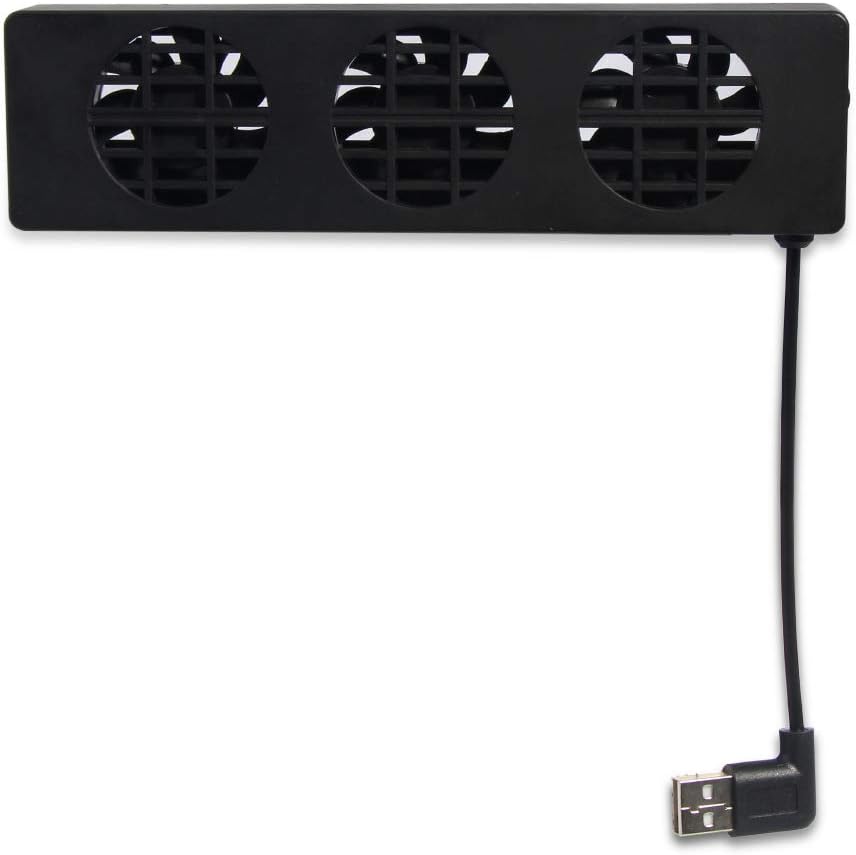
Bewinner offers a versatile cooling solution with three internal fans. These work together to dissipate heat. The side switch allows you to toggle speeds. This flexibility caters to different gaming sessions. It keeps the console cool effectively.
We may earn a commission when you buy through this link, at no additional cost to you.
The material quality is solid ensuring longevity. The compact design makes it easy to store. While it lacks advanced tech it performs its core task well. This model is compatible with various game consoles.
The trade-off is the lack of detailed feedback like LED displays. However the reliable performance compensates for this. It prevents overheating during heavy use. This ensures your games run smoothly without interruption.
This cooling stand is great for users seeking simplicity. The three fans provide robust cooling power. Its portability adds value for travel. A dependable option to protect your console from excess heat.
Three fans work in unison for better airflow. This speeds up heat exchange significantly.
Choose between Turbo and Normal modes. Adjust the cooling power to suit your needs.
We may earn a commission when you buy through this link, at no additional cost to you.
OSTENT provides a dedicated cooling dock with three fans. These increase airflow to the console quickly. The switch offers Normal and Turbo modes. This helps reduce temperature effectively. It is driven directly by the dock USB port.
We may earn a commission when you buy through this link, at no additional cost to you.
The design is easy to insert and carry. No extra power source is required. This simplifies your setup. The fans ensure heat exchange happens fast. It helps maintain optimal console performance.
While ratings are mixed the core function remains useful. The lack of advanced features keeps costs low. It serves basic cooling needs. This ensures you can play without overheating issues.
This option fits well for straightforward cooling. It prevents heat buildup during long play. The portable nature is a plus. A cost-effective way to extend your console's lifespan.
Uses the dock's USB port. This removes the need for extra cables.
Easy to carry and store. Ideal for taking your console elsewhere.
We may earn a commission when you buy through this link, at no additional cost to you.
TNP designed this unit specifically for the original dock. It improves heat dissipation effectively. Three fans work together to lower temperature. This prevents overheating during long play. The design is compact to save space.
We may earn a commission when you buy through this link, at no additional cost to you.
The adjustable speed offers Turbo and Normal options. This balances cooling with noise. The USB power is simple to connect. It helps keep your console in good shape. Perfect for light or hardcore gamers.
Installation is straightforward with no tools needed. The design matches your TV stand well. It ensures tidy room space. The reliable ventilation extends the system's lifespan. A practical choice for original dock owners.
This cooler is tailored for original console users. It ensures stable performance without bulk. The quiet operation is a plus. A solid upgrade to maintain your console's health.
Specially designed for original docks. Ensures a perfect and stable connection.
Operates quietly even at high speeds. Keeps your gaming environment peaceful.
We may earn a commission when you buy through this link, at no additional cost to you.
This cooling fan features a vertical stand design. It works with the original dock. The LED display shows RPM and exhaust temperature. This helps you monitor cooling performance. Three buttons allow easy speed adjustment.
We may earn a commission when you buy through this link, at no additional cost to you.
Speed ranges from 510 RPM to 6000 RPM. It stays quiet below 2400 RPM. The included fixed pad stabilizes the unit. This prevents console scratches. The setup includes joystick caps for extra protection.
The design is simple but effective. It helps avoid game pauses. The warranty covers potential issues. This ensures you can game longer. It is reliable for maintaining system health.
Gamers looking for basic adjustable cooling will like this. The display adds helpful transparency. It keeps your console protected. An efficient addition to your gaming station.
Adjustable from 510 to 6000 RPM. Tailor cooling to your current needs.
The anti-slip pad prevents scratches. Keeps your console safe during use.
We may earn a commission when you buy through this link, at no additional cost to you.
This cooler offers a black finish for OLED docks. It integrates seamlessly with the base. The cooling function maintains proper temperature. It prevents overheating during sessions. The design is sleek and understated.
We may earn a commission when you buy through this link, at no additional cost to you.
The unit fits the OLED base perfectly. It provides reliable airflow. This ensures your console stays cool. The simple design avoids clutter. A good choice for those preferring a minimal look.
While detailed specs are limited the function is clear. It supports long gaming sessions. The packaging suggests regional availability. It serves as a basic accessory for protection.
This is suitable for users needing basic cooling. The black finish adds style. It protects your console effectively. A straightforward option to extend your console's use.
Black finish matches modern consoles. Keeps your setup looking cohesive.
Provides essential heat dissipation. Prevents overheating issues during play.
We may earn a commission when you buy through this link, at no additional cost to you.
Selecting the right cooling fan involves checking compatibility, features, and user feedback. Here are the key factors to consider for your gaming setup.
Ensure the fan matches your specific dock type. Some models work with original docks while others fit OLED or newer Switch 2 versions. Check the product details to confirm fit before purchasing.
This is crucial to avoid installation issues or inefficient cooling due to mismatched sizes.
Look for adjustable speed options. Higher RPM provides better cooling but may increase noise. Balance cooling needs with your preferred noise level for your room.
Adjustable fans let you switch to quiet modes for casual play and turbo modes for intense sessions.
Most fans use USB or Type-C power from the dock. This avoids extra cables. Ensure your dock has a free port for this connection.
Direct power from the dock simplifies your setup and reduces clutter on your desk.
Fans with temperature and RPM displays provide real-time feedback. This helps you know how well the cooling is working. It is useful for monitoring console health.
Choose a display model if you want precise control and awareness of your system's temperature.
Some coolers include game card slots or extra USB ports. These add utility to your station. Consider if you need extra storage or charging options.
These features help organize your gaming setup and reduce the need for additional accessories.
Check user feedback for reliability insights. High ratings usually indicate good performance. Look for comments on cooling effectiveness and build quality.
Real-world experiences help you gauge if the fan meets your specific needs and expectations.
ABS plastic and sturdy build quality are common. Durable materials ensure the fan lasts. Check for anti-slip features to protect your console.
Strong materials prevent wear and tear while keeping your console safe from scratches.
Price varies by features and brand. Compare what you get for the cost. A slightly higher price might offer better longevity or extra features.
Focus on long-term value rather than just the initial cost to ensure satisfaction.
First, ensure your dock is compatible with the cooling fan model. Connect the power cable to the dock USB port as instructed. This provides stable power for the fan.
Turn on the fan using the button or switch. Adjust the speed based on your gameplay. Higher speeds are best for intense games while lower speeds save power and reduce noise.
Regularly clean the fan blades to maintain performance. Dust buildup can reduce airflow. Wipe the exterior with a dry cloth. Keep the area around the dock clear for better ventilation.
No, cooling fans are designed to prevent overheating which protects your console. They plug into existing USB ports without altering the dock. As long as they fit properly they are safe for daily use.
Noise levels vary by speed. Most operate quietly below 2400 RPM. At maximum speed they may produce more sound. Adjust settings to find a balance between cooling and quiet operation.
Yes, many models are compatible with OLED docks. Ensure you check the product description for exact fit. Some are specifically designed for the 2021 OLED model.
Most fans use the dock USB port for power. This means no extra cables are needed. The fan draws power directly from your console setup.
With regular use and proper care, they last several years. Avoiding dust and handling gently helps extend life. Quality materials also play a role in durability.
Some brands offer universal fits but compatibility varies. Check the product specs to confirm. Selecting a model meant for your dock ensures the best performance.
Use a soft dry cloth to wipe the exterior. For blades use compressed air to remove dust. This keeps airflow optimal. Turn off the fan before cleaning.
Yes by preventing overheating it helps maintain performance. Overheating can cause throttling. Keeping the console cool helps avoid performance drops.
We reviewed ten top cooling fans ranging from basic options to advanced models. The Editor's Choice offers excellent monitoring while the premium picks provide added features.
Consider your specific dock and cooling needs when choosing. Extra storage or LED displays can enhance your setup. Prioritize compatibility and performance.
Prices and availability change frequently. Check current offers before buying. These fans ensure your console stays cool for many gaming sessions.