
Corsair Galleon 100 SD
3.8Editor score
Five-Inch LCD Screen
Elgato Stream Deck Integration
Eight-Kilohertz Hyper-Polling
Compare the top 10 Corsair Mechanical Keyboard models with real ratings, features, and expert insights to find your perfect gaming or typing companion.
Choosing the right Corsair Mechanical Keyboard can transform your gaming experience and daily productivity. With numerous options ranging from budget-friendly to premium builds, finding the perfect match requires careful consideration of switch types, layout sizes, and unique features like macro keys or streaming integration.
We analyzed ten distinct models based on user ratings, build quality, and specialized capabilities. This list covers full-size, tenkeyless, and compact 96% layouts, ensuring you find a device that fits your desk space and performance needs without sacrificing durability or style.
Each pick highlights specific strengths such as polling rates, lighting customization, and media controls. While ratings reflect current user satisfaction, remember that inventory and availability can shift quickly. Always verify the latest details before making your final decision to ensure you get the best value.
3.8Editor score

4.5Editor score

4.3Editor score
This side-by-side comparison highlights the core specifications and unique selling points of every model in our lineup. From high-speed polling rates to specialized streaming tools, each entry is designed to help you quickly identify which keyboard aligns best with your specific workflow and gaming style.


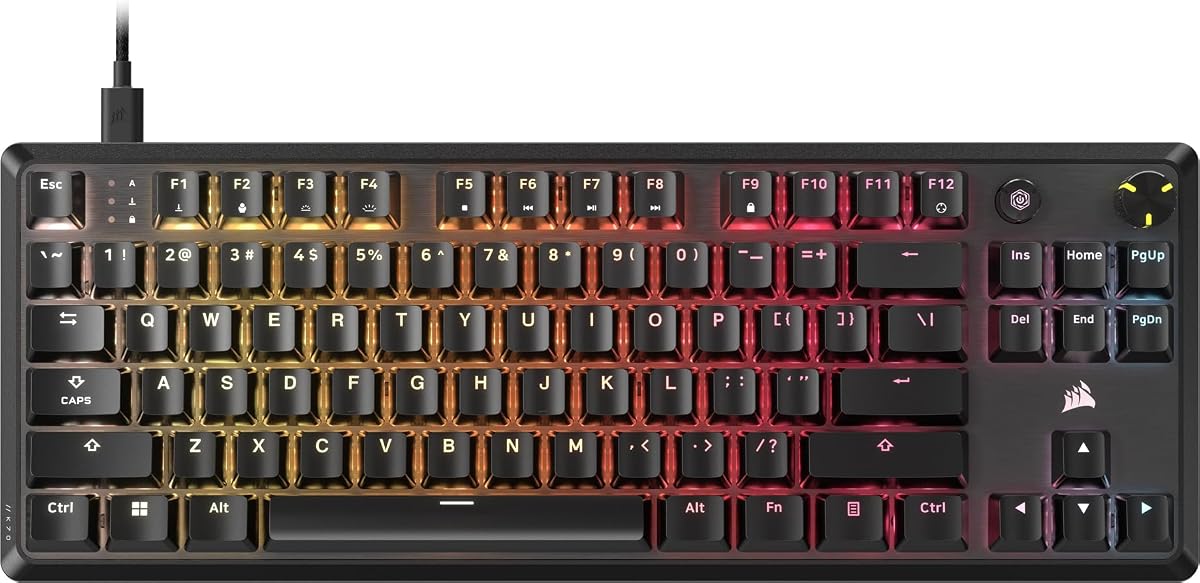


The Corsair K100 RGB stands out as the flagship option in this lineup, earning a strong 4.5 rating from users. It combines cutting-edge optical switch technology with a refined aluminum design to deliver a premium experience for serious gamers and power users.
We may earn a commission when you buy through this link, at no additional cost to you.
Powered by AXON Hyper-Processing Technology, this keyboard offers up to four times faster throughput than standard models. The OPX optical-mechanical switches ensure hyper-fast input with a 1.0 millimeter actuation distance, while the 44-zone LightEdge adds significant visual flair to your setup.
While the performance is exceptional, the larger footprint might not suit smaller desks. Additionally, the price reflects its top-tier features, making it an investment for those who prioritize speed and customization over budget considerations.
If you demand the fastest response times and extensive macro capabilities, this model is the ideal choice. It is best suited for competitive gamers who need every millisecond advantage and want a centerpiece for their high-end gaming station.
The AXON technology and optical switches work together to reduce latency significantly, ensuring your commands register instantly during intense gaming sessions.
Seamless integration with Elgato Stream Deck software allows you to manage complex macros and streaming commands directly from the keyboard without extra hardware.
We may earn a commission when you buy through this link, at no additional cost to you.
The Corsair Galleon 100 SD redefines what a gaming keyboard can be with its massive five-inch dynamic LCD screen. While it holds a 3.8 rating, its unique features make it a standout for streamers and tech enthusiasts who want integrated control systems.
We may earn a commission when you buy through this link, at no additional cost to you.
This model allows you to keep tabs on hardware performance, Twitch channels, and more directly on the keyboard. The dedicated Stream Deck keys and dials provide precise real-time command over your entire setup, eliminating the need for secondary devices on your desk.
The complexity of the software integration and the premium price tag are trade-offs to consider. Users might find the learning curve steep, but once mastered, the control it offers over gaming and streaming environments is unmatched.
This keyboard is perfect for content creators who want an all-in-one solution for monitoring and control. If you value visual feedback and streamlined workflow management above all else, this is a compelling high-end option.
The integrated LCD and macro keys act as a central command center for your apps and games, reducing the clutter of external stream deck devices.
With 8000Hz hyper-polling and FlashTap SOCD, you get ultra-responsive inputs that help you maintain an edge in competitive matches.
We may earn a commission when you buy through this link, at no additional cost to you.
The Corsair K55 RGB PRO offers an accessible entry point into gaming peripherals with a solid 4.3 rating. Although it uses membrane technology rather than mechanical switches, it delivers reliable performance for casual gamers and budget-conscious buyers.
We may earn a commission when you buy through this link, at no additional cost to you.
Its IP42-rated protection guards against dust and spills, ensuring durability during long sessions. The six dedicated macro keys allow you to automate commands easily via iCUE software, while the detachable palm rest adds comfort without taking up permanent space.
While the switches do not offer the tactile feedback of mechanical models, the price reflects this difference. It is a practical choice for those who need basic macro functionality and RGB lighting without breaking the bank.
This keyboard is ideal for casual players or those setting up a first gaming station. If you prioritize value and spill resistance over switch feel, this model provides excellent utility for the cost.
The spill-resistant design means you can focus on your game without worrying about minor accidents damaging the device permanently.
With five RGB lighting zones and multiple effects, you can personalize the look of your desk to match your aesthetic preferences.
We may earn a commission when you buy through this link, at no additional cost to you.
The CORSAIR K70 CORE RGB earns a 4.0 rating by balancing performance and comfort effectively. It features pre-lubricated MLX Red linear switches that deliver smooth keystrokes enhanced by sound dampening layers for a satisfying typing experience.
We may earn a commission when you buy through this link, at no additional cost to you.
A magnetic detachable soft-touch palm rest adds significant comfort for long gaming sessions. The media control dial allows quick volume adjustments, and the sturdy double-shot keycaps ensure longevity even under heavy pressure.
While the ABS keycaps may show shine over time compared to PBT alternatives, the overall build quality remains robust. It is a reliable workhorse for those seeking a full-size mechanical keyboard without unnecessary frills.
This model suits users who want a comfortable, stable keyboard with essential features. If you value a balanced setup with sound dampening and media controls, this is a solid choice for daily use.
The magnetic palm rest provides a comfortable spot to rest your hands, reducing fatigue during extended play or typing sessions.
Two layers of sound dampening minimize unwanted noise, making it suitable for shared spaces or quiet environments.
We may earn a commission when you buy through this link, at no additional cost to you.
The CORSAIR Vanguard 96 RGB combines a full keyboard layout with a compact footprint, earning a 4.1 rating. It retains arrow keys, a numpad, and a dedicated LCD screen within a frame roughly the size of a tenkeyless keyboard.
We may earn a commission when you buy through this link, at no additional cost to you.
The vibrant full-color LCD screen lets you display custom animations or system specs, adding a unique visual element. With 8000Hz hyper-polling and Elgato Virtual Stream Deck integration, it offers high performance for gaming and productivity alike.
The dense layout might feel cramped for users accustomed to standard spacing, requiring an adjustment period. However, the space saved on the desk allows for larger mouse movements, which can benefit gamers with large mousepads.
This keyboard is perfect for those who need a full feature set but have limited desk space. If you value efficiency and customization through the LCD and G-keys, this is a versatile tool for both work and play.
By condensing a full layout into a smaller frame, you gain more room for mouse sweeps without sacrificing access to numbers or arrows.
The integrated LCD allows you to personalize your setup with images or system data, making your keyboard a unique focal point.
We may earn a commission when you buy through this link, at no additional cost to you.
Similar to the version with a palm rest, this variant offers the same high-quality features in a slightly different configuration, maintaining a 4.0 rating. It features pre-lubricated switches and sound dampening for a smooth and quiet typing experience.
We may earn a commission when you buy through this link, at no additional cost to you.
The ability to store up to five profiles onboard means your settings travel with the keyboard, making it useful for different setups. The durable aluminum top plate provides stability, ensuring the keyboard remains steady during intense gameplay.
While it lacks the included palm rest of the other version, the core mechanical experience remains excellent. Users looking for a reliable keyboard with essential customization options will find this model well worth considering.
This is a great option for those who prefer to use their own wrist support or need a sleeker profile. If you value onboard memory and a robust frame, this keyboard delivers consistent performance.
Onboard storage allows you to keep your custom settings handy without needing the iCUE software running on a PC.
The aluminum top plate adds weight and stability, preventing the keyboard from sliding around during rapid input.
We may earn a commission when you buy through this link, at no additional cost to you.
The Corsair K70 CORE TKL offers a tenkeyless layout that saves space while retaining essential features, earning a 4.4 rating. It uses pre-lubricated MLX Red v2 switches for smooth, responsive keystrokes suitable for fast-paced gaming.
We may earn a commission when you buy through this link, at no additional cost to you.
Two layers of premium foam material dampen sound, tempering unwanted pings and clacks for a subdued typing experience. The media dial and programmable media button allow easy volume control without interrupting your workflow.
Removing the numpad frees up desk space for mouse movement, which is ideal for FPS games. However, if you rely heavily on number inputs, this layout might feel limiting compared to a full-size board.
This model is best for gamers who prioritize room for mouse movement. If you want a compact, high-quality mechanical keyboard with great acoustic tuning, this TKL version is a top contender.
The premium foam layers significantly reduce noise, making this keyboard a great choice for office environments or shared rooms.
The compact footprint leaves more room for sweeping mouse movements, which is crucial for competitive gaming accuracy.
We may earn a commission when you buy through this link, at no additional cost to you.
The Corsair K70 CORE RGB Renewed offers a unique color variant and potential savings while maintaining a 4.7 rating. It features the same reliable MLX Red linear switches and sound dampening as the new version but arrives in a steel grey finish.
We may earn a commission when you buy through this link, at no additional cost to you.
Note that this model does not include the palm rest, which keeps the profile sleek and reduces bulk. The onboard storage ensures your settings are saved directly on the keyboard, making it ready to use on any system.
As a renewed product, it represents an eco-friendly and budget-conscious choice. While the lack of a palm rest is a trade-off, the core mechanical experience and build quality remain intact for daily use.
This option is ideal for those who prefer a steel grey aesthetic or want to save money without sacrificing performance. If you do not need a palm rest, this is a highly rated alternative.
Choosing a renewed model helps reduce electronic waste while still providing a high-quality mechanical keyboard for your desk.
The steel grey finish offers a distinct look compared to the standard black options, allowing for more variety in your setup.
We may earn a commission when you buy through this link, at no additional cost to you.
The Corsair Vanguard 96 Renewed provides access to high-end features at a more accessible price point, boasting a 4.7 rating. It retains the 96% layout, LCD screen, and MLX Quantum switches for responsive gaming and typing.
We may earn a commission when you buy through this link, at no additional cost to you.
This renewed version does not include a wrist rest, keeping the package lightweight and compact. The dual tone finish adds a stylish touch to the keyboard, complementing modern gaming setups without overwhelming the desk.
While there are limitations to renewed items regarding warranty or condition, the high user satisfaction suggests excellent quality control. It is a great way to experience the unique 96% form factor without the premium cost.
This is perfect for those seeking a compact, feature-rich keyboard on a budget. If you are comfortable with a renewed product and don't need a wrist rest, this model offers great value.
The 96% layout packs a numpad, arrows, and macro keys into a small frame, saving space without cutting essential keys.
Buying renewed allows you to access advanced features like LCD screens and high polling rates at a lower price point.
We may earn a commission when you buy through this link, at no additional cost to you.
The Corsair K60 RGB TKL stands out with its optical-mechanical switches and durable construction, earning a 4.5 rating. It offers hyper-fast input with a 1.0 millimeter actuation distance, ideal for players who need instant response.
We may earn a commission when you buy through this link, at no additional cost to you.
A brushed aluminum frame ensures rugged durability, while the detachable USB Type-C cable simplifies setup and portability. The tenkeyless layout provides a compact footprint that leaves more room for your mouse to move freely.
While polycarbonate keycaps offer a smooth feel, they differ from the traditional ABS or PBT materials found on other models. The 8000Hz hyper-polling ensures your inputs are transmitted faster, giving you a competitive edge in any game.
This keyboard is best suited for players who prioritize speed and portability. If you want a compact mechanical keyboard with optical switch performance and a sleek metal build, this is an excellent choice.
The OPX switches use light instead of physical contact to register keystrokes, reducing wear and increasing speed.
The detachable cable and lightweight frame make it easy to transport the keyboard between LAN parties or different workspaces.
We may earn a commission when you buy through this link, at no additional cost to you.
Selecting the right mechanical keyboard involves evaluating several key factors that impact performance and comfort. Understanding these elements will help you narrow down the options to find a device that matches your specific needs.
Corsair offers various switch types including linear, tactile, and optical. Linear switches like MLX Red provide smooth keystrokes suitable for gaming, while optical switches offer faster actuation for competitive play.
Choose the switch type that best matches your preference for feedback and speed. If you prioritize silence and smoothness, look for pre-lubed linear options.
Layouts range from full-size with a numpad to tenkeyless and compact 96% options. A full-size board offers all keys but takes up significant space, while TKL models save room for mouse movement.
Decide based on your desk space and whether you need a numpad. For gaming, smaller layouts often provide better ergonomics by bringing the mouse closer.
Polling rate determines how often the keyboard sends data to the computer. Higher rates like 8000Hz reduce input lag, which is crucial for competitive gaming where every millisecond counts.
Look for models with high polling rates if you play fast-paced games. Standard 1000Hz is often sufficient for casual play, but hyper-polling gives a distinct advantage.
Build quality affects durability and aesthetics. Aluminum top plates provide stability and a premium feel, while plastic frames may feel less robust. Keycaps made from PBT are more durable than ABS.
Prioritize keyboards with sturdy frames and high-quality materials. This ensures your device lasts longer and maintains its look over time.
Corsair uses iCUE software to manage RGB lighting, macros, and profiles. Some models support Elgato Stream Deck integration for advanced workflow management. Ensure the software meets your needs before buying.
Check for onboard profile storage if you often switch computers. This feature allows you to save settings directly on the keyboard without needing the software running.
Extra features like media dials, LCD screens, and palm rests can enhance usability. A media dial simplifies volume control, while a palm rest reduces wrist strain during long sessions.
Consider which extras add value to your workflow. A large LCD might be cool, but ensure it is not just a gimmick that adds bulk without function.
Comfort is key for long typing or gaming sessions. Detachable palm rests allow you to adjust based on your preference. Look for keyboards with sound dampening to reduce noise and feedback.
Invest in ergonomics if you use your keyboard daily. Features like sound dampening and padded rests can significantly reduce fatigue over time.
Most keyboards are wired for stability, but some offer detachable cables for easier transport. USB Type-C connections are becoming standard and offer reversible plugging and better cable management.
If you travel often, look for a detachable cable and a compact design. Portability allows you to use the same device across different setups seamlessly.
Start by connecting the keyboard to your computer via the provided USB cable. Download the iCUE software from the Corsair website to unlock full customization options for lighting, macros, and profiles.
Clean your keyboard regularly using a soft brush or compressed air to remove dust and debris from between the keys. Avoid using harsh chemicals that could damage the keycaps or frame.
If your keyboard has a detachable cable, unplug it carefully when not in use to protect the port. Store the cable securely to prevent bending or fraying over time.
Mechanical keyboards use individual switches for each key, providing tactile feedback and durability. Membrane keyboards use a rubber dome system that is generally quieter but feels mushier and wears out faster.
Optical switches use light to register keypresses, which can be faster and more durable than mechanical contacts. They are ideal for competitive gaming where speed is critical, though they may lack the tactile feel of traditional mechanical switches.
Most Corsair keyboards are compatible with Mac computers via USB, but some software features like iCUE may have limited support. Always check the product description for specific Mac compatibility before purchasing.
Some models offer onboard memory that allows you to save macros directly to the keyboard. However, programming these macros usually requires iCUE software on a PC at least once before using the onboard memory.
The LCD screen allows you to display custom images, system stats, or animations. It adds a unique visual element to your setup and can be used for quick monitoring without alt-tabbing.
Use a soft brush or compressed air to remove dust. For deep cleaning, you can remove the keycaps with a puller and wash them with warm soapy water, ensuring they are completely dry before reattaching.
We have explored ten distinct Corsair Mechanical Keyboard models, each offering unique strengths for different users. The K100 RGB leads with performance, while the K55 RGB PRO provides great value for budget shoppers.
When making your decision, prioritize the features that matter most to your workflow. Whether it is layout size, switch type, or advanced tools like LCD screens, the right choice depends on your specific usage patterns.
Remember that product availability and details can change. Always verify the latest specifications and user reviews before finalizing your purchase to ensure you get the best experience for your needs.