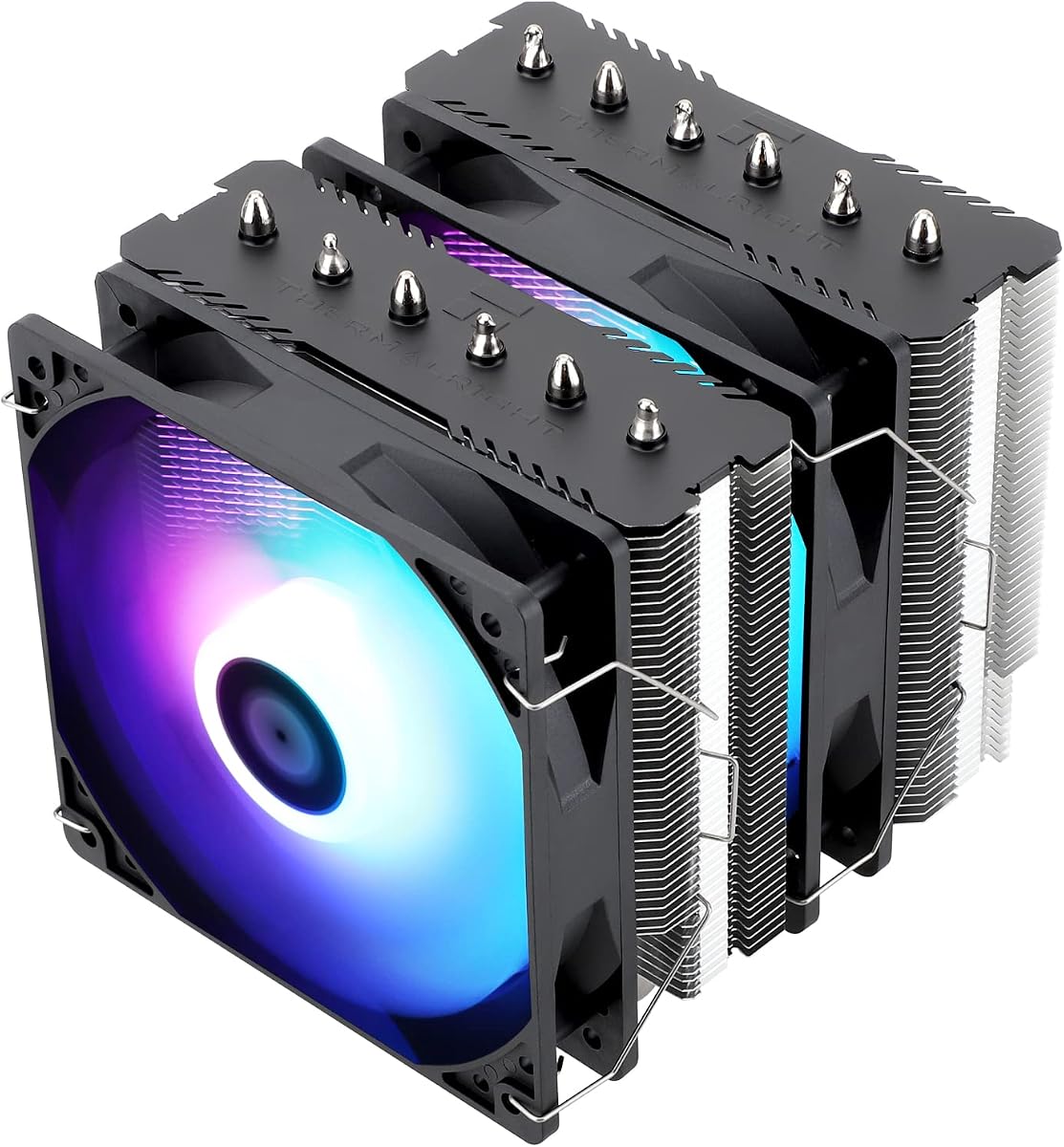
Thermalright Peerless Assassin 120 SE
4.7Editor score
6 Heat Pipes
Dual TL-C12C-S Fans
AGHP Technology
Discover the top 10 CPU Air Cooler Fan Heatsink options. Compare specs, ratings, and features to find the perfect cooling solution for your build.
Finding the right CPU Air Cooler Fan Heatsink is essential for maintaining optimal performance and longevity in your computer system. Whether you are building a new gaming rig or upgrading an existing workstation, efficient heat dissipation ensures your processor runs smoothly under load without thermal throttling.
We have carefully analyzed the market to bring you a comprehensive list of the most reliable and effective air cooling solutions available today. Our selection criteria include thermal performance, noise levels, build quality, compatibility with modern sockets, and overall value for money to help you make an informed decision.
Each product on this list offers unique strengths tailored to different needs, from budget-friendly options to premium high-performance coolers. While the specifications and ratings provided are accurate based on current data, please note that prices and availability can change frequently, so checking the latest details before purchasing is always recommended.
4.7Editor score

4.8Editor score

4.8Editor score
This side-by-side comparison highlights the key specifications and features of all ten selected products to help you quickly identify which cooler best fits your specific case size, socket type, and performance requirements.


The Noctua NH-D15 chromax.Black stands out as the definitive choice for users seeking the highest performance without switching to liquid cooling. With a stellar 4.8 rating, this cooler is renowned for its ability to handle high thermal loads while maintaining exceptionally low noise levels. The all-black design ensures it blends seamlessly with modern aesthetic preferences without sacrificing the iconic Noctua reliability.
We may earn a commission when you buy through this link, at no additional cost to you.
At its core, this cooler features a dual-tower design equipped with six heatpipes and two NF-A15 140mm fans. These fans are engineered for low noise acoustics while delivering massive airflow, supported by Low-Noise Adaptors for even quieter operation at lower speeds. The SecuFirm2 mounting system ensures a secure fit across Intel and AMD sockets, including the latest AM5 and LGA1851 configurations.
While the performance is undeniable, the sheer size of the NH-D15 can be a consideration for smaller cases or those with tall RAM modules. However, the offset mounting option and generous clearance usually mitigate these concerns. The inclusion of high-end NT-H1 thermal paste further simplifies the installation process, ensuring optimal thermal transfer right out of the box.
This cooler is best suited for enthusiasts, overclockers, and silent computing advocates who prioritize performance and silence above all else. Whether you are running a high-end Core Ultra or Ryzen 9, the NH-D15 chromax.Black provides the thermal headroom needed for sustained performance without the complexity of a pump or fluid maintenance.
The dual-tower architecture combined with six heatpipes allows heat to dissipate rapidly, keeping CPU temperatures low even under heavy multi-core loads.
Thanks to the NF-A15 fans and S-FDB bearings, the system operates silently, making it ideal for media centers or quiet office environments.
We may earn a commission when you buy through this link, at no additional cost to you.
The Thermalright Peerless Assassin 120 SE offers a compelling mix of affordability and high-end performance, earning a robust 4.8 rating. It brings dual-tower cooling to the budget segment, featuring six heat pipes and two high-speed PWM fans that rival much more expensive models. Its design focuses on maximizing heat exchange surface area while keeping the cost accessible for everyone.
We may earn a commission when you buy through this link, at no additional cost to you.
Key features include soldered heat pipes for improved thermal transfer and an AGHP technology that mitigates gravity issues depending on case orientation. The dual TL-C12C fans provide over 66 CFM of airflow with noise levels around 25.6dB, ensuring efficient cooling without drowning out your system. The nickel-plated base and brushed top cover add durability and a premium look.
Installation is straightforward, though users with massive RAM heatsinks should check clearance due to the wider footprint. The offset asymmetrical layout helps with graphics card compatibility, but it remains a large component for smaller cases. Despite its size, the cooler remains compatible with most standard tower cases without major modifications.
If you are looking for a cooler that punches well above its price point, the Peerless Assassin 120 SE is an excellent choice. It is particularly recommended for builders who want robust cooling for gaming or content creation without overspending, ensuring your CPU stays cool during demanding tasks.
Soldered heat pipes ensure direct contact between the base and the pipes, enhancing the speed at which heat moves away from the CPU.
AGHP technology allows the cooler to function effectively regardless of whether it is installed vertically or horizontally in your case.
We may earn a commission when you buy through this link, at no additional cost to you.
The Noctua NH-U12A chromax.Black delivers top-tier performance in a more compact 120mm form factor, ideal for cases where dual towers might not fit. Rated 4.8 by users, it utilizes seven heatpipes and dual NF-A12x25 fans to achieve cooling power that rivals larger units. The chromax.black finish provides a sleek, uniform look suitable for modern builds.
We may earn a commission when you buy through this link, at no additional cost to you.
This cooler excels in compatibility, ensuring it does not overhang RAM slots or block PCIe connectors on most ATX and Micro-ATX boards. The dual fans offer excellent airflow and pressure, controlled by PWM to keep noise at bay. The SecuFirm2 mounting system ensures stability, and the included NT-H1 paste guarantees great thermal conductivity.
While it carries a premium price, the build quality and silence justify the investment for many users. The height of 158mm fits within most tower case clearances, making it a versatile option for various chassis sizes. The offset mounting option for AM4 and AM5 allows for fine-tuning thermal performance if needed.
Ideal for users who need powerful cooling but have constraints on width or RAM clearance, the NH-U12A is a fantastic alternative to bulkier dual-tower coolers. It is perfect for office workstations or gaming PCs where aesthetics and silence are paramount, offering a reliable solution for long-term use.
The NF-A12x25 fans use advanced impeller designs to deliver high static pressure and airflow while maintaining whisper-quiet acoustics.
Full support for Intel LGA1851/1700 and AMD AM5/AM4 ensures this cooler will remain relevant as you upgrade your CPU in the future.
We may earn a commission when you buy through this link, at no additional cost to you.
The Thermalright Assassin X120 Refined SE is a reliable budget-friendly option that delivers solid cooling for standard usage scenarios. With a 4.7 rating, it features four heatpipes and a single TL-C12C PWM fan, making it an efficient solution for non-overclocked builds. The AGHP technology ensures it works well regardless of orientation in your case.
We may earn a commission when you buy through this link, at no additional cost to you.
Its dimensions are designed to fit medium-sized computer cases without obstructing other components. The noise level stays low at 25.6dB, ensuring the fan does not interfere with your work or entertainment. The aluminum heatsink cover provides durability while keeping the weight light at 0.645kg.
Installation is supported by metal fasteners for both Intel and AMD platforms, though you might need the original backplate for some AM5 boards. The height of 148mm is friendly to most RAM modules and GPU clearance. While it lacks the power of dual-tower options, it handles typical workloads with ease.
For budget builders or those with tight cases, this cooler offers a great balance of performance and cost. It is suitable for office PCs or budget gaming rigs where the CPU does not generate excessive heat, ensuring stable operation without adding unnecessary expense to your build.
The AGHP technique solves inverse gravity effects, ensuring heat pipes function correctly even when the cooler is installed horizontally.
The TL-C12C fan is tuned for low noise, making it ideal for users who prioritize a quiet environment over extreme overclocking.
We may earn a commission when you buy through this link, at no additional cost to you.
This iteration of the Noctua NH-U12A chromax.Black continues to impress with its tower design and dual-fan configuration. The 4.8 rating reflects its ability to handle high-performance CPUs while keeping noise levels minimal. It stands out for its ability to integrate seamlessly into complex builds where RAM space is limited.
We may earn a commission when you buy through this link, at no additional cost to you.
The use of dual NF-A12x25 fans allows for efficient air movement across the heatsink fins, maximizing cooling efficiency. The SecuFirm2 mounting system simplifies the process, ensuring a tight fit with the processor die for optimal heat transfer. The matte black color matches well with modern blacked-out builds.
While the price is higher than many competitors, the longevity and performance make it a worthy investment. The height of 158mm is standard for tower coolers, fitting comfortably in most cases. The 6-year warranty provides peace of mind for long-term usage scenarios.
Users seeking a reliable, high-performance cooling solution that respects case dimensions will find this model ideal. It is particularly beneficial for those using tall memory kits or who require PCIe clearance, offering a blend of power and practicality that few other coolers match.
The NF-A12x25 fans are engineered to move air effectively across dense fins, ensuring heat is expelled quickly from the system.
Built with premium materials and backed by a long warranty, this cooler is designed to last for years of reliable service.
We may earn a commission when you buy through this link, at no additional cost to you.
The Thermalright Assassin X 120R Digital ARGB introduces a unique digital screen to the CPU cooler market, offering real-time monitoring of temperatures. Rated 4.7, this model combines performance with aesthetics, using a high-speed PWM fan and four heat pipes to dissipate heat efficiently. The LCD top cover displays CPU and GPU temperatures instantly.
We may earn a commission when you buy through this link, at no additional cost to you.
The fan runs at 2000 RPM, delivering significant airflow at 70.84 CFM to handle demanding loads. ARGB lighting syncs with the motherboard for a unified lighting effect. The symmetrical all-aluminum fins and digital cover enhance the look without compromising cooling capacity. Height is 151mm, fitting most standard cases easily.
The digital screen requires software configuration, which might be a hurdle for some users. Noise is slightly higher at 29.8dB due to the higher fan speed, but acceptable for performance-focused builds. The top cover design adds a premium feel to an otherwise standard tower cooler.
This cooler is perfect for enthusiasts who want to monitor temperatures visually without software overlays. It is ideal for gaming rigs where aesthetics and instant thermal data are valued, offering a modern twist on traditional air cooling with functional and decorative benefits.
The top cover screen allows you to see vital stats like CPU temperature and usage at a glance, adding utility to your build.
The fan lighting syncs with your system to create a cohesive aesthetic look that enhances the overall visual appeal of the PC.
We may earn a commission when you buy through this link, at no additional cost to you.
The classic Noctua NH-D15 is a legendary choice for high-performance cooling, earning a 4.8 rating for its consistent reliability. This dual-tower design features two NF-A15 fans that deliver massive airflow and static pressure, keeping CPUs cool even under intense overclocking. The SecuFirm2 mounting system ensures it stays firmly in place.
We may earn a commission when you buy through this link, at no additional cost to you.
Six heatpipes distribute heat quickly across the massive fins, supported by low-noise adaptors for whisper-quiet operation. The included NT-H1 paste is a proven thermal interface material that simplifies the setup process. It supports all modern sockets, making it a future-proof choice for upgrades.
Its large footprint requires careful case selection, as it may not fit in small form factor cases. However, for standard ATX builds, the performance is unmatched. The brown and beige color scheme is distinctive, though many prefer the chromax.black variant for a different look.
This cooler is for those who demand the absolute best from air cooling. It is ideal for workstation tasks, gaming marathons, and silent builds, providing peace of mind that your system will not overheat even under maximum stress.
Decades of refinement have led to a design that balances thermal performance and noise levels better than almost any other air cooler.
Support for a wide range of sockets means this cooler will work with your current CPU and any future upgrades you might make.
We may earn a commission when you buy through this link, at no additional cost to you.
The Noctua NH-D15S chromax.Black features an asymmetrical single-fan design that offers dual-tower performance with better compatibility. Rated 4.8, it solves the clearance issues often found with twin-tower models by shifting the second tower. It includes one NF-A15 140mm fan and low-noise adaptors for quiet operation.
We may earn a commission when you buy through this link, at no additional cost to you.
This design ensures that the cooler does not block the PCIe slot on most ATX boards, making it highly versatile. The SecuFirm2 mounting system and included NT-H1 paste make installation straightforward. The all-black design complements modern aesthetic preferences perfectly.
While it is still a large component, the 65mm RAM clearance is a significant advantage for builders using tall memory modules. The height is 160mm, which fits most tower cases. The asymmetrical layout maintains cooling performance close to the standard NH-D15 while improving usability.
This is the ideal choice for users who want maximum performance but need to ensure compatibility with their motherboard's layout. It is particularly recommended for those with tall RGB RAM or specific motherboard constraints, offering a perfect balance of power and practicality.
The asymmetrical design allows for better clearance around RAM and PCIe slots, avoiding common issues with standard dual-tower coolers.
Despite the single fan, the high efficiency of the NF-A15 ensures the system stays cool and quiet even under heavy workloads.
We may earn a commission when you buy through this link, at no additional cost to you.
The Noctua NH-D9L is a compact dual-tower solution ideal for smaller builds, earning a 4.7 rating for its efficiency in small form factors. With a height of 110mm, it fits easily into HTPC and ITX cases. The NF-A9 92mm fan provides solid airflow with ultra-quiet operation thanks to PWM support.
We may earn a commission when you buy through this link, at no additional cost to you.
Its design ensures it does not overhang RAM or PCIe slots, making it safe for compact motherboards. The SecuFirm2 mounting system guarantees a secure fit, and the included NT-H1 paste ensures optimal thermal transfer. It is a premium option for small cases that need high performance.
While it is less powerful than larger 140mm coolers, it is a significant upgrade over stock coolers in small builds. The dual-tower layout helps maximize the cooling surface area within a small footprint. It is perfect for users who want quiet cooling without sacrificing too much performance.
This cooler is highly recommended for those building HTPCs, mini-ITX gaming rigs, or office PCs. It provides the peace of mind that comes with a Noctua product, ensuring your system stays cool and quiet even in restrictive chassis environments.
At 110mm height, it clears standard GPU heights, allowing for a powerful cooling solution in tiny cases where space is limited.
The NF-A9 fan moves air effectively across the fins, delivering better cooling than typical stock options without adding noise.
We may earn a commission when you buy through this link, at no additional cost to you.
The Noctua NH-U12S is a classic single-tower cooler that offers outstanding performance in a slim form factor, rated 4.8. Its design avoids overhang issues on RAM and PCIe slots, making it highly compatible with various motherboards. The NF-F12 focused flow fan delivers excellent cooling with minimal noise.
We may earn a commission when you buy through this link, at no additional cost to you.
It includes the SecuFirm2 mounting system for a secure installation and NT-H1 paste for optimal thermal conductivity. The height of 158mm fits most cases. This cooler is a reliable choice for users who need more than a stock cooler but do not need the bulk of a dual-tower unit.
The single fan design simplifies the build and reduces potential noise sources. While it may not match the cooling capacity of larger models, it is sufficient for most non-overclocked CPUs. The build quality is premium, reflecting the Noctua reputation for durability and efficiency.
This cooler is ideal for users seeking a balance between performance and footprint. It is suitable for office builds or gaming PCs where standard cases are used. It provides a silent, effective cooling solution that ensures stability without complicating the build process.
The NF-F12 fan is designed to focus airflow on the fins, maximizing heat dissipation efficiency with a single fan.
The slim tower design ensures it fits in tight spaces while still delivering performance that outpaces most stock solutions.
We may earn a commission when you buy through this link, at no additional cost to you.
Choosing the right CPU air cooler involves understanding various technical aspects to ensure compatibility and performance. This guide breaks down the key factors you should consider before making a purchase.
The height of the cooler is critical for ensuring it fits inside your computer case. Most mid-tower cases accommodate coolers up to 160mm, but smaller cases may require compact options. Always check your case specifications against the cooler dimensions to avoid clearance issues.
Ensure the cooler height matches your case clearance to prevent physical incompatibility with the side panel or other components.
Verify that the cooler supports your CPU socket type, such as LGA1700 for Intel or AM5 for AMD. Newer CPUs require specific mounting brackets which should be included in the box.
Check socket compatibility to ensure the mounting kit works with your specific motherboard and CPU generation.
Noise levels are measured in decibels (dB) and indicate how loud the fan will be. Lower dB values are quieter, which is important for office or silent setups. Look for PWM fans that can adjust speed based on temperature.
Prioritize low noise ratings and PWM control to maintain a quiet computing environment during both idle and load conditions.
Thermal performance depends on factors like heat pipe count, surface area, and fan speed. Dual-tower coolers generally dissipate heat better than single towers, making them suitable for high-end processors.
Select a cooler with sufficient thermal capacity to handle your CPU's heat output without throttling under load.
Some coolers extend over the RAM slots, which can block tall memory modules. Models with offset designs or single towers often provide better RAM clearance.
Confirm that the cooler design leaves enough space for your RAM modules to install without obstruction.
Modern coolers often feature ARGB lighting or chromax finishes to match your build theme. If you prefer a discreet look, choose a model with a plain finish.
Choose a visual style that aligns with your system's theme to ensure a cohesive and pleasing look.
Quality coolers come with comprehensive mounting systems and instructions. SecuFirm2 or similar systems make installation easier and secure. Look for models that include thermal paste.
Ensure the cooler has a user-friendly mounting system to simplify the assembly process.
Air coolers range from budget options to premium high-end models. Determine your budget while balancing performance needs to get the best value for your money.
Consider the cost relative to performance to find a balance that meets your needs without overspending.
To ensure optimal performance, apply a thin layer of thermal paste between the CPU and the cooler base before mounting. This helps transfer heat more efficiently and reduces air pockets that could cause hot spots.
Clean the cooler regularly using compressed air to remove dust buildup from the fins. Accumulated dust acts as an insulator and restricts airflow, leading to higher temperatures and louder fans.
Check the fan connections periodically to ensure they are securely plugged into the motherboard headers. Verify the mounting screws are tight to prevent any movement that could affect thermal transfer.
Air coolers are generally more reliable and easier to install than liquid cooling. They do not have pumps that can fail or require maintenance, making them a safer choice for long-term use.
Most quality air coolers come with thermal paste pre-applied or included in the box. Always verify if additional paste is needed before installation to ensure good contact.
This depends on the cooler's width and RAM height. Choose a cooler with offset or slim towers if you plan to use tall RGB memory modules.
Quality coolers operate silently, around 25dB. Noise increases with fan speed but remains manageable with PWM control for balanced performance.
Yes, most modern coolers support AM5. Verify the socket support list to ensure the mounting kit is included for your motherboard.
Use compressed air to blow dust out of the fins. Remove the fan if possible for deeper cleaning, and avoid spinning the blades with the air stream.
In summary, the Noctua NH-D15 chromax.Black, Thermalright Peerless Assassin 120 SE, and Noctua NH-U12A chromax.Black represent the top choices for performance, value, and single tower needs respectively.
When selecting a cooler, prioritize your case dimensions and CPU requirements. Balance your budget with the features that matter most to your specific use case.
Remember to check current prices and availability before purchasing. Cooling solutions vary in stock, so comparing the latest offers helps secure the best deal for your build.