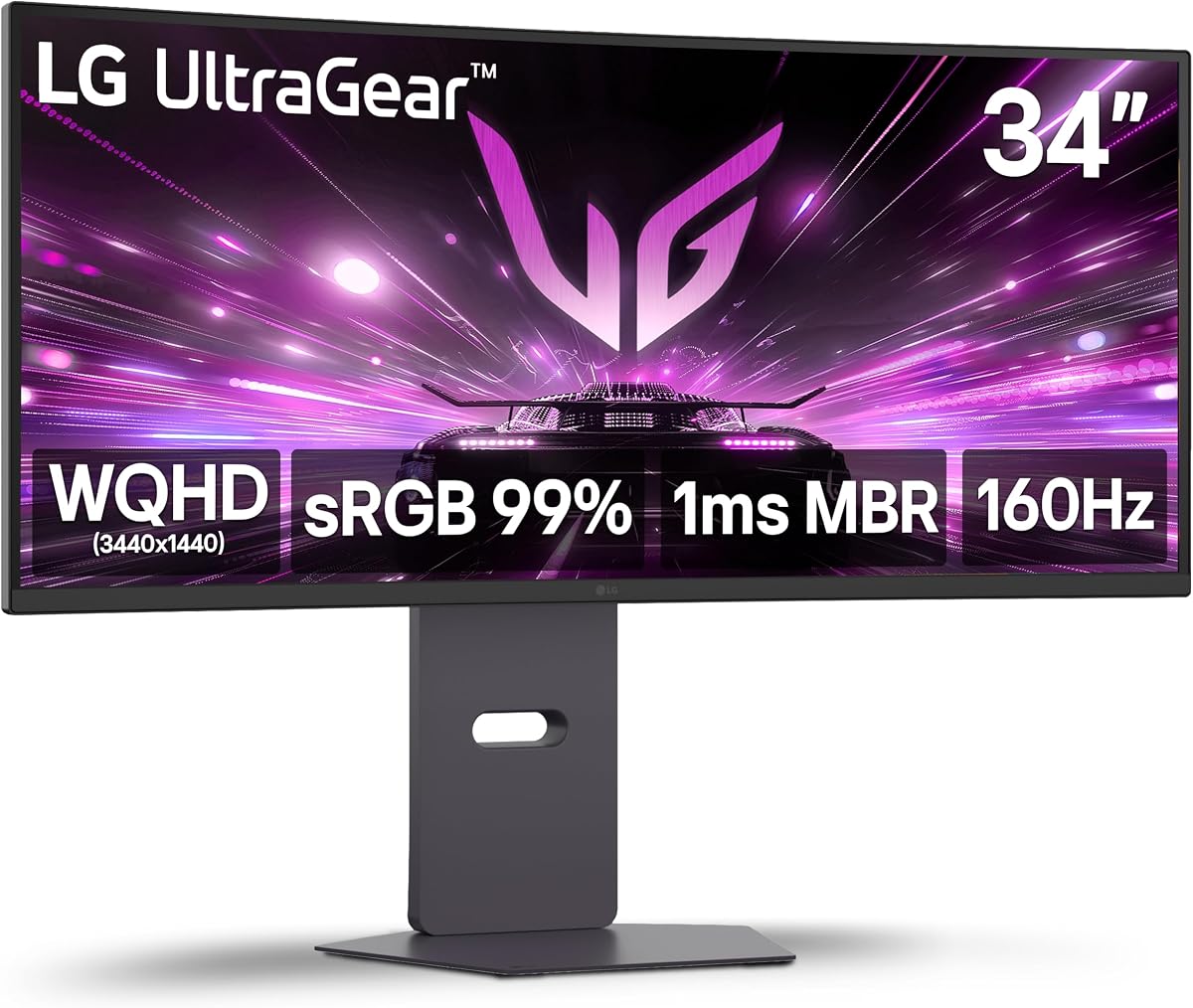
LG 34G600A-B 34-inch Ultragear
4.5Editor score
34 inch WQHD curved display
AMD FreeSync Premium support
Built-in Waves MaxxAudio speakers
Finding the right gaming monitor can transform your experience from flat to immersive. Curved displays wrap around your field of view, reducing eye strain and drawing you deeper into the action. When paired with a 160Hz refresh rate, these screens deliver silky smooth motion that competitive players demand for fast-paced titles.
We have analyzed ten distinct models ranging from budget-friendly 24-inch options to premium ultrawide panels. Our evaluation focuses on response times, color accuracy, connectivity options, and overall build quality. Each product was selected based on user ratings and verified specifications to ensure reliability and performance.
Every pick in this list highlights specific strengths whether you need budget value or high-end features. We detail key specs and pros to help you decide quickly. Please note that availability and pricing can change frequently so check the links for the most current information before purchasing.
4.5Editor score

4.4Editor score

4.5Editor score
As an Amazon Associate we earn from qualifying purchases.
This side-by-side comparison helps you visualize the differences between each model at a glance. We highlight key specifications like resolution, refresh rate, and curvature to make your decision easier.






This monitor stands out as a top choice for budget-conscious gamers who refuse to compromise on refresh rate. With a solid 4.4 rating from users, it delivers reliable performance for competitive gaming without breaking the bank. The 24-inch form factor fits easily on most desks while offering an immersive curved view.
We may earn a commission when you buy through this link, at no additional cost to you.
Its key strengths lie in the 160Hz refresh rate and 110% sRGB color coverage which ensure smooth motion and vibrant visuals. The 1500R curvature is designed to reduce eyestrain during long sessions by wrapping the screen slightly around your vision. Features like black level adjustment and various game modes help tailor the display for specific genres like FPS or RTS.
While it lacks built-in speakers, this is a common trade-off at this price point and allows you to use better external audio. The stand only offers tilt adjustment so you might need a VESA mount for better ergonomics. These minor drawbacks are acceptable given the high performance and low cost relative to competitors.
This model is ideal for students or entry-level gamers needing a capable curved screen for 1080p gaming. If you prioritize smooth frame rates and good color output without spending much, this SANSUI option is a strong recommendation. It balances essential gaming features with affordability effectively.
The 1500R curve pulls you into games by matching the natural curve of the human eye. This reduces peripheral distortion and helps you focus on the center of the action more naturally.
HDMI 2.0 and DP 1.4 ports ensure you can connect to modern consoles and PCs without bottlenecking the 160Hz refresh rate. This flexibility supports both gaming PC and console setups seamlessly.
We may earn a commission when you buy through this link, at no additional cost to you.
This 27-inch model expands the viewing area compared to the 24-inch variant while keeping the same responsive performance. Users appreciate the extra screen real estate for multitasking and media consumption alongside gaming. The 4.4 rating reflects general satisfaction with its image quality and smoothness.
We may earn a commission when you buy through this link, at no additional cost to you.
The 160Hz refresh rate ensures fluid gameplay with minimal motion blur thanks to the 1ms MPRT response time. The 4000:1 contrast ratio provides deep blacks which enhance visibility in dark game scenes. You can toggle HDR mode via the OSD menu for added dynamic range when watching movies or playing supported titles.
A potential downside is that 1080p resolution on 27 inches may show some pixelation compared to higher resolutions. However, for budget gamers this trade-off is often acceptable for the cost savings. You will need external speakers as this unit does not include them.
This monitor fits users wanting a bigger screen without increasing their budget significantly. It is particularly good for casual gaming and office work where screen size matters more than ultra-high resolution. The flexible preset modes allow quick optimization for different activities.
Features like crosshair overlay and game timers help improve gameplay mechanics in competitive titles. These tools are accessible through the OSD and can be toggled without interrupting your session.
Low blue light and anti-flicker technologies reduce eye strain during long sessions. This makes it suitable for extended work or gaming periods where comfort is a priority.
We may earn a commission when you buy through this link, at no additional cost to you.
With a 4.5 rating this model offers high satisfaction for its price point. It is designed for users who need a reliable gaming display without extra frills. The 24-inch size is standard for competitive gaming setups where focus is key.
We may earn a commission when you buy through this link, at no additional cost to you.
It delivers a 160Hz refresh rate for fast-paced gaming which smooths out motion significantly compared to standard 60Hz panels. The DCI-P3 97% color coverage ensures vibrant visuals suitable for media and games alike. Flicker-free and blue light reduction features protect your eyes during extended use.
The stand only tilts which might limit ergonomic positioning for some users. Also the lack of speakers means you need separate audio. However these are typical compromises for budget monitors and do not affect core performance.
This is perfect for budget gamers or students needing a solid entry-level monitor. It covers essential specs like refresh rate and color well. If you want high performance at a low cost this is a top candidate.
The Kensington lock slot allows you to secure the monitor in public or shared spaces. This adds a layer of security against theft or unauthorized removal.
The 178-degree viewing angle ensures consistent color and brightness from side angles. This is useful when multiple people view the screen or if your setup limits direct viewing.
We may earn a commission when you buy through this link, at no additional cost to you.
This 32-inch 4K monitor is ideal for those wanting maximum detail and immersion in games or content creation. The 1500R curve enhances the widescreen experience making it feel like a window into the game world. A 4.3 rating indicates solid performance among users.
We may earn a commission when you buy through this link, at no additional cost to you.
Its standout feature is the 3840×2160 resolution which offers nearly four times the pixel count of 1080p. This sharpness is perfect for text work and detailed game environments. The built-in speakers add convenience by eliminating cable clutter on your desk.
However driving 4K at 160Hz requires a high-end graphics card which may increase total system costs. The price is also higher than budget options which might not suit all buyers. But for creators and enthusiasts the benefits outweigh these requirements.
Buy this if you need high resolution for creative work and gaming with a large screen. The integrated audio and HDR support make it versatile for media consumption too. It bridges the gap between gaming and productivity effectively.
With 120% sRGB coverage it reproduces colors accurately for photo and video editing. This makes it a dual-purpose tool for both work and play.
HDMI 2.1 and DP 1.4 support next-gen consoles and PCs easily. This future-proofs your setup for upcoming hardware upgrades.
We may earn a commission when you buy through this link, at no additional cost to you.
This LG Ultragear model represents a top-tier experience with its WQHD resolution and premium build quality. A 4.5 rating highlights its ability to deliver both performance and comfort. The 34-inch size offers ample space for multitasking and immersive gaming.
We may earn a commission when you buy through this link, at no additional cost to you.
Key strengths include the AMD FreeSync Premium which minimizes screen tearing during fast action. The stand allows height and swivel adjustments ensuring a comfortable viewing position. Waves MaxxAudio speakers provide surprisingly rich sound for integrated audio solutions.
The curvature is 1800R which is flatter than some competitors but still effective for this screen size. It may feel less immersive to those used to tighter curves but the wider aspect ratio compensates well. The price reflects its premium features so it is an investment.
Perfect for professionals and gamers who want the best of both worlds. The ergonomic stand and color accuracy make it great for long hours. If budget allows this is a standout choice for high-end setups.
Black Stabilizer and Crosshair features help in spotting enemies and aiming accurately. These tools are built into the OSD for quick access without drivers.
Reader Mode adjusts the display for text work reducing eye strain. This is useful when switching between gaming and document editing frequently.
We may earn a commission when you buy through this link, at no additional cost to you.
This renewed version offers the same high-end specs as the brand-new model at a reduced price. With a perfect 5.0 rating it shows high satisfaction among buyers who opted for refurbished. It is ideal for getting premium features without the premium price tag.
We may earn a commission when you buy through this link, at no additional cost to you.
You get the same WQHD resolution 160Hz refresh rate and ergonomic stand adjustments. The unit is typically tested and certified to work like new with warranty coverage. This makes it a safe choice for budget-conscious buyers wanting quality.
The only downside is that it might have minor cosmetic imperfections that do not affect performance. Stock levels vary so availability is not guaranteed at all times. But the cost savings are significant compared to buying new.
Choose this if you want top specs and trust certified refurbished products. It is a smart way to get into premium gaming displays affordably. Great for those looking for value without compromising on core features.
Renewed units usually come with a warranty to protect against defects. This gives peace of mind similar to buying a new device.
Opting for renewed reduces electronic waste and promotes sustainability. It extends the life of high-quality hardware already in circulation.
We may earn a commission when you buy through this link, at no additional cost to you.
This Samsung monitor is known for its intense 1000R curvature that wraps tightly around your vision. A 4.4 rating suggests users love the immersive feel it brings to gaming. The 32-inch size provides plenty of space for detail and multitasking.
We may earn a commission when you buy through this link, at no additional cost to you.
The 1000R curve is designed to match the human eye which reduces distortion across the screen. This creates a more realistic view which is great for racing or flight sims. The QHD resolution ensures crisp text and game assets on a large panel.
Some users may find the curve too strong for non-gaming tasks like spreadsheets. The stand offers basic tilt which might require a VESA mount for better adjustment. However the visual experience often justifies these trade-offs.
Ideal for gamers who prioritize immersion and have a deep enough desk. The 165Hz rate ensures smooth motion in fast games. If you want to feel like you are inside the game this is a strong pick.
A 1ms response time eliminates blur so you can react instantly in combat. This is crucial for competitive titles where split-second decisions matter.
Eye Saver Mode reduces blue light to help keep eyes relaxed. This supports healthier habits during long gaming sessions.
We may earn a commission when you buy through this link, at no additional cost to you.
This model combines an ultrawide format with high refresh rates for a dynamic experience. A 4.2 rating indicates it is well-received for its feature set. The 21:9 ratio gives you 30% more screen space than standard monitors for multitasking.
We may earn a commission when you buy through this link, at no additional cost to you.
The 180Hz refresh rate delivers fluid motion which is great for fast-paced games. LED lights on the back add a modern aesthetic to your setup. Built-in speakers mean you can get started without extra hardware right away.
Some users report inconsistencies in software or settings adjustments. While the hardware is solid the user interface might need familiarity. These issues do not impact basic performance but could affect ease of use.
This is suitable for users wanting ultrawide productivity and gaming at a reasonable cost. If you like RGB styling and extra screen space this fits well. Check reviews for specific batch quality before purchasing.
The ultrawide screen allows multiple windows side by side comfortably. This is perfect for coding or managing spreadsheets while referencing other data.
Luminous backcover lights add a modern look to your desk setup. These can be customized to match your gaming rig's theme or mood.
We may earn a commission when you buy through this link, at no additional cost to you.
Alienware is known for reliability and this model continues that tradition with a 4.6 rating. It offers an iconically designed monitor that fits well in enthusiast setups. The 34-inch WQHD screen delivers sharp visuals and smooth motion.
We may earn a commission when you buy through this link, at no additional cost to you.
Features like VESA DisplayHDR 400 and 180Hz refresh rate ensure vibrant colors and fast response. The dedicated console mode optimizes settings for game consoles which enhances experience significantly. Low blue light hardware solutions protect eyes without affecting color accuracy.
The price is high reflecting the brand value and premium features. Menus can be complex for new users but provide deep customization. This is not a budget item but offers quality that justifies the cost.
Choose this if you want a trusted brand with top-tier performance. It suits those who value design and HDR quality highly. Great for serious gamers and console users seeking reliability.
Dedicated console mode adjusts input lag and brightness for game consoles. This ensures a plug-and-play experience for Xbox or PlayStation users.
The sleek stand and bezel design looks modern and premium. This adds a touch of elegance to any desk setup.
We may earn a commission when you buy through this link, at no additional cost to you.
This model focuses on speed with a 200Hz refresh rate for ultra-smooth gameplay. A 4.5 rating shows users are happy with its responsive performance. The 34-inch screen provides a wide view for action-packed titles.
We may earn a commission when you buy through this link, at no additional cost to you.
The 0.3ms MPRT response time minimizes blur which helps in tracking fast moving targets. Height adjustment allows you to set the screen at eye level reducing neck strain. HDR ready support adds dynamic contrast for better scene visibility.
Note that 100Hz is max over HDMI so DisplayPort is best for full speed. VA panels can sometimes show minor ghosting which varies per unit. But overall speed is a key strength here for competitive play.
Perfect for gamers prioritizing refresh rate and ergonomics in an ultrawide. The price is competitive for these specs. Check cable choices to ensure you get maximum performance on your setup.
A 0.3ms response ensures your actions reflect instantly on screen. This reduces delays that can impact competitive gaming performance significantly.
Ergonomic stand allows height tilt and swivel adjustments easily. This supports finding the perfect viewing angle for comfort during long sessions.
We may earn a commission when you buy through this link, at no additional cost to you.
Selecting the right monitor involves weighing several factors to match your specific needs and budget. This guide breaks down the most important aspects to consider before making a purchase.
Screen size typically ranges from 24 to 34 inches for these monitors. 24-inch models often use 1080p resolution while 32-inch and larger usually offer 1440p or 4K. Higher resolution provides more clarity but requires a stronger graphics card to drive 160Hz smoothly. If you prioritize speed and have limited GPU power 1080p on 24 inches is a practical choice.
Curvature is measured in R where a lower number means a tighter curve. 1500R is common for immersion without too much distortion. 1000R is tighter and more immersive but can warp desktop interfaces. 1800R is flatter and better for productivity mixed with gaming. Choose based on how much immersion you prefer versus how much you use the monitor for work.
Refresh rate determines how many frames the screen shows per second with 160Hz offering smooth motion. Response time measures how fast pixels change color ideally 1ms MPRT to reduce blur. Ensure both specs match your gameplay style especially for competitive titles. Some models allow refresh rates up to 200Hz which provides even smoother motion for high-end systems.
Most curved monitors use VA panels which offer high contrast ratios and deep blacks. IPS panels have better color accuracy but are less common in curved budget options. TN panels are faster but suffer from poor viewing angles. For gaming VA is often the sweet spot balancing contrast and cost effectively.
Adaptive sync like FreeSync or G-Sync matches your GPU to the monitor to reduce tearing. FreeSync is common and works well with AMD and NVIDIA cards. Ensure the monitor supports the sync standard of your graphics card for tear-free gaming. This feature improves visuals without needing extra hardware costs.
Check for HDMI 2.0 or DP 1.4 ports to support high refresh rates at high resolutions. HDMI 2.1 is future-proof for consoles and next-gen PCs. Audio outputs are useful if you lack external speakers. Verify cable availability since some monitors only include HDMI which might need upgrades for DP usage.
Stands vary from basic tilt to full height and swivel adjustments. Ergonomic stands help align the screen with your eyes reducing strain. If the stand is basic ensure VESA mount compatibility for arm installation. Height adjustment is vital for long sessions to maintain good posture comfortably.
Look for high sRGB coverage like 110% to ensure vibrant and accurate colors. Brightness around 300 nits is standard but higher helps in bright rooms. HDR support adds dynamic contrast but works best on models with high brightness. For creators prioritize color accuracy while gamers can balance speed and color.
To get the most out of your monitor start by connecting it via DisplayPort if possible. This ensures you reach the full 160Hz refresh rate without bandwidth limitations. Adjust the OSD settings to enable FreeSync or G-Sync to prevent screen tearing during gameplay.
Clean the screen regularly with a microfiber cloth to avoid scratches. Avoid using harsh chemicals that can damage the anti-glare coating. Keep the monitor out of direct sunlight to reduce glare and maintain brightness levels over time.
Yes 160Hz provides a slightly smoother experience particularly in fast-paced games. While not massive the difference is noticeable if you have a GPU that can support it. It is a good future-proofing measure as game engines demand higher frame rates.
Yes curved screens match the natural field of view of your eyes reducing peripheral distortion. This means your eyes do not have to refocus as much between the center and edges. Over time this can help prevent fatigue during long gaming or work sessions.
Yes most curved monitors work well for office tasks especially ultrawide models. The wide screen allows multiple windows side by side for productivity. However high resolutions like 1440p ensure text remains sharp for reading and writing.
DisplayPort 1.4 is the most reliable choice for 160Hz at high resolutions. HDMI 2.0 can support 160Hz at 1080p but may not work at 1440p. Always check your monitor's manual to confirm supported cables and ports for your setup.
Built-in speakers are convenient for casual use but lack depth compared to external options. They work for menu navigation and single-player games. For immersive sound you might want dedicated speakers or headphones to enhance the experience.
Budget monitors often have HDR modes that are limited compared to premium displays. They can enhance contrast slightly but lack the brightness for true HDR content. Enable it if you enjoy movie watching but expect minor improvements in dark scenes.
Enable overdrive or MPRT settings in the OSD to reduce motion blur. Ensure response time is set to 1ms for fastest pixel transitions. Also avoid using motion blur in-game if possible to maintain crisp visuals during movement.
A 27-inch monitor is versatile and great for both gaming and productivity. At 1080p it might show pixelation but at 1440p it is ideal. If you sit close 24 inches might be more comfortable but 27 inches gives more immersion.
We reviewed ten models ranging from budget-friendly 24-inch options to premium 34-inch ultrawides. The SANSUI 24-inch models stand out for value while LG and Alienware offer premium features for enthusiasts. Each product has unique strengths depending on your needs and setup space.
Prioritize response time and refresh rate if you play competitive games. For creators focus on color accuracy and resolution. Ergonomics matter if you work long hours so consider stands with height adjustment. Your usage defines the best match more than price alone.
Prices and availability change frequently so check current listings before buying. We hope this guide helps you find a monitor that enhances your gaming experience. Happy gaming and enjoy the immersion these curved screens bring to your setup.