
Topping DX1 II Game HiFi DAC
4.5Editor score
ES9039Q2M DAC chip
10-Band parametric EQ included
Fully balanced headphone amplifier
Discover the top 10 DACs for PS5 to enhance audio fidelity. Compare features, specs, and real user ratings to find your perfect match.
Finding the right digital-to-analog converter for your PlayStation 5 can transform your gaming experience. A quality DAC delivers clearer sound, richer bass, and more precise positional audio. This guide reviews the best options available to elevate your setup.
We have evaluated ten top-rated models based on performance, connectivity, and user feedback. Our comparison covers various price points and features like Bluetooth support, multiple inputs, and specialized gaming enhancements. Each product offers unique benefits for different needs.
Below you will find detailed reviews and specifications for each selected model. Please note that prices and availability can change frequently. Check current listings for the most up-to-date information before making your final purchase decision today.
4.5Editor score

4.7Editor score

4.3Editor score
This table provides a quick overview of key specifications for all ten models reviewed in this guide. Compare inputs, output power, and special features to find the right fit for your specific audio needs and budget constraints today.




The Fosi Audio K7 stands out as a versatile hub for any serious gaming setup. With a high rating from users, it delivers audiophile-grade performance that enhances every aspect of your audio experience. Its ability to handle high-resolution formats ensures you hear every subtle detail in games.
We may earn a commission when you buy through this link, at no additional cost to you.
Equipped with the AK4493S DAC and XMOS XU208 processor, the K7 supports PCM up to 384kHz and DSD256. This powerful combination allows for lossless audio decoding that surpasses standard console outputs. The TPA6120 headphone amp provides up to 2100mW output, making it easy to drive even the most demanding headphones with clarity.
While the K7 offers premium features, it does come with a higher price tag and a substantial size that requires dedicated desk space. However, these trade-offs are acceptable for those seeking top-tier audio fidelity and extensive connectivity options. The rugged all-metal build ensures durability over long periods of daily use.
This model is ideal for gamers and audiophiles who want a single unit to handle music, movies, and gaming. If you value high-resolution audio and flexible inputs like Bluetooth and coaxial, the K7 is a strong recommendation. It transforms your PS5 audio into a premium listening experience.
For users wanting a compact solution, the K7 might be too large. But for those prioritizing sound quality above all else, it delivers exceptional performance. The balanced outputs provide even greater detail for high-end equipment setups.
The K7 supports PCM up to 384kHz and DSD256, ensuring you hear every nuance in high-res files.
With USB, optical, coaxial, and Bluetooth inputs, you can connect virtually any source device easily.
We may earn a commission when you buy through this link, at no additional cost to you.
The Topping DX1 II is engineered for users who demand precision and customization in their audio chain. With a 4.5 rating, it excels at providing a clean signal with minimal interference. Its flagship-grade engineering ensures that every sound cue is reproduced with absolute accuracy.
We may earn a commission when you buy through this link, at no additional cost to you.
Built around the ES9039Q2M DAC chip and XMOS XU-316 processor, the DX1 II supports PCM up to 384kHz. A standout feature is the 10-band parametric EQ accessible via a web interface. This allows you to sculpt your sound precisely, such as boosting footsteps for competitive gaming without affecting other audio frequencies.
Despite its performance, the DX1 II has fewer input options than some desktop models and relies on a web browser for EQ settings. While minor inconveniences, they do not detract from the overall quality of sound. The unit offers a dead-quiet background, making it perfect for sensitive IEMs or high-fidelity headphones.
This device is perfect for competitive players who need to tweak audio profiles for specific games or headphones. If you value a silent background and balanced outputs, the DX1 II is a top-tier choice. It combines professional audio specs with gaming-focused usability.
Users seeking simple plug-and-play without software tweaks might find the EQ setup slightly involved. However, the audio quality is worth the effort. The balanced output delivers wider soundstage and tighter dynamics for immersive gameplay.
The 10-band parametric EQ lets you tailor frequencies to your specific headset and game genre.
Engineered with a fully balanced architecture, the noise floor is incredibly low for pristine audio.
We may earn a commission when you buy through this link, at no additional cost to you.
The Fosi Audio K5 Pro offers an impressive entry point for anyone looking to upgrade their PS5 audio. With a 4.3 rating, it proves that good sound does not require a high price. It is designed to be a simple yet effective external sound card for home gaming systems.
We may earn a commission when you buy through this link, at no additional cost to you.
Featuring a Texas Instruments NE5532 op-amp chip, the K5 Pro delivers a low-noise floor and clean sound. It supports inputs like USB-C, Optical, and Coaxial, giving you flexibility in connecting various devices. The device also includes a microphone input, making it convenient for voice chat without extra adapters.
While the K5 Pro is affordable, its output power is lower than more expensive models, which may limit its ability to drive high-impedance headphones fully. Additionally, it lacks advanced features like balanced outputs or extensive EQ controls. These are minor trade-offs considering its budget-friendly nature and core performance.
This unit is ideal for casual gamers who want better audio without spending a lot. If you need a reliable DAC with basic inputs and a mic option, the K5 Pro is a solid choice. It fits easily into most desktop setups without taking up much space.
For users with high-end headphones, you might need more power. But for standard gaming headsets, it performs well. The compact design keeps your desk clean and functional for daily gaming sessions.
The K5 Pro provides essential digital inputs and clear audio at a price point accessible to most users.
Just connect your device via USB-C or optical cable and enjoy improved sound quality immediately.
We may earn a commission when you buy through this link, at no additional cost to you.
The Fosi Audio C3 is specifically engineered for competitive FPS players who need a tactical edge. With a 4.5 rating, it focuses heavily on positional audio clarity. Its StepSense technology allows you to hear enemy movements sooner than standard audio setups provide.
We may earn a commission when you buy through this link, at no additional cost to you.
This device features a flagship CS43131 DAC supporting 32-bit/384kHz PCM. It processes 7.1 surround sound through any stereo headset, giving you precise 360-degree audio positioning. You can also reduce background noise with intelligent mic processing, keeping your voice chat clear during intense matches.
While the C3 excels in gaming audio, it relies on a single USB-C connection which limits direct console connectivity without specific modes. Advanced features like custom EQ profiles require browser-based controls on a PC. These requirements might be a hurdle for console-only users.
This amplifier is perfect for PC gamers or hybrid players who prioritize competitive advantage. If you need better footstep detection and surround sound, the C3 is a strong contender. Its CNC aluminum design adds a premium feel to any desk setup.
Users seeking pure Hi-Fi music playback might look elsewhere for more balanced output. But for gaming, the C3 delivers focused performance. The ergonomic controls make adjusting volume during gameplay effortless.
The StepSense feature enhances enemy movement audio to help you react faster in FPS games.
Native 7.1 surround sound processing works with any stereo headset for immersive directional audio.
We may earn a commission when you buy through this link, at no additional cost to you.
The SteelSeries GameDAC Gen 2 aims to provide a cleaner signal path for your gaming audio. With a 3.8 rating, it offers notable improvements in signal purity compared to previous generations. It is designed to elevate resolution to 96KHz/24-Bit for a richer soundscape in PS5 titles.
We may earn a commission when you buy through this link, at no additional cost to you.
Featuring an ESS Sabre Quad-DAC, this unit supports Hi-Res audio certification. It also includes ClearCast AI noise cancellation to eliminate background noise from your microphone. The 360-degree Spatial Audio is fully compatible with Tempest 3D Audio, allowing you to hear every critical cue.
While it supports multi-system connect for switching between PC and console, it requires specific headset models to maximize certain features. The lower rating score suggests some users may find the performance less consistent than competitors. However, the hardware is robust and built for multimedia use.
This device is good for users already invested in the SteelSeries ecosystem. If you want to switch between systems and enjoy spatial audio without extra hardware, it is a solid option. The design creates a centralized base for your audio needs.
Users seeking universal compatibility with any headset might prefer alternatives. But for SteelSeries owners, integration is seamless. The AI noise cancellation adds value for streaming and voice chat applications.
The ESS Sabre Quad-DAC provides a 78 percent purer signal for more detailed audio.
You can plug in two systems at once and transition between them with a simple button press.
We may earn a commission when you buy through this link, at no additional cost to you.
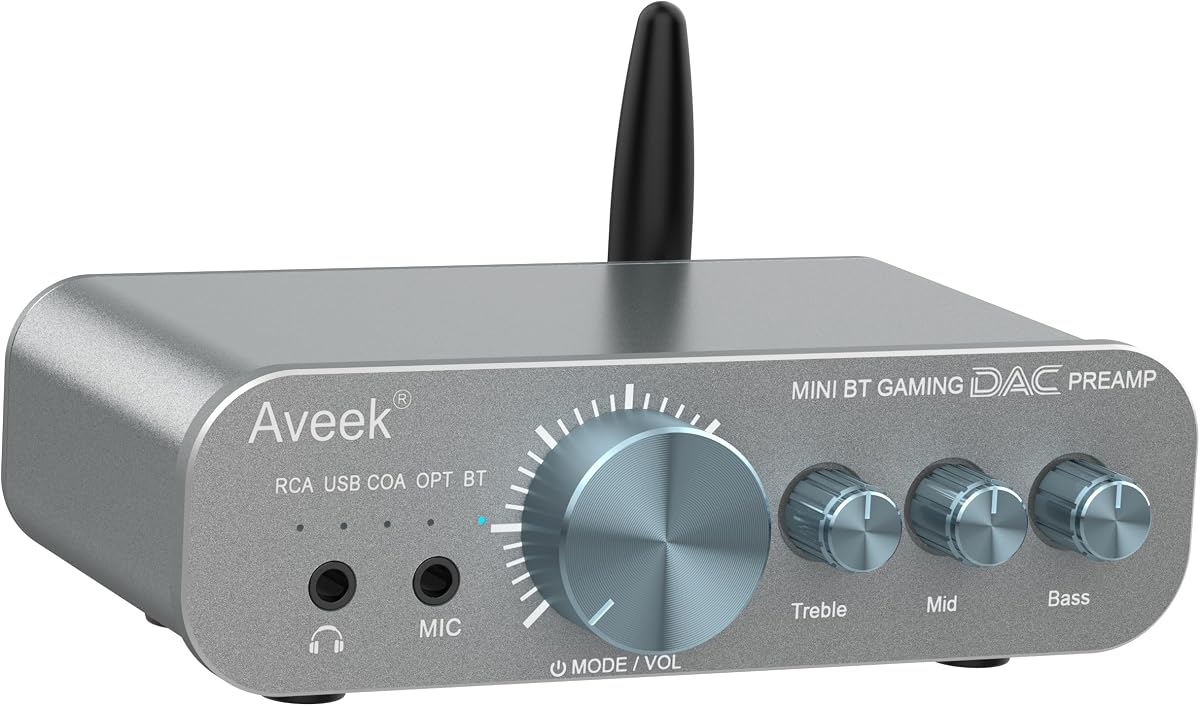
The Aveek Gaming DAC combines a gaming DAC, amplifier, and preamp in one compact unit. With a 4.4 rating, it offers flexible connectivity options like Bluetooth and multiple digital inputs. This makes it easy to switch between your PS5, TV, and smartphone without unplugging cables.
We may earn a commission when you buy through this link, at no additional cost to you.
It supports 24-Bit/96 kHz Hi-Fi audio with low distortion. A unique feature is the true 3-band EQ allowing independent control over bass, mid, and treble. This level of shaping is rare in budget DACs and helps tailor sound for games or movies directly from the front panel.
While the Aveek is versatile, it may not drive high-impedance headphones as effectively as larger desktop units. The build quality is good but standard for its price point. These are minor compromises for a device that offers so many connectivity options in such a small form factor.
This unit is perfect for users who need a central hub for various devices. If you value Bluetooth streaming and easy EQ adjustments, the Aveek is a great choice. It works well for desktop gaming and voice communication.
For audiophiles needing max power, consider a stronger amp. But for general use, the sound is clear and balanced. The preamp output also allows connecting to downstream audio gear easily.
With five inputs including Bluetooth, you can connect virtually any audio source without hassle.
Adjust bass, mid, and treble independently to match your listening preference for any content.
We may earn a commission when you buy through this link, at no additional cost to you.
The SMSL PO100 PRO is designed as a compact USB digital interface rather than a full headphone amp. With a 4.6 rating, it excels at transporting high-quality digital signals to external DACs. It is perfect for travel or setups where you need a clean digital source connection.
We may earn a commission when you buy through this link, at no additional cost to you.
Equipped with the XMOS XU316 chip, it supports PCM up to 32bit/768kHz and DSD native. A key feature is MQA decoding without requiring additional software. You can also use DOP64 with the PS5 via optical or coaxial output, ensuring high-quality audio delivery to your system.
Since it is a converter, it does not output analog signals directly. You will need an external amp or DAC to drive headphones. This limitation makes it less versatile than all-in-one units but highly effective for specific high-fidelity chains.
This device is ideal for audio enthusiasts who already have a quality analog setup. If you need a portable digital interface with high-resolution support, the PO100 PRO is a smart choice. It stows easily in bags for on-the-go use.
Users needing a standalone headphone amp should look elsewhere. But for upgrading digital signal quality, it is excellent. The compact build ensures it adds minimal bulk to your setup.
Supports PCM up to 768kHz and native DSD for true high-resolution digital transmission.
MQA playback does not require extra software, making it easier to enjoy certified streams.
We may earn a commission when you buy through this link, at no additional cost to you.
The Fosi Audio DS3 is a portable dongle DAC that packs impressive specs into a tiny form factor. With a 3.9 rating, it offers audiophile-grade performance for mobile and desktop use. It runs on an XMOS POWERED processor ensuring lossless audio streaming from source to decoder.
We may earn a commission when you buy through this link, at no additional cost to you.
It pairs the ES9039Q2M with native DSD512 support, delivering high SNR and low THD. A standout feature is the hardware spatial audio algorithm that turns 7.1-channel game audio into 360-degree surround. It also offers an 8-band hardware-level PEQ adjustable via a web panel for precise customization.
While it offers high performance, its dongle design may not suit users who need multiple inputs or desktop controls. The rating suggests some variability in experience but overall performance remains strong. The aluminum build adds durability to this lightweight device.
This dongle is perfect for users who travel or want a clean desktop setup without large units. If you need balanced outputs and high-quality decoding in a small package, the DS3 is a great pick. It fits easily with phones, PCs, and consoles.
For users needing more power or inputs, a larger unit might be better. But for portability, the DS3 is excellent. The volume memory in both modes adds convenience for switching devices.
Despite its size, the DS3 delivers high-performance audio with low power draw and battery-free operation.
Hardware spatial audio and FPS effects pinpoint footsteps and gunfire without needing extra drivers.
We may earn a commission when you buy through this link, at no additional cost to you.
The Sound Blaster G8 redefines versatility with its ability to stream audio from two USB devices simultaneously. With a 4.2 rating, it provides unparalleled audio fidelity with playback up to 32-Bit / 384 kHz. It is designed for those who need seamless connectivity across multiple platforms.
We may earn a commission when you buy through this link, at no additional cost to you.
Powered by a custom-designed Xamp discrete bi-amplifier, the left and right channels are driven individually. This brings silky smooth audio with exceptional clarity and precision. The dynamic range of 130 dB allows you to hear the quietest nuances in any game or movie.
While the G8 offers advanced features, it comes at a higher price point and may require software to unlock full capabilities. Some users might find the setup slightly complex compared to plug-and-play units. However, the performance benefits justify the effort for power users.
This unit is ideal for professional streamers or multi-platform gamers who need flexibility. If you value individual channel drive and massive dynamic range, the G8 is a strong recommendation. It offers a suite of audio enhancements for competitive edges.
Users seeking simple hardware might prefer alternatives. But for full control and sound quality, it stands out. The X-factor technology ensures every beat is felt with life-like realism.
Stream audio from two USB devices at once for seamless connectivity between PC and console.
Individual channel drive ensures silky smooth audio with exceptional clarity and precision.
We may earn a commission when you buy through this link, at no additional cost to you.
The SMSL PS100 is a compact digital converter designed to enhance audio signals from various sources. With a 4.2 rating, it supports high-quality audio signal transmission with a maximum resolution of 192kHz. It serves as an excellent bridge for your PS5 and home cinema systems.
We may earn a commission when you buy through this link, at no additional cost to you.
Equipped with an independent ES9023 DAC chip, the PS100 enhances audio signal conversion for improved sound quality. It offers coaxial and optical inputs, plus HDMI ARC which allows connection to TVs without extra cables. A USB interface is also available to improve sound quality from computers or mobile phones.
This device is strictly a converter and does not have a headphone output or built-in amplifier. You will need to connect it to powered speakers or an external system. This makes it less flexible for direct headphone listening but perfect for home theater setups.
The PS100 is ideal for users looking to improve TV audio or convert digital signals to analog RCA. If you need a simple way to get better sound from your PS5 via HDMI ARC, this is a great option. It promises enhanced sound quality and convenience.
Users needing headphones should look for an amplifier. But for system integration, it is reliable. The USB input ensures you can boost sound quality from any digital source easily.
Connect directly to your TV's HDMI ARC interface to enjoy audio without extra cables or adapters.
The independent DAC chip ensures improved signal conversion for better sound across all inputs.
We may earn a commission when you buy through this link, at no additional cost to you.
Selecting the right DAC requires understanding your specific needs and the features that matter most. Here are key factors to consider before making your purchase.
Check what input methods the DAC supports to ensure compatibility with your PS5. Most units offer USB-C or optical connections, which are essential for direct console linking. Some models also feature multiple inputs like HDMI ARC or coaxial, allowing you to connect other devices such as TVs or computers seamlessly.
Prioritize models with inputs that match your current setup to avoid buying extra adapters or cables.
Output power determines how well the DAC can drive your headphones. If you use high-impedance headphones, look for units with higher milliwatt ratings to ensure sufficient volume and clarity. Standard gaming headsets generally require less power, so lower wattage models will suffice for most users.
Match the output power to your headphone impedance for optimal sound performance.
Higher resolution formats like PCM 32-bit/384kHz or DSD support can enhance detail and fidelity. While PS5 output is limited, a high-quality DAC can still improve the decoding of available streams. Check for support of Hi-Res audio standards if you prioritize the best possible sound quality for media.
Higher resolution support ensures you get the most out of every audio file.
Some DACs include specialized features like footstep enhancement or spatial audio processing for competitive gaming. These tools can give you a tactical edge by isolating critical sounds in your environment. If you play a lot of shooters, models with these enhancements are worth considering.
Look for gaming-specific audio profiles if competitive edge is your main goal.
Ensure the DAC has the necessary ports for your headphones and accessories. Balanced outputs like 4.4mm can reduce noise and improve stereo separation for high-end headphones. Standard 3.5mm jacks are more common and work with most gaming headsets without adapters.
Select the port type that matches your existing equipment for plug-and-play use.
Durable materials like aluminum alloy ensure longevity and better heat dissipation during long sessions. Compact metal designs also resist wear and tear better than plastic alternatives. A sturdy build often correlates with better internal shielding from electromagnetic interference.
Metal builds generally provide better durability and performance than plastic units.
Advanced units may offer EQ customization via web interfaces or dedicated software. This allows you to tailor sound profiles to your specific preferences or headphones. If you prefer hardware knobs and no software dependency, stick to simpler models with physical controls.
Decide between hardware simplicity and software flexibility based on your workflow.
DACs range from budget-friendly options to premium audiophile units. Determine your budget and find a model that offers the best features within that range. Sometimes mid-range devices offer the best balance of performance and cost without unnecessary high-end features.
Focus on core needs rather than extra features you may not use.
To connect your DAC to PS5, use a USB-C cable or optical cable depending on your model. Ensure the device is recognized in the PS5 audio output settings. You may need to switch the output format to PCM for best compatibility.
Always turn off the DAC before plugging or unplugging cables to prevent electrical surges. Keep firmware updated via the manufacturer's website if your model supports it. Regular updates can fix bugs or add new audio features.
Clean the unit with a dry cloth to avoid dust buildup on the surface. Avoid placing it near direct heat or moisture sources to protect internal components. Proper care will ensure your DAC lasts for years of reliable performance.
Not all DACs work directly with PS5 since the console primarily supports USB audio or optical output. Look for models explicitly mentioning PS5 compatibility. Some may require specific UAC modes or adapters to function correctly.
A DAC improves sound quality by converting digital signals to analog with higher precision. This results in clearer audio, less distortion, and more accurate bass and treble. It also allows for better headphone amplification than the console provides.
Yes, most DACs support standard 3.5mm or 6.35mm headphone jacks. Ensure your headset impedance is supported by the DAC's output power. If your headset has a USB cable, a USB DAC is usually the best choice.
High-end DACs often include spatial audio or positional enhancements that help locate enemies. Better audio clarity can also improve communication and reaction times. Look for features like footstep enhancement if this is your priority.
Many DACs come with built-in amplifiers sufficient for most headphones. If you use high-impedance studio monitors, you might need a standalone amp. Check if the model is a DAC/Amp combo before purchasing.
Visit the manufacturer's website for specific instructions. Most require a web-based interface or PC software to upload updates. Always follow guidelines to avoid bricking the device during installation.
USB is generally more flexible for DACs with built-in amplifiers. Optical works well for converters that output RCA or digital signals. Check your specific model requirements to see which connection is supported.
Ensure you are using the correct cable and that the device is powered on. Some units require UAC mode switching on PS5 for proper detection. Try restarting the console or checking settings if issues persist.
We have reviewed ten top-rated models that offer a range of features for different budgets. The Fosi Audio K7 stands out as the best overall choice with its versatility and high-resolution support. The Topping DX1 II offers premium customization for those who need precise audio control.
When selecting a DAC, consider your specific needs like competitive gaming features or portability. A model with multiple inputs might be better if you switch between devices frequently. Ensure the output power matches your headphones for optimal performance.
Remember that prices and availability may change over time. Always check current listings to get the best deal before making your final decision. With the right DAC, you can significantly enhance your gaming audio experience.