
Electronic Dance Mat for Kids & Adults
5.0Editor score
3D camera integration
Soft velvet fabric surface
150 popular dance tracks
Discover the top DDR Electronic Dance Pads for fitness and fun. Compare features, ratings, and performance across 10 leading models to find your perfect rhythm game setup.
Finding the right DDR Electronic Dance Pads can transform your living room into an active gaming studio. Whether you want to burn calories or enjoy rhythm games, these mats offer an engaging way to move. Choosing the best one requires looking at sensitivity, durability, and compatibility with your devices.
We analyzed ten top-rated dance pads to bring you this comprehensive guide. Our evaluation focuses on user feedback, build quality, and gaming experience. Each product offers unique strengths, from budget-friendly USB mats to advanced wireless systems with camera integration for a full immersive experience.
This guide presents detailed reviews and comparisons to help you decide quickly. Every pick highlights key specs, pros, and cons based on real data. Keep in mind that availability and prices can change, so check current listings before making your final purchase decision today.
5.0Editor score

4.6Editor score

3.9Editor score
This side-by-side comparison helps you see how each pad stacks up in key areas. We focus on connectivity, surface material, and unique features to highlight differences. Use this table to quickly narrow down choices based on your specific needs and gaming preferences.
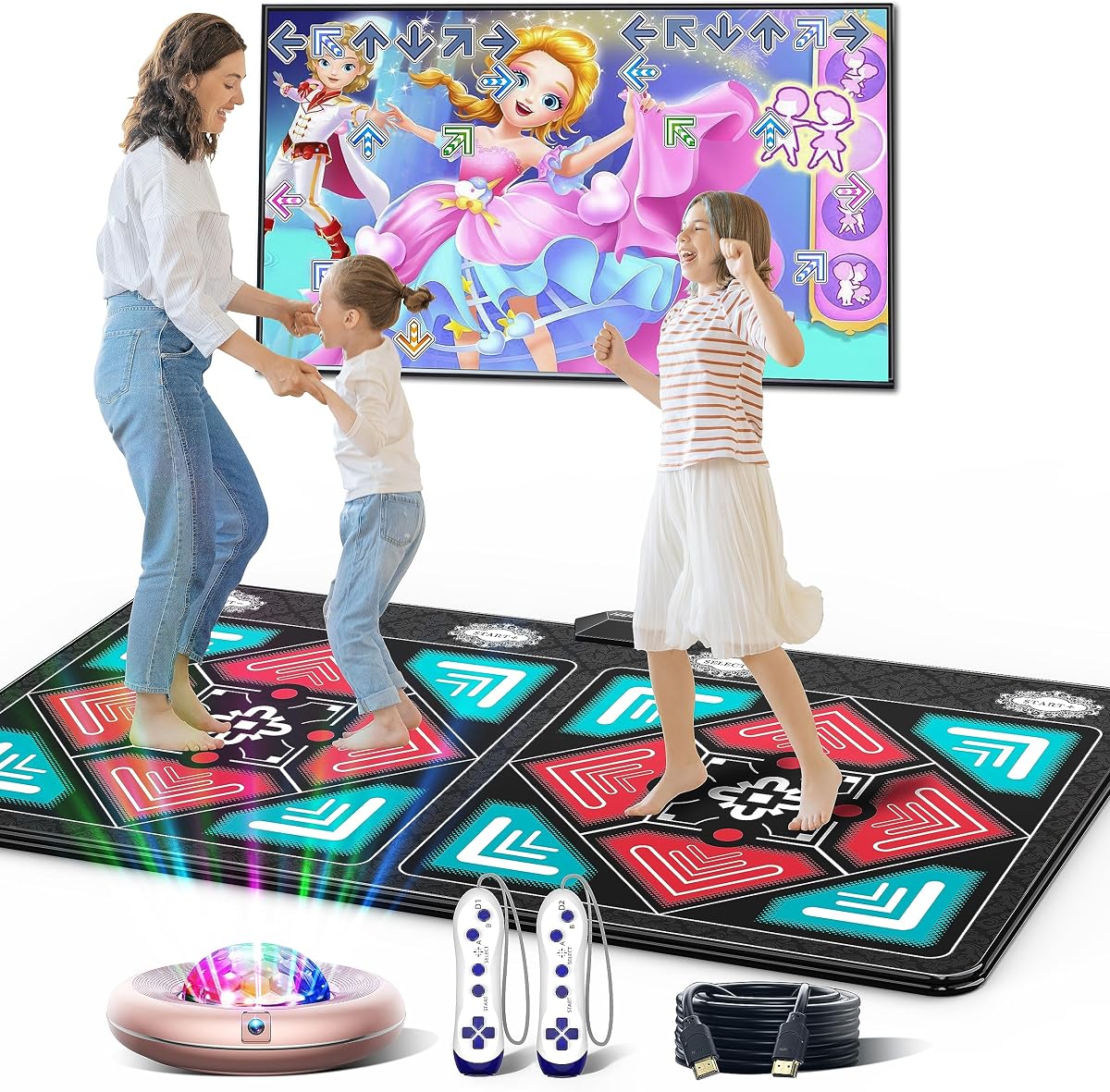


This wireless electronic dance pad stands out for its seamless HDMI connection and extensive game modes. With a rating of 4.6 stars, it is a top choice for families wanting a versatile mat. The thick PEVA surface protects knees while the built-in camera adds interactive fun for all ages.
We may earn a commission when you buy through this link, at no additional cost to you.
The quad-core HD chip ensures lag-free video transmission to your TV or projector. You get over 149 tracks and 72 games plus yoga and running modes. Dual wireless controllers allow two players to enjoy simultaneous fun without cables getting in the way during lively sessions.
The setup is incredibly simple and takes just five minutes to start dancing. The granular non-slip bottom keeps the mat stable during intense movement. However, you need to provide six AAA batteries for the controllers which adds a small initial cost.
Families looking for a high-quality gift or fitness tool will love this mat. Its combination of durability, game variety, and ease of use makes it a standout option. It bridges the gap between exercise and entertainment perfectly for kids and adults alike.
The wireless design eliminates cable clutter while the heavy-duty base ensures the mat stays in place during rapid steps.
Built-in camera technology allows for body-sensing games that track movement for a more immersive and realistic gaming experience.
We may earn a commission when you buy through this link, at no additional cost to you.
This premium mat boasts a perfect 5.0 rating and exceptional build quality for family entertainment. The velvet fabric surface feels comfortable underfoot and looks elegant in any room. It supports a wide range of modes including dance yoga and 3D camera games for endless fun.
We may earn a commission when you buy through this link, at no additional cost to you.
The HDMI connection delivers crisp visuals to your TV making the experience feel like a real arcade. You can enjoy classic games and motion-sensing challenges that project your figure onto the screen. The dual wireless controllers support two players for competitive or cooperative play sessions.
Setup is straightforward with plug and play functionality requiring no extra software or network. The shock-absorbing design protects feet and makes dancing safer for younger kids. While the mat is thick and durable it does take up significant floor space when in use.
Parents seeking a high-quality alternative to screen time will find this mat ideal. It encourages physical activity while keeping everyone engaged with interactive challenges. The robust feature set and top rating make it a smart investment for long-term use.
The soft velvet fabric provides a luxurious feel and prevents blisters during extended dance sessions.
Augmented reality features map your movements to the game screen for a unique immersive gaming adventure.
We may earn a commission when you buy through this link, at no additional cost to you.
This USB dance mat is a solid budget option for PC users who want an easy entry into rhythm games. It features a high sensitivity chip that ensures responsive input for better gameplay accuracy. The PVC material is tough and easy to clean after active use.
We may earn a commission when you buy through this link, at no additional cost to you.
The non-slip design keeps the mat steady on floors while you dance. It supports Windows 98 through 7 and is ready to use out of the box. The eight directional buttons offer full digital dance control for a variety of classic games included in the package.
It is simple to use and requires no complex setup or drivers beyond basic installation. The USB cable ensures a stable connection to your computer without battery worries. However the average rating suggests some users may find the material less cushioned than premium mats.
Budget-conscious shoppers looking for a reliable PC controller will appreciate this value. It delivers a great arcade feel at home without breaking the bank. For casual gamers who prioritize function over extra features this mat is a smart practical choice.
No drivers or extra software are needed to get started making it perfect for quick gaming sessions.
High quality PVC ensures the mat withstands repeated use and resists wear over time.
We may earn a commission when you buy through this link, at no additional cost to you.
This wireless dance pad combines fitness and gaming with integrated yoga and running programs. The HD camera captures body movements for enhanced camera-based games and challenges. The 15mm thick flannel surface cushions every step and provides a comfortable feel for kids and adults.
We may earn a commission when you buy through this link, at no additional cost to you.
You can use two wireless handles for synchronized play to expand the fun. The system connects to TVs via HDMI and supports single or multi-player experiences. A disco ball adds a vibrant light show to make family dance nights more engaging and memorable.
The flannel material is soft and hypoallergenic making it safe for users with sensitivities. It is also wrinkle-resistant and maintains a clean look even when folded. However the unit requires six AAA batteries for operation which are not included in the package.
Families interested in combining yoga with dance will find this mat useful and versatile. It encourages physical activity through varied modes that suit different fitness levels. The camera features and easy setup make it a great gift for home entertainment.
Dedicated yoga and running modes let you use the mat for exercise beyond just rhythm games.
Smart camera tracking enhances gameplay by monitoring movements for real-time feedback and fun challenges.
We may earn a commission when you buy through this link, at no additional cost to you.
This pad is redesigned for improved sensitivity resulting in more accurate game play. It is a great option for those focused on PC gaming and precise input. The non-slip design ensures safety while the large dimensions provide enough room for active dancers.
We may earn a commission when you buy through this link, at no additional cost to you.
It supports Windows systems from 98 to 7 with a memory requirement of at least 64M. The package includes a CD driver and user manual to assist with setup. For those who cannot use the CD contact the manufacturer for the installer via other means.
The size is 94 x 82 centimeters which is suitable for a dedicated gaming space. The surface is durable and designed to resist wear from frequent use. However it is not compatible with TV systems or mobile devices limiting its flexibility.
PC gamers who want a focused rhythm experience will value this mat accuracy. The redesigned sensors help reduce missed steps during fast sequences. If you have a PC ready for games this mat delivers a solid and reliable performance.
The redesigned pad technology ensures every step is registered accurately for smoother gameplay.
A wide play area allows for comfortable foot placement and movement without constraints.
We may earn a commission when you buy through this link, at no additional cost to you.
This USB dance floor mat works well with laptops and PCs for home entertainment. It features a highly sensitive chip for a comfortable gaming experience. The PVC material is environmentally friendly and built to last through regular play.
We may earn a commission when you buy through this link, at no additional cost to you.
The non-slip design allows you to focus on the game without worrying about slipping. It is easy to use with plug and play convenience that requires no complex setup. The blanket style makes it light to move and store when not in use.
While it is a basic model it delivers a solid experience for casual gamers. The mat supports Windows systems and is ready to use out of the box. However it lacks advanced features like camera integration or wireless controllers found in higher end models.
For laptop users or anyone seeking a simple dance solution this mat is practical. It provides an arcade feel at home without extra complexity. If you want a straightforward way to move and play this option fits well.
Connect via USB and start dancing immediately without needing extra software or drivers.
High quality PVC ensures the mat remains in good condition after multiple uses.
We may earn a commission when you buy through this link, at no additional cost to you.
This PC USB dance mat is redesigned for better sensitivity and accurate gameplay. It supports PC AV systems and works well on Windows 7 and older versions. The large 94 by 82 centimeter size allows for comfortable movement during active sessions.
We may earn a commission when you buy through this link, at no additional cost to you.
The non-slip design ensures safety while you play and helps prevent injuries. It requires a CD driver for installation which is included in the package. If the CD cannot be used the manufacturer will provide an alternative installer upon request.
The surface is durable and designed to resist wear from regular use. It is a straightforward tool for rhythm gaming without extra frills. While it does not work with TVs it is a reliable choice for dedicated PC setups.
Gamers who need a solid mat for PC gaming will find this model useful. It offers a stable and responsive surface for practice or competition. The large size and accuracy make it a good pick for focused play.
Improvements to the sensing layer help ensure every step is counted correctly for better performance.
The bottom surface provides reliable grip to keep the mat in place during play.
We may earn a commission when you buy through this link, at no additional cost to you.
This standalone mat is a specially designed controller for DanceDanceRevolution on Wii. It turns you into a dancing machine with official Konami design. The anti-slip surface on the bottom keeps the mat secure during active movement.
We may earn a commission when you buy through this link, at no additional cost to you.
It combines fun excitement and a great workout for users of all ages. The mat is simple to use with compatible software on the Wii system. The durable build ensures it lasts through regular play at home.
While it is limited to the Wii it is a reliable choice for fans. The anti-slip feature helps prevent accidents during intense play. Setup is straightforward with no complex pairing required beyond connecting to the console.
Wii owners looking for a dedicated DDR pad will find this model solid. It provides a familiar arcade experience at home. For those who value official design and reliability this is a great option.
Authentic Konami branding ensures a true DDR experience with trusted quality standards.
Durable construction withstands active play and maintains shape over time.
We may earn a commission when you buy through this link, at no additional cost to you.
This original Konami dance pad is built for Xbox 360 DDR games. It features Freestyle Mode so you can dance how you want without arrows. The Quest Mode lets you build your own character adding a unique personal touch.
We may earn a commission when you buy through this link, at no additional cost to you.
You can play online download new music and more via Xbox Live. The pad is compatible with all Xbox 360 DDR games for a full experience. It delivers a comfortable and responsive surface for rhythm gaming.
While it is designed for an older console it remains a great pick for fans. The Freestyle Mode is a standout feature for creative players. Setup is simple and integrates well with the Xbox ecosystem.
Owners of the Xbox 360 will value this authentic pad. It supports diverse play styles and social features. If you want a classic DDR experience on this system this pad is a top choice.
Dance freely without following arrows which allows for creative and fun movement.
Quest Mode lets you build and play as your own avatar for added engagement.
We may earn a commission when you buy through this link, at no additional cost to you.
This USB step dance mat is designed for StepMania and Windows rhythm games. It has a high grade USB interface for stable connection. The non-toxic PVC print and high-elastic cotton EVA layers provide comfort underfoot.
We may earn a commission when you buy through this link, at no additional cost to you.
The size is 920 by 800 mm which is ample for active play. The cable length is 172 mm so consider placement when setting up. It is based on Dance Dance Revolution with eight level difficulties to choose from.
The surface is non-slip and resistant to wear making it safe to use. It is a practical choice for PC enthusiasts who prefer a specific interface. The cotton layers help protect knees during longer gaming sessions.
StepMania fans will appreciate the reliability and layout. The non-slip surface ensures stability during complex patterns. If you need a dedicated mat for PC rhythm gaming this option is a solid pick.
High-density black EVA and cotton provide cushioning that reduces impact on joints.
A high-grade USB connection minimizes input lag for better timing accuracy.
We may earn a commission when you buy through this link, at no additional cost to you.
Choosing the best DDR Electronic Dance Pads depends on your device and desired features. This section covers key factors to help you pick the right mat.
Connectivity determines which devices your pad works with. USB mats suit PCs and laptops while HDMI mats work with TVs and projectors. Wireless options offer flexibility but may need batteries. Always check your console or computer ports.
Pick HDMI for TVs and USB for PCs to ensure smooth setup.
Surface material affects comfort and durability. PVC mats are tough and easy to clean. Flannel or velvet surfaces feel softer and may protect knees better. Non-slip bottoms prevent shifting during use.
Choose materials that match your comfort needs and floor type.
Thickness impacts comfort and safety. Thicker mats like 15mm provide more cushioning for knees and joints. Thinner mats may feel more responsive but less forgiving. Consider your activity level when selecting thickness.
Opt for 15mm thickness if you plan long sessions.
Extra modes add value to your experience. Look for yoga running or camera-based games for variety. Dual controllers enable two-player fun. Built-in cameras allow body tracking for immersive play.
Select mats with modes that match your fitness and fun goals.
Check OS and system support before buying. Some mats work only with Windows PCs or specific consoles. Ensure your device matches the pad specs to avoid issues. Wireless pads may need batteries for controllers.
Confirm compatibility with your current system and power needs.
Build quality affects longevity. High-quality PVC resists wear and tear. Thick edges and reinforced corners prevent fraying. Durable mats are a better investment for frequent use.
Choose durable construction to extend the life of your pad.
Size matters for play space and storage. Larger mats offer more room for movement but require more space. Foldable designs help save room when not in use. Measure your area before buying.
Pick a size that fits your room and storage needs.
Ease of setup affects daily use. Plug and play mats require minimal setup. Wireless pads might need battery installation. CD drivers for PC mats can be a hurdle. Look for simple installation.
Choose mats with quick setup to reduce hassle.
To get started connect your mat to the appropriate device via USB or HDMI. If using a PC ensure your system meets the minimum requirements and install any drivers. For wireless mats insert batteries into the controllers before turning on the device.
Place the mat on a flat non-slip surface like a hard floor or carpet. Ensure there is enough space around you to move safely without hitting furniture. Stand on the arrows and face the screen to follow the game cues during play.
After use roll or fold the mat and store it in a cool dry place to prevent damage. Clean the surface with a damp cloth to remove dust or sweat. Regular care keeps the mat in good condition and ensures long-term use.
Most PC USB dance mats are designed for computers only and do not connect directly to TVs. For TV use look for pads that offer HDMI or wireless HDMI connectivity. Always check the product specs for compatibility before buying.
Standard pads are around 94 by 82 centimeters which fit most adults comfortably. Consider your available floor space and whether you need extra room for movement. Foldable options help save space when not in use.
Some mats support two-player play especially wireless models with dual controllers. USB models may offer split modes but often require specific software or setups. Check if the pad includes two controllers or supports dual input.
Most dance mats are safe for kids with non-slip surfaces and soft materials. Ensure the mat has a thick cushioned surface to protect joints. Always supervise younger children and choose models rated for their age group.
Clean your dance mat with a damp cloth and mild soap as needed. Avoid soaking the mat or using harsh chemicals that may damage the surface. Dry it thoroughly before rolling or folding to prevent mildew.
Most dance mats support Windows systems and may not be compatible with Mac computers. Some models work with universal inputs but drivers are often Windows specific. Check product details for Mac support before purchasing.
Our top picks include the Wireless HDMI mat and the Velvet fabric mat for premium features. The USB mat stands out as the best budget choice for PC users. Each option delivers solid performance for different needs and budgets.
Focus on connectivity and comfort when choosing your mat. If you want versatility pick a wireless HDMI model with multiple modes. For a simple solution a USB mat offers reliable performance at a lower cost.
Remember to check current availability and ensure the mat matches your devices. Prices and stock can change quickly so verify listings before buying. With the right choice you can enjoy active fun and fitness at home.