
Lenovo 24 FHD All-in-One
4.2Editor score
16GB RAM and 256GB SSD
Wireless Keyboard and Mouse
Wi-Fi 6 and Bluetooth 5.2
Discover the top desktop computers for kids in 2026. Compare specs, ratings, and real reviews to find the perfect PC for your child's needs.
Finding the right desktop computer for kids involves balancing performance, durability, and ease of use. Whether for homework, creative projects, or light gaming, a reliable PC ensures smooth learning experiences without frustrating technical issues.
We evaluated ten current models based on processor power, memory capacity, storage options, and overall user ratings. Each pick offers a different blend of features to suit various ages and budget requirements while maintaining solid build quality.
Every recommendation includes key specs and honest pros and cons to help you decide quickly. Keep in mind that pricing and availability change frequently, so check current listings before making your final purchase decision for your home office or study area.
4.2Editor score

4.5Editor score

3.8Editor score
This table provides a quick side-by-side look at the key specifications for each model. Compare processor types, memory, storage, and screen sizes to find the best fit for your child's daily tasks and entertainment needs.




This all-in-one desktop stands out with its crisp 21.5-inch display and included docking hub that expands connectivity options. It scores highly among parents for its clean design and ready-to-use setup that gets kids started quickly.
We may earn a commission when you buy through this link, at no additional cost to you.
The Intel N100 processor handles basic schoolwork and web browsing with ease while the 8GB RAM ensures smooth multitasking between homework and educational videos. The anti-glare screen reduces eye strain during long study sessions.
While storage is limited to 384GB, the included SD card slot provides flexible expansion for media files. The dock supports multiple USB devices making it easy to connect printers or external drives.
This model is perfect for younger students needing a straightforward computer for learning and creativity. Its compact footprint saves desk space while the included keyboard and mouse provide everything needed from day one.
The 8-in-1 docking hub allows easy connection of multiple peripherals without cluttering desk space.
Anti-glare technology ensures comfortable viewing during extended homework sessions.
We may earn a commission when you buy through this link, at no additional cost to you.
This renewed HP Elite desktop offers powerful specs with 16GB RAM and a Core i5 processor ideal for demanding school projects. The 22-inch monitor provides ample screen real estate for split-screen learning.
We may earn a commission when you buy through this link, at no additional cost to you.
The large memory capacity handles multiple browser tabs and educational software simultaneously without slowdown. The 1TB hard drive stores plenty of school files, games, and media for years of use.
RGB lighting on the keyboard and speaker adds a fun visual element kids enjoy though some may prefer a simpler look. The refurbished unit comes with a 90-day warranty for peace of mind.
This PC suits middle schoolers who need reliable performance for research and creative work. The included monitor and peripherals make it a complete bundle ready for immediate setup at home.
Sixteen gigabytes of RAM ensures smooth switching between study apps and entertainment.
One terabyte of space accommodates large files and growing digital collections.
We may earn a commission when you buy through this link, at no additional cost to you.
This refurbished Dell package delivers essential computing power at an accessible entry level. The Core i5 processor and 8GB RAM handle everyday tasks smoothly for students on a budget.
We may earn a commission when you buy through this link, at no additional cost to you.
The complete bundle includes a monitor keyboard and mouse so you only need a power outlet to begin. The DVD drive remains useful for reading physical media or installing software from discs.
While the 19-inch screen is compact it fits easily on smaller desks without overwhelming the workspace. The system comes with Windows 11 Pro pre-installed for modern security features and updates.
Ideal for elementary and middle school students needing a basic machine for homework and browsing. Its lower price makes it an excellent choice for families prioritizing function over latest features.
All necessary peripherals included means no extra purchases before first use.
Smaller monitor conserves valuable desk space for books and supplies.
We may earn a commission when you buy through this link, at no additional cost to you.
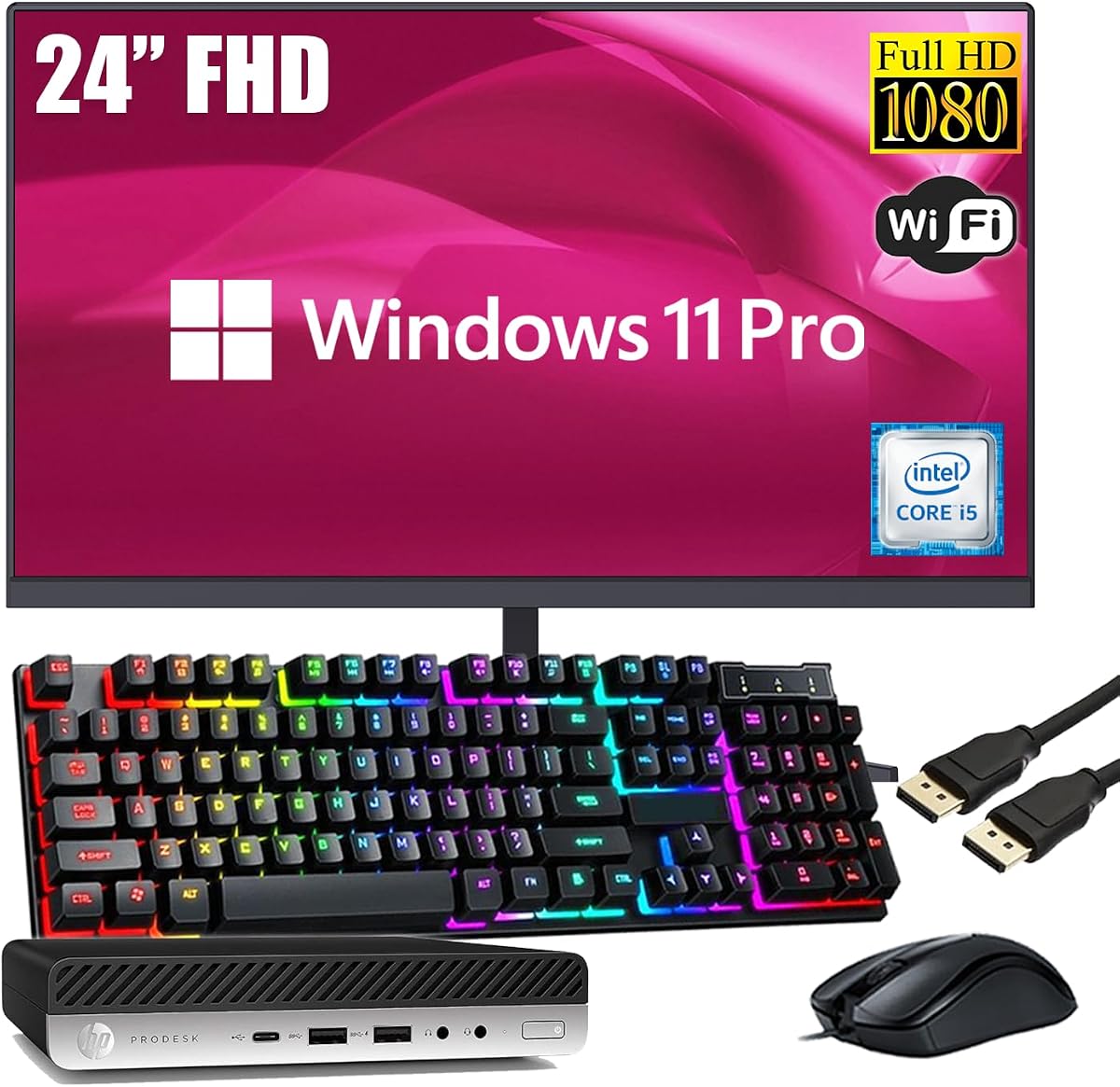
This refurbished HP desktop stands out with its SSD storage that loads apps and files much faster than traditional hard drives. The 16GB RAM supports heavy multitasking for research and video editing.
We may earn a commission when you buy through this link, at no additional cost to you.
The 24-inch monitor offers a spacious workspace for homework and projects while the included webcam helps with online classes. WiFi 6 ensures stable connections for streaming and video calls.
RGB keyboard and mouse add a modern touch kids appreciate though durability varies. The system includes speakers ready for multimedia lessons without needing external audio.
Best for students needing quick boot times and reliable performance for multiple applications. The SSD technology protects data integrity and provides a snappy computing experience for daily tasks.
Solid state drive reduces startup wait times for immediate productivity.
Built-in camera supports seamless virtual classes without extra accessories.
We may earn a commission when you buy through this link, at no additional cost to you.
This Dell desktop offers an impressive two terabytes of storage making it ideal for families with extensive media libraries. The 16GB RAM supports smooth operation for complex school projects and multitasking.
We may earn a commission when you buy through this link, at no additional cost to you.
The included 22-inch monitor provides a clear view for study sessions while the RGB keyboard and mouse add personality. Windows 11 Pro gives access to advanced security and management features.
HDD storage is slower than SSD but delivers reliable performance for storing large video files and game libraries. The refurbished unit includes a 90-day warranty for added protection.
Perfect for households with multiple children sharing one computer or storing lots of digital content. Its storage capacity ensures you won't need to upgrade soon as digital needs grow over time.
Two terabytes hold countless videos music and educational resources for years.
Windows 11 Pro offers enhanced security features for family use.
We may earn a commission when you buy through this link, at no additional cost to you.
This Lenovo all-in-one combines wireless peripherals and SSD storage for a clutter-free experience. The 16GB RAM ensures smooth performance for productivity apps and web research.
We may earn a commission when you buy through this link, at no additional cost to you.
The wireless keyboard and mouse reduce cable clutter while the IPS display delivers accurate colors for creative work. The PCIe SSD provides fast boot times for instant readiness.
Its premium build quality and clean aesthetics suit a modern home office environment. The included Windows 11 Pro supports secure family accounts and easy software installation.
Ideal for older students preparing for college or adults needing a reliable home work machine. The wireless connectivity makes setup simple and keeps the workspace tidy and organized.
Included wireless peripherals eliminate cable mess for a cleaner desk.
IPS panel ensures true colors for design and art projects.
We may earn a commission when you buy through this link, at no additional cost to you.
This mini desktop saves significant desk space while still delivering capable performance for daily tasks. The 8GB RAM and SSD combination ensures responsive computing without lag.
We may earn a commission when you buy through this link, at no additional cost to you.
The included USB-C port enables modern connectivity options for charging peripherals and data transfer. The 24-inch monitor provides a comfortable viewing size for schoolwork and browsing.
Its compact design fits perfectly in tight corners or shared workspaces where space is limited. The Windows 11 Pro license adds professional management tools and security updates.
Perfect for small apartments or shared bedrooms where a full tower would be too bulky. Its efficiency keeps power usage low while providing reliable service for homework and communication.
Mini tower frees up valuable floor and desk surface area.
USB-C support ensures compatibility with newer devices and chargers.
We may earn a commission when you buy through this link, at no additional cost to you.
This all-in-one features a stunning borderless display with excellent color accuracy perfect for creative projects. The 16GB RAM supports demanding applications while the SSD ensures quick system responsiveness.
We may earn a commission when you buy through this link, at no additional cost to you.
The integrated HD webcam simplifies online learning with clear video for classes. The slim bezels maximize screen real estate for a more immersive viewing experience.
Its premium build quality makes it a durable choice for heavy daily use in a family setting. The design looks professional and modern on any desk or study area.
Ideal for students focused on media creation or visual arts needing reliable screen performance. The combination of memory and storage balances well for sustained productivity over time.
Borderless display design minimizes distractions during focused study.
Sleek aesthetic enhances any home office or study setup.
We may earn a commission when you buy through this link, at no additional cost to you.
This Lenovo all-in-one offers solid SSD performance at a reasonable price point for families. The 8GB RAM handles standard tasks well while the 512GB SSD provides fast access to files.
We may earn a commission when you buy through this link, at no additional cost to you.
The wireless peripherals keep the desk clean and the compact design fits easily in small rooms. WiFi 6 ensures stable internet for streaming educational content and video calls.
Its simplicity makes setup easy for parents and kids alike without technical complications. The anti-glare display protects eyes during long study sessions in various lighting conditions.
Perfect for households needing a reliable secondary computer or primary machine for elementary school. The balance of speed and cost delivers strong value for everyday computing needs.
SSD storage provides quick access to school projects and documents.
Wireless keyboard and mouse minimize clutter for better focus.
We may earn a commission when you buy through this link, at no additional cost to you.
This Dell bundle provides a classic computing experience with a full set of included accessories. The Core i5 processor delivers reliable performance for web browsing and document editing.
We may earn a commission when you buy through this link, at no additional cost to you.
The 20-inch monitor offers enough screen space for basic homework while the RGB keyboard adds a modern touch. The renewed unit includes a 90-day warranty to protect against defects.
HDD storage is adequate for essential files but slower than solid state alternatives. The system supports modern Wi-Fi connections for internet access and streaming services.
Best for families seeking a low-cost entry into desktop computing without sacrificing essentials. Its durability ensures it can handle daily use from kids without major technical concerns.
Monitor keyboard and mouse included for immediate out-of-box use.
Integrated wireless supports easy internet connection without cables.
We may earn a commission when you buy through this link, at no additional cost to you.
Choosing the right desktop requires balancing performance needs with budget constraints. Consider how your child will use the computer whether for basic homework creative projects or light gaming.
The processor acts as the brain of the computer handling all software operations. For most schoolwork modern Intel N100 or i3 processors provide sufficient speed without breaking the bank.
Prioritize a Quad-Core processor to ensure smooth multitasking when switching between tabs and apps.
RAM determines how many programs can run simultaneously without slowdown. Eight gigabytes is a good baseline for elementary students while older children may benefit from 16GB.
Ensure the model allows upgrades so memory can be expanded as needs grow over time.
Solid State Drives boot much faster than traditional Hard Drives. Look for SSD models to reduce wait times when starting homework or loading educational software.
At least 512GB storage is recommended to store school files and photos without filling up quickly.
A 22 to 24-inch screen provides enough workspace for reading and research. Anti-glare panels reduce eye strain during long study sessions in bright rooms.
IPS panels offer better color accuracy and viewing angles compared to cheaper TN panels.
Check available USB ports for printers and flash drives. Modern systems should include USB-C for future compatibility and faster data transfer speeds.
Built-in WiFi 6 ensures stable internet connections for video classes and online research tools.
Windows 11 Pro offers better security and parental controls than Home editions. Ensure the system supports the latest updates for protection against online threats.
Pre-installed systems without bloatware save setup time and free up storage space.
Bundles including monitors keyboards and mice save money and simplify setup. Verify included accessories match your desk layout preferences.
Check if the keyboard and mouse are wireless to reduce cable clutter on the desk.
Renewed products often include limited warranties like 90 days. Verify the return policy and support options before purchasing refurbished models.
A good warranty protects your investment against early hardware failures or component issues.
Place the computer in a well-ventilated area away from direct sunlight to prevent overheating. Ensure at least four inches of clearance around all sides for proper airflow.
Clean the keyboard and screen regularly with a microfiber cloth to remove dust and fingerprints. Never spray liquid directly onto the monitor or keyboard surfaces to avoid damage.
Use a surge protector to guard the PC against power fluctuations. This simple step extends the lifespan of internal components and protects sensitive electronic parts.
Yes all listed models include built-in WiFi or Ethernet ports for internet access. You can connect to your home network for online learning and research immediately.
Many models support internal upgrades though some all-in-ones have limited options. Check the specific product specs to see if it allows adding a second drive.
Absolutely Windows 11 offers a simplified Start menu and intuitive interface ideal for younger users. Parental controls are built-in to manage screen time and content.
With proper maintenance most desktops remain functional for five to seven years. Regular cleaning and software updates help extend their useful life significantly.
Certified refurbished units undergo testing to ensure proper functionality. Buying from reputable sellers with warranties provides added security for your purchase.
Windows 11 comes with built-in Windows Defender which provides solid protection. You can also install additional third-party software if desired for extra layers of security.
The HP 21.5 All-in-One stands out for visual learning while the HP Elite offers strong performance for advanced users. Consider your child's age and primary tasks when making your selection.
Prioritize fast SSD storage and sufficient RAM to ensure the computer remains responsive as demands increase over time. These investments pay off in reduced frustration and better study sessions.
Prices and availability change frequently so verify the latest specs before clicking buy. Taking time to compare options ensures you get the right fit for your budget and needs.