
Amazon Basics Height Adjustable Stand
4.6Editor score
Three-level stackable design
Lightweight ABS plastic build
Compact tapered structure
Compare the top 10 desktop monitor risers for 2026. Find the best adjustable, wooden, and dual monitor stands with real ratings and expert insights.
A quality desktop monitor riser elevates your screen to eye level, reducing neck strain and improving posture during long work sessions. It also creates valuable storage space underneath for keyboards and accessories, helping keep your workspace tidy and organized efficiently.
We evaluated ten highly rated monitor stands based on build quality, adjustability, weight capacity, and user feedback. Our comparison covers metal, wood, and plastic options suitable for single or dual monitor setups in home offices and professional environments.
Each pick below highlights specific strengths like ergonomic height settings, ventilation features, or extra storage drawers. Prices and availability can change, so verify current details on Amazon before making your final decision for your specific desk setup.
4.6Editor score

4.7Editor score

4.6Editor score
This side-by-side comparison highlights the key specifications and features of each monitor stand to help you choose the right fit for your desk and devices.



The WALI Computer Monitor Stand earns our top spot for its robust metal build and versatile height adjustments. With a 4.7 rating, users praise its stability and ability to hold heavy monitors securely.
We may earn a commission when you buy through this link, at no additional cost to you.
Its large shelf accommodates most screens and laptops, while the vented design keeps devices cool during extended use. The rubber pads protect your desk surface from scratches and slipping.
While assembly might require a few minutes, the included tools and clear steps make it straightforward. The weight is a trade-off for durability, ensuring the stand stays put.
Ideal for home and office desks, this riser helps reduce neck strain by elevating screens to eye level. It is a solid investment for anyone seeking a reliable monitor solution.
Choose from three height settings to find the most comfortable viewing angle for your posture and desk setup.
Open holes in the shelf allow airflow to prevent laptops and monitors from overheating during long work sessions.
We may earn a commission when you buy through this link, at no additional cost to you.
TEAMIX offers a reliable wood monitor stand at a budget-friendly price. Its 4.6 rating reflects satisfaction with its sturdiness and classic black finish that blends well with office decor.
We may earn a commission when you buy through this link, at no additional cost to you.
The MDF wood provides a stable base capable of holding up to 80 lbs, making it suitable for larger monitors. The simple assembly process gets you started quickly without hassle.
Though it lacks adjustable height settings, the fixed position offers a consistent ergonomic boost. The weight ensures it does not wobble during typing or mouse use.
This stand is perfect for those wanting a clean look without breaking the bank. It frees up desk space for keyboards and accessories underneath the shelf.
High-quality MDF ensures the stand remains stable and durable for daily use in home or office settings.
Use the space below to store notebooks, keyboards, and other items to keep your desk clutter-free.
We may earn a commission when you buy through this link, at no additional cost to you.
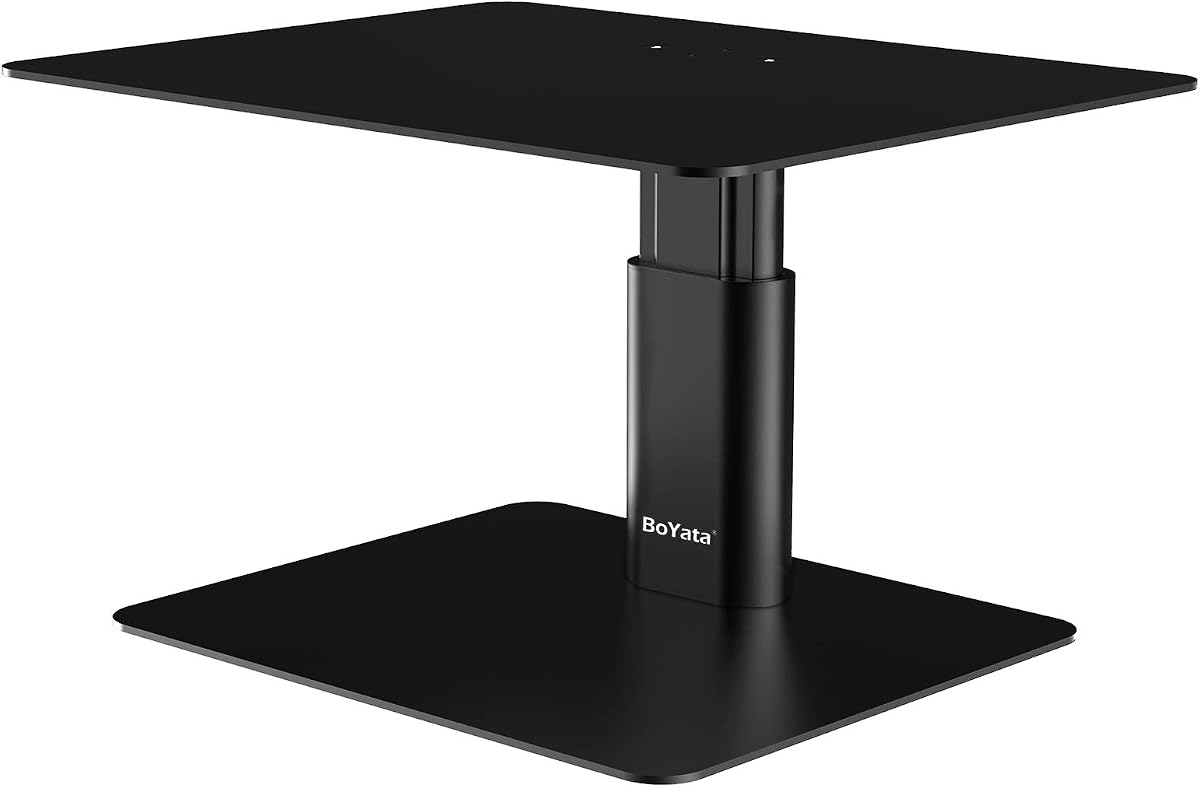
BoYata stands out with its twist knob adjustment, allowing quick height changes to suit your comfort. Users rate it 4.7 for its strong metal construction and ease of use.
We may earn a commission when you buy through this link, at no additional cost to you.
The stand supports up to 33 lbs, suitable for most standard monitors. Its metal plates provide a secure base, while the skidproof pads prevent sliding on smooth surfaces.
Assembly involves a screwdriver included in the package, making it accessible even for first-timers. The space between plates leaves room for keyboards underneath.
If you need fine-tuned height control without breaking the bank, this riser delivers well. It helps maintain good posture during long computing hours.
The twist knob lets you adjust the height quickly to match your preferred eye level and desk height.
Constructed from metal to resist bending and denting, ensuring long-term stability for your display.
We may earn a commission when you buy through this link, at no additional cost to you.
Amazon Basics delivers a practical plastic stand with three height options. Its 4.6 rating highlights its ease of use and portability for small offices or dorms.
We may earn a commission when you buy through this link, at no additional cost to you.
The ABS plastic construction keeps it light yet durable enough for standard laptops and monitors. Detachable legs let you customize the height to your liking.
While it supports only 22 lbs, this covers most standard devices. The tapered design saves space, and non-skid feet ensure it stays stable.
This is an ideal choice for budget-conscious users needing basic elevation. It helps improve viewing angles without adding bulk to your desk.
Three detachable leg options allow you to set the stand at 2.87, 4.2, or 4.8 inches for ergonomic comfort.
The ABS material makes it easy to move or relocate the stand as your workspace needs change.
We may earn a commission when you buy through this link, at no additional cost to you.
YAOHUOO excels with a 39-inch wide shelf designed for dual monitors or large displays. Its 4.6 rating reflects stability and capacity to hold heavy equipment securely.
We may earn a commission when you buy through this link, at no additional cost to you.
Heavy-duty steel legs support up to 100 lbs, ensuring no shaking during use. The ergonomic height reduces neck pain while keeping the workspace organized.
Assembly takes about ten minutes with included tools. Non-slip pads on legs protect your desk from scratches and movement.
This stand is perfect for multitaskers needing room for multiple screens. It combines wood aesthetics with industrial strength for a premium look.
The extra-wide surface easily accommodates two monitors or one large screen with space for accessories alongside.
With a 100 lb limit, this stand handles heavy monitors or printers without risk of collapsing or tipping.
We may earn a commission when you buy through this link, at no additional cost to you.
Canyora offers two stands in one package, making it ideal for dual setups or office pairs. Rated 4.7, users appreciate the sturdy steel build and quick setup.
We may earn a commission when you buy through this link, at no additional cost to you.
Each stand holds up to 44 lbs and features heat dissipation holes to keep devices cool. The three height settings let you find the best viewing angle.
Tool-free assembly means you can set them up in under thirty seconds. Rubber pads protect desks from scratches while keeping the stands stable.
Buying two at once saves money and ensures consistency across workspaces. These risers provide ample space for organization underneath the shelves.
Purchase two stands together for better pricing and uniformity across multiple workstations or desks.
Fifteen hundred holes actively prevent overheating, extending the life of your laptops or computers.
We may earn a commission when you buy through this link, at no additional cost to you.
Klearlook stands out with a foldable design and built-in storage drawer. Its 4.7 rating highlights its versatility and convenience for organized desks.
We may earn a commission when you buy through this link, at no additional cost to you.
Adjustable widths match various workstations, and the phone holder keeps devices accessible. The drawer stores essentials like pens or cables neatly.
Assembly is not needed, so you can start using it immediately. The rubberized legs prevent sliding, providing a stable surface for heavy monitors.
Ideal for those wanting extra organization without clutter. This stand elevates screens to ergonomic heights while adding functionality to your workspace.
Keep office supplies hidden but accessible in the hidden drawer integrated into the monitor stand.
Fold the stand when not in use to save space and protect its components for later reuse.
We may earn a commission when you buy through this link, at no additional cost to you.
OPNICE combines monitor elevation with desk organization. Its 4.6 rating reflects satisfaction with the built-in drawer and pen holders for streamlined access.
We may earn a commission when you buy through this link, at no additional cost to you.
The metal construction ensures stability for daily use, while the sleek black finish blends into any office. It supports dual monitors comfortably on the wide shelf.
Since no installation is required, you can place it right away. The design frees up space underneath for keyboards or mice.
This stand suits users who prioritize organization alongside ergonomics. It helps reduce visual clutter and keeps tools within reach.
Keep essentials like pens and notes organized in the included drawer and holders for better focus.
Skip the tool work and start using the stand immediately to optimize your workspace efficiency.
We may earn a commission when you buy through this link, at no additional cost to you.
WESTREE combines wood and steel for a distinct look. Its 4.6 rating highlights its sturdy build and ease of assembly for dual monitor setups.
We may earn a commission when you buy through this link, at no additional cost to you.
Thick steel legs provide a strong bearing load, while anti-slip pads keep it in place. The pre-drilled holes make installation quick and straightforward.
This stand serves multiple purposes like printer or laptop stands. The ergonomic height protects your eyes and neck from strain.
For those seeking a blend of style and strength, this riser delivers. It organizes your desk while elevating your screen to eye level.
The brown wood finish paired with black steel adds a unique decorative touch to your office.
Use it for monitors, printers, or laptops, making it a flexible solution for various devices.
We may earn a commission when you buy through this link, at no additional cost to you.
gianotter offers a patented design with magnetic holders for convenience. Its 4.5 rating shows solid performance despite fewer reviews compared to top picks.
We may earn a commission when you buy through this link, at no additional cost to you.
The metal materials ensure stability, and the drawer keeps your desk tidy. No assembly means you can place it directly on your desk.
It elevates your monitor to eye level to reduce neck and eye strain. The design maximizes space by allowing storage underneath the shelf.
This stand works well for those wanting a ready-to-use solution. It balances aesthetics and function for a revitalized workspace.
Keep pens organized and accessible with magnetic holders that prevent them from falling over.
USPTO patented design ensures a unique approach to monitor organization and ergonomic support.
We may earn a commission when you buy through this link, at no additional cost to you.
Selecting the right monitor riser involves considering build material, dimensions, adjustability, and storage needs to match your workspace.
Metal stands offer durability and weight capacity, while wood provides a warm aesthetic. Plastic options are lighter but may support less weight over time.
Choose metal for heavy screens, wood for decor, and plastic for portability.
Measure your desk space to ensure the riser fits without overcrowding. The shelf width should accommodate your monitor(s) comfortably.
Always check product dimensions before purchasing to avoid fit issues.
Height adjustable models let you tailor the screen to eye level. Some offer fixed heights that may not suit all users.
Adjustable stands improve ergonomics and reduce neck strain effectively.
Ensure the stand supports your monitor's weight safely. Check the maximum load listed in the specs.
Overloading a stand can cause tipping or damage to devices.
Some risers include drawers or holders for extra organization. Under-shelf space is crucial for storing keyboards and accessories.
Opt for stands with storage if you need to declutter your desk.
Vented shelves help cool devices during extended use. Solid shelves may trap heat if devices are enclosed.
Look for ventilation holes if you place laptops or high-performance monitors on the stand.
Some stands require tools while others are tool-free. Consider your comfort with assembly before buying.
No-assembly models save time for those in a hurry.
Prices vary by material and features. Budget options may lack adjustability, while premium ones offer more functionality.
Set a budget range to narrow your choices effectively.
Place the riser on a flat surface to ensure stability. Adjust the height so the screen is level with your eyes to reduce strain.
Keep the shelf clean by wiping it regularly with a dry cloth. Avoid placing heavy items that exceed the weight capacity.
Check screws and legs periodically for tightness. If using a wooden model, avoid exposing it to moisture to prevent damage.
A desktop monitor riser is a stand designed to elevate your computer screen to eye level. It improves ergonomics by reducing neck strain and creates space underneath for storing accessories like keyboards.
Many stands come with clear instructions and tools, making assembly simple. Some models are designed for tool-free setup so you can use them right away.
Use a dry cloth to wipe down the surface regularly. For metal or plastic models, a mild cleaner can be used, but avoid excessive moisture on wood finishes.
Some stands like the YAOHUOO and WESTREE are specifically designed for dual monitors. Check the dimensions and weight capacity to ensure they fit your setup.
Yes, by elevating screens to eye level, risers help maintain a neutral neck position. This can significantly reduce back and neck pain during work.
Common materials include metal, wood, and plastic. Each offers different benefits regarding weight, aesthetics, and durability depending on your needs.
We selected the WALI Computer Monitor Stand as our top choice for its balance of strength, adjustability, and ventilation. It suits a wide range of users seeking comfort and organization.
Consider your specific needs such as storage or dual monitor support when making your decision. Features like drawers or foldable designs can add value to your workspace.
Prices and availability may vary, so check current listings on Amazon before buying. Investing in the right stand will enhance your daily computing experience.