
Acer 13-in-1 Laptop Docking Station
4.5Editor score
Triple display support
110W power adapter included
Gigabit Ethernet port
Discover the top 10 docking stations with 2 HDMI ports for dual monitor setups. Compare features, performance, and real user ratings to find your perfect match.
In today's modern work environment, having a dual monitor setup is essential for productivity and efficiency. A docking station with 2 HDMI ports allows you to connect multiple displays to your laptop easily. This guide helps you find the right hub to expand your workspace without the clutter of multiple cables.
We have carefully reviewed and compared the leading docking stations available on the market today. Our analysis focuses on video output quality, charging capabilities, data transfer speeds, and overall build quality. We looked at real user feedback and technical specifications to ensure every recommendation meets high standards.
Each pick in this list highlights specific strengths for different user needs and budgets. Whether you need a budget-friendly option or a premium solution with advanced features, you will find a suitable choice here. Keep in mind that product availability and details may change over time, so always check the latest listings.
4.5Editor score

4.5Editor score

4.4Editor score
This side-by-side comparison highlights the key specifications and capabilities of each docking station on our list. It helps you quickly identify which model offers the specific ports, video resolutions, and power features you need for your dual monitor setup.


The Anker Laptop Docking Station Dual Monitor stands out as a highly reliable choice for professionals needing a robust hub. It received a strong rating from users due to its consistent performance and quality construction. This 8-in-1 hub expands your connectivity significantly while maintaining a small footprint on your desk.
We may earn a commission when you buy through this link, at no additional cost to you.
Its standout feature is the ability to drive dual displays via two HDMI ports, making it perfect for multitasking workflows. The 85W Power Delivery pass-through ensures your laptop stays charged even during heavy usage. Additionally, the inclusion of an Ethernet port provides a stable internet connection which is crucial for remote work.
While it is a great choice, users should note that it does not support Thunderbolt 3 or 4, which may limit speeds for some high-end devices. Also, the power adapter is not included, so you need to provide your own compatible charger. These are minor trade-offs given the overall value and performance it delivers.
This docking station is ideal for office workers and creatives who need a stable dual monitor setup without breaking the bank. If you prioritize reliability and broad compatibility over cutting-edge Thunderbolt speeds, this is the top recommendation for your setup.
The hub supports dual HDMI outputs and provides up to 85W of power to your laptop ensuring it remains powered during long work sessions.
With Ethernet and SD card readers included, you get versatile connection options that cover both data and network needs effectively.
We may earn a commission when you buy through this link, at no additional cost to you.
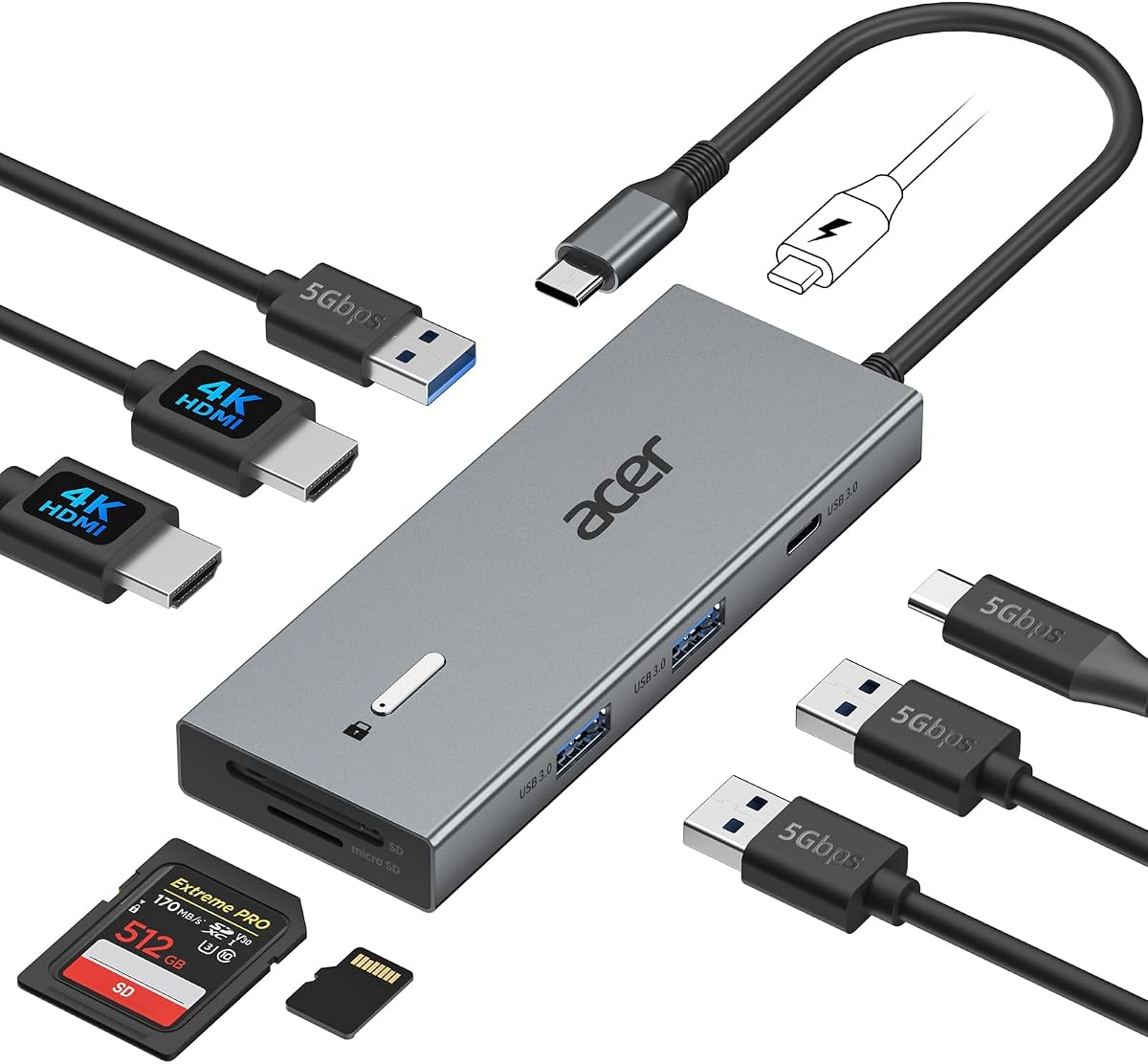
The Acer 13-in-1 Laptop Docking Station offers a premium experience for users who need maximum connectivity. It has garnered high praise for its ability to support triple displays which is rare in this category. The build quality is top-notch with an aluminum body that helps dissipate heat efficiently during operation.
We may earn a commission when you buy through this link, at no additional cost to you.
One of its key strengths is the included 110W power adapter which delivers up to 100W to your laptop. This ensures your device remains fully charged even when driving multiple monitors. The Gigabit Ethernet port also ensures stable and fast network connections ideal for video conferencing.
The main drawback is the higher price compared to other options on the list. Also Mac users will find that the display modes are limited to mirroring due to system constraints. Despite these points the overall feature set justifies the cost for power users needing extensive connectivity.
If you require a workstation that can handle three monitors simultaneously this is the best choice available. It is perfect for data analysts or video editors who need multiple screens and reliable power delivery all in one compact unit.
This dock allows for triple screen setups on Windows laptops and includes a powerful adapter to keep your laptop charged under heavy loads.
The integrated Gigabit Ethernet port provides a reliable wired internet connection while USB ports support fast file transfers.
We may earn a commission when you buy through this link, at no additional cost to you.
The Selore USB C Docking Station Dual Monitor provides an excellent entry point for those needing dual HDMI support. It is highly rated for offering 4K resolution at 60Hz on both ports which ensures smooth visuals for most tasks. The aluminum construction gives it a premium feel despite the budget friendly price.
We may earn a commission when you buy through this link, at no additional cost to you.
Its key strength is the ability to provide 100W power input which supports fast charging for most laptops. The USB 3.0 ports allow for quick file transfers making it versatile for daily office work. Users appreciate the plug and play nature which requires no drivers to install.
On the downside it does not have an Ethernet port which might be a dealbreaker for some who need wired internet. Mac users should also be aware that extension is not supported due to system limitations. These limitations are acceptable given the strong value it offers.
This is the top pick for budget conscious buyers who still want high quality video output. If you need dual 4K monitors at 60Hz without spending a fortune this hub delivers exactly what you need.
Both HDMI ports support 4K resolution at 60Hz allowing for crisp and smooth visuals on external monitors.
The hub supports 100W charging input and includes USB 3.0 ports for rapid data transfers between devices.
We may earn a commission when you buy through this link, at no additional cost to you.
The Acer 9-in-1 Laptop Dock is a solid option for users who value portability and security. It features dual HDMI ports that support high resolution displays and includes a physical lock button for added protection. The build quality is strong with an aluminum body that feels durable in hand.
We may earn a commission when you buy through this link, at no additional cost to you.
One of its main strengths is the integrated lock button which allows you to secure the device quickly with a standard cable lock. This is particularly useful in shared office spaces or public areas. It also supports up to 90W power delivery ensuring your laptop charges efficiently while in use.
However it does not include an Ethernet port which limits networking options for some users. Mac users are also restricted to mirroring only which might not suit everyone. These are minor drawbacks given the focus on security and portability this device offers.
This docking station is best for travelers or those working in shared environments where physical security matters. If you need a reliable dual monitor hub with a built-in security feature this model is a strong contender.
The dock includes a lock button that enables you to secure the unit to your desk using a standard cable lock.
Dual HDMI ports support 4K resolution at 60Hz providing excellent clarity for external monitors during work.
We may earn a commission when you buy through this link, at no additional cost to you.
The Dell D3100 Docking Station is a classic choice for users with Dell Latitude or Inspiron laptops. It supports dual HDMI and an additional DisplayPort allowing for versatile monitor configurations. The hub is known for its stable performance and reliability in office environments.
We may earn a commission when you buy through this link, at no additional cost to you.
Its main strength is the tailored design for Dell devices ensuring seamless compatibility without drivers. The included HDMI to DVI adapter adds extra flexibility for connecting older monitors. It also supports triple display setups which is helpful for complex workflows.
A significant limitation is that it relies on USB 3.0 rather than USB-C which may limit speeds for modern peripherals. Also it is not suitable for newer MacBooks due to connection type differences. These factors make it more suited for specific legacy setups.
This is the ideal choice if you are using a Dell laptop from the last decade and need a proven dock. It offers stable performance and compatibility that newer hubs might not match for these specific older devices.
This dock is specifically optimized for Dell Latitude and Inspiron laptops ensuring seamless integration with older systems.
With two HDMI ports and a DisplayPort output it supports multiple screens and includes adapters for various monitor types.
We may earn a commission when you buy through this link, at no additional cost to you.
The Anker 7-in-1 USB-C Hub is designed for users who prioritize fast data transfers over high resolution video. It features dual HDMI outputs that support 1080p resolution which is ideal for standard office tasks. The standout feature is the 10Gbps USB data ports that enable quick file movement.
We may earn a commission when you buy through this link, at no additional cost to you.
Its primary strength is the ability to move large files rapidly which is crucial for data analysts or developers. The 85W power delivery ensures your laptop charges while you work and the compact design makes it easy to carry. Anker's reputation for quality adds to its reliability.
However the video output is limited to 1080p so it is not suitable for 4K creative work. Also the absence of an Ethernet port means you rely on Wi-Fi for internet. These trade-offs are acceptable if data speed is your main concern.
This hub is best for professionals who need fast data transfer speeds but do not require high resolution external displays. If your work involves moving large datasets and you need a portable reliable hub this is a great choice.
This hub features USB ports that support data transfer speeds up to 10Gbps allowing for rapid file movement.
Built with Anker's trusted quality it offers a small footprint that fits easily into any travel kit.
We may earn a commission when you buy through this link, at no additional cost to you.
The MOKiN USB C Docking Station offers an impressive array of ports for users needing maximum connectivity. It supports dual 4K HDMI outputs and includes an Ethernet port for stable internet. The screen lock button provides a convenient way to protect your work quickly.
We may earn a commission when you buy through this link, at no additional cost to you.
One of its main strengths is the sheer number of USB ports which allows you to connect many peripherals simultaneously. The Gigabit Ethernet ensures your internet connection remains stable during video calls. The 100W charging support keeps your laptop powered throughout the day.
The downside is that it is slightly bulkier than other options making it less ideal for daily travel. Mac users are also limited to mirroring due to system restrictions. These factors are minor compared to the extensive connectivity it provides.
This dock is best for users who need to connect multiple USB devices and want a stable internet connection. If you need a comprehensive hub for a desk setup this model offers excellent value and versatility.
With 13 ports including Ethernet and multiple USB options this hub connects nearly all your peripherals in one place.
The screen lock button allows instant privacy while the 100W power delivery keeps your laptop charged during use.
We may earn a commission when you buy through this link, at no additional cost to you.
The Selore USB C Docking Station Dual Monitor offers a unique solution for users needing three screens. It includes two HDMI ports plus DP and VGA allowing for flexible display configurations. This hub is highly rated for its ability to expand workspace significantly on compatible Windows laptops.
We may earn a commission when you buy through this link, at no additional cost to you.
Its key strength is the support for triple 4K displays which is rare for this price point. The Gigabit Ethernet port ensures stable connectivity and the monitor control button allows you to manage screens efficiently. The aluminum build ensures it stays cool during long sessions.
It requires a laptop with DP1.4 support to achieve full performance which may not be present on all machines. Mac users are also restricted to mirroring which limits its utility for Apple users. Despite this it is a strong choice for Windows power users.
If you need a dual monitor hub that can grow into a triple display setup this is the top recommendation. It offers excellent value for those who need expanded screen real estate without investing in expensive equipment.
This hub supports three independent 4K monitors on Windows making it ideal for multitasking and complex workflows.
With HDMI DP and VGA ports it supports a wide range of monitors and projectors for any office setup.
We may earn a commission when you buy through this link, at no additional cost to you.
The Anker 13-in-1 USB C Dock is a powerhouse designed for power users who need extensive connectivity. It features dual HDMI ports plus a DisplayPort for triple display support. The dock includes a 135W adapter ensuring your laptop remains charged even with multiple monitors connected.
We may earn a commission when you buy through this link, at no additional cost to you.
Its primary strength is the ability to drive up to three 4K displays which enhances productivity significantly. The USB-C data ports support fast transfers and the vertical design saves valuable desk space. Anker's build quality ensures it can handle daily heavy usage.
The higher price may be a barrier for some users but the included adapter and features justify the cost. Mac users are limited to mirroring which restricts its utility for Apple users. For Windows professionals this dock is a top-tier solution.
This is the best choice for users who need a full desktop replacement experience with multiple high resolution screens. If you require triple display support and a robust build this dock is worth the investment.
This dock supports three external monitors allowing for a massive workspace for data analysis or editing.
The included 135W adapter ensures your laptop charges quickly while you run multiple displays and peripherals.
We may earn a commission when you buy through this link, at no additional cost to you.
Choosing the right docking station with two HDMI ports requires understanding your laptop capabilities and specific workflow needs. Here are the key factors to consider to ensure you make the best purchase for your setup.
Always check the resolution limits of each HDMI port. While many docks claim dual 4K support the refresh rate might drop to 30Hz on one or both ports. Ensure the dock supports at least 60Hz on both displays for smooth video playback and cursor movement.
Look for a dock that matches your monitor requirements to avoid blurry text or choppy video.
A docking station must deliver enough power to keep your laptop charged during use. Many hubs offer up to 85W or 100W pass-through charging. Ensure the adapter included or required provides sufficient wattage for your specific laptop model.
Verify the power delivery capacity to ensure your device does not drain while you work.
Your laptop must have a USB-C port that supports video output via DP Alt Mode. Not all USB-C ports support video so check your device manual. Also note that macOS often limits multiple monitors to mirroring only due to system restrictions.
Check your laptop specifications before purchasing to ensure dual display support is possible.
Beyond HDMI consider what other ports you need like USB-A USB-C or Ethernet. A docking station with 2 HDMI ports often includes data ports for peripherals. Ensure there are enough USB ports for your mouse keyboard and other devices.
Choose a hub that covers all your essential connection needs to avoid buying additional adapters later.
Docks that support multiple displays generate heat. Look for hubs with aluminum alloy bodies that help dissipate heat efficiently. Good build quality ensures durability during daily use and prevents overheating which can cause crashes.
Select a model with a sturdy casing to ensure long-term reliability.
Windows laptops typically support extended displays via MST while macOS often limits to mirroring. If you need extended displays on Mac check for Thunderbolt docks or external GPUs. Ensure the dock is compatible with your specific OS version.
Confirm OS compatibility to avoid unexpected limitations in your workspace setup.
Docking stations range from budget options to premium workstations. Consider whether you need extra features like Ethernet or multiple USB-C ports. Sometimes a slightly more expensive model offers better reliability and support which saves money in the long run.
Balance the features you need with the budget to find the best value for your situation.
A good warranty protects your investment against defects. Look for brands that offer at least 18 months of warranty coverage. Reliable customer support ensures you get help quickly if any issues arise with the dock.
Check the warranty terms and brand reputation before making a final decision.
To begin setting up your dock connect the USB-C cable to your laptop's video supporting port and plug in the power adapter. Then connect your monitors to the HDMI ports. Ensure your laptop settings are configured to extend or duplicate displays as needed.
Place the dock in a well-ventilated area to prevent overheating. Avoid covering the vents and ensure the aluminum body has enough space to dissipate heat. This will help maintain performance during long work sessions.
Regularly clean the ports with a dry soft cloth to remove dust and debris. Avoid using liquids directly on the hub. If you notice connection issues try resetting the dock by unplugging and replugging the cables to refresh the connection.
Yes you can connect it but macOS typically limits multiple monitors to mirroring only. Extended desktop support is rare on Mac due to system restrictions. You may need Thunderbolt 3 docks or external GPU solutions for extended displays on macOS.
No not all USB-C ports support video. Your laptop must have a port with DP Alt Mode or Thunderbolt support. Check your laptop manual to ensure the port supports video before purchasing a docking station.
This often happens if one HDMI port does not support 4K at 60Hz. Some docks offer dual 4K but limit one port to 30Hz. Ensure your monitors and cables match the dock specifications for consistent resolution.
100W power delivery ensures your laptop charges even when driving multiple monitors. Lower wattage docks might drain your battery during heavy use. 100W is ideal for high performance laptops to stay powered throughout the day.
Some docks support up to three monitors with additional DisplayPort or USB-C options. However basic dual HDMI hubs typically support only two displays. Check the product specs if you need a triple display setup.
Most modern docks are plug and play requiring no drivers. However some Windows versions may ask for updates. Mac users might need to adjust display settings but usually no extra software is needed.
If your laptop USB-C port is data only video will not work. You will need a laptop with a video supported port. In rare cases you might need an alternative connection like VGA or DisplayPort if available.
Ensure the dock is placed on a hard flat surface for airflow. Avoid using it on soft surfaces like blankets. Also do not block the ports while in use to help the metal casing dissipate heat.
We have explored ten top-rated docking stations that support dual HDMI displays and cater to various professional needs. From the budget-friendly Selore hub to the premium Acer 13-in-1 each model offers unique strengths. Select the one that best fits your resolution and power requirements.
When choosing prioritize display quality power delivery and port variety to ensure a smooth workflow. Consider whether you need Ethernet or extra USB ports before making a purchase. The right dock transforms your laptop into a powerful desktop workstation.
Remember that prices and availability can change frequently so check current listings before buying. Always verify compatibility with your specific laptop model to avoid any issues. Investing in the right hub will significantly enhance your productivity and workspace.