
Microsoft Surface Dock 2
4.5Editor score
Dual 4K at 60Hz
199W power supply
Gigabit Ethernet included
Discover the top docking stations for Surface Pro. Compare features, ports, and ratings to find the perfect dock for your workspace setup.
Finding the right docking station for your Surface Pro is essential for transforming your tablet into a full desktop workstation. A quality dock provides reliable connectivity for monitors, keyboards, and other peripherals while keeping your workspace organized.
We compared ten highly rated docking stations based on port variety, video output capabilities, charging power, and overall compatibility with the Surface ecosystem. Our analysis focuses on real-world performance and user feedback to help you make an informed decision.
Each pick highlights specific strengths like triple display support, high-speed data transfer, or premium build quality. Keep in mind that availability and offers may change over time, so verify current details before purchasing your ideal accessory.
4.5Editor score

4.4Editor score

4.1Editor score
This side-by-side comparison highlights the key specifications and unique features of each dock to help you quickly identify which model fits your specific workflow needs and budget constraints.




The Microsoft Surface Thunderbolt 4 Docking Station stands out as a top-tier solution for professionals needing high-speed connectivity and reliable performance. With a solid rating from users, it delivers lightning-fast data transfer and media streaming capabilities that elevate productivity.
We may earn a commission when you buy through this link, at no additional cost to you.
Its standout feature is the inclusion of Thunderbolt 4 ports which enable users to connect up to two 4K monitors while simultaneously charging devices at high speeds. The design also incorporates tactile indicators on each port making it easy to identify connections without fumbling in low light.
While the price is higher than many competitors the investment is justified by the superior speed and durability. The only notable trade-offs are the cost and occasional stock limitations which may delay acquisition for some buyers eager to upgrade their setup.
This dock is ideal for power users who require maximum bandwidth and seamless multi-monitor workflows. It transforms your Surface Pro into a robust desktop workstation ensuring you stay productive for extended periods without interruptions or connection bottlenecks.
Thunderbolt 4 technology ensures that data transfer and video output happen simultaneously without compromising speed or stability for demanding tasks.
Made with recycled ocean-bound plastic and featuring tactile port markers this dock combines environmental responsibility with practical usability for daily work.
We may earn a commission when you buy through this link, at no additional cost to you.
The Microsoft Surface Dock is a classic choice known for its broad compatibility with various Surface devices including older generations. Users appreciate its ease of use and reliable connectivity for transforming a laptop into a desktop experience.
We may earn a commission when you buy through this link, at no additional cost to you.
Key strengths include its magnetic Surface Connect cable that secures the connection quickly and its suite of four USB 3.0 ports for connecting peripherals. It also features two Mini DisplayPort outputs which work well for standard monitor setups.
However the reliance on Mini DisplayPort instead of modern HDMI or USB-C video outputs may limit flexibility for newer monitors. Additionally it does not support the latest high-speed charging standards found in more recent docking solutions.
This dock is best suited for users with Surface Go or older Pro models who need a straightforward reliable connection. It remains a practical option for those who prioritize simplicity and wide device support over cutting-edge port technology.
Designed to work with a wide range of Surface devices from Surface Go to Surface Book 2 it ensures legacy hardware remains functional and connected.
The magnetic Surface Connect cable allows for quick attachment and detachment making daily docking undocking simple and hassle-free for busy users.
We may earn a commission when you buy through this link, at no additional cost to you.
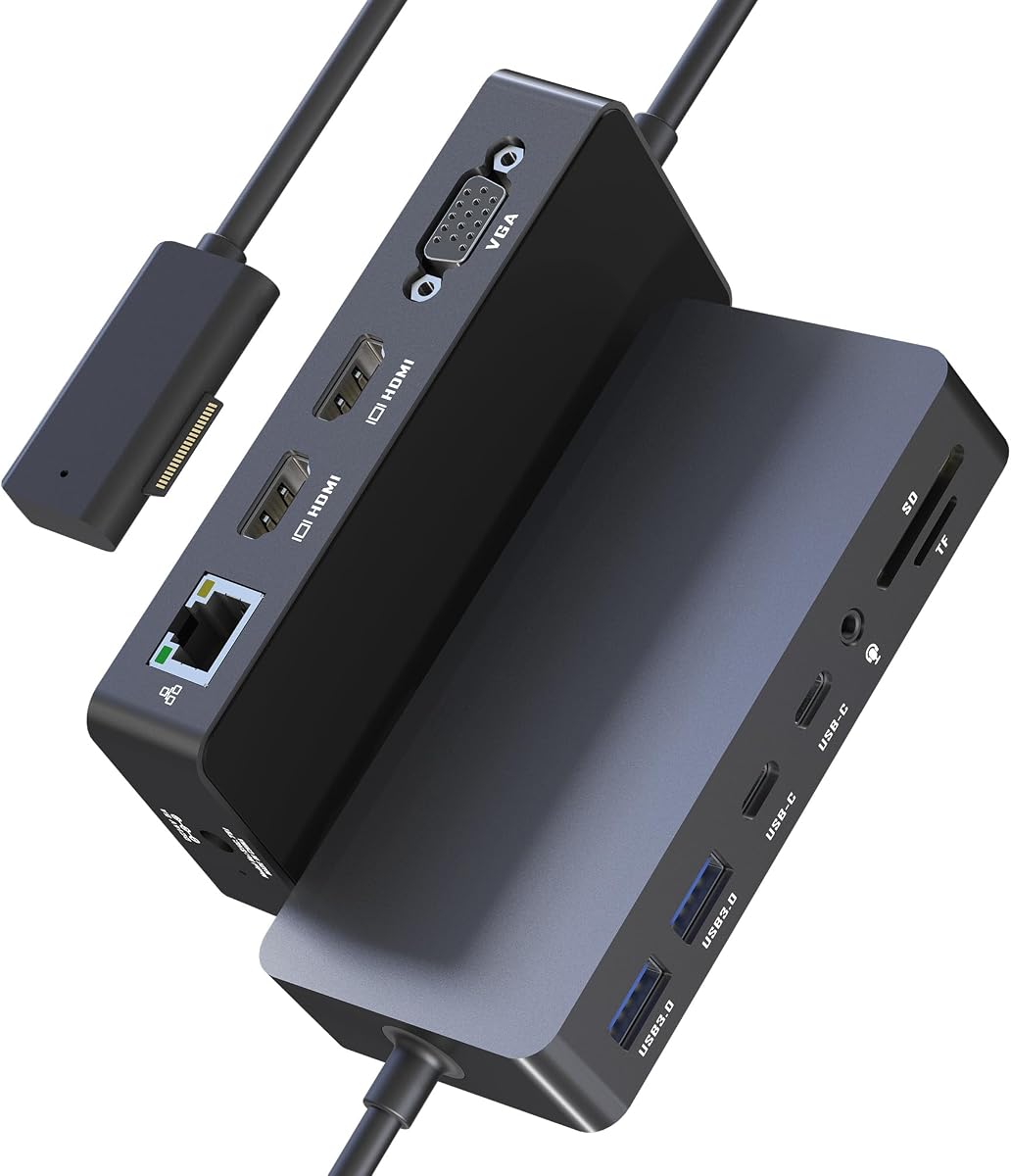
This 12-in-1 Surface Docking Station offers an affordable entry point for users needing multiple display outputs without breaking the budget. It supports three screens simultaneously which is rare at this price point and boosts multitasking efficiency significantly.
We may earn a commission when you buy through this link, at no additional cost to you.
It features two HDMI ports supporting 4K at 30Hz and a VGA port for an additional display. The unit also includes USB data ports SD TF card slots and an Ethernet connection ensuring comprehensive connectivity for various peripherals and media.
While cost-effective the VGA port supports lower resolutions compared to HDMI which might impact visual fidelity for detailed work. Additionally it requires a separate power adapter which adds a small amount of bulk to the desk setup.
Ideal for budget-conscious professionals students or educators this dock provides exceptional value for money. It enables a powerful triple monitor workstation setup that supports enhanced productivity and efficient workflow management at a fraction of the cost.
Supports three displays at once allowing users to extend or mirror screens for better multitasking and streamlined task management.
Includes a variety of ports including HDMI VGA USB and SD slots ensuring compatibility with a wide range of devices and accessories.
We may earn a commission when you buy through this link, at no additional cost to you.
With an impressive user rating this docking station delivers reliable performance for creative professionals and remote workers. Its design focuses on versatility offering a balanced mix of video data and network connectivity in a compact form factor.
We may earn a commission when you buy through this link, at no additional cost to you.
The device provides two HDMI outputs and one VGA port to support three screens enhancing workflow efficiency significantly. It also includes a robust power adapter that charges the Surface device while running peripherals ensuring no interruptions during long work sessions.
Although the Ethernet port is limited to 100Mbps which may be slower than gigabit options it remains stable for most online tasks. The lack of USB-C power output means users must rely on the included adapter for charging which adds cable clutter.
This dock is perfect for creative professionals who need high-speed data transfer and stable network connections. It simplifies desk organization while maximizing functionality making it a reliable choice for hybrid workers and classroom presentations.
Engineered to handle large file transfers and multi-monitor setups without bottlenecks supporting the needs of designers and video editors.
Features a dedicated Ethernet port and audio jack ensuring smooth video conferencing and immersive audio experiences during presentations.
We may earn a commission when you buy through this link, at no additional cost to you.
This docking station delivers a powerful all-in-one solution for Surface Pro users seeking expanded connectivity and high-quality visual outputs. Its dual 4K HDMI support ensures sharp clear visuals for detailed design work and multimedia consumption.
We may earn a commission when you buy through this link, at no additional cost to you.
It features a 12-in-1 layout that includes SD and TF card slots for photographers and creators to offload media quickly. The 72W power supply ensures your device stays charged even when driving multiple external monitors and peripherals.
The ethernet port is capped at 100Mbps which may be insufficient for heavy data streaming or large file transfers over the network. Also the charger uses a DC barrel plug rather than USB-C which limits charging versatility with other devices.
Best suited for creative professionals this hub simplifies your workspace while maximizing your device capabilities. It is an excellent choice for designers and educators who need reliable triple-screen setups and fast access to camera cards.
Delivers dual 4K HDMI outputs for stunning visuals allowing for enhanced productivity and better multitasking capabilities.
Includes dedicated SD and TF card slots for rapid photo and video offloading without needing extra adapters.
We may earn a commission when you buy through this link, at no additional cost to you.
The Surface Dock 2 transforms your Surface into a desktop PC with next-gen ports and robust power delivery. It is widely regarded as a premium solution due to its high refresh rate video support and reliable connectivity options.
We may earn a commission when you buy through this link, at no additional cost to you.
Users benefit from dual 4K displays at 60Hz providing smooth visuals for video editing and graphical work. The dock includes multiple USB-C and USB-A ports along with a gigabit Ethernet connection ensuring fast and stable data transfer and network access.
The primary drawback is its higher price compared to third-party alternatives which may not fit all budgets. Additionally the number of USB-A ports is limited which might require additional adapters for legacy peripherals.
Ideal for professionals who demand top-tier performance and seamless integration with the Microsoft ecosystem. It offers a future-proof solution for those who value high-speed charging and crisp dual 4K monitoring capabilities.
Supports dual 4K at 60Hz and provides 199W power for fast charging and simultaneous peripheral usage.
Includes Kensington-compatible security lock support to protect your hardware in public or shared work environments.
We may earn a commission when you buy through this link, at no additional cost to you.
This version of the Surface Dock 2 offers wide compatibility across various Surface models from Pro to Studio. It maintains the premium features of the standard model while providing an even more versatile selection of connectivity options.
We may earn a commission when you buy through this link, at no additional cost to you.
Key strengths include eight USB ports in total allowing for extensive peripheral connectivity without needing additional hubs. The support for dual 4K monitors at 60Hz ensures smooth high-resolution visuals ideal for creative professionals and power users.
The reliance on the Surface Connect cable means users need to ensure they have the correct adapter for newer devices. While it offers high performance the cost can be prohibitive for casual users looking for basic functionality.
Best for users who need maximum flexibility and reliable performance across multiple devices. Its broad compatibility and robust port selection make it a solid choice for enterprise environments and multi-device households.
Equipped with eight USB ports and gigabit Ethernet ensuring comprehensive connectivity for all your essential peripherals.
Delivers dual 4K at 60Hz for high-resolution immersive visuals suitable for professional video editing and gaming.
We may earn a commission when you buy through this link, at no additional cost to you.
This 12-in-1 dock transforms your Surface into a desktop powerhouse with triple display support and high-speed data transfer. It is engineered for power users who need extensive connectivity without compromising on video quality or network speed.
We may earn a commission when you buy through this link, at no additional cost to you.
It features dual 4K at 60Hz HDMI outputs and a VGA port for three-screen workflows. The inclusion of gigabit Ethernet ensures low-latency internet access which is crucial for video conferencing and large file downloads.
The dock requires a dedicated 100W DC power adapter which adds to the physical bulk and cable management requirements. Additionally the setup process might be slightly more complex compared to simpler plug-and-play hubs.
Perfect for traders designers and professionals with complex workflows this dock eliminates adapter clutter and maximizes screen real estate. It bridges the gap between your mobile tablet and a fully functional high-performance desktop setup.
Supports MST enabling extension or mirroring across three external monitors simultaneously for boosted multitasking efficiency.
Offers gigabit Ethernet and fast USB 3.0 data transfer to handle large files and high-speed streaming smoothly.
We may earn a commission when you buy through this link, at no additional cost to you.
This renewed version of the Surface Dock 2 offers high performance at a reduced cost compared to buying brand new. It includes essential accessories like the power adapter and a USB-C cable ensuring a complete setup out of the box.
We may earn a commission when you buy through this link, at no additional cost to you.
Users can expect dual 4K display support at 60Hz and reliable gigabit connectivity. The product has been rigorously tested for durability and includes a limited warranty which provides peace of mind for budget-conscious buyers.
The main trade-off is that it is a renewed product which may show signs of previous use or have shorter warranty terms. Buyers should inspect the condition upon arrival to ensure there are no cosmetic or functional issues.
Ideal for buyers looking for premium features at a lower price point. This option delivers the full power of the Dock 2 experience without the premium price tag while maintaining essential quality standards.
Get high-end specs like 4K 60Hz and powerful charging in a renewed unit that costs less than a new model.
Includes the dock power adapter and USB-C cable ensuring you have everything needed for immediate use.
We may earn a commission when you buy through this link, at no additional cost to you.
This dock uses traditional Mini DisplayPort outputs which make it a reliable choice for users with compatible legacy monitors. It provides stable connectivity for a range of Surface devices with a focus on simplicity and essential features.
We may earn a commission when you buy through this link, at no additional cost to you.
The unit includes four USB 3.0 ports for connecting peripherals like keyboards and mice alongside a gigabit Ethernet port for secure internet access. The 90W power supply ensures your Surface stays charged during operation.
The reliance on Mini DisplayPort instead of HDMI or USB-C limits compatibility with newer monitors that lack these specific inputs. Users might need additional adapters if their monitors do not support this older connection standard.
Best for users who already own Mini DisplayPort monitors or want a simple no-fuss docking solution. It remains a practical choice for those who prioritize stable connectivity over modern port variety.
Uses Mini DisplayPort and Ethernet to provide reliable connections for monitors and networks without complex setups.
Includes a 90W power supply to charge the device while in use ensuring continuous productivity.
We may earn a commission when you buy through this link, at no additional cost to you.
Selecting the right docking station depends on understanding your specific connectivity needs the types of monitors you use and your budget constraints. This guide breaks down the essential factors to consider.
Check how many monitors you need to connect and what resolution you require. Look for HDMI or USB-C video ports for newer displays and Mini DisplayPort for older ones. Ensure there are enough USB ports for your keyboard mouse and external drives.
A good dock should provide enough power to charge your Surface Pro while running peripherals. Check the wattage of the included power adapter to ensure it can handle your device and connected accessories simultaneously.
For fast file transfers ensure the dock supports USB 3.0 or USB-C ports with high throughput. If you work with large video files or use external SSDs look for Thunderbolt 4 or fast USB 3.1 specifications.
Ethernet connections are often more stable than Wi-Fi for important work. Look for gigabit Ethernet support to ensure smooth video conferencing and quick downloads without lag or interruptions.
The dock should be sturdy enough to withstand daily use and fit well on your desk. A compact design helps reduce clutter while durable materials ensure longevity over time.
Always check the warranty period and customer support availability before buying. A reliable warranty protects your investment against defects and provides peace of mind.
Ensure the dock is compatible with your specific Surface Pro model and any accessories you use. Some docks may require specific Surface Connect cables or adapters for older or newer devices.
Determine your budget and compare features to find the best value. Premium docks cost more but offer better speed and durability while budget options may suffice for basic needs.
Connect your monitor cables to the video ports on the dock before connecting the Surface Pro. Ensure all peripherals like keyboards and mice are plugged into the USB ports securely to avoid connectivity issues.
Plug the power adapter into the dock and then into a wall outlet to ensure stable power delivery. Check that the Surface Connect or USB-C cable is properly aligned before attaching it to your device.
Keep your dock in a well-ventilated area to prevent overheating during extended use. Regularly clean the ports with compressed air to remove dust and maintain optimal performance over time.
Yes most docking stations provide power delivery that allows your Surface Pro to charge while connected. Ensure the dock supports your device's charging requirements for optimal performance.
Many docking stations support dual or even triple monitors depending on the model and video outputs. Check the specifications for HDMI or DisplayPort counts to confirm multi-monitor support.
Most docks work with any device that has a compatible USB-C or USB-A port. However some features may be limited to Surface devices depending on the specific model.
Use the included Surface Connect or USB-C cable for the best performance. Avoid using damaged or incompatible cables to prevent connectivity issues and power loss.
Most docks are plug-and-play and do not require additional drivers. However some advanced features might need updates or software from the manufacturer.
Check the product specifications or manufacturer website for listed compatible devices. Ensure your Surface Pro model is included in the supported list for optimal performance.
We reviewed ten top-rated docking stations offering a range of options from premium Thunderbolt models to affordable triple-display hubs. Each provides unique benefits tailored to different workflow needs and budgets.
Prioritize the features that matter most to you whether it is video quality data speed or port variety. A well-chosen dock will transform your Surface Pro into a powerful desktop workstation.
Remember that availability and offers change frequently so check current prices and stock before purchasing. The ideal dock is the one that fits your specific workspace requirements and enhances your daily productivity.