
IPEVO VZ-X Wireless 8MP Document Camera
4.6Editor score
Three modes of connectivity including Wi-Fi and HDMI
Up to 33-feet wireless range for flexibility
Nine to twelve hours of battery life
Selecting the right visual aid can transform how students engage with lessons daily. A document projector allows educators to display physical materials clearly on large screens instantly.
We analyzed ten leading models focusing on resolution, connectivity options, and ease of use in busy teaching environments. Our goal is to highlight tools that support modern learning needs effectively.
Each pick below shows specific strengths for different classroom setups and budget ranges. Please note that product availability and pricing may change frequently on retailer sites.
4.6Editor score

4.5Editor score

4.4Editor score
As an Amazon Associate we earn from qualifying purchases.
This table provides a side-by-side comparison of all ten products to help you quickly identify key specifications and suitability for your specific classroom environment.





This camera stands out as a top choice for educators needing reliable visual presentation. It holds a solid 4.5-star rating reflecting user satisfaction with its performance in various settings.
We may earn a commission when you buy through this link, at no additional cost to you.
The 8 Megapixel camera captures ultra-high-definition images up to 3264 x 2448 pixels ensuring every detail on a page or object is visible. High frame rates allow lag-free live streaming which is crucial for maintaining student attention during live demos or distance learning sessions.
While the fast focusing speed minimizes interruptions when switching materials some users may find the shooting area slightly limited compared to larger A3 options. However the multi-jointed stand offers a simple fix for tightening loose joints caused by heavy daily use making it durable over time.
Teachers who prioritize image clarity and quick setup will find this model excellent. It works seamlessly with Mac PC and Chromebook environments making it versatile for different school IT infrastructures.
Sony CMOS Image Sensor ensures exceptional noise reduction and color reproduction great for capturing documents clearly.
Designed to work with a variety of software and applications allowing use in different ways across systems.
We may earn a commission when you buy through this link, at no additional cost to you.
This overhead projector offers a traditional approach to classroom visual aids with high brightness capabilities. It maintains a good 4.2-star rating from users who appreciate its robust design for presentations.
We may earn a commission when you buy through this link, at no additional cost to you.
Featuring 2000 Lumen Output this device ensures visibility even in well-lit rooms. The open head design with 10 inch by 10 inch area allows teachers to place transparencies or physical books directly under the lens for immediate display on screens.
The inclusion of an LCD display allows the presenter to see exactly what is being projected before sending it to the main screen. This helps in framing documents correctly and adjusting the focus without interrupting the lesson flow.
Educators looking for a reliable analog to digital bridge may prefer this model. It supports VGA and USB connectivity making it compatible with older projectors as well as modern computers.
2000 lumens ensure clear visibility during daytime sessions or in rooms with ambient light.
The open head design makes it easy to place various objects under the lens quickly.
We may earn a commission when you buy through this link, at no additional cost to you.
This premium camera offers unmatched flexibility for mobile teaching styles with its wireless capabilities. It boasts a high 4.6-star rating confirming its value for advanced classroom presentations and remote collaboration.
We may earn a commission when you buy through this link, at no additional cost to you.
The three modes of connectivity including Wi-Fi HDMI and USB allow seamless connection to computers iOS or Android devices Apple TV or projectors. In USB mode it captures near 4K quality images which ensures text and diagrams are sharp enough for large screens.
A notable feature is the battery life which provides nine to twelve hours of operation. This ensures a complete class or presentation session without interruptions. The wireless range extends up to 33 feet giving teachers the freedom to walk around the classroom while capturing different objects.
Institutions needing a high-end solution that supports BYOD policies will find this model ideal. The swiveling head and multi-jointed stand allow capture from different height angles and orientations effortlessly.
Up to 33 feet of wireless range allows teachers to present from anywhere in the room.
The 8 MP sensor captures images in high definition or near 4K quality depending on the connection mode.
We may earn a commission when you buy through this link, at no additional cost to you.
This camera delivers impressive features at a budget-friendly price point making it accessible for many schools. It holds a strong 4.4-star rating from users who value its high resolution and flexible design.
We may earn a commission when you buy through this link, at no additional cost to you.
With an 8MP resolution it outputs ultra-high-definition images and videos live transmission up to 2448P megapixels. The camera allows manual adjustment of image reversal meaning you can fix mirrored images easily. Additionally the 3-level LED lights eliminate shooting problems under difficult lighting conditions.
The foldable design occupies a small space after folding which is great for storage or classrooms with limited desk space. The multi-joint support allows rotation to capture both 2D and 3D objects better for science or art demonstrations.
For educators needing a plug-and-play solution that covers A3 size documents this is a top budget pick. The built-in dual silicon microphones help reduce noise and improve sound quality during video calls.
Manually adjust image reversal left/right and up/down for perfect output in video chats.
Embedded design and folding capability make it easy to carry and store in small classrooms.
We may earn a commission when you buy through this link, at no additional cost to you.
This model is specifically designed for professional educators and art instructors needing clear display for large documents. It maintains a solid 4.4-star rating due to its high resolution and professional feature set.
We may earn a commission when you buy through this link, at no additional cost to you.
The 13MP SONY sensor captures clear 4K Ultra HD images at 30fps ensuring that even the smallest text or brush strokes are visible. The multi-joint arm allows flexible angle adjustments for documents up to A3 size which is excellent for textbooks or portfolios.
It comes with ALL-IN-ONE DOCUMATE SOFTWARE that offers zoom annotation and video recording tools. This software enhances teaching capabilities significantly. However users must download the latest version for free on the website to access these full features.
Educators who need to present large artwork or two-page spreads will appreciate this camera's capabilities. The plug-and-play compatibility with Windows Mac iPad and Chromebook makes it easy to integrate into existing systems.
Built-in LED light and anti-glare sheet deliver clear and professional presentations consistently.
Documate software offers annotation and whiteboard tools to make lessons more interactive.
We may earn a commission when you buy through this link, at no additional cost to you.
This dedicated projector offers specialized optical zoom capabilities for detailed viewing. It holds a 3.6-star rating which suggests it is more niche compared to versatile document cameras.
We may earn a commission when you buy through this link, at no additional cost to you.
Featuring 6x optical zoom manual zoom and 8x digital zoom this unit provides detailed views without moving the object. The high-resolution UXGA SXGA and XGA support ensures crisp visuals on compatible projectors and screens.
Convenience is a factor with one-touch video recording and playback and internal memory for 120 JPEG images. The SD card slot accepts up to 32 GB allowing for additional storage capacity for classroom resources.
Institutions with interactive whiteboards may find this device compatible and useful. It serves well for technical presentations where detailed zoom is necessary for showing small components or intricate designs.
High-resolution optical zoom allows detailed viewing without compromising image quality.
Internal memory and SD card slot provide offline storage for lesson materials.
We may earn a commission when you buy through this link, at no additional cost to you.
This LCD projector is a robust choice for general classroom projection needs. It has an impressive 4.9-star rating indicating high reliability and user satisfaction.
We may earn a commission when you buy through this link, at no additional cost to you.
The 3LCD technology produces vibrant eye-catching images that are essential for engaging lessons. Its durable design provides a long lamp life of 17000 hours which reduces maintenance needs over time.
The moderator function connects up to 50 users simultaneously which is useful for collaborative sessions. HDMI connectivity transfers video and audio through a single cable simplifying setup for teachers.
While it does not have a built-in document camera it pairs well with external ones to form a complete system. The built-in speaker adds convenience for audio during presentations without extra equipment.
3LCD technology ensures images are vibrant and eye-catching for better student engagement.
Moderator function allows connection with up to 50 users simultaneously for group activities.
We may earn a commission when you buy through this link, at no additional cost to you.
This business projector is engineered for bright environments making it ideal for classrooms with daylight. It has achieved a perfect 5.0-star rating for its performance in office and training spaces.
We may earn a commission when you buy through this link, at no additional cost to you.
With 3300 lumens this projector delivers bright images that are visible even in well-lit rooms. DLP technology ensures professional images with natural color presentation and enhanced contrast suitable for teaching materials.
Quick start for daily business use reduces preparation time before lessons. The wide display supports large-size projection which helps everyone follow displayed content more easily in large rooms.
Educators teaching during the day without window shades will find this model extremely useful. Easy wired connection setup allows users to start displaying content without complicated installation steps.
3300 lumens provide bright enough images to hold up against moderate ambient lighting.
Fast startup design reduces waiting time for presentations to begin.
We may earn a commission when you buy through this link, at no additional cost to you.
This model offers flexible construction making it easy to display from virtually anywhere. It holds a strong 4.8-star rating for its reliable performance and image quality.
We may earn a commission when you buy through this link, at no additional cost to you.
The 3LCD technology produces vibrant true-to-life images which are essential for accurate representation of educational materials. It includes a 5-watt speaker built in for engaging projector displays without extra speakers.
Durable design provides a long lamp life of 12000 hours. HDMI connectivity transfers video and audio through a single cable ensuring a clean setup for educators.
For schools looking to install projectors in various locations this flexibility is key. It pairs well with document cameras to create a complete visual teaching system.
3LCD technology ensures vibrant true-to-life images for accurate educational content.
HDMI connectivity transfers video and audio through a single cable for easy setup.
We may earn a commission when you buy through this link, at no additional cost to you.
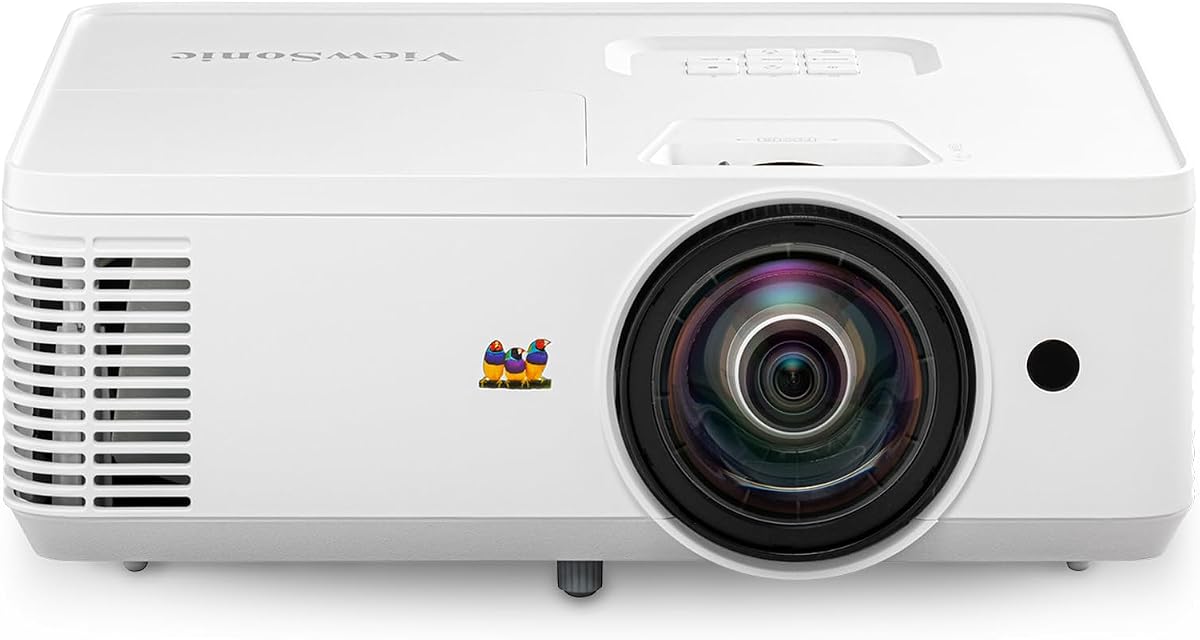
This short throw projector is designed to transform small rooms with massive screen sizes. It holds a solid 4.4-star rating from users needing space-saving solutions.
We may earn a commission when you buy through this link, at no additional cost to you.
With a 0.5 throw ratio it can project a massive 100-inch image from just 4.5 feet away. This maximizes limited floor space which is crucial in modern compact classrooms or meeting areas.
4000 ANSI lumens ensure punchy images that hold up against moderate ambient lighting. SuperColor technology provides a wide color gamut for lifelike visuals in educational settings.
Vertical auto-keystone correction ensures a perfectly squared display without manual tweaking. Dual HDMI ports allow easy connection to multiple devices which is great for student presentations.
Transform small rooms by projecting large images from just a few feet away.
SuperColor technology provides a wide color gamut for lifelike visuals.
We may earn a commission when you buy through this link, at no additional cost to you.
Selecting the right visual tool requires understanding specific classroom needs and technical requirements.
Resolution determines how clear text and images appear on the screen. Look for at least 8MP sensors or 4K output to ensure students can read fine details without strain.
High resolution is essential for displaying math formulas or detailed artwork accurately during lessons.
Modern classrooms often use multiple devices including laptops tablets and smartphones. A projector with USB HDMI and Wi-Fi offers the most flexibility for these diverse setups.
Multiple connectivity options ensure your visual aid works with whatever device you or students are using.
The area you can capture affects whether you can show standard letter pages or larger A3 documents. If you work with art or textbooks choose a model with A3 support.
Larger capture areas reduce the need to crop materials and provide more context for the class.
Classrooms vary in lighting from dim media rooms to bright open spaces. LED lights with adjustable brightness help maintain image clarity in any environment.
Adjustable brightness ensures images remain visible even if window shades are open or lights are on.
If you move between classrooms or need to store equipment daily portability is key. Foldable designs and multi-jointed stands save space and allow flexible positioning.
Easy setup and storage make it more likely teachers will use the technology regularly.
Check if the device works with your operating system and presentation tools. Most modern units support Windows Mac and Chromebook which covers most school standards.
Compatibility prevents installation headaches and ensures the device integrates with existing school software.
Prices vary significantly from budget-friendly cameras to premium projectors. Determine your core needs to avoid overspending on features you might not use.
A balanced approach considers both upfront cost and long-term value for classroom utility.
Classroom equipment faces heavy daily use so build quality matters. Look for products made with durable materials and backed by reliable manufacturer support.
Strong construction and warranty protection ensure your investment lasts through multiple academic years.
Start by connecting your projector to a display device using the appropriate cable or wireless method. Ensure the focus is adjusted correctly by testing with a sample document before class starts.
Regularly clean the lens with a soft cloth to prevent dust from affecting image quality. Store devices in dry secure places to protect them from accidental damage during movement.
Update software and drivers periodically to maintain compatibility with new operating systems. Check connections and power sources daily to avoid interruptions during scheduled lessons.
Yes many document cameras and projectors work via USB or HDMI cables without needing internet. Wireless models may require local network setup for Wi-Fi or Bluetooth connectivity.
A document camera captures physical objects and sends the video signal to a projector or monitor. A traditional projector displays images from a computer or device already digitized on a screen.
Most modern document cameras are compatible with interactive whiteboards. Check specific connection requirements such as USB or HDMI to ensure they integrate properly with your smartboard system.
Many models have an autofocus button or ring adjustment on the lens. Follow the manufacturer guide to manually calibrate focus if automatic adjustments do not provide clear images.
The capture area size determines how much text you can display at once. Larger sensors support more text such as full A3 pages while smaller sensors may show only single letter pages.
Moderate lighting without direct glare on the display area works best. Most models have built-in LED lights to help maintain visibility in dimly lit or well-lit environments.
We reviewed ten distinct solutions ranging from versatile document cameras to dedicated display projectors. Each offers unique strengths tailored for different educational environments and budget levels.
Prioritize resolution and connectivity options to ensure your visual aid meets modern teaching demands. Consider long-term reliability and ease of use to maintain consistent classroom engagement.
Remember to verify current pricing and availability as models update frequently. Select the tool that best supports your specific instructional goals and classroom layout today.