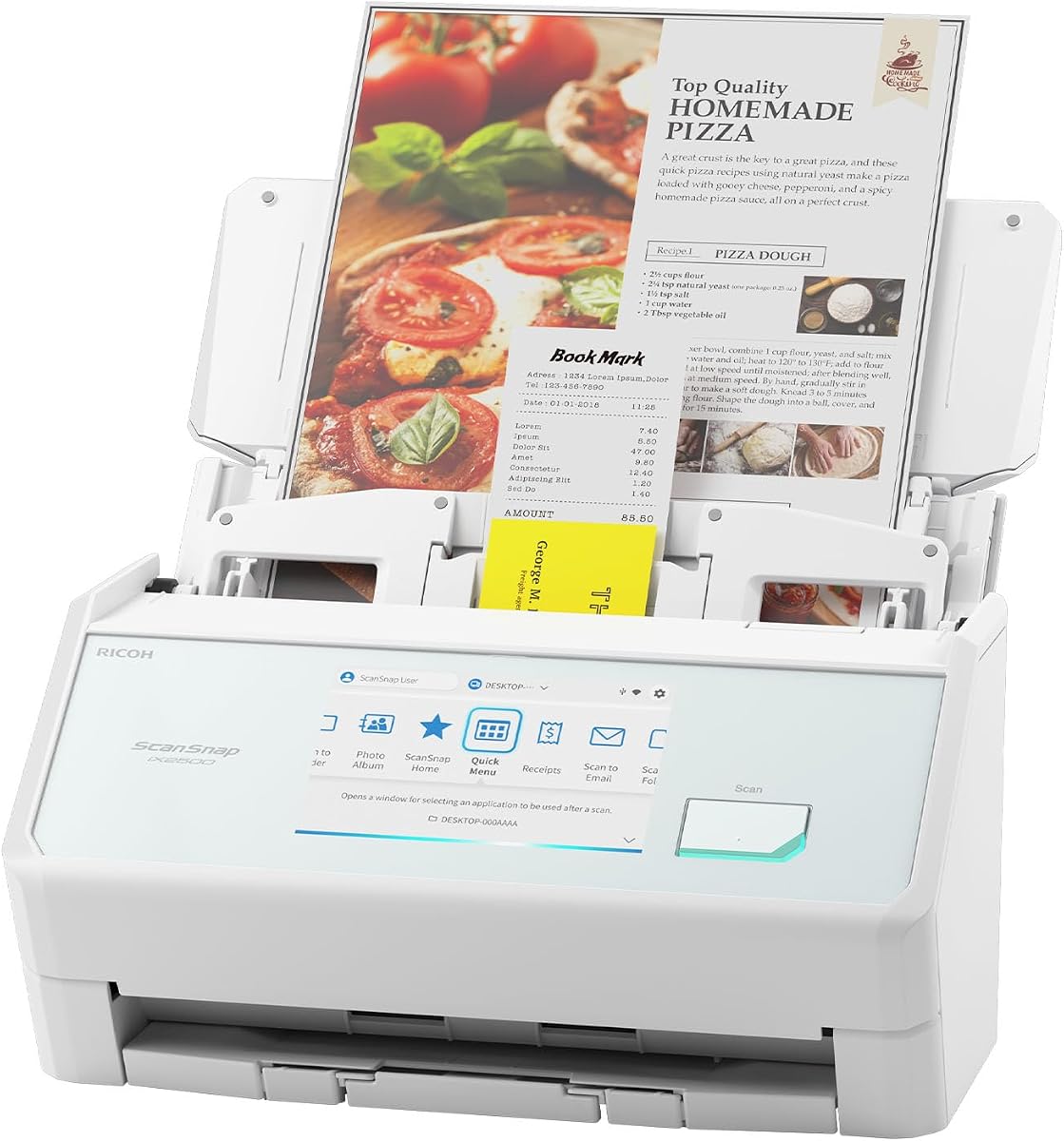
ScanSnap iX2500
4.4Editor score
100-sheet automatic document feeder
Wi-Fi 6 and USB-C connectivity
Large customizable touchscreen interface
Discover the top document scanners for iPhone 18 users. Compare features, speeds, and compatibility to find the perfect portable scanning solution for your workflow.
Finding a reliable document scanner for your iPhone 18 is essential for modern productivity. Whether you are managing receipts, scanning contracts, or archiving notes, the right tool ensures crisp digital copies without the clutter of paper. This guide highlights the best options available for seamless mobile integration and efficient workflow management.
We evaluated ten top-rated devices based on portability, scanning speed, connectivity options, and software compatibility. Our analysis focuses on models that integrate well with iOS ecosystems while offering robust features for both personal and professional use. Each product was selected for its ability to deliver high-quality scans on demand.
Each pick in this list showcases unique strengths tailored to different user needs. From ultra-compact feeders to versatile handheld wand scanners, you will find solutions that match your specific requirements. Please note that availability and features may vary, so reviewing the latest details before purchasing is always recommended.
4.4Editor score

4.3Editor score

3.9Editor score
The following comparison table outlines the key specifications and features of each top-rated document scanner. Use this side-by-side view to quickly identify which model best aligns with your specific scanning needs and mobility requirements.




The Epson Workforce ES-50 stands out as a top contender for users seeking a lightweight and efficient mobile scanning solution. With a rating of 4.3 stars, it is praised for its ultra-fast performance and compact design that fits easily into bags or pockets. This device is ideal for professionals who need to digitize receipts, IDs, and invoices on the go without compromising on quality.
We may earn a commission when you buy through this link, at no additional cost to you.
Its standout feature is the ability to scan documents up to 72 inches long, making it perfect for lengthy contracts or financial records. The scanner operates solely via USB, eliminating the need for batteries and ensuring consistent power. The included Nuance OCR software allows users to create searchable PDFs and editable Word files, significantly enhancing document organization and searchability across systems.
While the single-sheet feeding mechanism means it is not designed for high-volume batch scanning, the speed of 5.5 seconds per page makes it efficient for daily tasks. Users note that the setup is intuitive and the software provides a seamless experience for reviewing and saving scans. The lack of wireless connectivity is a trade-off but ensures stable data transfer without battery drain concerns.
This scanner is best suited for mobile professionals, students, and small business owners who prioritize portability and speed over bulk processing. If you need a reliable tool that transforms paper documents into organized digital files quickly, the ES-50 delivers exceptional value. It balances performance and convenience in a way that few other portable scanners manage to achieve.
The ES-50 is engineered for quick capture of critical documents, allowing you to stay organized while traveling or working remotely.
Included software enables text recognition that makes scanned documents searchable and editable, streamlining your workflow significantly.
We may earn a commission when you buy through this link, at no additional cost to you.
The Brother DS-640 is a powerhouse of efficiency in a tiny package. With a 4.3-star rating, it is celebrated for its blazing speed of 16 pages per minute and its ability to fit into virtually any bag or purse. This device is perfect for users who need to scan color and black and white documents quickly without slowing down their workflow.
We may earn a commission when you buy through this link, at no additional cost to you.
Powered via a micro USB 3.0 cable, the DS-640 ensures you are ready to scan wherever you are connected to a computer. The free iPrint&Scan desktop app provides versatile scanning destinations including PC network and cloud services. Automatic color detection and image adjustment features ensure that every scan looks sharp and professional without manual tweaking.
One limitation is the lack of wireless connectivity, which means you must be near a computer to use it effectively. However, the compact design and fast performance often outweigh this for users who primarily work from a laptop or desktop. The software suite includes OCR capabilities that enhance the utility of your scanned documents for further editing.
Ideal for business travelers and field agents, this scanner offers the speed and portability needed for dynamic work environments. It is a reliable choice for those who need a dependable mobile scanner that performs well in diverse settings. The combination of speed, compactness, and smart software features makes it a strong contender in its category.
Color scans are processed at the same speed as black and white, ensuring no slowdowns when digitizing mixed document types.
Automatic settings adjust brightness and contrast to produce clear, professional-quality digital copies every time.
We may earn a commission when you buy through this link, at no additional cost to you.
The ScanSnap iX2500 represents the pinnacle of home and office scanning technology. Rated at 4.4 stars, it offers an impressive speed of 45 pages per minute and a 100-sheet feeder that handles bulk scanning with ease. This scanner is ideal for offices or power users who need to digitize large volumes of paperwork quickly and efficiently.
We may earn a commission when you buy through this link, at no additional cost to you.
With built-in Wi-Fi 6 and USB-C connectivity, the iX2500 allows for flexible connection options. You can scan directly to mobile devices or cloud services without needing a computer nearby. The large touchscreen enables customizable profiles and quick access to favorite applications, streamlining the scanning process significantly for daily tasks.
Features like automatic file naming and multi-feed detection ensure that your digital archive remains organized and accurate. The brake roller system prevents paper jams and damage, offering reliable performance over time. While the price is higher than entry-level models, the efficiency and robust features justify the investment for heavy users.
If you need a scanner that can handle high volume with minimal fuss, the iX2500 is unmatched. It is perfect for offices, small businesses, or individuals with extensive document organization needs. The seamless integration with cloud services and mobile devices makes it a versatile tool for modern workflows.
Personalized profiles and custom buttons allow you to automate scanning tasks for specific apps and destinations instantly.
Wi-Fi 6 ensures fast and secure wireless connections, reducing latency and improving performance in busy environments.
We may earn a commission when you buy through this link, at no additional cost to you.
The CZUR Shine Ultra is a unique device designed for scanning books and documents with incredible speed. With a rating of 4.2 stars, it is known for its ability to scan a page in about one second using its advanced camera technology. This makes it an excellent tool for digitizing large books, manuals, or research materials quickly.
We may earn a commission when you buy through this link, at no additional cost to you.
Its patented flattening technology automatically corrects curved book pages, ensuring flat and readable scans without physical damage to the book. The high-resolution CMOS camera captures sharp details, and the included software supports over 180 languages for OCR. This versatility makes it valuable for academic and professional research environments.
While it does not support mobile iOS or Android apps directly, it functions well with Windows and Mac systems. The ability to act as a document camera for remote teaching adds another layer of utility to this device. The height-adjustable neck and foldable design ensure it can be adapted to various desk setups easily.
This scanner is best suited for researchers, librarians, and educators who need to digitize bound materials. If you deal with thick books or curved pages regularly, the Shine Ultra offers a solution that flatbed scanners cannot match. Its speed and specialized technology make it a standout choice for specific document types.
The flattening technology allows you to scan thick books without damaging spines, preserving valuable materials.
Use it as a document camera for Zoom or Google Meet to display physical materials clearly to students.
We may earn a commission when you buy through this link, at no additional cost to you.
The Brother DS-740D takes the compact scanner concept further by offering duplex scanning in a single pass. Rated at 4.3 stars, it saves significant time by scanning both sides of a document at once without manual flipping. This feature is particularly beneficial for users dealing with contracts, receipts, or double-sided notes regularly.
We may earn a commission when you buy through this link, at no additional cost to you.
With a speed of 16 pages per minute, it handles daily scanning tasks efficiently while maintaining a footprint that fits in pockets or purses. The included software allows for scanning to multiple destinations including cloud services and email. Automatic image optimization ensures that text and colors are enhanced for better readability in digital formats.
The lack of wireless connectivity is a consideration, but the USB power ensures consistent performance when connected to a laptop. The desk-saving design reduces clutter, making it suitable for small workspaces or mobile desks. It is a reliable option for professionals who need speed and convenience without sacrificing quality.
This model is ideal for administrative staff and consultants who frequently handle double-sided paperwork. If you want to reduce scanning time and keep your documents organized, the DS-740D delivers strong performance. Its balance of size, speed, and duplex features makes it a practical tool for modern workflows.
Scanning both sides simultaneously cuts processing time in half compared to single-sided feeders.
The unique design reduces the desk space needed, keeping your workspace organized and uncluttered.
We may earn a commission when you buy through this link, at no additional cost to you.
The Canon imageFORMULA R10 is a versatile portable scanner designed for ease of use and efficiency. With a rating of 4.1 stars, it is praised for its ability to scan various media types from receipts to embossed cards. The 20-sheet feeder allows for small batch scanning, which is useful for office and field environments.
We may earn a commission when you buy through this link, at no additional cost to you.
It offers a scanning speed of 12 pages per minute with duplex capabilities, ensuring that both sides of documents are captured quickly. The built-in software requires no installation and updates automatically, making setup straightforward for any user. Energy Star certification highlights its efficiency, consuming minimal power during operation.
The lack of wireless features means it depends on a USB connection for power and data transfer. However, its compact design ensures it fits easily into a laptop bag for mobility. The integration with Canon's camera technology ensures high-quality imaging for all document types scanned.
This scanner is well-suited for remote workers and small business owners who need a reliable tool for daily tasks. It combines durability, efficiency, and portability in a way that appeals to mobile users. If you need a scanner that handles diverse media with ease, the R10 is a solid choice.
Low power consumption makes this device ideal for users who need to scan on battery power or limited outlets.
Handles plastic cards and receipts alongside standard paper, reducing the need for multiple tools.
We may earn a commission when you buy through this link, at no additional cost to you.
The Epson Perfection V19 II is a flatbed scanner designed for users who prioritize image quality. With a resolution of 4800 dpi, it captures fine details in photos and artwork that other mobile scanners might miss. Rated at 3.9 stars, it is a preferred choice for digitizing family albums and historical documents.
We may earn a commission when you buy through this link, at no additional cost to you.
Features like Easy Photo Fix technology allow you to restore color to faded images with a single click. The removable lid accommodates books and photo albums without flattening them, preserving their integrity. While the scanning process is slower than feeders due to its flatbed nature, the quality makes up for the time difference.
It includes ScanSmart software that simplifies the creation of searchable PDFs and editable documents. The kickstand design allows for vertical storage when not in use, saving valuable desk space. USB power ensures it is portable and easy to connect to various systems.
This scanner is best for photographers and archivists who need high-fidelity scans. If preserving visual detail is your primary goal, the V19 II delivers exceptional results. Its versatility with books and photos makes it a unique tool in a market dominated by feeders.
Automatic tools help bring life back to old photos with one-click color correction.
4800 dpi resolution ensures that every nuance of an image is captured accurately.
We may earn a commission when you buy through this link, at no additional cost to you.
The Epson Workforce ES-60W is a standout option for users who require true wireless capabilities. Rated at 4.1 stars, it allows scanning directly from iOS or Android devices without a computer. This flexibility makes it a powerful tool for on-the-go professionals who need immediate digital access to documents.
We may earn a commission when you buy through this link, at no additional cost to you.
Its speed of 4 seconds per page ensures that scanning tasks are completed quickly. The device automatically switches between USB and battery-powered wireless modes based on availability, reducing user intervention. The included software supports scanning directly to cloud storage, streamlining backup processes effectively.
While battery management is a factor, the portability it offers is unmatched by USB-only devices. The automatic feeding mode simplifies multi-page scans, combining them into a single file. This feature enhances organization and reduces manual file handling during workflows.
Ideal for field workers and sales teams, this scanner provides the connectivity needed to stay productive anywhere. If you need a device that removes the tether to a computer, the ES-60W is a strong choice. Its balance of speed, wireless features, and portability sets it apart.
Wireless connectivity removes the need for cables, allowing you to scan anywhere within network range.
Smart connectivity switching ensures you can keep working without interruption regardless of available power.
We may earn a commission when you buy through this link, at no additional cost to you.
This handheld scanner offers an affordable and lightweight solution for basic scanning tasks. With a rating of 3.9 stars, it is designed for users who need a simple tool for scanning documents and images without complex setups. The ability to store files directly on an SD card makes it convenient for travel.
We may earn a commission when you buy through this link, at no additional cost to you.
It supports multiple resolution modes up to 900 DPI, allowing users to choose between speed and quality. The plug and play feature means no software installation is needed, making it accessible for all technical levels. Powered by AA batteries, it provides independence from power outlets during use.
The manual scanning motion requires a steady hand but provides flexibility for scanning irregular items. This is useful for scanning documents that do not fit into standard feeders or books. The compact size ensures it fits easily into pockets for easy transport.
This device is ideal for budget-conscious users who need occasional scanning capabilities. It works well for students and travelers who need to digitize documents quickly. If portability and cost are your main concerns, this handheld option provides essential functionality effectively.
SD card storage allows you to carry your scans without relying on cloud services or computer space.
Multiple DPI modes give you control over file size and clarity depending on your project needs.
We may earn a commission when you buy through this link, at no additional cost to you.
This silver handheld scanner provides similar capabilities to the blue version with a focus on portability and simplicity. Rated at 3.9 stars, it is a budget-friendly option for those who need basic document digitization. The design ensures it is easy to carry and operate without technical overhead.
We may earn a commission when you buy through this link, at no additional cost to you.
The device supports scanning in multiple resolution modes to balance speed and clarity. Files are saved directly to an SD card which allows for easy transfer and storage. It is powered by AA batteries, making it convenient for use in locations without electrical access.
Manual operation requires a steady hand to ensure straight scans but offers flexibility for different document sizes. This makes it a versatile tool for irregular documents or books. The compact size ensures it does not add bulk to your travel or work kit.
This scanner is suitable for casual users who need a reliable tool for occasional tasks. It serves students and professionals who need to capture digital copies quickly without investing in high-end hardware. If you value simplicity and cost-effectiveness, this handheld model is a practical choice.
The device is designed for quick setup and use, making it ideal for spontaneous scanning needs.
SD card support offers an alternative to digital cloud storage for keeping your files private and offline.
We may earn a commission when you buy through this link, at no additional cost to you.
Selecting the right document scanner requires understanding your specific needs for portability, connectivity, and file management. This guide outlines the essential factors to consider when making a purchase.
When selecting a scanner for your iPhone 18 workflow, consider how it connects to your devices. Some scanners offer Wi-Fi or Bluetooth options that allow direct scanning to mobile devices without a computer. Others rely on USB connections which may limit mobility but ensure stable data transfer and consistent power supply.
Look for models that support cloud services or mobile apps to streamline your workflow. Direct connectivity to your iPhone ensures that scanned documents are immediately accessible for sharing or storage.
Scanning speed is crucial if you handle large volumes of documents regularly. Entry-level feeders might take several seconds per page, while high-end models can process dozens of pages per minute. Consider your daily scanning load to determine the speed required for efficiency.
High volume users should prioritize devices with fast processing speeds and automatic feeders. Casual users may find slower speeds acceptable if they prioritize budget or compact design.
Paper handling features such as automatic document feeders allow you to scan multiple pages without manual intervention. For multi-page documents, this feature is essential for saving time. Ensure the feeder capacity matches your needs, whether it is a few sheets or hundreds.
Check for features like duplex scanning which handles double-sided documents in one pass. This capability significantly increases productivity for contracts and double-sided forms.
Software compatibility is a major factor in the usability of a document scanner. Ensure the included software supports your operating system and offers Optical Character Recognition (OCR) to create searchable PDFs. OCR allows you to edit scanned text and search documents quickly.
Look for software that integrates well with cloud storage and your existing apps. Good software can automate file naming and organizing, reducing the effort required to manage digital files.
Portability is key for mobile professionals who need to scan on the go. A compact and lightweight design ensures the scanner fits into bags or purses easily. Consider the physical footprint of the device if desk space is limited in your workspace.
Battery-operated models offer greater freedom than USB-powered devices but may require frequent recharging. Balance the need for mobility with the convenience of constant power when selecting a device.
Resolution determines the clarity of your scanned documents. Higher DPI values result in sharper text and images, which is important for detailed documents or photos. Most business documents are well-suited for standard resolution settings.
Check if the scanner offers adjustable resolution settings to balance file size with quality. This flexibility is useful when you need to send large scans via email or store them locally.
Some scanners are designed for specific tasks such as scanning books, receipts, or ID cards. A flatbed scanner may be necessary for bound materials or fragile documents that cannot fit into a feeder. Consider your typical document types when making a choice.
If you scan a lot of receipts or cards, ensure the scanner has specific modes or settings for small media. This ensures accurate scanning without wasting space or losing detail.
Document scanners range from affordable handheld options to premium desktop models. Establish a budget that aligns with your usage needs to ensure you do not overspend on features you do not require.
Invest in a device that offers a good balance of features and price. Consider the long-term value of reliability and software support when evaluating different models.
To get the best results from your document scanner, start by ensuring your documents are clean and free of staples or paper clips. Properly aligning your paper in the feeder or on the flatbed ensures accurate scans without skewing or missing content. This simple step helps maintain quality and prevents paper jams.
Use the included software to adjust settings such as resolution and color mode before scanning. Selecting the right settings ensures your files are optimized for their intended use, whether that is archival storage or email sharing. Regularly update your software to take advantage of new features and security patches.
Care for your scanner by keeping it in a dry and dust-free environment. Periodically clean the glass or feeder rollers with a soft cloth to maintain optimal performance. Proper maintenance extends the lifespan of your device and ensures consistent quality over time.
Yes, certain scanners offer Wi-Fi or Bluetooth capabilities that allow direct connection to your iPhone. These models can send scanned documents to apps or email without needing a computer. Ensure you install the companion app for seamless integration and workflow management.
A feeder scanner uses an automatic document feeder to process multiple pages quickly, which is efficient for high volumes. A flatbed scanner requires you to place each page individually on the glass, making it better for books, photos, or fragile documents.
Most modern scanners come with dedicated software that provides advanced features like OCR and cloud integration. While basic drivers may work without installation, the included software optimizes your experience and ensures compatibility with various file types and platforms.
To make scanned documents searchable, use Optical Character Recognition (OCR) software included with your scanner. OCR converts scanned text into editable and searchable characters. This feature allows you to search for specific words or phrases within your digital files easily.
PDF is generally the best format for storing documents as it preserves layout and supports text search. JPEG is suitable for images or photos where file size is a concern. Choose formats based on your storage needs and accessibility requirements.
Standard portable feeders may struggle with thick books due to their design. Flatbed or specialized book scanners are better suited for this task as they allow you to scan pages without damaging the spine. Check the scanner's specifications for media limits before use.
Choosing the right document scanner depends on your specific needs for speed, portability, and connectivity. Whether you need a compact handheld model or a high-volume feeder, this guide highlights top contenders that deliver quality and reliability for mobile users.
Prioritize features such as wireless connectivity and OCR software to ensure your scanning workflow is efficient and organized. Consider how often you scan and what types of documents you handle to find the device that fits your lifestyle and budget best.
Always check current availability and features before purchasing to ensure the device meets your expectations. With the right scanner, you can transform your paperwork into organized digital files that support your productivity and organization on the go.