
Epson LQ-590II
4.3Editor score
24-pin print head
High monochrome speed
Parallel and USB support
Dot matrix printers remain essential for industries requiring durable, multi-part document printing. These impact printers offer reliability that modern inkjet and laser models cannot match for specific workflows.
We evaluated ten leading dot matrix computer printers based on speed, connectivity, duty cycle, and user ratings. Our analysis highlights models suited for high-volume tasks and specialized business needs.
Each selection showcases key strengths and trade-offs to help you decide. Prices fluctuate frequently, so verify current listings before purchasing to ensure you get the best value available today.
4.3Editor score

4.7Editor score

3.7Editor score
As an Amazon Associate we earn from qualifying purchases.
The following table provides a side-by-side comparison of all ten selected dot matrix printers. Review key specifications to understand how each model performs in real-world business environments.
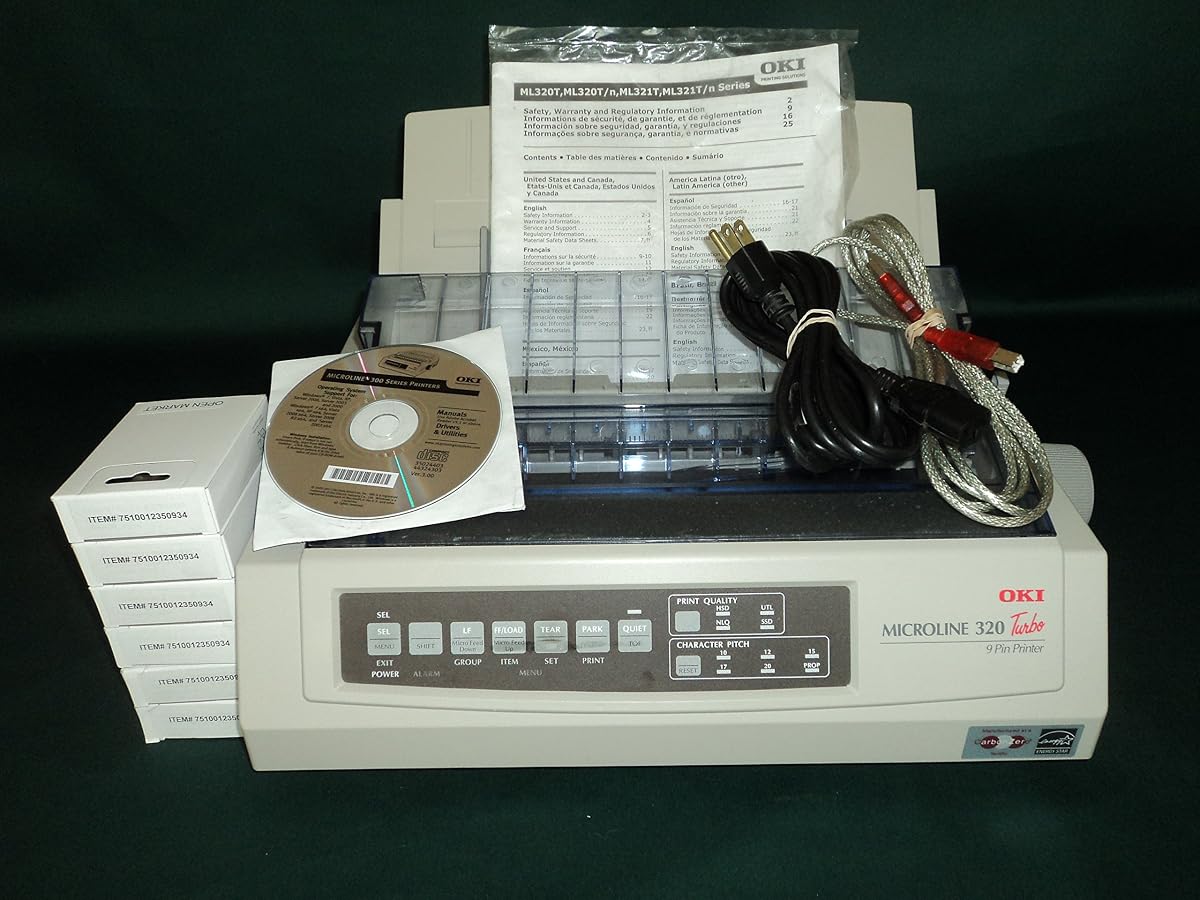


The Oki Microline 320 Turbo/N stands out with a exceptional 4.7 user rating. It delivers consistent impact printing suitable for demanding business environments requiring reliable output.
We may earn a commission when you buy through this link, at no additional cost to you.
Its reputation for reliability stems from durable internal components. The printer handles continuous operation well, minimizing downtime during critical printing tasks in busy offices.
While it carries a higher price than some alternatives, the build quality justifies the cost. Users report fewer mechanical issues over time compared to competitors in this segment.
This model is ideal for businesses prioritizing uptime and consistency. If you need a workhorse that rarely fails, this printer represents a solid long-term investment.
Its high rating indicates consistent performance under pressure, making it a trusted choice for mission-critical printing workflows.
The construction is designed to withstand years of use without significant degradation in print quality or mechanical function.
We may earn a commission when you buy through this link, at no additional cost to you.
The Epson LQ-590II offers premium performance with a 24-pin print head and 584 characters per second speed. It is built for high-volume monochrome printing tasks.
We may earn a commission when you buy through this link, at no additional cost to you.
Its fast speed ensures efficient workflow in busy settings. The USB and parallel connections provide flexibility for older and modern systems alike.
The monochrome limitation is acceptable for invoicing and shipping labels. Regular ribbon replacement is needed but cost-effective given the high output volume.
Choose this if you need speed and reliability from a trusted brand. It excels in environments where document volume and turnaround time are critical.
With 584 cps speed, this printer reduces wait times significantly compared to older 9-pin models in heavy-duty scenarios.
Both USB and parallel ports allow seamless integration into various network setups without requiring additional adapters or hubs.
We may earn a commission when you buy through this link, at no additional cost to you.
The Epson LQ-590 is an affordable 24-pin impact printer ideal for small businesses needing reliable monochrome output. It supports USB and IBM PPDS protocols.
We may earn a commission when you buy through this link, at no additional cost to you.
Its lower price makes it accessible for startups or departments with tight budgets. The 24-pin head provides better clarity than older 9-pin alternatives.
While the 3.7 rating suggests some users find it basic, it fulfills core printing needs effectively. It may lack the speed of higher-end models.
This model is best for those seeking essential impact printing without extra costs. It serves well for occasional invoices, receipts, or shipping documents.
Lower upfront cost and affordable consumables make this a strong choice for businesses managing tight operational expenses.
It focuses on core impact printing tasks, avoiding unnecessary features that might increase complexity or price unnecessarily.
We may earn a commission when you buy through this link, at no additional cost to you.
This OKI MICROLINE 320 Turbo model features a 9-pin dot matrix system with a robust 20,000-page monthly duty cycle. It is a reliable option for steady output.
We may earn a commission when you buy through this link, at no additional cost to you.
Its 435 characters per second speed is solid for standard document printing. Users appreciate the USB and parallel ports for versatile integration.
The 9-pin technology may produce slightly less crisp text than 24-pin models, but it remains effective for drafts and forms. Noise levels are typical for impact printers.
Choose this for consistent performance in mid-volume environments. It offers a balance of durability and functionality that many businesses find dependable.
The 20,000-page duty cycle ensures the printer can handle regular office volumes without risking premature wear or failure.
While not high-resolution, the 9-pin system delivers clear text for invoices and shipping labels where speed and cost matter more.
We may earn a commission when you buy through this link, at no additional cost to you.
The MICROLINE 420 delivers impressive 570 characters per second speed with 128 KB memory, making it efficient for data-heavy tasks. It holds a 4.5 rating.
We may earn a commission when you buy through this link, at no additional cost to you.
Its larger memory buffer helps manage complex documents smoothly. The Energy Star certification indicates lower power consumption during operation compared to non-certified models.
As a 9-pin printer, text resolution is adequate for internal documents but may lack detail for high-quality letters. Noise is inherent to impact technology.
This model suits businesses needing faster processing without switching to expensive 24-pin units. It balances cost with performance for routine printing jobs.
With 570 cps and 128 KB memory, this printer processes batches quickly, reducing queue times for large document sets.
The Energy Star status means lower energy bills, aligning with sustainability goals while maintaining robust performance levels.
We may earn a commission when you buy through this link, at no additional cost to you.
This Oki MICROLINE 320 Turbo version boasts a rare 5.0 user rating. It includes serial, USB, and parallel ports alongside zero-tear technology for paper handling.
We may earn a commission when you buy through this link, at no additional cost to you.
Its perfect rating reflects consistent satisfaction with reliability. The zero-tear auto-park ensures clean paper cuts and waste reduction during operation.
While it is a 9-pin model, it meets standard business needs effectively. The wide connectivity range makes integration into legacy networks seamless.
Opt for this if you value stability and comprehensive connectivity. It stands out as a trusted solution for environments where uptime is non-negotiable.
The zero-tear auto-park technology ensures clean cuts, preventing jamming and paper waste during multi-part form handling.
A perfect 5.0 rating indicates that buyers consistently find it reliable and easy to manage for daily printing tasks.
We may earn a commission when you buy through this link, at no additional cost to you.
The Epson LQ-2090II features a 24-pin print head for clearer text than 9-pin models. It runs at 550 characters per second and holds Energy Star certification.
We may earn a commission when you buy through this link, at no additional cost to you.
Its 24-pin design improves readability for detailed forms. The Energy Star rating helps reduce operational costs in high-volume environments where power adds up.
Parallel port-only connectivity may limit flexibility for modern setups. The 3.7 rating suggests mixed user experiences, likely due to connectivity or setup nuances.
Choose this if you prioritize print clarity and power efficiency. It suits legacy systems where parallel ports are standard and high resolution is needed.
The 24-pin head produces sharper characters, making this printer better for detailed forms and professional invoices than 9-pin units.
Energy Star certification reduces power consumption, which is beneficial for businesses running multiple units throughout the day.
We may earn a commission when you buy through this link, at no additional cost to you.
This model handles up to six copies with auto-park technology, reducing waste and improving efficiency for carbonless forms. It operates at 435 characters per second.
We may earn a commission when you buy through this link, at no additional cost to you.
Its zero-tear feature ensures clean paper processing. Users rate it positively, appreciating the convenience of handling multipart documents without manual intervention.
While speed is moderate, the multi-copy capability is a key advantage. Setup can be slightly complex but pays off in streamlined operations.
Select this if you frequently print invoices needing copies. Its design optimizes workflow for businesses relying on carbonless multipart document processes.
Producing up to six copies directly from one pass saves significant time compared to manual copy handling or separate runs.
The auto-park and zero-tear technology minimize paper waste, reducing both material costs and maintenance requirements over time.
We may earn a commission when you buy through this link, at no additional cost to you.
The Oki Microline 620 is described as high-volume versatile with reliable performance. It holds an impressive 4.8 user rating from buyers who value sharp, clear output.
We may earn a commission when you buy through this link, at no additional cost to you.
Its simplified media loading saves setup time for operators. The high rating suggests that users find it durable and efficient in demanding production environments.
While pricing tends to be higher, the performance and reliability justify the cost. It avoids complex specifications that may not matter for standard business use.
Pick this if you need consistent, sharp printing for large batches. It is a strong contender for departments prioritizing ease of use and output quality.
The design focuses on simplified loading, which reduces operator time and frustration during frequent paper changes.
Sharp, precise printing ensures invoices and labels remain readable, reducing errors and improving professional presentation.
We may earn a commission when you buy through this link, at no additional cost to you.
This OKI MICROLINE 320 Turbo offers proven reliability with a 4.5 rating. It delivers 435 characters per second with a solid 20,000-page duty cycle.
We may earn a commission when you buy through this link, at no additional cost to you.
Its track record makes it a safe choice for businesses transitioning to impact printing. Users report stable operation and fewer hardware failures.
It supports both USB and parallel ports for broad compatibility. The noise level is typical for impact printers but acceptable in most settings.
Choose this for dependable daily tasks. It balances performance, cost, and longevity effectively for offices needing consistent output without complexity.
Consistent performance and sharp impact text ensure that invoices and shipping labels remain professional and clear.
USB and parallel connectivity options mean this printer works across diverse systems, from legacy PCs to modern networks.
We may earn a commission when you buy through this link, at no additional cost to you.
Selecting the right dot matrix printer requires understanding specific technical aspects and business needs. This guide outlines key factors to consider for optimal purchasing decisions.
Print speed is measured in characters per second (cps) and determines how quickly documents are generated. Faster speeds like 584 cps help in high-volume environments, while 435 cps suits average office usage.
Prioritize faster speeds if you handle large batches daily. For occasional use, standard speeds may be sufficient and more cost-effective.
24-pin printers produce clearer, more detailed text than 9-pin models. If you print invoices or forms needing high readability, a 24-pin head is preferable for professional results.
Choose 9-pin for draft documents or internal use where speed outweighs resolution. 24-pin is best for client-facing printed materials.
Check if the printer supports USB, parallel, or serial ports based on your existing setup. Modern networks often require USB, while legacy systems may depend on parallel connections.
Ensure the ports match your computers and network infrastructure to avoid needing extra adapters or converters that could complicate integration.
Monthly duty cycle indicates how many pages the printer can handle before potential strain. Look for 20,000 pages or higher if you operate in high-demand settings daily.
A robust duty cycle extends hardware lifespan. Investing in a printer with higher capacity reduces long-term maintenance and replacement costs.
Energy Star certified models consume less power during operation and standby. This reduces electricity bills and aligns with sustainable office practices.
Always check for Energy Star status if you plan to run multiple units. Efficiency adds up significantly over time for busy departments.
Dot matrix printers often use tractor feeds for multi-part forms. Look for zero-tear or auto-park features that prevent paper jams and ensure clean cuts.
Proper paper handling prevents downtime. A system that feeds smoothly saves time during high-volume shifts and reduces waste.
Impact printers generate noise during operation. If your office environment is quiet, consider models designed for quieter performance or place them in a dedicated room.
Noise tolerance varies by space. Industrial settings may not care, but open offices should look for quieter options to maintain productivity.
Consider ribbon costs and availability alongside the initial price. Compatible ribbons can reduce expenses, but ensure quality to avoid print issues.
Long-term costs impact budget. Calculate expected monthly costs based on ribbon usage to make an informed financial decision.
Proper setup is crucial for longevity. Install the correct drivers and ensure all connections are secure before powering on to avoid communication errors.
Regular cleaning prevents dust buildup in the print head. Use a soft brush or compressed air to remove debris that could clog pins or cause smearing.
Monitor ribbon levels and replace them promptly to maintain print quality. A worn ribbon can lead to faded text and unnecessary stress on the print mechanism.
Dot matrix printers remain essential for businesses needing multi-part carbonless forms and durable impact printing. They offer reliability that laser or inkjet models cannot match for specific workflows.
Yes, impact printers generate noticeable noise. However, many modern models are designed to be quieter. Place them in a dedicated area if noise is a concern.
24-pin printers produce clearer, sharper text. This resolution benefits invoices and labels. 9-pin models remain good for drafts where speed is prioritized.
Ribbon life varies by volume. Typically, a ribbon lasts for thousands of characters. High-capacity ribbons are available to reduce replacement frequency.
Most models do not support wireless out of the box. You may need a print server or network bridge to enable wireless connectivity for modern setups.
Documents needing carbon copies like shipping labels and invoices work best. Impact printers transfer ink through pressure, creating multiple copies efficiently.
Turn off the printer before removing paper. Check for debris in the feed path. Gently pull out stuck paper to avoid damaging the mechanism.
The Oki Microline 320 Turbo/N stands out as our Editor's Choice due to its high reliability and solid rating. The Epson LQ-590II offers premium performance with a 24-pin head and fast speed.
Prioritize connectivity and pin count based on your specific workflows. A printer meeting your technical needs now will save money on upgrades later.
Remember that prices fluctuate frequently. Check current listings before purchasing to ensure you secure the best value for your budget today.