
APC ES620 Dual GPU AI Workstation
4.6Editor score
Dual RTX 5090 GPUs
256GB DDR5 RAM
360mm liquid cooling system
Explore the top 10 Dual GPU AI setups for local LLM inference. Compare specs, performance, and real user ratings to find your ideal system.
Choosing the right Dual GPU AI Setup is crucial for developers who need local power without cloud costs. These systems enable massive language model inference directly on your desk. We review the leading options available this month.
Our team analyzed technical specs, thermal performance, and software compatibility across ten distinct configurations. From compact mini workstations to enterprise rack servers, we cover every form factor. We focus on VRAM capacity and inference speeds primarily.
Each pick highlights specific strengths like memory bandwidth or cooling efficiency. Prices vary significantly based on components and build quality. Check current listings before buying as stock fluctuates rapidly for high-end AI hardware.
4.6Editor score

4.5Editor score

4.5Editor score
This table compares the top ten Dual GPU AI setups side by side. We highlight core specs like VRAM capacity, CPU power, and storage to help you decide quickly.


The WEELIAO MAXSUN Intel Arc Pro B60 offers a revolutionary approach to dual GPU setups by combining two GPUs into a single card. With 48GB VRAM, it handles large LLMs without needing complex multi-card motherboards.
We may earn a commission when you buy through this link, at no additional cost to you.
It delivers 394 TOPS combined compute power, allowing for high concurrency in AI tasks. The Turbo Edition cooling ensures stable performance during long inference runs, making it ideal for developers needing local power.
While it requires a motherboard with PCIe lane bifurcation, the simplified cabling and reduced system cost often outweigh this constraint. It is a unique choice for those prioritizing VRAM density over traditional GPU counts.
Buy this if you want maximum VRAM in a single form factor. Its specialized design makes it a standout for local LLM deployment where standard dual GPU setups would be too bulky or expensive.
This design treats the two GPUs as a unified memory pool, removing the overhead of inter-card communication for model loading.
By using standard PCIe 5.0 x8 lanes instead of requiring x16 bifurcation for two cards, it lowers the overall motherboard cost.
We may earn a commission when you buy through this link, at no additional cost to you.
The APC MES2X is a fully built professional workstation designed for heavy AI loads. It pairs a powerful Ryzen 9 CPU with two RTX PRO 6000 GPUs, ensuring you have the best enterprise-grade hardware available.
We may earn a commission when you buy through this link, at no additional cost to you.
With 256GB DDR5 RAM and 8TB NVMe storage, data ingestion speeds are incredibly fast. The liquid cooling system keeps the system silent and cool even under maximum GPU loads for days.
It comes ready to use with Windows 11 Pro and drivers, saving setup time. However, the price is significant, making it best for businesses that need guaranteed reliability and support.
Choose this if you need a turnkey solution for enterprise workloads. It removes the hassle of building a multi-GPU system yourself and provides professional warranty support.
The RTX PRO 6000 GPUs are certified for professional software, offering stability that consumer cards sometimes lack.
Liquid cooling prevents thermal throttling during prolonged training sessions, maintaining consistent clock speeds.
We may earn a commission when you buy through this link, at no additional cost to you.
The APC ES620 brings dual RTX 5090 power into a workstation chassis. This is ideal for developers who need the raw performance of the latest consumer GPUs for local LLM inference.
We may earn a commission when you buy through this link, at no additional cost to you.
Each GPU offers 64GB VRAM, totaling 128GB of high-speed memory. The Ryzen 9 CPU handles data preprocessing tasks efficiently, ensuring the GPUs are never starved for data.
The system includes 8TB of NVMe storage, perfect for hosting large datasets locally. While it consumes significant power, the 1600W PSU handles the load with stability.
This is the top pick for those prioritizing GPU performance over server-grade stability. It is a powerful machine for both AI research and heavy 3D rendering tasks.
The RTX 5090 provides GDDR7 memory for higher bandwidth, speeding up model loading and token generation.
With RAID 0 NVMe, you can load models directly into VRAM faster than ever before.
We may earn a commission when you buy through this link, at no additional cost to you.
The NVIDIA DGX Spark offers a complete AI supercomputer experience at your desk. It integrates the Grace Blackwell chip, providing seamless support for the full NVIDIA AI software stack.
We may earn a commission when you buy through this link, at no additional cost to you.
With 128GB of unified memory, CPU and GPU tasks share data efficiently. This reduces latency and simplifies development workflows for AI engineers.
It supports model fine-tuning and inference with enterprise-scale power in a compact form. The energy-efficient design allows it to run continuously without excessive cooling.
Buy this if you want guaranteed NVIDIA compatibility and support. It is perfect for prototyping and testing models before moving them to larger cloud systems.
Unified memory simplifies memory management, allowing for larger models without worrying about VRAM boundaries.
It comes with optimized drivers and libraries that are difficult to configure on custom builds.
We may earn a commission when you buy through this link, at no additional cost to you.
The ASUS Dual EPYC server is built for high-performance computing clusters. With eight RTX PRO 6000 GPUs, it provides the power needed for large-scale model training and inference.
We may earn a commission when you buy through this link, at no additional cost to you.
It supports 24-channel DDR5 memory and high-bandwidth networking for rapid data transfer. The redundant power supplies ensure uptime during critical operations.
This system is designed for data centers rather than home offices. Its toolless design simplifies maintenance and hardware upgrades without downtime.
Choose this if you need enterprise-grade reliability and massive scaling. It is the ultimate choice for organizations running multiple concurrent AI workloads.
ASUS Control Center allows remote monitoring and management, essential for maintaining uptime in production environments.
The chassis is designed for airflow to keep eight GPUs cool without noise or thermal throttling.
We may earn a commission when you buy through this link, at no additional cost to you.
The Cloud Ninjas Iron Bull is designed for professionals who need heavy compute power. While it has a single GPU, the Threadripper CPU handles parallel data processing tasks efficiently.
We may earn a commission when you buy through this link, at no additional cost to you.
ECC memory ensures data integrity, which is crucial for scientific computing and precision tasks. The system includes fast networking to connect to remote storage or clusters.
It features a robust 1600W power supply and quiet cooling for stable operation. This is a reliable choice for studios needing rendering and AI capabilities.
Buy this if you work with large datasets requiring high CPU cores. It balances GPU performance with the processing power needed for complex data pipelines.
ECC memory prevents silent data corruption, which is vital for accurate scientific or financial modeling.
The 32-core CPU handles preprocessing and inference tasks alongside GPU workloads.
We may earn a commission when you buy through this link, at no additional cost to you.
The AMD EPYC Workstation PC offers an extreme number of cores for heavy multitasking. It supports three RTX PRO 6000 GPUs, making it ideal for rendering and complex model training.
We may earn a commission when you buy through this link, at no additional cost to you.
With 768GB of RAM, you can run multiple virtual machines or containers locally. The Gen5 NVMe SSDs ensure that data moves to the CPU and GPUs as fast as possible.
It includes a 3-year warranty and lifetime support, giving peace of mind for professional use. The custom chassis ensures cooling is adequate for all components.
This is the best choice for heavy computational workloads. It provides the raw power needed for CAD, deep learning, and scientific simulations.
The 768GB RAM allows you to load massive datasets entirely into memory, removing I/O bottlenecks.
Triple GPU configuration provides massive VRAM capacity for multi-model inference setups.
We may earn a commission when you buy through this link, at no additional cost to you.
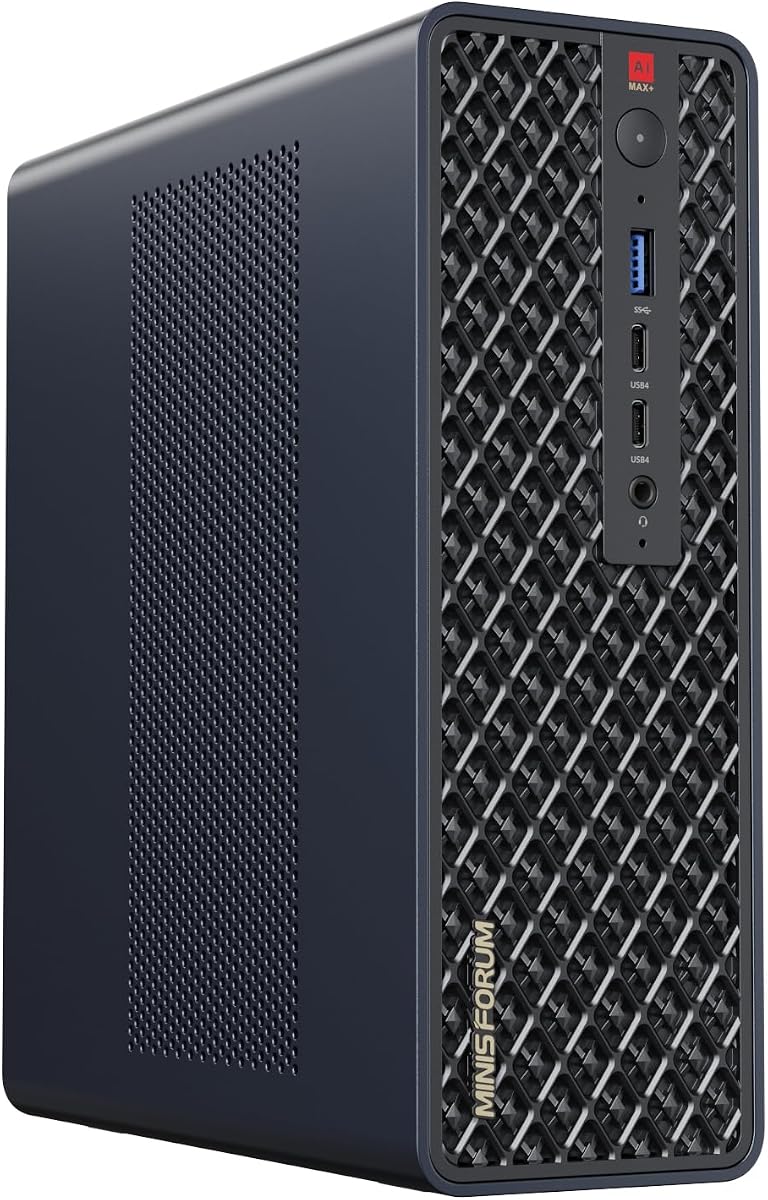
The MINISFORUM MS-S1 MAX is a mini PC that packs impressive AI capabilities. It supports running large models locally via its high-bandwidth unified memory system.
We may earn a commission when you buy through this link, at no additional cost to you.
Its cluster design allows multiple units to work together, scaling performance for large models without a traditional multi-GPU setup. This is ideal for space-constrained offices.
The system includes USB4 V2 ports for fast external expansion. It is a perfect balance of size and power for developers who need portability.
Buy this if you want a portable AI workstation. It is the most compact solution for running local LLMs and creative workflows.
The 128GB LPDDR5x acts as unified VRAM, bypassing traditional GPU memory limits.
Linking units allows you to increase compute power simply by adding more mini PCs.
We may earn a commission when you buy through this link, at no additional cost to you.
The NVIDIA RTX PRO 6000 Blackwell Max-Q is designed for professional workstations. It offers 96GB of ECC VRAM, ensuring reliability for long training sessions.
We may earn a commission when you buy through this link, at no additional cost to you.
The Max-Q design reduces power consumption while maintaining high performance. This makes it easier to cool in compact or dual-GPU chassis setups.
It integrates seamlessly into standard desktops, supporting local LLM inference with enterprise features. The bandwidth allows for fast data streaming.
This card is ideal for upgrading existing workstations. It provides the VRAM capacity needed for complex models without changing the entire system.
Optimized for thermal efficiency, allowing sustained boost clocks even in smaller cases.
Error-correcting memory protects against data corruption during critical operations.
We may earn a commission when you buy through this link, at no additional cost to you.
The MINISFORUM MS-S1 Max offers a cost-effective entry into AI workstations. With 128GB RAM, it can run smaller models locally efficiently.
We may earn a commission when you buy through this link, at no additional cost to you.
It supports up to five displays and has fast networking for data transfer. The design is silent, making it suitable for home offices or studios.
While it uses integrated graphics, the memory bandwidth is high enough to run AI tasks smoothly. It is a versatile machine for general AI tasks.
Buy this if you need a compact, affordable solution. It is ideal for prototyping and running lightweight models without a large investment.
Large RAM allows for loading models and data simultaneously without swapping.
Small size allows for placement on desks where large towers would not fit.
We may earn a commission when you buy through this link, at no additional cost to you.
Selecting a Dual GPU AI Setup requires balancing VRAM, CPU power, and cooling. This guide explains the key factors to consider.
VRAM determines the size of the LLM you can run locally. Dual GPU setups should total at least 128GB VRAM for most 70B models.
Prioritize systems with high VRAM per GPU to avoid bottlenecks during inference tasks.
A fast multi-core CPU ensures that data is processed quickly before reaching the GPUs. Look for Ryzen Threadripper or EPYC processors.
Strong CPU performance prevents stalls during data ingestion and preprocessing steps.
High memory bandwidth ensures fast data transfer between CPU and GPU. DDR5 and LPDDR5x are preferred standards.
Look for systems with fast RAM speeds to maximize GPU utilization rates.
Dual GPUs generate significant heat. Liquid cooling or high-airflow cases are necessary to prevent thermal throttling.
Ensure the system has a robust cooling solution for sustained operation.
Check if the GPU drivers support your required AI libraries like PyTorch or TensorFlow. NVIDIA cards generally offer better support.
Enterprise cards provide certified stability for professional software environments.
Dual GPU setups require high wattage PSUs. Look for systems with 1600W or higher for stability.
Ensure the PSU is reliable to prevent system crashes during training.
Decide if you need a tower, mini PC, or rack server based on your space. Mini PCs save space but have limits.
Consider expansion slots if you plan to upgrade components later.
High-end workstations are expensive but save cloud costs. Calculate your total cost of ownership before buying.
Look for pre-built systems that include warranties for peace of mind.
Start by installing the latest drivers for your GPUs. Ensure that all updates for your OS are applied to avoid conflicts.
Monitor thermal temps during long inference sessions. Keep the room cool to prevent overheating of your system.
Back up your models and datasets regularly. AI workflows involve large files that are critical to your work.
For most 70B models, you need at least 48GB to 64GB VRAM. Larger models may require 128GB or more depending on quantization.
Consumer GPUs are cheaper and have more VRAM per dollar. Professional GPUs offer better drivers and stability for production environments.
It depends on the chassis and power supply. Many workstations allow upgrades, but check compatibility first.
Yes, you need a motherboard that supports PCIe bifurcation or multiple x16 slots for proper bandwidth distribution.
A dual GPU setup typically needs 1000W to 1600W or higher depending on the specific models.
Liquid cooling is generally better for dual GPUs as it handles heat more efficiently in compact chassis.
Yes, some mini PCs support clustering. You can link them to increase memory and compute power.
ECC RAM corrects data errors automatically. It is crucial for scientific and professional tasks to ensure accuracy.
We reviewed ten top Dual GPU AI setups for local LLM inference. From compact mini PCs to powerful enterprise servers, there is a solution for every need.
Prioritize VRAM capacity and cooling when buying. Ensure your CPU is strong enough to feed data to the GPUs efficiently.
Prices and availability change quickly. Check current listings to find the best deal for your specific workflow.