
Cooler Master HAF II 500
4.8Editor score
220mm and 180mm fans
Dual-mode GPU support
Split cable management
Explore the top 10 dual system PC cases for 2026. Compare airflow, build quality, and ratings to find the perfect chassis for your multi-computer setup.
Dual system PC cases provide an innovative way to house two independent computers in one shared chassis. These units are perfect for home lab enthusiasts, content creators, or businesses needing multiple workstations without cluttering your desk with extra towers.
We evaluated ten premium cases based on cooling capacity, internal space, and ease of installation. Each product was selected for its ability to support motherboards, power supplies, and graphics cards simultaneously while maintaining excellent thermal performance.
Read on to find detailed reviews of every top model. Each pick highlights unique features and real user ratings so you can make an informed choice. Note that product availability and pricing may change at any time.
4.8Editor score
4.5Editor score

4.7Editor score
The following table compares the key specifications of all ten selected cases. Use this overview to quickly identify which model fits your motherboard type, cooling needs, and space constraints.


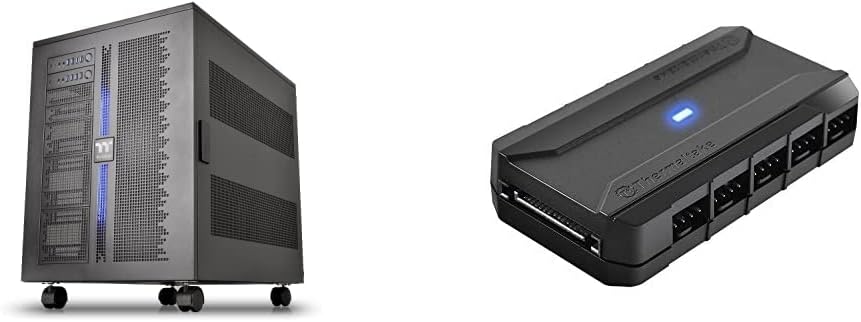
The Thermaltake Core W200 is a rare find for users who truly need two separate systems in one chassis. It supports installing two motherboards, power supplies, and graphics cards in a back-to-back configuration. This design is ideal for homelabs, render farms, or testing environments.
We may earn a commission when you buy through this link, at no additional cost to you.
Its standout feature is the fully modular design that allows complete breakdown for easy transport. The included Commander FP hub can power up to 10 PWM fans simultaneously. Additionally it supports up to two 600mm radiators for custom liquid cooling.
While the case is massive and requires significant desk space it offers unparalleled utility for dual systems. The cable management includes reusable ties and velcro tabs to keep wires tidy. It stands out as a specialized solution for specific needs.
Buyers needing two computers in one case should strongly consider this model. It delivers robust cooling and flexibility that few others can match. Ensure you have enough room before purchasing.
You can install two separate motherboards with dedicated PSUs and GPUs. This makes it perfect for running server and client machines simultaneously.
The chassis supports up to 600mm radiator applications for full custom liquid cooling. This is vital for high-performance dual workstation builds.
We may earn a commission when you buy through this link, at no additional cost to you.
The NZXT H9 Flow RGB+ separates main components from the PSU and drives using a dual-chamber design. This separation improves thermal performance and cable management significantly. Its panoramic wraparound glass lets you showcase every detail of your build.
We may earn a commission when you buy through this link, at no additional cost to you.
Optimized airflow is achieved through perforated steel panels and angled fans. It supports up to nine 140mm fans across top front and bottom. The included NZXT Control Hub manages RGB lighting effortlessly for a cleaner setup.
While it costs more than basic cases the build quality and included accessories justify the expense. The back-connect ready design supports motherboards like ASUS BTF and MSI Project Zero for cable-free looks. It is excellent for modern enthusiasts.
Choose this case if you want a clean look with separate airflow zones. It balances style and function beautifully. The included RGB features add immediate visual appeal.
Separating the PSU and drives from main components prevents heat soak on sensitive hardware. This improves cooling efficiency for your CPU and GPU.
Seamless wraparound tempered glass panels let you see your entire build. This is perfect for showcasing custom water loops or vibrant RGB setups.
We may earn a commission when you buy through this link, at no additional cost to you.
The ASUS TUF Gaming GT502 features a dual-chamber design that divides internals into main and rear chambers. This allows independent cooling zones for your CPU and GPU. It also supports vertical GPU mounting for a unique aesthetic.
We may earn a commission when you buy through this link, at no additional cost to you.
Tool-free side panels can be removed by pressing a button on the rear. The front includes a high-speed USB 3.2 Gen 2 Type-C port for fast data transfer. Tempered glass panels provide a tinted view of the main chamber.
Its robust build quality supports heavy GPUs with a bundled support bracket. The design is versatile for many build styles. The cooling zones ensure thermal efficiency during heavy gaming loads.
Gamers looking for a case with independent zones and solid build quality will love this model. It combines practicality with style. Ensure your GPU fits the vertical mount dimensions.
The rear chamber can be configured independently from the main chamber. This helps keep CPU temps low while protecting the GPU from heat soak.
The front panel includes a USB 3.2 Gen 2 Type-C port. This offers fast speeds for modern external drives and peripherals.
We may earn a commission when you buy through this link, at no additional cost to you.
The Cooler Master HAF II 500 is built for maximum cooling performance with oversized 220mm front intake fans. It uses large ventilation openings to improve airflow throughput. The split-level cable management creates room for the rear exhaust cooling.
We may earn a commission when you buy through this link, at no additional cost to you.
The MasterRail mounting system supports multiple fan and radiator sizes easily. It includes a dual-mode GPU holder that can support two GPUs up to 3.6 slots thick each. This makes it perfect for multi-GPU setups.
Its flexible storage cage supports 3.5-inch and 2.5-inch drives in various orientations. The case prioritizes function over fancy aesthetics. If cooling is your priority this is a top contender.
Buyers prioritizing thermal performance should choose this case. It delivers exceptional airflow for high-end components. Just ensure you have space for the large chassis.
Two 220mm front fans and one 180mm rear fan provide massive cooling power. This reduces reliance on additional aftermarket fans for high-performance builds.
The GPU holder supports two graphics cards for specialized workloads. This feature is rare in modern cases focused on single GPU performance.
We may earn a commission when you buy through this link, at no additional cost to you.
The Antec Flux Pro is crafted with a unique combination of metal glass and wood. This creates a high-quality texture that stands out from typical all-metal cases. It supports up to 12 fans simultaneously with pre-installed PWM units.
We may earn a commission when you buy through this link, at no additional cost to you.
Its iShift PSU mount allows a 90-degree rotation for better cable routing. The case supports simultaneous installation of 420mm and 360mm radiators. Removable cooling brackets on top front and shroud offer flexibility.
The design combines aesthetic elegance with high-performance cooling. It is built for users who value materials as much as thermal specs. The included fans save money on aftermarket purchases.
Choose this if you want a case that looks like furniture. It balances style and cooling well. Ensure your PSU fits the vertical orientation requirements.
Wood metal and glass create a high-quality texture unmatched by competitors. This adds a sophisticated touch to any gaming or professional setup.
The PSU mounts vertically with a 90-degree rotation. This opens up routing space for cleaner cable management and airflow.
We may earn a commission when you buy through this link, at no additional cost to you.
The ASUS ROG Strix Helios II is made for showcase builds with a diamond-grille aluminum front panel. It supports EATX motherboards and graphics cards up to 450mm long. Four pre-installed performance fans ensure ultimate airflow from day one.
We may earn a commission when you buy through this link, at no additional cost to you.
Effortless cable management is enabled by multifunction covers and rear clips. The advanced I/O panel features two USB 3.0 Type-C ports for modern peripherals. A graphics card slot clamp prevents sagging for heavy GPUs.
While premium in price it delivers top-tier build quality and features. The 2-year warranty adds peace of mind. It is perfect for high-end enthusiast systems.
Enthusiasts building a flagship PC should choose this ROG case. It combines stunning design with practical features. Verify your PSU fits the shroud dimensions.
The aluminum front and glass panels create a stunning visual impression. It is designed to house your most expensive components with care.
Two USB 3.0 Type-C ports offer high-speed connectivity. This is essential for modern storage devices and accessories.
We may earn a commission when you buy through this link, at no additional cost to you.
The HAVN HS 420 features a hybrid structure for optimal GPU cooling. It uses a dual-chamber design with balanced airflow to direct cool air onto the GPU. Its 11 fan slots offer massive cooling potential for any build.
We may earn a commission when you buy through this link, at no additional cost to you.
The SimpliCable routing system is user-friendly with top-to-bottom grooved guides. This creates a pristine appearance without complex cable management. It supports up to 420mm radiators on top right and bottom.
The UniSheet glass panel provides a panoramic view with minimal distortion. It includes a VESA display mount for customization. This case offers unique features for a mid tower chassis.
Builders wanting extensive cooling options in a mid tower should look at this model. It balances airflow with cable management perfectly. Check your GPU size before mounting.
Unique grooved guides make cable routing effortless. This ensures your build looks clean and professional without excessive clips.
The design directs cool air from bottom intake onto the GPU. This targeted airflow keeps your graphics card temperatures low during gaming.
We may earn a commission when you buy through this link, at no additional cost to you.
The Thermaltake Capo X delivers parallel operation from a single chassis. It can house two independent mATX systems simultaneously. This opens extra desk space compared to using two separate towers.
We may earn a commission when you buy through this link, at no additional cost to you.
Each system features its own I/O ports at top and bottom for easy access. It supports hidden connector motherboards like ASUS BTF for a cleaner build. Detachable GPU braces provide top and bottom support for stability.
With space for 13 fans and multiple radiators cooling is never an issue. The footprint is minimized to save desk space. This is the ideal case for compact homelabs.
Buyers needing two mATX systems should choose this model. It saves space while delivering top performance. Verify board size before purchasing.
You can run two mATX systems independently in one chassis. This saves significant desk space for tools or peripherals.
Extra cutouts allow support for hidden connector motherboards. This eliminates rear cable clutter for a streamlined look.
We may earn a commission when you buy through this link, at no additional cost to you.
The NZXT H6 RGB+ features a dual-chamber design isolating power and cables from the main build. Its seamless curved glass provides a tight radius for minimal distortion. Every component and RGB detail sits front and center with no seams.
We may earn a commission when you buy through this link, at no additional cost to you.
High-airflow mesh across top and right panels improves airflow efficiency. The removable bottom nylon filter keeps dust out without restricting intake. It ships without fans so you can fully customize lighting and cooling.
An integrated anti-sag bracket keeps heavy GPUs firmly supported. The compact size fits well on smaller desks. It is a strong choice for those wanting a clean look.
Choose this if you want a compact case with dual-chamber benefits. The curved glass is a standout feature. Plan your fan setup before buying.
Single-piece bent glass provides a seamless view of your build. This modern aesthetic looks impressive on any desk.
The adjustable bracket prevents GPU sag for heavy graphics cards. This protects your hardware from long-term damage.
We may earn a commission when you buy through this link, at no additional cost to you.
The Thermaltake View 380 TG features a dual chamber design with pillarless front and side tempered glass panels. It supports hidden connector motherboards for a cleaner build. Four hydraulic bearing ARGB fans are pre-installed.
We may earn a commission when you buy through this link, at no additional cost to you.
Its design offers a pillarless view that looks sleek. The case supports up to 360mm radiators and 415mm VGA length. I/O ports include USB-C for modern connectivity.
While it is more affordable than premium cases it delivers solid value. The included fans save upfront costs. It is great for casual dual chamber enthusiasts.
Budget-conscious buyers wanting dual chamber benefits should choose this model. The warranty adds extra value. Check radiator limits before installing.
The pillarless design provides an uninterrupted view of your components. This enhances the aesthetic appeal of your build.
Support for hidden connector motherboards allows a cable-free rear look. This is perfect for clean and minimalist setups.
We may earn a commission when you buy through this link, at no additional cost to you.
Selecting the right dual system case involves checking motherboard size, airflow, and physical space. We outline the key factors to consider before making your purchase.
Ensure the case supports the motherboard form factors you need. Some cases like the Thermaltake Core W200 support mATX boards while others support ATX. Verify clearances for CPU coolers and GPUs.
Always match the case specs to your component requirements.
Dual chamber designs separate heat sources like the PSU from main components. This improves thermal performance and makes cable management easier. Look for models with dedicated drive bays.
Separating power and cables keeps your main build cooler and cleaner.
Check the number of fan mounts and radiator support. High-performance builds need large fans like 220mm or multiple 140mm units. Liquid cooling support is vital for demanding workloads.
Prioritize cases with ample fan mounts to prevent overheating.
Cases with dedicated channels and tie-down points make routing easier. Look for features like tool-free panels and removable shrouds. Clean cables improve airflow and aesthetics.
Good cable management reduces clutter and improves airflow efficiency.
Glass panels showcase components but may restrict airflow compared to mesh. Mesh cases are better for cooling but show less of the build. Choose based on your priority for looks or performance.
Balance your aesthetic preferences with thermal needs.
Measure your desk space before purchasing. Dual system cases are often large and require significant room. Ensure you have access to I/O ports on both systems.
Always measure your workspace to avoid fit issues.
Check I/O ports on the front panel. USB-C and multiple USB 3.0 ports are convenient. Some cases offer individual I/O for dual systems.
Verify that the ports meet your peripheral needs.
Longer warranties often indicate better build quality. Check what the warranty covers and how to claim it. Reliable support is crucial for complex builds.
Always check warranty terms before finalizing your order.
Start by reading the manual for dual system layouts. Plan your cable routes before installing hardware to avoid tight spaces. Ensure both systems are properly grounded.
Regular cleaning is essential for airflow. Dust filters and intake fans should be cleaned monthly to prevent heat buildup. Keep vents clear of obstructions.
Check GPU sag brackets regularly to ensure stability. Tighten screws if you notice movement during transport. Keep components cool with proper fan placement.
They are worth it for homelabs or testing environments where space is limited. They save desk clutter by housing two computers. However they cost more than standard cases and require careful planning.
Some models like the Thermaltake Core W200 support mATX boards. Others like the HAVN HS 420 support ATX. Always check the specific motherboard clearance before purchasing.
Yes many support large radiators like 360mm or even 420mm. Ensure the case supports your radiator placement and pump. This is ideal for high-performance builds.
Use separate channels or dividers to keep cables isolated. Many cases have dedicated spaces for PSU cables. Plan your routes before installing hardware.
Some cases include fans like the Thermaltake Core W200. Others like the NZXT H9 Flow RGB+ ship with basic units. Check the product specs for included accessories.
The Thermaltake Core W200 or Capo X are best for labs needing two systems. They offer dedicated I/O and space for servers. Ensure your hardware fits the board type.
We reviewed ten top cases offering dual chambers or true dual system support. The Thermaltake Core W200 and NZXT H9 Flow RGB+ are excellent choices for different needs.
Prioritize cooling and motherboard support when choosing your case. Consider desk space and aesthetics for a final decision that fits your setup.
Prices and availability change often so check current listings before buying. This guide helps you find the right model for your project.