
Nulea M501 Wireless Trackball Mouse
4.4Editor score
Ergonomic Design with Smooth Thumb Control
Precise Tracking with Adjustable DPI
True Wireless Freedom
Compare the top 6 eye tracking computer input devices. Real user ratings and detailed specs for gaming, productivity, and accessibility tools.
Finding the right input device can transform your computing experience. Whether you need hands-free control or ergonomic support, modern technology offers diverse solutions.
We compared six top-rated devices based on user reviews, technical specs, and versatility. Our analysis covers head trackers, trackballs, and smart mice for every user.
Each pick highlights unique strengths and ideal use cases. Prices change frequently so verify current offers before buying to ensure you get the best value today.
4.4Editor score

4.4Editor score

4.1Editor score
This side-by-side comparison highlights key features and ratings for all six selected devices to help you find the perfect match for your workflow.


The TrackIR 5 Head Tracking System stands out as the top choice for immersive simulation gaming. With a solid 4.4 rating from users, it delivers precise tracking that translates natural head movements into seamless camera control.
We may earn a commission when you buy through this link, at no additional cost to you.
Its core strength lies in the True 6DOF Motion Capture feature. This tracks motion across all three axes plus yaw pitch and roll offering full 3D control that enhances realism significantly in compatible games.
While the setup requires attaching the TrackClip PRO to a hat or visor, the low-latency performance makes it worthwhile. Some users note that it works best with specific simulation software which may limit broader utility.
If you are a dedicated flight or racing simulator player seeking maximum immersion, this device is highly recommended. Its stable mounting and precise tracking provide an edge that standard mouse setups cannot match.
Converting natural head movements into camera control offers ultra-realistic gameplay that standard peripherals cannot replicate effectively.
The TrackClip PRO reflects infrared signals for accurate tracking even in low-light environments ensuring reliable performance.
We may earn a commission when you buy through this link, at no additional cost to you.
This version of the TrackIR 5 system offers similar tracking capabilities but excludes the TrackClip PRO accessory. It holds a 4.3 rating and remains a strong option for users who prefer alternative mounting solutions.
We may earn a commission when you buy through this link, at no additional cost to you.
The High-Precision USB Optical Sensor ensures smooth tracking in low-light conditions. Users appreciate the customizable software that allows adjustment of motion curves and dead zones for tailored performance.
A key consideration is the absence of the TrackClip PRO. If you need a visor attachment you may need to purchase it separately. Otherwise the magnetic mount provides easy setup.
Ideal for gamers wanting improved realism without the extra bundle cost this system delivers reliable 6DOF tracking. It suits those who already have compatible clip solutions or prefer simpler hardware.
Increased realism enhances your game experience through subtle immersion that traditional controllers cannot provide.
Powerful software lets you adjust motion curves sensitivity and dead zones for a personalized gaming experience.
We may earn a commission when you buy through this link, at no additional cost to you.
The Nulea M501 offers an ergonomic thumb-control trackball solution at a budget-friendly price. With a 4.4 rating it helps reduce wrist strain by keeping your palm in a natural position throughout long work sessions.
We may earn a commission when you buy through this link, at no additional cost to you.
Its precise tracking with adjustable DPI ensures accuracy across various surfaces. The wireless design lets you switch between three devices effortlessly making it versatile for both work and home setups.
One trade-off is that the buttons are not programmable limiting advanced customization. However for basic productivity and comfort the long rechargeable battery life compensates well for daily usage.
If you seek an affordable alternative to traditional mice that prioritizes comfort this trackball is a top choice. Its space-saving design and smooth thumb control make it ideal for compact workspaces.
The optimal angle allows you to keep your palm in a natural position for all-day comfort reducing muscle stress.
Adjustable DPI levels provide exceptional accuracy and control whether you are on a desk or a couch.
We may earn a commission when you buy through this link, at no additional cost to you.
The Turonic TP1 provides a portable wireless touchpad option for laptops and desktops. It holds a 3.9 rating and offers a 150x105mm sensing area with accurate gestures for smooth navigation.
We may earn a commission when you buy through this link, at no additional cost to you.
Its dual connectivity via Bluetooth and 2.4GHz dongle ensures flexibility. The rechargeable battery lasts up to 30 hours on a single charge making it reliable for extended use.
Some users note a lower rating compared to competitors due to limited gesture precision. However the slim design and fast charging make it a practical choice for on-the-go productivity.
If you need a lightweight touchpad for travel or casual use this model delivers essential features without bulk. Its long battery life supports uninterrupted work sessions away from power outlets.
Connect to 3 devices with Bluetooth or 2.4GHz dongle for seamless switching between laptops and desktops.
Slim body and non-slip pads offer stability and easy storage for mobile work setups.
We may earn a commission when you buy through this link, at no additional cost to you.
This smart mouse integrates advanced AI voice typing and a ChatGPT assistant for productivity. With a 4.1 rating it offers 98% accuracy and supports multiple languages making it ideal for writers and professionals.
We may earn a commission when you buy through this link, at no additional cost to you.
Its standout feature is local AI processing ensuring privacy while providing real-time translation and summarization. The 600mAh battery lasts long on a single charge with fast Type-C charging capabilities.
Performance depends on environmental noise and app setup which can be complex. However for users prioritizing voice control and AI assistance this mouse provides unique functionality beyond standard input methods.
If you want hands-free typing and instant AI support this device is a strong choice. Its ergonomic design and wide OS compatibility make it accessible for diverse workflows and tech environments.
Dictate translate and summarize instantly with one-click AI voice control for fast input and instant output.
100% local processing ensures maximum privacy and security for your documents and data.
We may earn a commission when you buy through this link, at no additional cost to you.
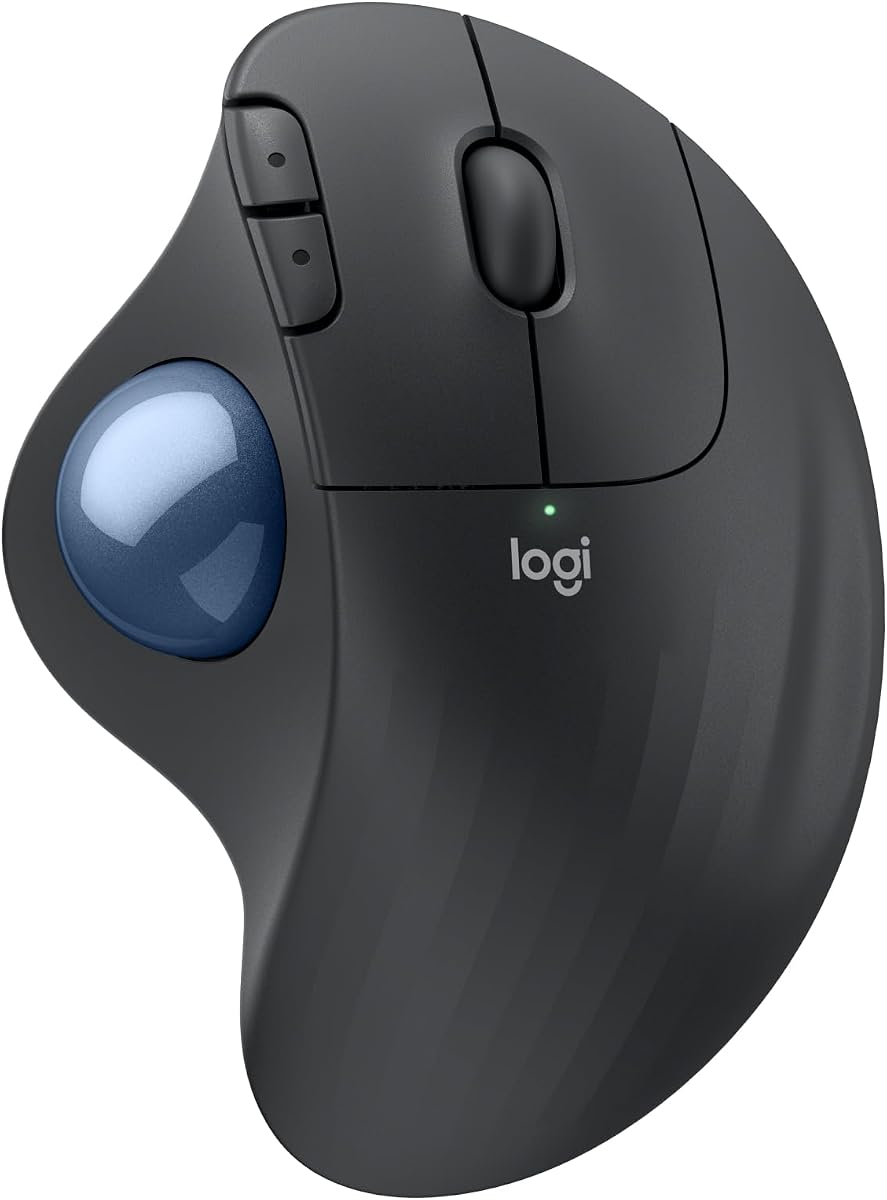
The Logitech Ergo M575S delivers premium ergonomic comfort with thumb control. Rated 4.4 it reduces muscle strain by 25% and offers quiet clicks for peaceful long work sessions.
We may earn a commission when you buy through this link, at no additional cost to you.
Its sculpted shape realigns your forearm and supports all-day comfort. The customizable buttons and smart actions enhance workflow efficiency while the trackball saves desktop space.
A higher price may be a consideration but the certified ergonomic design justifies it for those with wrist pain. The long battery life and easy Bluetooth or USB receiver connection add to its appeal.
If you prioritize health and ergonomics this trackball is an excellent investment. It suits professionals seeking a durable comfortable device that minimizes physical strain over time.
Certified by ergonomists it supports your hand and realigns your forearm into a better posture throughout the day.
Thumb control lets you move the cursor without moving your hand ideal for small or space-saving setups.
We may earn a commission when you buy through this link, at no additional cost to you.
Selecting the right input device requires considering your specific needs environment and comfort requirements.
Look for devices with high-precision sensors and adjustable settings to ensure smooth and reliable input. Accurate tracking minimizes errors and improves overall productivity.
Prioritize models with user reviews confirming stable performance across different lighting conditions.
Choose devices that promote natural hand positions to reduce strain during long sessions. Features like thumb control or ergonomic shapes help prevent repetitive stress injuries.
Opt for products certified by ergonomists if you spend many hours at the computer daily.
Ensure the device supports your operating system and preferred connection method such as Bluetooth USB or wireless. Multi-device support can simplify switching between work and personal devices.
Check compatibility with your specific software or games to avoid connectivity issues.
Long battery life reduces interruptions and rechargeable batteries are more eco-friendly. Consider devices with fast charging options for convenience.
Look for clear indicators or settings that help monitor power consumption effectively.
Robust software allows you to tailor sensitivity curves and button mappings to your workflow. Customization can significantly enhance usability and productivity.
Choose devices with intuitive apps that support regular updates and feature expansions.
Materials like recycled plastics or durable metals contribute to a device's longevity and environmental impact. Sturdy construction ensures consistent performance over time.
Read user reviews focusing on long-term reliability and wear resistance.
Quick plug-and-play setups save time and reduce frustration especially for non-technical users. Clear instructions and accessible controls improve initial adoption.
Consider devices that require minimal configuration for immediate functionality.
Advanced features like voice typing or multi-touch gestures can add significant value depending on your tasks. Evaluate which extra capabilities align with your specific needs.
Balance advanced features with reliability to avoid unnecessary complexity.
Start by installing any required drivers or software to enable full functionality. Follow the manufacturer's instructions for pairing and initial calibration to ensure accurate tracking.
Keep the device clean by wiping the surfaces regularly with a soft cloth. For trackballs remove the ball periodically to clean accumulated dust and ensure smooth movement.
Manage battery life by unplugging the device when not in use for extended periods. Adjust sensitivity settings to match your workspace layout and personal comfort preferences.
Many modern devices support both Windows and macOS through Bluetooth or USB receivers. Always verify compatibility on the product page before purchasing to ensure seamless integration with your system.
Head tracking systems convert your natural head movements into camera control offering immersive realism in simulation games. This hands-free input allows for quicker reactions and deeper engagement during gameplay.
Trackball mice are primarily designed for productivity but can work in some games. Look for models with high DPI settings and low latency for better responsiveness during fast-paced gaming.
Battery life varies by model with some trackball mice lasting up to 18 months on one charge. Other devices offer 30 hours of continuous use. Check specific details on the product page.
Basic functions like cursor movement usually work plug-and-play. However advanced features like gesture controls or voice typing require dedicated software or apps for full functionality.
Ergonomic devices promote natural hand positions that reduce muscle strain and prevent repetitive stress injuries. Certified models can help maintain healthy posture during extended computer use.
The TrackIR 5 Head Tracking System leads as our Editor's Choice for immersive simulation gaming. Budget-conscious buyers can rely on the Nulea M501 for ergonomic comfort without breaking the bank.
Prioritize devices that match your primary use case whether it is gaming, productivity, or accessibility. Consider factors like connectivity, customization, and build quality to find the perfect fit.
Prices and availability change frequently so check current offers before purchasing. Verify compatibility and read recent reviews to ensure the device meets your evolving needs.