
Cable Matters 10Gbps 1U 24-Port Cat6A Ethernet Patch Panel
4.7Editor score
24 Port Cat6A STP Shielded
Individual Port Shielding
Includes Installation Accessories
10Gbps Performance
Compare the top 10 Network Patch Panels rated by users. Find the best Cat6, Cat6A, and keystone options for home and office networks.
Network patch panels are essential components for organizing and managing Ethernet connections in any structured cabling setup. They provide a central point where cables from various devices converge, allowing for easy switching and maintenance. A good patch panel ensures reliability, reduces clutter, and supports high-speed data transfer across your network.
We evaluated ten top-rated network patch panels based on user feedback, build quality, port count, and compatibility with modern standards like Cat6 and Cat6A. Our analysis covers pass-through designs, keystone options, and shielded versus unshielded models. Each product was assessed for ease of installation, cable management features, and overall value.
Each review highlights the specific strengths and ideal use cases for every panel on this list. Whether you need a compact solution for a small office or a robust rackmount for a server room, these picks offer varied options. Note that prices and availability may change, so check current listings before purchasing.
4.7Editor score

4.7Editor score

4.6Editor score
The following table provides a side-by-side comparison of the ten best network patch panels available today. It highlights key specifications such as port count, shielding type, mounting style, and compatibility to help you quickly identify the right model for your needs.



The Cable Matters 24 Port Cat6 Patch Panel stands out as our top recommendation due to its robust build and reliable performance. With a rating of 4.7 stars from users, it is a trusted choice for both home and enterprise networks. The gold-plated contacts ensure stable connections, while the UL listing guarantees fire safety compliance.
We may earn a commission when you buy through this link, at no additional cost to you.
This panel supports 10-Gigabit Ethernet and is compatible with Cat5e and Cat5 cables, making it highly versatile. The numbered ports and color-coded wiring diagrams simplify the installation process significantly. It also supports PoE, PoE+, and PoE++, which is essential for powering devices like IP cameras and access points without separate power supplies.
While it requires a punch down tool for installation, the process is straightforward with the provided diagrams. The lack of shielding means it might not be ideal for environments with high electromagnetic interference, but for most standard office setups, it performs exceptionally well.
Network administrators and home lab enthusiasts should consider this panel for its balance of price and performance. It is future-proof enough for most modern Gigabit and 10Gb switches. We highly recommend it for anyone looking to upgrade their network infrastructure with a reliable, heavy-duty patch panel.
Gold-plated contacts prevent corrosion and signal loss, while UL listing ensures the panel meets strict fire safety standards for secure installation.
Supports 10Gbps speeds and PoE++, ensuring your network can handle modern high-bandwidth devices and power demands without needing a replacement.
We may earn a commission when you buy through this link, at no additional cost to you.
For those requiring maximum protection against interference, the Cable Matters 10Gbps Cat6A Ethernet Patch Panel is the premium choice. This STP (Shielded Twisted Pair) panel features individual shielding for each port, which minimizes electromagnetic and radio frequency interference. It boasts a high user rating and is optimized for environments where signal integrity is paramount.
We may earn a commission when you buy through this link, at no additional cost to you.
The advanced cable management system includes a robust bar with C-shaped keyholes and sequential labels, keeping your rack neat and organized. It comes with a complete set of installation accessories, including cable ties, hook-and-loop ties, and rack screws. This makes it a true all-in-one solution for professional setups.
The included accessories and specialized shielding do increase the cost compared to standard Cat6 panels. Installation also requires more care to ensure shielding continuity. However, for high-performance networks or areas with heavy electrical equipment, the investment pays off in stability and speed.
This panel is ideal for server rooms, data centers, and professional studios where consistent high-speed data transfer is critical. It supports PoE++ for power-hungry devices. If you need the highest level of protection and organization, this Cat6A model is the clear winner.
Each port features individual foil or mesh shielding to protect against EMI/RFI, ensuring uninterrupted high-quality performance in noisy environments.
Includes 26 cable ties, reusable wire ties, and cage nuts, providing everything needed for secure mounting and orderly cable arrangement.
We may earn a commission when you buy through this link, at no additional cost to you.
The Rapink 12 Port Cat6 Panel offers exceptional value for small offices or home setups with limited space. It supports speeds up to 10Gbps and is compatible with Cat6, Cat5e, and Cat5 cabling. With gold-plated pins, it ensures reliable connections despite its budget-friendly positioning. Users appreciate its compact 10-inch width which fits wall mounts easily.
We may earn a commission when you buy through this link, at no additional cost to you.
Installation is made easier by the 568B labeling on the panel itself, providing a quick reference for wiring. The package includes screws and zip tie wraps to manage cables effectively. The sturdy construction supports the weight of cables without deformation, maintaining network stability over time.
The main limitation is the 12-port count and specific 10-inch width requirement. It is not suitable for large server racks that require 19-inch standards. However, for a desktop or wall setup, this limitation is often acceptable in exchange for the lower price and smaller footprint.
This panel is perfect for DIY enthusiasts or small businesses needing a simple entry point for their network. If you have fewer than 12 devices or plan to use multiple panels, this is an efficient choice. It delivers reliable performance without the cost of larger enterprise models.
The 10-inch width and 1U height make it ideal for wall mounting in homes or small offices where space is at a premium.
Gold-plated pins ensure better network connections up to 10Gbps, preventing oxidation and maintaining signal integrity for years.
We may earn a commission when you buy through this link, at no additional cost to you.
The Jadaol 24 Port Patch Panel is unique because it uses a pass-through design with RJ45 couplers instead of traditional punch-down terminals. This means you can connect pre-terminated cables directly from both sides without tools. It holds a 4.6 rating and is excellent for those who want quick setup and minimal wiring errors.
We may earn a commission when you buy through this link, at no additional cost to you.
The modular design allows all ports to be removable keystone-style couplers. It includes one extra module for quick replacement without downtime, which is a thoughtful touch. The rear cable management bar helps keep your setup clean and secure. It supports up to 10Gbps with Cat6 cables for stable connections.
Because it uses couplers, it cannot support punching down bare wires. You must use pre-terminated Ethernet cables with RJ45 connectors. This requirement limits its flexibility if you already have bulk cable runs. However, for modern home labs and offices using patch cables, this is often a benefit rather than a drawback.
This panel is best suited for users who want a plug-and-play experience without specialized tools. It is perfect for home networks and small offices. If you prioritize speed of installation and modularity over raw wiring flexibility, this pass-through panel is a fantastic option.
Preloaded RJ45 couplers allow direct cable connections from front and back without crimping, punch-down tools, or wiring errors.
All ports are removable keystone-style couplers, including an extra module for quick replacement without downtime if a port fails.
We may earn a commission when you buy through this link, at no additional cost to you.
The Cable Matters 48 Port Patch Panel doubles the port density of standard 24-port models, making it ideal for larger networks. It retains the high-quality construction of the smaller version with gold-plated contacts and UL safety certification. The 2U height provides ample space for connections in a standard 19-inch rack.
We may earn a commission when you buy through this link, at no additional cost to you.
Like its 24-port counterpart, it supports 10-Gigabit Ethernet and is backwards compatible with Cat5e and Cat5. The numbered ports and color-coded wiring diagrams simplify installation even with higher port counts. It supports PoE, PoE+, and PoE++ for powering network devices effectively.
The size is significantly larger, requiring more rack space and careful planning. You will need a punch down tool to install it properly. If you have fewer than 48 connections, a smaller panel may be more cost-effective. However, for scaling up, this density is hard to beat.
This panel is perfect for medium-sized businesses or growing home labs that need to connect many devices. It is also great for ISPs or shared spaces. If you need to consolidate two 24-port setups into one unit, this is the most efficient solution available.
Supports 48 ports for high-density setups, ideal for server racks that need to handle dozens of simultaneous connections efficiently.
Supports 10-Gigabit Ethernet and backwards compatibility with Cat5e and Cat5, making it future-ready for expanding network needs.
We may earn a commission when you buy through this link, at no additional cost to you.
The TRENDnet 24-Port Blank Keystone Patch Panel is designed for users who want to customize their connections. It does not come pre-loaded with jacks but provides 24 slots for standard keystone jacks. With a high 4.8 rating, it is a trusted option for flexible network setups. It is NDAA compliant, which is crucial for government projects.
We may earn a commission when you buy through this link, at no additional cost to you.
The panel is made from SPCC steel, ensuring durability and resistance to torque from heavy cables. It features pre-numbered sequential ports with supplementary labels for easy cable recognition. This flexibility allows you to mix Ethernet, audio, video, or data connections as needed.
You must purchase keystone jacks separately, which adds to the total cost and requires assembly time. It is a more complex setup than a pre-terminated panel. However, for specific custom requirements, this modularity is invaluable and allows for future upgrades.
This panel is best for system integrators or anyone needing a mix of connection types. It is also excellent for strict compliance environments. If you need a robust frame to host your own selected jacks, this TRENDnet option offers top-tier build quality.
NDAA compliant patch panels help plan and install networking solutions that U.S. and Canadian government customers demand today.
Made from SPCC steel for long-lasting use, able to withstand the weight and torque of cables and keystone jacks.
We may earn a commission when you buy through this link, at no additional cost to you.
The Rapink 24 Port Patch Panel offers a tool-free installation experience with inline keystone couplers. It supports 10G speeds and is compatible with Cat6, Cat5e, and Cat5 cabling. Users appreciate the significant time savings, with installation taking just 10 minutes. The 24-port count is standard for versatile setups.
We may earn a commission when you buy through this link, at no additional cost to you.
The patch panel holder allows easy input and output of couplers for quick repairs or upgrades. It comes with a thick steel detachable back bar and zip ties for cable stability. This ensures that network failures caused by loose cables are minimized effectively.
Because it uses pass-through couplers, you cannot use bare wires or traditional punch-down blocks. This limits some flexibility but ensures faster deployment. The couplers are included in the package, saving you extra costs. It is a solid choice for efficiency-focused projects.
Ideal for home networks or small offices that need rapid deployment and reliability. The modular couplers allow for easy maintenance. If you value time-saving features over traditional cabling methods, this panel delivers excellent value and performance.
Up to 70% time save and only 10 minutes needed to install compared to traditional punch-down keystones or 110 blocks.
All 8P8C connectors are gold-plated to support better network connection up to 10G speed Ethernet networks effectively.
We may earn a commission when you buy through this link, at no additional cost to you.
The Cable Matters 1U 24 Port Keystone Patch Panel is designed for multimedia consolidation. It supports a wide range of standard keystone jacks including Ethernet, coax, HDMI, and more. With a 4.8 rating, it is praised for its versatility and build quality. It allows you to mix different cable types in one rack.
We may earn a commission when you buy through this link, at no additional cost to you.
The removable cable management bar features sequential labels and keyholes for secure tie organization. It is built with flame-retardant powder-coated steel for safety and durability. The stamped port numbers and writable labels help you manage complex setups without confusion.
This panel does not include keystone jacks, so you must source them separately. Assembly is required to insert the jacks. However, the flexibility to choose different jack types makes it an all-in-one multimedia solution for diverse home theater or office setups.
Best for users needing a unified connection point for various media types. It is also great for custom installations. If you want to combine audio, video, and data into one clean panel, this model offers the flexibility to do so.
Consolidate coax, Ethernet, fiber, voice, video, and data cables into a single 24 port patch panel keystone solution.
Heavy-duty, flame-retardant powder-coated steel ensures long-lasting performance and safety for any structured cabling setup.
We may earn a commission when you buy through this link, at no additional cost to you.
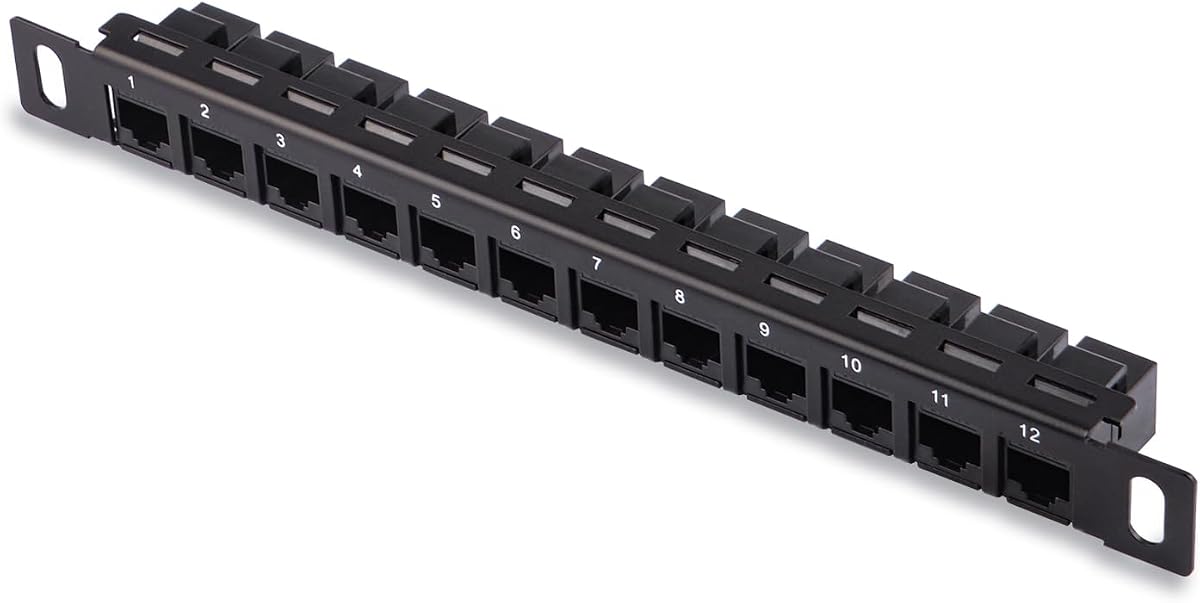
The GeeekPi 12 Port Patch Panel is designed for ultra-compact spaces like mini-server racks. At 0.5U height and 10 inches wide, it fits DeskPi RackMate units and similar small cabinets. It supports Cat6 Ethernet straight-through connections. Users rate it highly for its precision fit in tiny enclosures.
We may earn a commission when you buy through this link, at no additional cost to you.
It features pre-numbered sequential ports for easy identification. The straight-through design allows easy cable connection without drilling or complex routing. The package includes screws and washers to secure it in place. It is a perfect fit for specialized small form factor builds.
Its specialized design means it is not compatible with standard 19-inch racks. You must have a specific cabinet to use it. For other setups, it might be too small or narrow. This limits its broader appeal but serves its niche perfectly.
This panel is ideal for enthusiasts building mini server rigs. If you need to maximize limited space without sacrificing Ethernet connections, this is the best option. It ensures your compact build remains organized and functional.
Designed for DeskPi RackMate T1/T0/T2 and 10 inch server racks to save valuable space in compact enclosures.
Pre-numbered sequential ports allow for easy identification of cables in use in small, tightly packed server setups.
We may earn a commission when you buy through this link, at no additional cost to you.
The TRENDnet 24-Port Cat6 Unshielded Patch Panel is a reliable workhorse with a 3-year manufacturer protection warranty. It delivers steady 250MHz connections for Gigabit switches and meets ANSI/EIA/TIA standards. With a 4.8 rating, it is a top choice for those valuing long-term support and compliance.
We may earn a commission when you buy through this link, at no additional cost to you.
It features new version 110D IDC type terminal blocks. This requires specific punch down tools for installation. It is NDAA compliant for government use. The tech support is highly rated, ensuring you can get help if issues arise.
The 110D IDC blocks require specific tools, which might complicate installation for casual users. While it lacks PoE mentions, it is excellent for standard data connections. The warranty provides peace of mind that few other budget options offer.
Best for government projects or users who need reliable manufacturer support. If you value a long warranty and strict compliance, this is the top pick. It ensures your network stays secure and backed by trusted expertise.
Backed by 3 years of TRENDnet Manufacturer Protection for quality assurance and peace of mind on your network setup.
NDAA compliant for government customers, meeting the demand for secure and reliable networking solutions.
We may earn a commission when you buy through this link, at no additional cost to you.
Selecting the right patch panel depends on your network size, cabling type, and installation environment. This guide breaks down the key factors to consider.
Choose a port count that matches your current needs with room for growth. Common options include 12, 24, and 48 ports. Higher density saves space but requires a larger rack.
Assess your current connections and future needs to avoid buying too small or too large panels.
Ensure the panel supports your cable category. Cat6 supports 10Gbps, while Cat5e supports 1Gbps. Using mismatched standards can bottleneck your network speed.
Always match the panel rating to your existing or planned cable category for optimal performance.
Shielded (STP) panels reduce electromagnetic interference which is vital in industrial settings. Unshielded (UTP) panels are standard for home and office use.
Use shielded panels only if you have significant electrical noise near your network cables.
Most racks use 19-inch width and standard U heights (1U is 1.75 inches). Ensure your cabinet supports the panel dimensions.
Measure your rack space carefully to fit the panel and cable management accessories comfortably.
Punch-down panels require tools and wiring skills. Pass-through or inline keystone panels simplify installation for beginners.
Select the installation method that matches your technical comfort level and available tools.
Look for panels with built-in bars and labels. These features keep cables organized and make troubleshooting easier.
Good cable management prevents clutter and protects wires from damage over time.
Reputable brands offer multi-year warranties. This guarantees replacement if the unit fails early.
Prioritize brands with strong customer support to resolve any installation issues quickly.
Choose panels that support higher speeds than your current needs. This allows for easier upgrades later without replacing the hardware.
Investing in 10Gbps panels now can save costs when you upgrade switches in the future.
First, plan your layout and measure your rack space. Determine the cable routes from your devices to the patch panel location.
Second, organize your cables before connecting. Label both ends of each cable with its destination device for easy identification.
Third, route cables through the management bars to prevent strain. Secure them with zip ties but avoid overtightening which can damage wires.
A punch-down panel requires you to strip wires and press them into slots with a tool. A pass-through panel allows you to plug pre-terminated cables directly in. Pass-through models are faster to install but require patch cables.
Generally, no. Unshielded panels work perfectly for homes and offices. Shielded panels are only necessary if you are running cables near heavy electrical equipment that causes interference.
For standard panels, you need a punch-down tool (like 110 type). This tool presses wires into the slots and cuts the excess wire. Pass-through panels do not require this tool.
Keystone panels are more flexible as you can swap jacks for different types like coax or HDMI. Fixed panels are cheaper and faster to set up for simple Ethernet needs.
1U refers to the height of the unit in a rack, which is 1.75 inches. This standard measurement ensures the panel fits in most server cabinets and racks.
Yes, most Cat6 panels are backwards compatible with Cat5 and Cat5e. The panel will support the speed of the slowest cable connected to it.
Use the pre-printed numbers on the panel or attach adhesive labels to the faceplate. Always match these labels to your cable labeling system.
We have reviewed ten top-rated network patch panels that cater to different needs and budgets. The Cable Matters 24 Port Cat6 Panel stands out as our Editor's Choice for its balance of performance and reliability.
Whether you choose a budget-friendly option like the Rapink model or a premium shielded version, the right panel ensures your network remains organized and fast. Prioritize the features that match your specific cabling and space requirements.
Prices and availability change frequently so always check current listings before buying. A good investment in infrastructure today will keep your network running smoothly for years to come.