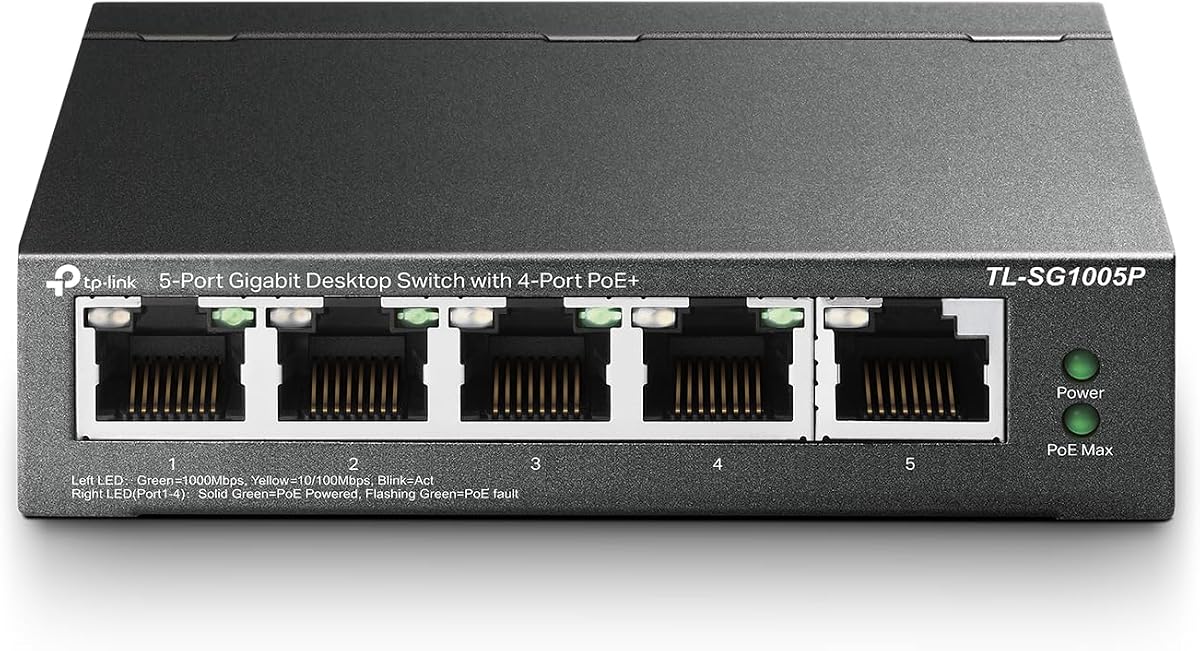
TP-Link TL-SG1005P, 5 Port Gigabit PoE Switch
4.7Editor score
Compact 5-port desktop design
Plug and play simplicity
Robust metal housing
Compare the top 9 PoE switches of 2026. Expert reviews on TP-Link, NETGEAR, and UGREEN models with real ratings and key features.
Power over Ethernet switches simplify network installations by delivering power and data through a single cable. These devices are essential for connecting IP cameras, VoIP phones, and wireless access points without needing separate power adapters at every location.
Our team analyzed nine top-rated models from leading brands like TP-Link, NETGEAR, and UGREEN. We evaluated port counts, power budgets, management capabilities, and user feedback to identify the most reliable options for home offices and small businesses.
Each review highlights specific strengths and trade-offs to help you choose the right switch. Ratings reflect real user experiences, but availability and terms may change. Always check current product details before making your final purchase decision.
4.7Editor score

4.8Editor score

4.5Editor score
The following table provides a side-by-side comparison of all nine featured switches. It outlines core specifications like port counts, total power budgets, and management types to help you quickly identify the model that fits your network size and complexity.


The NETGEAR GS308EP stands out as a top performer in the PoE switch market. With a 4.8 rating from users, it delivers consistent performance for small businesses needing reliable network connectivity.
We may earn a commission when you buy through this link, at no additional cost to you.
Its 8 PoE+ ports provide a generous 62W budget to power cameras and access points. The Easy Smart managed features allow you to prioritize traffic using QoS and secure your network with VLAN segmentation.
While the price is higher than unmanaged options, the reliability and management capabilities justify the cost. The fanless design ensures it operates silently even in office environments.
If you need a robust switch that balances ease of use with professional features, this model is an excellent investment. It offers long-term stability that cheaper alternatives often lack.
The web-based interface simplifies configuration of VLANs and QoS without requiring CLI expertise.
Per-port PoE controls let you manage power allocation dynamically to avoid overloading the switch.
We may earn a commission when you buy through this link, at no additional cost to you.
The TP-Link TL-SG1005P offers exceptional value for users needing a simple PoE solution. Its 4.7 rating reflects high satisfaction with its durability and performance.
We may earn a commission when you buy through this link, at no additional cost to you.
This compact desktop switch provides four PoE+ ports with a total budget of 65W. It handles standard video and VoIP traffic efficiently with built-in QoS and IGMP snooping.
Because it is unmanaged, there is no software to install or configuration required. This makes it perfect for users who want reliable power delivery without network complexity.
Consider this switch if you have limited space and budget. It handles essential needs well but lacks the scalability of larger managed models.
Its small footprint allows desktop mounting while keeping the metal casing sturdy enough for daily use.
Shielded ports protect against electromagnetic interference to ensure cleaner data transmission.
We may earn a commission when you buy through this link, at no additional cost to you.
The TP-Link TL-SG1428PE is designed for larger networks needing significant port capacity and power. Users rate it highly for its ability to handle complex enterprise environments.
We may earn a commission when you buy through this link, at no additional cost to you.
With 24 PoE+ ports and a 250W budget, it can power dozens of devices simultaneously. The auto-recovery feature ensures devices that freeze reboot automatically, reducing manual IT intervention.
VLAN features and smart management tools allow deep traffic segmentation. This security is critical for businesses protecting sensitive data across different departments.
While the setup is more complex than plug-and-play models, the long-term benefits are substantial. It is the ideal choice for expanding office networks.
Abundant VLAN features improve network security by segmenting traffic between departments.
SFP slots provide gigabit uplinks to connect the switch to your core network infrastructure.
We may earn a commission when you buy through this link, at no additional cost to you.
The TP-Link TL-SG1008MP bridges the gap between unmanaged ease and high power requirements. Its 4.6 rating indicates strong performance in demanding environments.
We may earn a commission when you buy through this link, at no additional cost to you.
With a 153W budget across 8 ports, it can support power-hungry devices like PTZ cameras. Prioritized power supply ensures critical ports stay active even if the budget is exceeded.
It comes with a limited lifetime warranty, offering peace of mind for business users. The sturdy metal case supports both desktop and rackmount installations.
This model is perfect if you need high power but do not want to manage VLANs. It provides essential reliability without network complexity.
Lower priority ports are disabled automatically to prevent overloading when total consumption is high.
Shielded ports and metal casing protect against interference and physical wear over time.
We may earn a commission when you buy through this link, at no additional cost to you.
The NETGEAR GS305P is an ideal choice for small home offices requiring minimal ports. Its 4.8 rating highlights its reliability and user-friendly design.
We may earn a commission when you buy through this link, at no additional cost to you.
It features 4 PoE+ ports with dynamic allocation that redistributes unused power. This ensures you get the most out of the 63W budget without manual configuration.
The switch is fully unmanaged, requiring no software installation. It integrates seamlessly with existing Cat5e or Cat6 cables for immediate use.
If you only need to power a couple of cameras and a phone, this switch provides the perfect balance of size and functionality.
Dynamic PoE allocation redistributes unused power to support more connected devices efficiently.
IEEE 802.3az Energy Efficient Ethernet reduces power consumption without impacting performance.
We may earn a commission when you buy through this link, at no additional cost to you.
The UGREEN switch offers a unique layout with dedicated uplink ports. This design is useful for connecting your switch directly to a main router without using a PoE port.
We may earn a commission when you buy through this link, at no additional cost to you.
It includes an Extend Mode that supports PoE distances up to 820 feet, ideal for security cameras in large properties. Auto recovery ensures frozen devices restart automatically.
Port Isolation prevents network storms by separating ports 1-8. This feature adds a layer of security without needing full management software.
Consider this switch if your setup requires long cable runs. The extend mode provides flexibility that standard switches do not.
Extend mode supports PoE up to 820 feet, ideal for security systems and long-distance deployment.
Port Isolation separates ports 1-8 to prevent network storms between connected devices.
We may earn a commission when you buy through this link, at no additional cost to you.
The NETGEAR GS108PP is a robust unmanaged switch with a high power budget. Its 4.8 rating proves it delivers consistent quality for demanding users.
We may earn a commission when you buy through this link, at no additional cost to you.
With 123W available across 8 ports, it can power multiple high-wattage devices easily. The plug-and-play nature means it works immediately upon connection.
It supports desktop, wall-mount, and rack-mount placements. This versatility makes it suitable for various physical environments like server rooms or living rooms.
Choose this if you want the build quality of NETGEAR without management software. It is reliable but lacks the configurability of managed alternatives.
Includes 8 PoE+ ports with 123W total power budget to support power-hungry devices.
Compact metal design supports desktop, wall-mount, or rack-mount placement for versatile installation.
We may earn a commission when you buy through this link, at no additional cost to you.
The TP-Link TL-SG108PE V3 is a cost-effective entry into managed networking. Its 4.6 rating reflects satisfaction with its essential features and support.
We may earn a commission when you buy through this link, at no additional cost to you.
It provides 4 PoE ports and allows you to set VLANs for security. Rate limiting and traffic monitoring ensure your critical applications get priority.
The web interface is straightforward, making it accessible for beginners. It also includes a limited lifetime warranty for long-term reliability.
This model is good if you need basic management features without high costs. However, newer models may offer better PoE budgets.
Abundant VLAN features improve network security via traffic segmentation.
Prioritize your traffic and guarantee high quality of video or voice data transmission.
We may earn a commission when you buy through this link, at no additional cost to you.
The TP-Link TL-SG1016PE offers a versatile mix of PoE and non-PoE ports. This makes it suitable for hybrid networks with both standard and powered devices.
We may earn a commission when you buy through this link, at no additional cost to you.
It includes 8 PoE+ ports with a 150W budget and supports Link Aggregation for increased bandwidth. Managed features like VLANs and QoS help secure and optimize traffic.
Auto recovery ensures that non-responsive devices reboot automatically. This feature minimizes downtime without requiring IT staff intervention.
This switch is a solid choice for growing networks. It balances flexibility with cost-effective management tools.
Link aggregation allows you to group ports for higher bandwidth and redundancy.
The switch automatically detects and reboots the dropped or unresponsive PoE-powered devices.
We may earn a commission when you buy through this link, at no additional cost to you.
Selecting the right PoE switch involves considering port count, power budget, and management features. Below are the key factors to evaluate before buying.
Determine how many devices need to be connected now and in the future. A switch with too few ports will require you to replace it quickly.
Choose a model with enough spare ports to accommodate growth without overcrowding.
Check the total wattage the switch can deliver across all ports. High-wattage devices like PTZ cameras require more power than standard phones.
Ensure the total budget exceeds the sum of all connected devices to avoid power failures.
Unmanaged switches are plug-and-play and ideal for simple setups. Managed switches offer VLANs and security settings for complex networks.
If you need traffic control, invest in an Easy Smart managed model.
Look for switches that support IEEE 802.3af and 802.3at standards. These ensure compatibility with a wide range of devices.
Standards compliance guarantees safety and interoperability across different brands.
Consider whether the switch fits on a desk or needs to be mounted in a rack. Rackmount switches are better for organized server rooms.
Desktop models are more versatile for homes or small offices.
Fanless designs ensure silent operation which is critical for home offices. Fan models might be louder and less durable due to moving parts.
Prioritize fanless switches for quiet environments.
Check the duration of the manufacturer warranty. Lifetime warranties offer better long-term protection than one or three-year options.
Reliable technical support ensures you can resolve issues quickly.
Connect your switch to your router using an Ethernet cable. Then plug PoE devices like cameras or phones directly into the PoE ports.
Ensure your power source is stable. Using a surge protector can protect the switch from voltage spikes that might damage connected devices.
Monitor the power usage periodically. If you add more devices, check the total wattage to prevent overloading the switch budget.
PoE (802.3af) provides up to 15.4W per port, while PoE+ (802.3at) provides up to 30W. PoE+ is required for high-power devices like PTZ cameras.
Yes, you can connect standard devices to any port. The switch automatically detects and supplies power only to compatible devices.
Standard Cat5e or Cat6 Ethernet cables work for both data and power. Ensure your cables are properly terminated for the best performance.
Most switches shut off power to lower-priority ports to prevent damage. This ensures critical devices like security cameras stay online.
Modern Easy Smart switches are user-friendly. Most require only web-based configuration without command-line expertise.
The standard distance is 328 feet (100 meters). For longer distances, consider switches with Extend Mode or fiber optic solutions.
We recommend the NETGEAR GS308EP for most users due to its balance of features and reliability. It delivers robust performance for small businesses.
If you are on a tight budget, the TP-Link TL-SG1005P provides essential PoE capabilities without complexity.
Remember that prices and availability fluctuate. Always verify the latest product details before purchasing to ensure you get the best value.