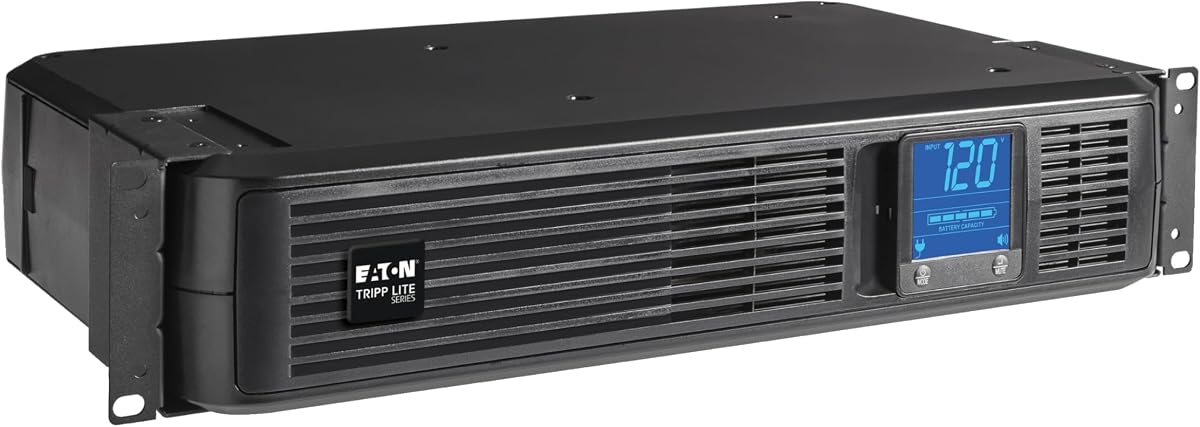
Eaton Tripp Lite SMART1500LCD 1500VA 2U Rack Mount UPS 900W Battery Backup
4.0Editor score
AVR Voltage Regulation
Rotatable LCD Display
User-Replaceable Batteries
Compare the top 4 Rack Mount UPS Systems of 2026. Expert analysis on specs, ratings, and performance to help you choose the right power protection.
Choosing the right Rack Mount UPS Systems is critical for protecting your valuable server equipment and ensuring uninterrupted operations during power outages.
We evaluated four leading models based on capacity, waveform quality, monitoring features, and real user ratings to provide a reliable buying resource.
Each selection below highlights specific strengths and trade-offs so you can match the UPS to your rack space and power requirements efficiently.
4.0Editor score
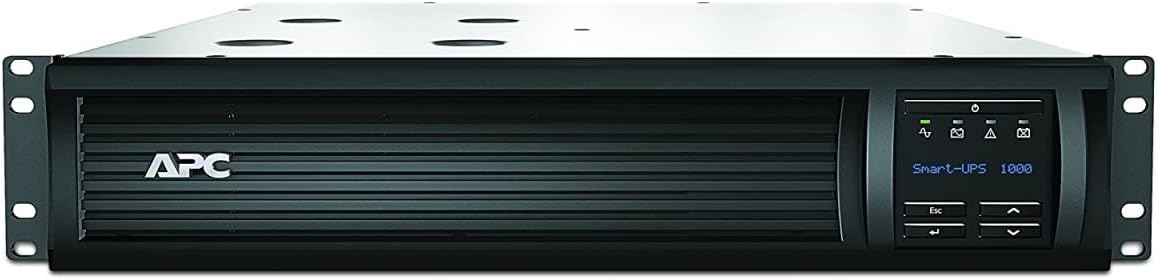
4.3Editor score

4.5Editor score
This side-by-side comparison highlights the key technical specifications and capabilities of each ranked UPS unit to help you make an informed decision.

The APC SMT1500RM2UC stands out as the top choice for Rack Mount UPS Systems due to its pure sine wave output and advanced SmartConnect monitoring capabilities.
We may earn a commission when you buy through this link, at no additional cost to you.
It delivers 1500VA of power with a pure sine wave, ensuring compatibility with Active PFC power supplies found in modern servers and high-end network gear.
While the price is higher than other options, the inclusion of rack rails and the ability to monitor status remotely via a secure portal justify the investment for critical infrastructure.
If you prioritize reliability, remote management, and maximum compatibility with sensitive IT equipment, this unit is the clear recommendation for your rack setup.
SmartConnect allows you to track uptime, battery status, and receive firmware updates without needing a separate network card installed in the unit.
This waveform ensures that motors and audio equipment do not overheat or experience noise interference when running on battery power during an outage.
We may earn a commission when you buy through this link, at no additional cost to you.
The Eaton Tripp Lite SMART1500LCD offers excellent value for those needing significant power capacity without the premium price tag of top-tier models.
We may earn a commission when you buy through this link, at no additional cost to you.
It provides 1500VA of backup with AVR to correct voltage fluctuations, making it a solid choice for small servers and network devices in standard racks.
The rotatable LCD screen provides clear visibility of system status, and the ability to replace batteries internally saves money over the lifespan of the unit.
For small businesses or home offices needing reliable backup for general computing and networking gear, this unit strikes a great balance between cost and performance.
The unit comes with an adapter that lets you mount it vertically as a tower if your rack space is limited or you prefer a floor-standing setup.
Backed by a three-year warranty and connected equipment insurance, this model gives you peace of mind regarding your invested hardware.
We may earn a commission when you buy through this link, at no additional cost to you.
The CyberPower OR700LCDRM1U earns its top rating by focusing on long-term reliability and user-friendly management features that appeal to cost-conscious administrators.
We may earn a commission when you buy through this link, at no additional cost to you.
Its standout feature is the three-year battery warranty, which is significantly longer than the industry standard of one year, reducing long-term ownership costs.
Although it offers lower wattage than the 2U models, it is perfectly sized for compact racks or smaller devices that do not draw excessive power loads.
If you need a reliable unit with extensive warranty protection and basic LCD monitoring without paying for advanced network cards, this is an ideal pick.
This rare three-year coverage on the battery ensures you have protection for the entire expected service life of the typical UPS cycle.
The included PowerPanel Business Edition allows for local monitoring and shutdown scripts without needing extra hardware purchases.
We may earn a commission when you buy through this link, at no additional cost to you.
The Eaton Tripp Lite SMART500RT1U is designed for users with very tight space constraints who need basic protection for small switches or routers.
We may earn a commission when you buy through this link, at no additional cost to you.
It features an individually controllable outlet that allows you to shed non-critical load to extend runtime for essential equipment during a power failure.
With a low depth of under 12 inches, it fits easily into shallow racks where larger 2U units might cause cable management or clearance issues.
This unit is best suited for edge computing devices or small branch offices where physical space is limited and power requirements are minimal.
The ability to control specific outlets allows you to prioritize power to critical systems by cutting off less important peripherals automatically.
Advanced software support helps reboot frozen servers or applications remotely, reducing the need for physical intervention during outages.
We may earn a commission when you buy through this link, at no additional cost to you.
Selecting the right UPS requires understanding several technical factors to ensure your equipment remains safe and operational during power disruptions.
You must calculate the total power draw of all devices you plan to connect to the UPS. The VA rating indicates apparent power while wattage indicates real power; ensure the UPS wattage exceeds your load by at least 20 percent to prevent overloading.
Always choose a UPS with a wattage capacity that exceeds your total equipment load to ensure safety and optimal battery runtime.
Pure sine wave outputs are essential for sensitive equipment like servers with active PFC power supplies because they mimic the smooth power from the grid. Modified or simulated sine waves can cause issues with some devices but are cheaper and acceptable for basic computers.
Invest in a pure sine wave UPS if you are protecting modern servers or audio gear to avoid damage and performance issues.
Rack units are measured in U, where 1U is 1.75 inches tall. You need to verify your available rack space before purchasing to ensure the UPS fits without displacing other critical networking gear.
Measure your rack space carefully and choose a 1U or 2U unit that leaves room for cabling and future expansion.
AVR helps correct brownouts and overvoltages without consuming battery power. This feature significantly extends battery life by allowing the UPS to handle minor power fluctuations without switching to battery mode unnecessarily.
Look for units with AVR to protect your equipment from voltage spikes without draining your battery reserves quickly.
Modern UPS units often include USB, serial, or network ports for remote monitoring. Advanced models feature smart software that can safely shut down servers during an outage to prevent data corruption.
Prioritize UPS units with software management options if you need to monitor power status remotely or automate shutdowns.
Batteries degrade over time and must be replaced every two to three years. Units with user-replaceable batteries and accessible battery doors save you from expensive service calls or sending the whole unit away.
Choose a UPS with a user-friendly battery replacement design to maintain long-term reliability easily.
Check the manufacturer warranty duration and what it covers regarding the battery versus the unit itself. Some premium models offer extended battery warranties or connected equipment insurance that can be crucial for business continuity.
Review the warranty terms carefully to ensure you have adequate protection for both the hardware and the batteries.
Consider the number and type of outlets needed for your equipment. Some units offer individually controlled outlets that allow load shedding, which is useful for managing power priority during low-battery scenarios.
Ensure the UPS has enough outlets and the right type to connect all your devices comfortably.
Proper installation involves securing the UPS firmly in the rack using the provided rails and ensuring cables are routed neatly to avoid obstruction of airflow.
Regular maintenance includes periodic self-tests initiated via the front panel to ensure the battery is holding charge correctly and alerting you to any issues.
Replace the battery every three years or immediately if the unit indicates a battery failure to maintain the system integrity and protect your data.
VA measures apparent power while Watts measure real power used by your devices. Watts are calculated by multiplying VA by a power factor. Always match the Watts rating to your load needs rather than just VA to avoid overloading the unit.
Yes, if your server has an active power factor corrected power supply, you should use a pure sine wave UPS. Simulated sine waves can cause the server power supply to malfunction or overheat when running on battery power.
Runtime depends on the load and battery capacity. A typical UPS might provide 5 to 15 minutes of runtime at half load. You can estimate runtime by checking the manufacturer charts or testing the unit.
Most rack mount UPS units are designed with user-replaceable batteries. Look for a battery door on the unit to swap the battery pack without needing professional service or returning the whole device to the manufacturer.
AVR stands for Automatic Voltage Regulation. It is a feature that corrects minor power fluctuations like brownouts without using battery power, thereby extending the battery life and protecting your equipment from power quality issues.
Refurbished units often come with shorter warranties compared to new ones. Always check the seller details to see what warranty is offered and whether it includes battery coverage before making a purchase decision.
We have reviewed four top Rack Mount UPS Systems that balance capacity, waveform quality, and features to suit various infrastructure needs from small offices to enterprise racks.
When choosing, prioritize pure sine wave outputs for sensitive servers and consider remote monitoring features if you manage equipment off-site or need proactive alerts.
Remember to verify your power requirements and rack space before purchasing, and always check current pricing and availability as deals change frequently on Amazon.