
Vondynote Pair Studio Monitor Stands
4.7Editor score
Hidden cable management
Multiple height settings
Heavy duty metal base
Finding the right support for your studio monitors is crucial for achieving accurate sound reproduction. Good stands elevate your speakers to ear level and reduce vibrations that can muddy your mix. Without proper isolation, floor resonance can interfere with your listening experience.
We analyzed the top-rated options on the market today to bring you a curated list of the best available. Our comparison considers build quality, adjustability, cable management features, and user ratings to ensure you get reliable gear for your workspace.
Each product in this guide offers unique benefits tailored to different studio environments and budgets. While we highlight key strengths, keep in mind that availability and pricing can change frequently. Always check the latest details before making your final purchase decision.
4.7Editor score

4.8Editor score
4.6Editor score
As an Amazon Associate we earn from qualifying purchases.
The following table provides a side-by-side comparison of all ten top-rated studio monitor stands. Reviewing these specifications will help you quickly identify which model aligns best with your specific spatial and acoustic requirements.


The Liquid Stands Studio Monitor Stands represent the top choice for desktop configurations with a remarkable 4.8 rating. These stands are engineered to provide a safe and secure environment for your critical listening equipment.
We may earn a commission when you buy through this link, at no additional cost to you.
Constructed from heavy duty stainless steel, these stands offer exceptional rigidity. The ability to adjust the tilt from 0 to 20 degrees allows for precise acoustic alignment, ensuring your tweeters are perfectly positioned relative to your listening position.
While the clamp mechanism requires a sturdy desktop, the trade-off is a massive reduction in desk footprint. The system includes all necessary hardware and features a ten-year warranty, reflecting the manufacturer's confidence in durability.
Ideal for home studio owners with limited floor space, these stands combine function with form. If you need reliable elevation without sacrificing valuable desk area, this is the premium desktop solution to consider.
The adjustable tilt feature ensures that sound waves travel directly to your ears for a more accurate mix.
Built with industrial grade materials and backed by a ten-year warranty, these stands are designed for long-term use.
We may earn a commission when you buy through this link, at no additional cost to you.
The Vondynote Pair Studio Monitor Stands stand out as a premium floor option with a strong 4.7 user rating. These stands are designed to elevate your monitors to the perfect listening height while maintaining a clean aesthetic.
We may earn a commission when you buy through this link, at no additional cost to you.
One of the standout features is the hidden cable management system, which tucks wires inside the main column. This keeps your studio looking tidy and prevents cables from becoming tripping hazards. The wide square base ensures rock-solid stability.
Adjusting the height is simple with four preset settings ranging from 31 to 50 inches. The EVA pads on the top plate protect your monitors from scratches and dampen vibrations. While they are sturdy, they are still easy to move when rearranging your room.
These stands are perfect for professionals who value both sound quality and room aesthetics. If you want a reliable, high-quality floor stand that hides the clutter, this Vondynote pair is an excellent investment for your studio.
The internal cable routing keeps your setup looking professional and distraction-free.
The wide square base provides a large footprint for superior stability with heavy monitors.
We may earn a commission when you buy through this link, at no additional cost to you.
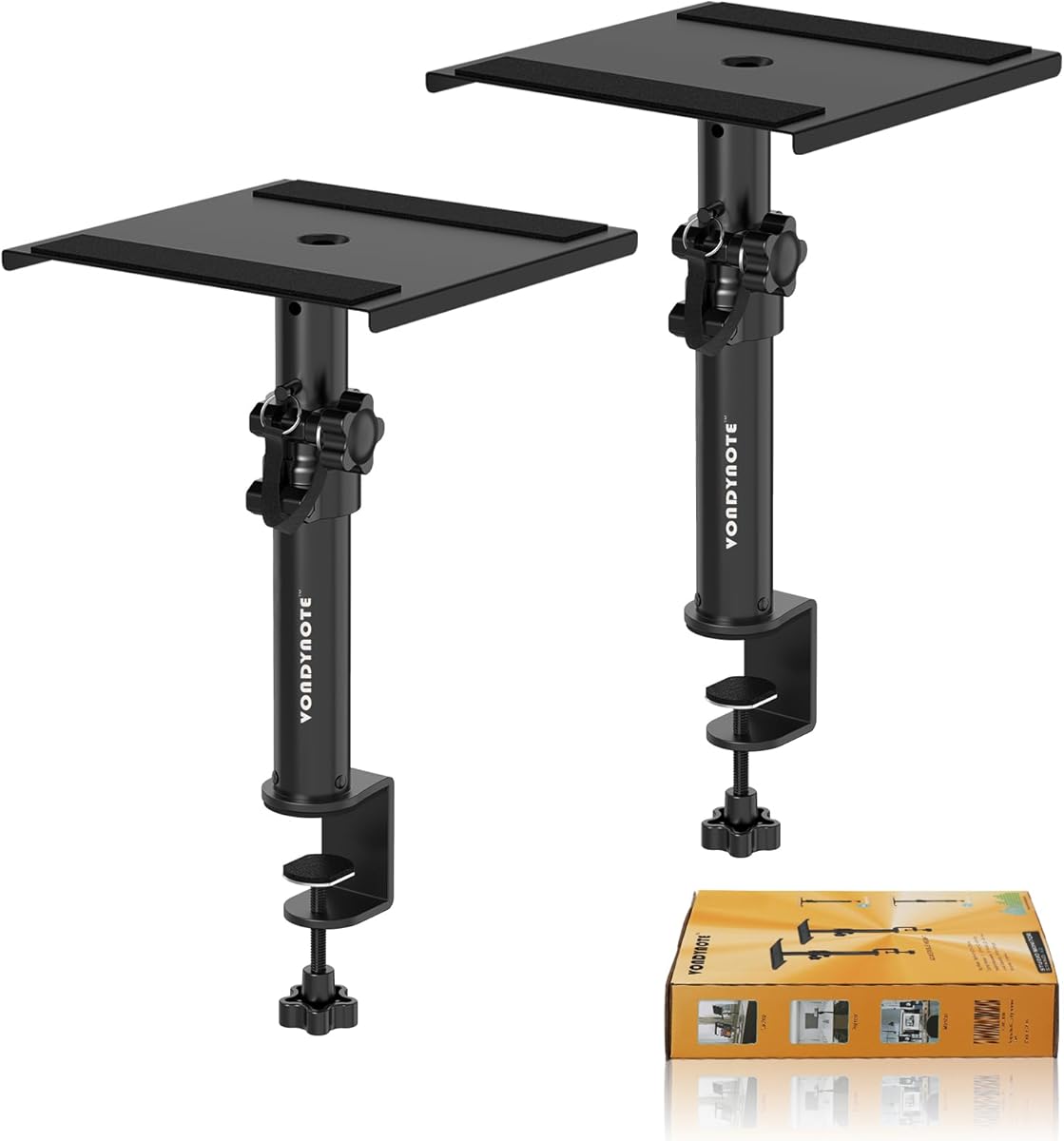
The Vondynote Set of 2 Desktop Clamp offers the best value for budget-conscious users seeking reliable speaker elevation. With a solid 4.6 rating, these short stands are perfect for getting your monitors off the desk surface.
We may earn a commission when you buy through this link, at no additional cost to you.
They feature a robust upgrade desk clamp with reinforced steel screws that ensure a firm grip without damaging your desktop. The 3mm EVA pad protects your desk surface while the metal top plate supports monitors up to 50 pounds securely.
While the height range is limited to 9 to 14 inches, this is sufficient for most home studios and gaming setups. The design saves significant desk space compared to traditional stands, making it ideal for cramped workspaces.
If you need an easy and affordable way to improve your monitoring position without breaking the bank, these stands are a smart buy. They are simple to install and provide the stability needed for daily studio use.
The included EVA pads on the clamp and top plate protect your equipment and furniture from scratches.
The adjustable clamp works with most desktops ranging from 0 to 2.6 inches in thickness.
We may earn a commission when you buy through this link, at no additional cost to you.
The Vondynote Studio Monitor Stands Pair offers a robust solution with a 4.6 rating and practical features. These stands are designed to handle heavy loads while keeping your audio cables organized and out of sight.
We may earn a commission when you buy through this link, at no additional cost to you.
A built-in wire hole allows you to run cables directly through the stand, reducing clutter significantly. The load capacity of 88 pounds per stand makes them suitable for a wide range of monitor sizes. You can choose between rubber or metal base feet depending on your floor type.
The square platform provides ample space for various equipment configurations. Height adjustment is smooth between 33 and 51 inches using knobs and pins. This versatility makes them adaptable for both seated and standing desk environments.
These stands are a reliable choice for users who prioritize capacity and organization. If you have larger monitors or want to keep your wires tidy without complex routing, this pair delivers excellent utility for the price.
With an 88-pound capacity, these stands can support even the heaviest studio monitors securely.
The inclusion of rubber and metal base feet allows for stability on both hard and soft surfaces.
We may earn a commission when you buy through this link, at no additional cost to you.
The AxcessAbles Studio Monitor Speaker Stands Pair delivers heavy-duty performance with a 4.6 rating. Constructed from recyclable steel, these stands prioritize durability and environmental responsibility without compromising on performance.
We may earn a commission when you buy through this link, at no additional cost to you.
The 18×18 triangle base provides ample support for a wide range of speakers. Non-skid rubber padding ensures the stands stay put. The weight capacity of 80 pounds makes these suitable for larger bookshelf or monitoring speakers.
Adjustment is straightforward between 26 and 46 inches using the tray system. They are compatible with popular brands like KRK, Yamaha, and JBL. While the steel construction is solid, adding isolation pads can further reduce vibration if needed.
These stands are ideal for users who want a traditional steel build with proven durability. If you need a reliable pair of floor stands for a professional setup, the AxcessAbles model is a trustworthy option to consider.
Made from 100 percent recyclable steel, these stands offer a greener choice for your studio equipment.
The 9×9 top tray fits most major studio monitor brands seamlessly.
We may earn a commission when you buy through this link, at no additional cost to you.
The PERLESMITH Universal Speaker Stands are perfect for satellite and smaller bookshelf speakers with a 4.3 rating. They offer a versatile solution for surround sound setups where weight capacity is less critical than flexibility.
We may earn a commission when you buy through this link, at no additional cost to you.
The adjustable width from 4.5 to 9 inches allows you to fit various speaker shapes securely. The twist-lock height adjustment is tool-free and easy to use. Hollow poles allow for internal cable routing to keep wires tidy.
However, these are best suited for lighter monitors up to 11 pounds. If you have heavy studio monitors, you might need a sturdier option. The base is wide enough for stability on most floor types.
These stands are a great choice for home theaters or gaming rooms with smaller speakers. If you need a lightweight and adjustable stand to elevate your surrounds, the PERLESMITH pair is a functional and affordable choice.
The twist-lock design allows you to change heights quickly without needing any extra tools.
Designed with smaller speakers in mind, these stands are ideal for multi-channel audio systems.
We may earn a commission when you buy through this link, at no additional cost to you.
The Pyle Speaker Stand Pair is a specialized solution with a 4.4 rating for SONOS Play 1 and 3 owners. These stands are designed specifically to match the aesthetics and shape of these popular speakers.
We may earn a commission when you buy through this link, at no additional cost to you.
With a telescoping height range from 26 to 52 inches, you can elevate your SONOS speakers to any position. The three-point triangle base offers significant stability, especially when used with the included floor spikes for hard floors.
While designed for SONOS, the square platform can support other small monitors. The weight capacity of 90 pounds ensures safety. However, the spikes may damage certain floor types if not careful, so consider using pads instead.
If you use SONOS Play speakers in your studio or living room, these stands provide a custom fit. They combine style with function to ensure your audio system looks great and performs well from any height.
The design is specifically tailored to fit SONOS speakers perfectly for a seamless look.
The 18×18 triangle base with floor spikes ensures the stands stay firmly in place.
We may earn a commission when you buy through this link, at no additional cost to you.
The Vondynote Pair of Studio Monitor Stands Desk Clamp 12 Degree Tilt offers a 4.6 rating for desktop setups. This model adds a unique tilt feature to the standard clamp design for better acoustic alignment.
We may earn a commission when you buy through this link, at no additional cost to you.
The tilt can be adjusted from 0 to 12 degrees, helping you aim the speakers directly at your ears. The clamp fits desks up to 2.6 inches thick and is reinforced with steel screws to prevent loosening over time.
Height is fixed at four positions between 10.4 and 15.4 inches. While you cannot set any height, the tilt compensates for precise listening. The 9×12 top plate accommodates most monitors securely with anti-skid pads.
These are great for desktop studios where desk space is at a premium. If you want the convenience of a clamp with the added benefit of tilt for better sound, this Vondynote model is a strong contender.
The 12-degree tilt allows you to angle the speakers toward your ears for better high-frequency response.
Grade 8.8 reinforced steel screws ensure the stand stays securely attached to your desk.
We may earn a commission when you buy through this link, at no additional cost to you.
The Vondynote Desk Studio Monitor Stands 11 to 16 with Tilt receive a 4.6 rating for their versatile positioning options. These desktop stands allow for rotation to give you flexibility in how your speakers are oriented.
We may earn a commission when you buy through this link, at no additional cost to you.
You can adjust the tilt from 0 to 12 degrees and rotate the stands freely. This is useful for positioning monitors horizontally in tight spaces. The height range is set between 11 and 16 inches with four specific positions.
The base is made of steel and supports loads up to 60 pounds. The top plate has full-coverage EVA padding to grip monitors firmly. The non-slip feet prevent the stands from shifting during use.
Ideal for tight desk environments where you need to maximize space, these stands offer great flexibility. If you need monitors that can be rotated or tilted for comfort, this Vondynote pair provides a practical solution.
Rotate the stand to position monitors horizontally or vertically based on your desk layout.
The full-coverage EVA pad keeps your monitors stable even when tilted or rotated.
We may earn a commission when you buy through this link, at no additional cost to you.
The Rockville RVSM1 Black Pair receives a 4.5 rating for its stable tripod design and robust build. These stands are constructed from heavy-duty steel to support a wide range of near-field monitors securely.
We may earn a commission when you buy through this link, at no additional cost to you.
The tripod base with rubber pads provides excellent grip on different floor surfaces. The top plate features a vibration-reducing EVA foam platform that helps absorb unwanted resonance. This contributes to cleaner audio playback.
Height adjustment is handled by a nylon clutch and safety pin for reliable locking between 33 and 45 inches. The weight capacity of 80 pounds ensures stability with most studio monitors. They are designed for long sessions.
These stands are a great choice for studio environments where floor stability is key. If you want a classic tripod design with good vibration isolation, the Rockville RVSM1 stands are a dependable and professional option.
The EVA foam platform helps absorb vibrations to keep your audio playback as clear as possible.
The nylon clutch adjustment ensures the height stays locked in place during your sessions.
We may earn a commission when you buy through this link, at no additional cost to you.
Choosing the right monitor stands requires balancing stability, adjustability, and material quality. This guide breaks down the essential factors to consider for making an informed decision.
Stability is the most critical factor for monitor stands. A wobbly stand can damage your equipment or ruin your mix. Always ensure the stand can support the weight of your heaviest monitor with a comfortable safety margin. Look for wide bases and sturdy materials like steel or heavy-duty aluminum.
Choose stands with a weight capacity that exceeds your speaker weight by at least 20 percent for added safety.
Adjustability allows you to position the tweeters at ear level for accurate sound. Consider your seating or standing height when selecting a range. Some stands offer infinite height adjustment while others use preset pins which can be convenient but less precise.
Prioritize stands that allow you to reach the ideal listening height comfortably for your specific setup.
Resonance from your monitors can travel through the stand into the floor and back. Vibration isolation pads or foam inserts absorb these frequencies to ensure cleaner playback. Stands made of materials that naturally dampen vibration like wood or composite can also help.
Select stands with integrated rubber or foam pads to minimize unwanted resonance in your audio.
Cluttered cables can cause tripping hazards and make your studio look unprofessional. Some stands feature internal routing holes or channels to hide wires completely. Others have external clips or hooks. Effective cable management keeps your workspace tidy and safe.
Look for built-in routing options or separate clips to keep your wires organized and out of sight.
The material of the stand affects its durability and aesthetics. Steel offers the highest strength but can be heavy. Aluminum is lighter but may be less rigid. Ensure the construction quality matches the intensity of daily use in your studio.
Invest in stands made from strong alloys like steel or aluminum to guarantee long-term durability and performance.
Floor stands are versatile for various room layouts while desktop clamps save floor space. Desktop clamps require a sturdy desk edge but eliminate the need for base width. Choose the mounting style that best fits your available space.
Decide between floor-standing for flexibility or clamping for desk space conservation based on your room layout.
Tilt and rotation allow for precise speaker orientation relative to your listening position. This is particularly useful for desktop setups where space is limited. Adjustable tilt helps align the sound waves directly with your ears for better imaging.
Prioritize stands with tilt or rotation features if you need precise acoustic alignment in a tight workspace.
A good warranty indicates the manufacturer's confidence in their product. Look for options that offer at least a one-year warranty against defects. Responsive customer support can be crucial if you face installation issues or hardware failures.
Choose brands that offer solid warranties and reliable support to protect your investment over time.
Start by fully assembling the stands according to the manufacturer's instructions. Tighten all screws and knobs securely to ensure the stand is rigid before placing any equipment on it.
Position your stands so the tweeters are at ear level when you are in your primary listening position. Use a tape measure or level to ensure both stands are at the same height and angle.
Regularly check the stability of the stands by inspecting bolts and feet. Keep them free of dust and debris to maintain their performance and aesthetic appearance over time.
Specialized stands elevate your monitors to the correct ear level for accurate sound imaging. They also isolate speakers from surfaces that cause vibration, ensuring you hear the mix accurately without coloration from the environment.
Floor stands are generally more stable and adjustable for a variety of heights. However, desktop clamps are ideal when you have limited floor space or want to save desk surface area.
Choose stands that support at least 20 percent more than your heaviest monitor. This safety margin ensures stability and prevents tipping or wobbling during use.
Cable management is not strictly necessary but highly recommended for safety and aesthetics. It helps keep wires organized and prevents tripping hazards in your studio.
Most monitor stands are designed for satellite or near-field monitors rather than heavy subwoofers. Check the weight capacity to ensure the stand can safely handle the equipment.
Rubber pads are highly recommended to prevent scratching and dampen vibrations. Many stands include them but aftermarket pads can offer even better isolation.
We have reviewed ten excellent options ranging from budget-friendly desktop clamps to premium floor stands. Each model offers unique strengths tailored to different needs and space requirements.
When deciding, prioritize stability and adjustability to ensure your monitors are positioned correctly. Consider your specific space constraints whether you need a floor or desktop solution.
Always verify the latest pricing and availability before purchasing. Your choice of stands significantly impacts your audio quality, so choose wisely.