
TP-Link LS1005G, Litewave 5 Port Gigabit Ethernet Unmanaged Switch
4.7Editor score
5 Gigabit RJ45 Ports
Energy Efficient Technology
Tiny Lightweight Frame
Auto MDI/MDIX Support
Compare the top 10 unmanaged network switches for 2026. Expert reviews, real ratings, and detailed specs to help you choose the right switch for your home or office network.
Unmanaged network switches are essential tools for expanding your wired connectivity without the complexity of configuration. They offer plug-and-play simplicity, making them ideal for homes, small offices, and setups where ease of use is paramount for reliable data transfer.
We compared ten leading models based on port count, speed capabilities, build quality, and energy efficiency. Our analysis focuses on real-world performance, user ratings, and key features that matter most when selecting a switch for your specific networking needs today.
Each pick below highlights distinct strengths, from budget-friendly 5-port options to high-speed multi-gigabit solutions. While prices may fluctuate over time, the core features and performance characteristics remain consistent guides for making an informed purchasing decision in 2026.
4.7Editor score
4.8Editor score

4.8Editor score
This side-by-side comparison highlights the key specifications of all ten models, helping you quickly identify the right switch based on port count, speed, and special features like PoE or Multi-Gigabit support.


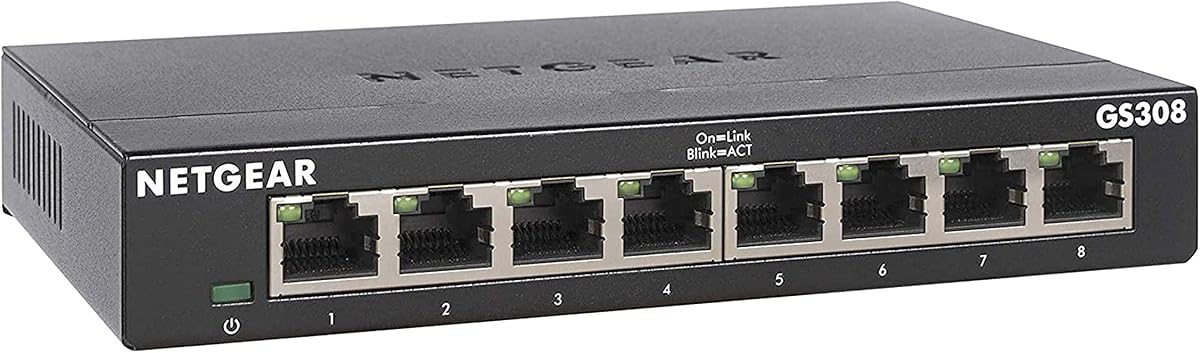
The NETGEAR GS308 stands out as a top choice for users needing reliable 8-port connectivity without complexity. Its 4.8 rating reflects strong performance in real-world environments, ensuring stable connections for various devices.
We may earn a commission when you buy through this link, at no additional cost to you.
Key strengths include auto-negotiating ports that optimize speed automatically, and a fanless design for silent operation. The compact metal casing ensures durability while supporting flexible mounting options for desktop or wall installation.
Trade-offs like regional compatibility constraints are minimal for most users in supported areas. The lack of Power over Ethernet is acceptable for basic connectivity needs without requiring powered devices directly.
Home office users or small business owners needing multiple wired connections will benefit most. Its combination of speed, reliability, and ease of use makes it a highly recommended choice.
The eight 1Gbps ports deliver consistent high-speed data transfer for multiple devices simultaneously without bottlenecks.
Zero configuration is required, making it ideal for users without networking expertise to set up quickly.
We may earn a commission when you buy through this link, at no additional cost to you.
The TP-Link TL-SG116 offers extensive connectivity with 16 ports, perfect for larger setups needing multiple wired connections. Its 4.7 rating indicates reliable performance and customer satisfaction.
We may earn a commission when you buy through this link, at no additional cost to you.
Advanced features like QoS allow prioritizing critical traffic such as video calls or VoIP. IGMP snooping optimizes multicast data streams, reducing bandwidth waste during streaming applications.
The larger metal case ensures durability but requires more desk space. While priced higher than 5-port options, the port density justifies the investment for growing networks.
Small businesses or offices with many wired devices will find this switch valuable. The included warranty and support add confidence to the purchase.
Port-based QoS and DSCP prioritization ensure real-time applications get necessary bandwidth without lag.
Innovative energy-efficient technology reduces power consumption while expanding network capacity significantly.
We may earn a commission when you buy through this link, at no additional cost to you.
The NETGEAR GS105NA delivers reliable 5-port connectivity with a strong 4.8 rating. It is well-suited for small spaces where simplicity and performance are key priorities.
We may earn a commission when you buy through this link, at no additional cost to you.
Its fanless design ensures quiet operation, making it ideal for home offices or living rooms. Auto-negotiating ports work seamlessly with existing Cat5e or Cat6 cables for maximum speeds.
Limited port count may require additional switches for larger setups, but the compact footprint saves space. Regional restrictions apply only to specific geographic areas.
Users needing just a few wired connections will appreciate its ease of use. The metal housing provides durability while maintaining a clean aesthetic.
Compact metal casing fits neatly on desks or can be wall-mounted for organized cable management.
IEEE 802.3az standards reduce power usage without sacrificing high-speed network performance.
We may earn a commission when you buy through this link, at no additional cost to you.
The NETGEAR MS305 offers 2.5G Multi-Gigabit connectivity for users needing faster than standard Gigabit speeds. Its 4.6 rating shows solid performance and user approval.
We may earn a commission when you buy through this link, at no additional cost to you.
Five 2.5Gbps ports support next-gen devices like Wi-Fi 6 routers or high-speed NAS systems. The metal design ensures durability while the fanless operation keeps noise to zero.
Priced higher than 1G models, the speed upgrade is valuable for bandwidth-intensive tasks. The five-port limit restricts expansion beyond basic multi-device setups.
Power users or tech enthusiasts needing high throughput will benefit from this model. Its ease of setup and reliability make it a strong premium option.
Five 2.5Gbps ports enable significantly faster data transfers compared to standard Gigabit Ethernet links.
Auto-negotiation works with existing cables to deliver optimal speed for connected devices automatically.
We may earn a commission when you buy through this link, at no additional cost to you.
The TP-Link LS1005G provides exceptional value with reliable 5-port connectivity at a budget-friendly price. Its 4.7 rating reflects strong reliability and user satisfaction.
We may earn a commission when you buy through this link, at no additional cost to you.
At just 2.8 ounces and with a compact frame, it is easy to hide or transport. IEEE 802.3X flow control ensures stable data transfers for connected devices.
While it lacks advanced features like QoS, the simplicity suits basic networking needs. The tiny size may feel less durable than heavier metal options.
Students or casual home users needing extra connections will find this ideal. The combination of low cost and proven performance is hard to beat.
Tiny body frame allows it to be tucked away easily or placed discreetly out of sight.
Latest innovative technology expands network capacity with much less power consumption to save money.
We may earn a commission when you buy through this link, at no additional cost to you.
The UGREEN switch offers straightforward 5-port connectivity with broad system compatibility. Its 4.7 rating indicates reliable performance across various devices.
We may earn a commission when you buy through this link, at no additional cost to you.
It supports Windows, macOS, Linux, Android, and iOS, making it versatile for mixed environments. The fanless design ensures silent operation while reducing energy consumption.
Lack of PoE may limit use for powered devices like cameras. Basic specifications mean it works well for standard internet and file sharing needs.
Users needing a reliable splitter for laptops, consoles, or printers will find it useful. The price and ease of use make it a solid choice.
Supports Windows, macOS, Linux, Android, and iOS systems for flexible integration with existing setups.
Wall mounting holes on the back help save desk space when hanging the unit securely.
We may earn a commission when you buy through this link, at no additional cost to you.
The NETGEAR GS108MX provides a powerful mix of one 10G port and eight Gigabit ports. Its 4.6 rating shows performance reliability for demanding environments.
We may earn a commission when you buy through this link, at no additional cost to you.
This setup is ideal for connecting high-speed servers or NAS devices to regular clients. Auto-negotiating ports detect optimal speeds automatically for all connected devices.
The high price point reflects its niche utility. Limited 10G port count may not suit all multi-device needs requiring equal high-speed access.
Advanced users needing fast uplink speeds will find this model advantageous. Its simplicity remains intact despite the enhanced capabilities.
Features one 10Gbps Multi-Gigabit port for exceptional connectivity to main network or storage.
Fanless design ensures silent performance while IEEE 802.3az reduces power consumption effectively.
We may earn a commission when you buy through this link, at no additional cost to you.
The D-Link 5-Port 2.5G switch is designed for high-performance networks like gaming or 8K streaming. Its 4.7 rating reflects strong reliability and user satisfaction.
We may earn a commission when you buy through this link, at no additional cost to you.
Five 2.5G ports provide multi-speed transmission, allowing fast data transfers. QoS features classify traffic into eight priority levels to minimize dropped packets.
The metal housing ensures durability and heat dissipation, though five ports may limit expansion. The cost is justified by the speed and performance features.
Gamers and media enthusiasts will appreciate the reduced latency. The smart auto-negotiation helps maximize network bandwidth automatically.
Classify traffic into eight priority levels to ensure critical data gets necessary bandwidth reliably.
Provides up to 25Gbps switching capacity to handle multiple high-speed devices simultaneously.
We may earn a commission when you buy through this link, at no additional cost to you.
The NETGEAR GS116PP offers extensive 16-port connectivity with PoE support for powered devices. Its 4.8 rating indicates exceptional performance and reliability.
We may earn a commission when you buy through this link, at no additional cost to you.
A 183W power budget supports power-hungry devices like high-power cameras or wireless access points. The plug-and-play setup simplifies installation without complex config.
The price is high, but for security or large networks, it is necessary. The size may require rack-mounting in larger installations.
Security professionals or large office IT managers will find this indispensable. It bridges the gap between simplicity and advanced power needs.
16 PoE+ ports provide power and data over cables, supporting devices like IP cameras.
Supports desktop, wall-mount, and rack-mount options for versatile placement options.
We may earn a commission when you buy through this link, at no additional cost to you.
The Linksys SE3005 provides reliable 5-port Gigabit performance with a 4.7 rating. It is known for its stable architecture and ease of use.
We may earn a commission when you buy through this link, at no additional cost to you.
Auto-sensing ports maximize data flow rates up to 1,000 Mbps. Power-saving modes detect unused ports to reduce energy waste efficiently.
It lacks some modern advanced features but remains robust for standard needs. The non-blocking architecture prevents bottlenecks during data transfer.
General home users or older office setups will find it effective. Its simplicity and reliability make it a solid long-term investment.
Auto-sensing ports adjust to maximize data flow rates up to 1,000 Mbps automatically.
Advanced power saving mode detects unused ports to reduce overall energy consumption.
We may earn a commission when you buy through this link, at no additional cost to you.
Selecting the right unmanaged switch involves considering key factors like port count, speed requirements, build quality, and special features to ensure it fits your network.
The number of ports determines how many devices you can connect directly. A 5-port switch suits small setups while 8 or 16 ports support larger networks.
Choose a port count that covers current needs plus some room for future growth.
Standard Gigabit switches offer 1Gbps speeds suitable for most homes. Multi-Gigabit models provide 2.5G or 10G for high-speed storage or networking.
Ensure your devices and cables support the switch speed to realize the full benefits.
Metal housings dissipate heat better and offer more durability than plastic. They are essential for reliable long-term operation in demanding environments.
Look for robust materials that can withstand daily use and environmental factors.
PoE switches supply power to connected devices like IP cameras over the same cable. This simplifies setup by removing the need for separate power adapters.
Choose PoE only if you need to power devices directly through the switch ports.
Energy Efficient Ethernet (EEE) standards reduce power consumption when ports are idle. This helps lower electricity costs and reduces environmental impact.
Opt for models with IEEE 802.3az compliance to save power over time.
Some switches offer desktop placement while others support wall or rack mounting. Choosing the right mounting style helps organize your space effectively.
Consider available space and installation preferences before purchasing to ensure proper fit.
Prices vary significantly based on features like port count, speed, and build quality. Determine how much you need before committing to a higher-end model.
Balance cost with performance needs to find the best value for your specific situation.
A good warranty provides peace of mind regarding product reliability and defects. Look for at least 3 years of coverage for long-term support.
Verify the warranty terms and availability of technical support from the manufacturer.
To set up your unmanaged switch, connect one port to your router using an Ethernet cable. Connect other devices to the remaining ports using Cat5e or Cat6 cables.
Ensure all devices are powered on and configured to obtain IP addresses automatically. The switch will handle traffic distribution without any software configuration.
Keep the switch in a well-ventilated area to avoid overheating. Periodically dust it to maintain airflow and check cables for wear or damage.
An unmanaged network switch is a plug-and-play device that connects multiple devices without requiring configuration. It automatically directs traffic between connected devices and requires no software setup.
Most basic unmanaged switches do not support PoE, but some specific models do. Check product specs carefully to ensure PoE capability is included before purchasing.
Yes, Cat5e cables support Gigabit Ethernet speeds up to 1,000 Mbps. For best performance and future-proofing, consider using Cat6 cables where possible.
EEE reduces power consumption when ports are idle, lowering electricity costs. It helps maintain performance while being more environmentally friendly over time.
Eight devices can connect directly to the switch ports. You can connect the switch to a router to access internet and expand your network further.
Yes, unmanaged switches are suitable for gaming as they provide stable wired connections. However, some models offer QoS features that prioritize gaming traffic.
Auto MDI/MDIX allows cables to be connected in any order without crossover cables. It simplifies setup by automatically adjusting the signal polarity.
Yes, unmanaged switches need power from an outlet to operate. They are not powered through Ethernet cables unless specifically designed with PoE.
The top picks above cover a range of needs from budget 5-port switches to high-performance Multi-Gigabit and PoE models. Each product offers reliable performance backed by strong user ratings.
Prioritize port count and speed based on your devices' requirements. Consider build quality and mounting options to ensure long-term durability and proper installation.
Always check current prices and availability before purchasing to ensure you get the best value. With the right switch, you can expand your network efficiently and effectively.