
Nacon Daija Arcade Fight Stick
4.2Editor score
Sanwa joystick and buttons
Fully configurable buttons
Textured palm rest
Explore the top arcade sticks for PS5 with real user ratings and detailed comparisons to find the perfect fightstick for your setup.
Finding the right arcade stick for PS5 can transform your fighting game experience from basic inputs to tournament-grade precision. A quality fightstick offers superior ergonomics, responsive controls, and a tactile feel that controllers simply cannot match for competitive play.
We have analyzed ten top-rated products based on official licensing, build quality, component options, and user feedback. This list covers everything from entry-level wireless options to high-end tournament sticks designed by professional players.
Each review highlights specific strengths and weaknesses to help you match a stick to your preferred games and budget. Please note that product availability and prices may change, so check current listings before making a purchase.
4.2Editor score

4.6Editor score

4.5Editor score
The following table provides a quick side-by-side comparison of all ten products featured in this guide. It highlights key specifications such as compatibility, button types, and connection methods to help you narrow down your choices efficiently.




The HORI PlayStation 5 Fighting Stick Alpha stands out as a top-tier option for serious fighters on the PS5. With a 4.6 rating from users, it delivers tournament-grade performance right out of the box. Its official licensing ensures seamless compatibility with Sony hardware without needing workarounds.
We may earn a commission when you buy through this link, at no additional cost to you.
This fightstick uses HORI's proprietary Hayabusa buttons and joystick, which are known for their crisp actuation and smooth movement. The metal chassis provides stability during intense matches, and the case opens easily for maintenance or upgrades. The top panel artwork is replaceable, adding a personalized touch.
While the Hayabusa components are excellent, some players prefer Sanwa parts for a different feel. The top panel also requires specific tools for replacement if you want to change the look. These trade-offs are acceptable given the overall build quality and official support.
If you want a reliable, officially licensed fightstick that works perfectly with PS5, this is the best choice. It suits players who value durability and official certification over modular customization. Consider this for competitive play or long-term home use.
Being officially licensed by Sony ensures full compatibility with PS5 system functions and fighting game titles without needing third-party adapters.
The proprietary Hayabusa buttons and joystick offer a unique tactile feel that balances speed and precision, favored by many tournament players.
We may earn a commission when you buy through this link, at no additional cost to you.
The Nacon Daija Arcade Fight Stick is engineered for professional-level gaming with premium components. Rated 4.2 by users, it offers a robust build with Sanwa joystick and action buttons that are a standard among competitive players. It is officially licensed for PlayStation systems.
We may earn a commission when you buy through this link, at no additional cost to you.
Key strengths include full button mapping via PC software, allowing you to create game-specific profiles easily. The textured palm rest ensures comfort during long sessions, and you can switch between two joystick heads for precision. The front plate is fully customizable for style.
The main trade-off is the need for software to configure button mappings, which might inconvenience users who prefer on-the-fly adjustments. The price is also on the higher end compared to entry-level options. However, the included accessories justify the cost for serious gamers.
This stick is ideal for players who want tournament-grade customization and comfort. It is best for those who invest in a dedicated setup and value modularity. Consider it if you prioritize component quality and personalization.
The Nacon Daija allows complete customization of buttons and faceplates, enabling players to tailor the stick to their exact preferences.
A textured palm rest and ergonomic design provide sturdy support, reducing fatigue during extended fighting game matches.
We may earn a commission when you buy through this link, at no additional cost to you.
The MAYFLASH Arcade Stick F700 is a versatile and affordable choice for fighting games across multiple platforms. With a 4.5 rating, it supports Bluetooth, 2.4G wireless, and wired connections, making it flexible for various setups. It works with PS5, PS4, Switch, and more.
We may earn a commission when you buy through this link, at no additional cost to you.
It supports turbo functions with speed settings and allows wired headset output for chat. The included 2.4G receiver has a hidden compartment for safe storage. Firmware updates enable Switch 2 compatibility, ensuring future-proofing for console owners.
The main limitation is that it only supports fighting games, not other genres, which limits its use as a universal controller. Customization options are limited compared to higher-end models. Still, for the price, it offers reliable performance and connectivity.
This stick is perfect for budget-conscious players who need wireless options and broad compatibility. It suits casual to intermediate fighters who do not require extensive modding. Consider it for a reliable entry into arcade stick gaming.
With support for Bluetooth and 2.4G wireless, the F700 offers flexible connectivity options for different gaming setups and distances.
Compatible with PS5, PS4, Switch, PC, and mobile devices, this stick is ideal for gamers who switch between different systems.
We may earn a commission when you buy through this link, at no additional cost to you.
The Qanba N3 Drone 2 is an officially licensed Sony product that delivers quality components at a budget-friendly price. Rated 4.5, it features authentic Qanba buttons and an OV7 OMRON switch joystick. It is designed for PS5, PS4, and PC users seeking reliability.
We may earn a commission when you buy through this link, at no additional cost to you.
Its full control panel includes a touch pad and 30-mm buttons that provide responsive input. The 3.5mm microphone input with mute button allows for easy communication during online matches. The build quality is solid for its price range, making it a strong value option.
The main trade-off is that it is wired only, limiting portability compared to wireless sticks. Some users may prefer additional modding capabilities. However, the official licensing and component quality make it a dependable choice for home use.
This stick is best for players who prioritize official compatibility and affordability over wireless features. It suits beginners or those building a budget setup. Consider it if you want a reliable stick without extra cost.
Authentic Qanba buttons and lever ensure a consistent and responsive feel that is trusted by fighting game enthusiasts worldwide.
The 3.5mm microphone input with mute control enhances online gameplay by allowing easy team communication without extra hardware.
We may earn a commission when you buy through this link, at no additional cost to you.
The MAYFLASH F700 Elite upgrades the standard F700 with premium Sanwa buttons and a precision 4-way joystick. With a 4.6 rating, it delivers instant and reliable strikes for fighting games. It supports Bluetooth, 2.4G, and wired USB connections for flexibility.
We may earn a commission when you buy through this link, at no additional cost to you.
It includes a full-size anti-slip rubber mat to keep the stick firmly in place during intense matches. Turbo functions with speed settings allow for rapid combos, and wired headsets work for chat and music. Firmware updates support Switch 2 connectivity.
The lack of Xbox compatibility may be a drawback if you play on multiple consoles. It is also limited to fighting games only. These limitations are acceptable for players focused on PS5 and PC fighting titles.
This stick is ideal for players who want Sanwa quality and wireless freedom. It suits those who value performance and stability. Consider it for a reliable wireless fighting stick with premium parts.
Premium Sanwa components provide a highly responsive and durable input mechanism that is favored by professional fighting game players.
The included anti-slip rubber mat ensures the stick remains stable on any surface, preventing unwanted movement during competitive play.
We may earn a commission when you buy through this link, at no additional cost to you.
The MAYFLASH F500 Arcade FightStick offers broad compatibility including Xbox Series S/X and PS5 via Magic Boots. Rated 4.0, it allows plug and play without needing a controller plugged in. It supports headsets for chat and music on compatible systems.
We may earn a commission when you buy through this link, at no additional cost to you.
It uses Xinput and Dinput for PC flexibility and supports turbo functions with speed settings. The Magic Boots enable seamless PS5 and PS4 use. It works with many platforms including Switch and older Xbox consoles for a wide gaming range.
While the rating is slightly lower, it provides excellent cross-platform support for the price. Users note that a wired Xbox controller is required for Xbox 360 and Xbox One setups. This is a minor inconvenience for the versatility offered.
This stick is best for players who game across multiple consoles including Xbox. It suits those who want a single stick for all systems. Consider it if cross-platform play is a priority for your setup.
With compatibility for Xbox and PlayStation, this stick allows you to use one controller across different console ecosystems.
The Magic Boots simplify connection on PS5 and PS4, eliminating the need for an additional controller plugged into the console.
We may earn a commission when you buy through this link, at no additional cost to you.
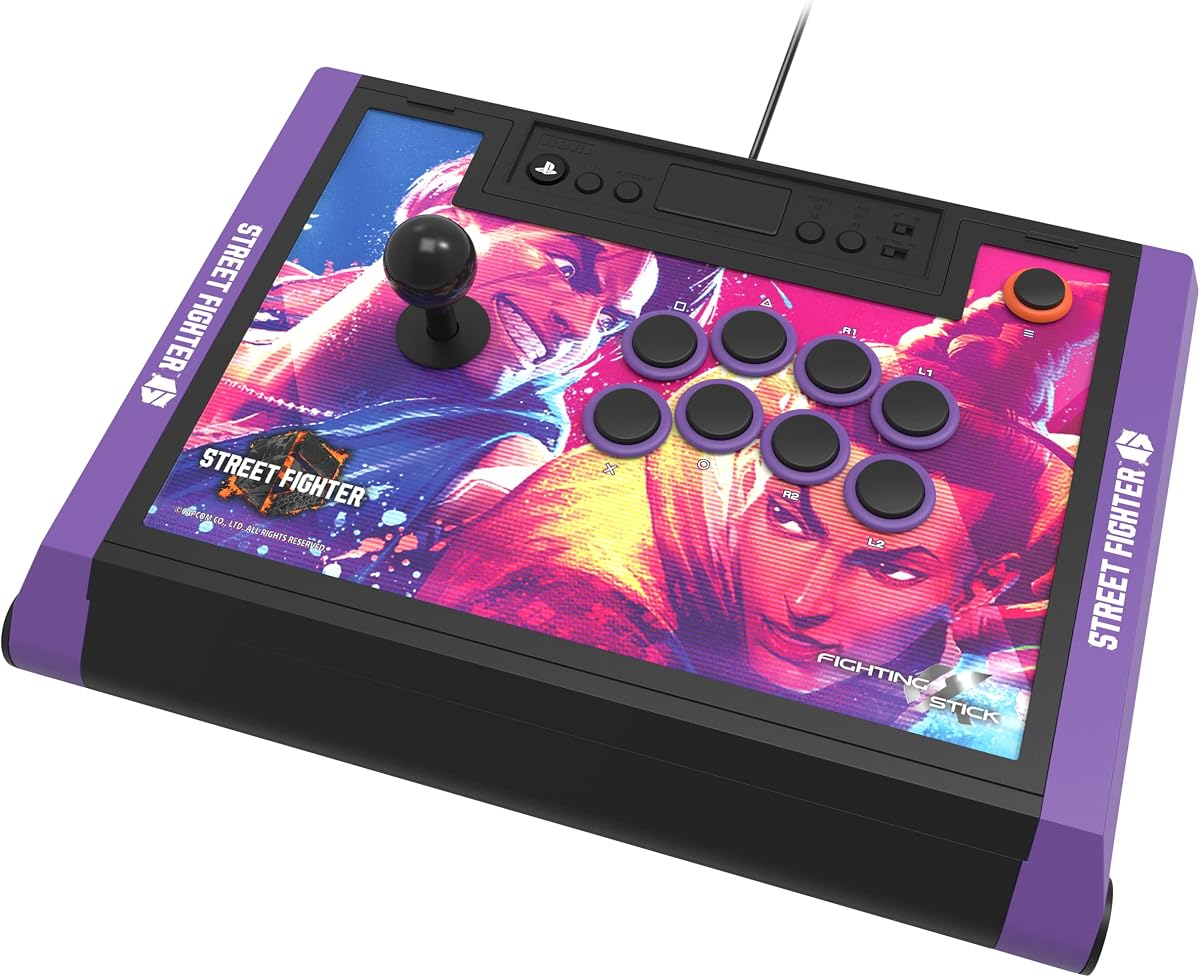
This edition features Street Fighter 6 top panel artwork with downloadable hi-res images for customization. Rated 4.5, it includes the same Hayabusa buttons and joystick as the standard Alpha. It is officially licensed by Sony and Capcom for authenticity.
We may earn a commission when you buy through this link, at no additional cost to you.
The tournament-ready design ensures high performance with a metal case that opens for customization. The link to downloadable images adds a unique touch for SF6 fans. It works seamlessly with PS5 and PC fighting titles.
The main drawback is the higher price due to the themed branding. The internals are identical to the standard Alpha, so performance is consistent. For SF6 enthusiasts, the design and licensing add value beyond the base model.
This stick is ideal for Street Fighter 6 fans who want a specialized look and reliable performance. It suits collectors or players who prefer themed peripherals. Consider it if you want a dedicated SF6 setup.
The Street Fighter 6 top panel artwork and downloadable images create a personalized and immersive fighting game aesthetic.
Official licensing by Sony and Capcom guarantees compatibility and authentic branding for official game releases and tournaments.
We may earn a commission when you buy through this link, at no additional cost to you.
The Qanba Q7 Obsidian 2 offers a balance of features with OBSF buttons and swappable Sanwa JLF joystick tops. Rated 4.3, it is an officially licensed Sony product for PS5, PS4, and PC. A switch allows easy changes between platforms.
We may earn a commission when you buy through this link, at no additional cost to you.
Its full control panel includes a touch pad and 30mm buttons for precise control. The 3.5mm microphone input with mute button is useful for online communication. The design is sturdy and tailored for fighting games.
The main trade-off is the wired connection, which limits flexibility compared to wireless sticks. The price is moderate but still requires a commitment. For wired setups, it delivers quality components at a fair price.
This stick is best for players who prefer wired reliability and customizable joystick options. It suits mid-level competitors who value component selection. Consider it if you want a solid stick with Sanwa modding potential.
Swappable Sanwa JLF joystick tops allow you to adjust the joystick feel without replacing the entire stick for a personalized experience.
A simple switch on the device lets you change between PS5, PS4, and PC modes, simplifying multi-system use.
We may earn a commission when you buy through this link, at no additional cost to you.
This stick features Tekken 8 top panel artwork with downloadable alternate artwork to print for customization. Rated 4.6, it includes proprietary Hayabusa buttons and joystick for tournament-ready performance. It is officially licensed by Sony and Bandai Namco.
We may earn a commission when you buy through this link, at no additional cost to you.
The metal case opens for maintenance and modding while retaining the official branding. Compatibility extends to PS5, PS4, and PC. The design appeals specifically to fans of the Tekken series looking for authentic peripherals.
As with the SF6 edition, the price reflects the themed branding. Internals remain the same as the standard Alpha, so performance is consistent. For Tekken players, the aesthetics and licensing offer added value.
This stick is ideal for Tekken 8 fans who want a specialized look and reliable performance. It suits collectors or dedicated players who prefer themed peripherals. Consider it if you want a dedicated Tekken setup.
The Tekken 8 artwork and alternate downloadable designs create a customized and immersive aesthetic for fans of the series.
Tournament-grade build quality with Hayabusa components ensures precision and durability for competitive play environments.
We may earn a commission when you buy through this link, at no additional cost to you.
The GuileKeys GK-18 uses an 18-key all-button layout for a unique fighting experience. Rated 4.3, it features Kailh Choc low-profile switches with input latency under 1ms. It is compatible with Windows, Steam Deck, and other platforms.
We may earn a commission when you buy through this link, at no additional cost to you.
RGB backlighting and customizable OLED screen enhance immersion, while hot-swappable switches allow easy replacement without soldering. The web configurator supports deep customization and adjustable turbo settings. It includes Tournament Lock to prevent accidental pauses.
The main trade-off is that PS4/PS5 compatibility requires an additional arcade stick converter. The leverless design also has a learning curve for traditional joystick users. These are acceptable for players seeking a different control style.
This stick is best for players who want a leverless option and high customization. It suits those interested in all-button layouts. Consider it if you want unique controls and RGB aesthetics.
The four-direction movement buttons instead of a joystick reduce input errors and provide precise control for complex combos.
Hot-swappable switches and RGB lights allow extensive personalization to match your gaming setup preferences.
We may earn a commission when you buy through this link, at no additional cost to you.
Choosing the right arcade stick involves considering licensing, components, connectivity, and your budget. This guide outlines key factors to help you select a fightstick that matches your playing style.
Officially licensed products ensure full compatibility with the PS5 system and prevent issues like game detection failures. Licensed sticks often come with warranty support and regular firmware updates.
Always verify that the stick is officially licensed by Sony for PS5 to guarantee seamless performance.
High-quality buttons and joysticks like Sanwa or Hayabusa improve responsiveness and durability. These components determine the tactile feel and how well the stick handles intense inputs.
Choose sticks with reputable components to ensure long-term reliability and precise controls.
Wired connections offer lower latency, while wireless options provide convenience. Some sticks support both USB wired and Bluetooth for flexibility depending on your setup.
Decide whether you prefer wired stability or wireless freedom based on your gaming environment.
Open designs and replaceable panels allow you to personalize the look and feel. Some sticks let you swap joystick tops or buttons without soldering, making maintenance easier.
Look for sticks that open easily if you plan to upgrade parts or change artwork over time.
Ensure the stick supports PS5 and other systems you use like PC or Switch. Some sticks require adapters for certain platforms which can affect usability.
Check compatibility lists to confirm the stick works with all your gaming devices.
A well-designed palm rest and ergonomic shape reduce hand fatigue during long sessions. The size should fit your table and reach comfortably without strain.
Prioritize sticks with comfortable rests and sturdy build quality for extended play.
Prices vary widely based on components and branding. Entry-level sticks are affordable but may lack premium features, while high-end options offer superior build quality.
Set a budget and compare features to find the best value for your needs.
Connect the stick to your PS5 using the included USB cable or pair via Bluetooth. Follow the on-screen instructions to ensure proper recognition by the console. Adjust settings if needed for button mapping.
Keep the stick clean by wiping buttons and joystick with a soft cloth. Store it in a dry place to prevent dust buildup. Check for firmware updates periodically to maintain optimal performance.
If you notice loose parts, tighten screws and inspect for wear. Custom sticks allow you to replace worn buttons easily. Use non-slip mats to keep the stick stable during play.
No, only officially licensed or compatible sticks work seamlessly with PS5. Unlicensed ones may require adapters or have limited functionality. Always check the product details for PS5 support before buying.
Updating firmware ensures compatibility with new games and consoles. Most manufacturers provide tools to update sticks via PC. Check the support page for instructions if issues arise.
Many sticks support PC, Switch, and Xbox in addition to PS5. Some require switching modes or using adapters. Verify multi-platform support to maximize usability across your devices.
Sanwa is a renowned brand for arcade buttons and joysticks known for durability. These components are common in high-end sticks. They provide a consistent and responsive feel preferred by pros.
Use a soft dry cloth to wipe surfaces. Avoid liquids near internal parts. If removable, clean buttons gently with a damp cloth. Regular cleaning prevents dust buildup and extends lifespan.
Modern Bluetooth and 2.4G wireless sticks offer low latency suitable for competitive play. Wired sticks still have the lowest lag but are less convenient. Test the stick to see if latency impacts your game.
This guide reviewed ten top arcade sticks for PS5 including licensed models from HORI, Nacon, and MAYFLASH. Each offers unique features like Hayabusa parts, wireless modes, and customizable designs.
Prioritize components and compatibility to ensure a reliable gaming experience. Consider your budget and whether you need modding options or wireless flexibility when making your choice.
Check current prices and availability before purchasing as they may change. Investing in the right stick will enhance your PS5 fighting game performance significantly.