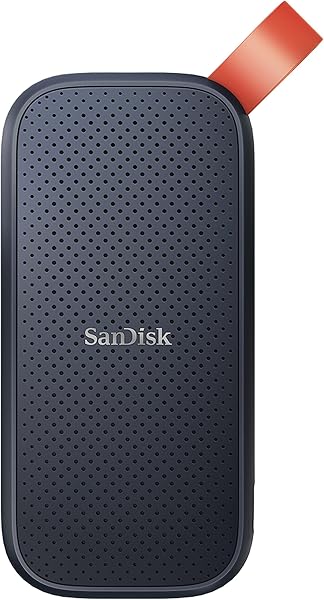
Verbatim Pocket 1TB
8.6Editor scoreUp to 1000MB/s read
Up to 1000MB/s write
Keyring and cable holder
Nero Backup Software included
Compare the best portable SSDs for photographers. Review top models from SanDisk and Samsung with real ratings, speeds, and durability features for 2026.
Photographers need reliable storage to protect their work on the go. A fast portable SSD ensures quick transfers and safe backups during shoots. Choosing the right drive means balancing speed, capacity, and ruggedness for your workflow.
Modern cameras capture massive files that demand high-performance storage solutions. USB-C drives with NVMe technology deliver the speed needed for RAW images and 4K video. Durability matters too when equipment faces dust, water, or drops in the field.
This guide reviews ten top-rated models based on performance and value. We compare read speeds, protection ratings, and price points to help you decide. Each option offers distinct benefits for different shooting styles and budget requirements.
We compared these 10 portable ssds for photographers by lining up the listed specifications, key features, prices, customer ratings, and the details each seller makes available. Each review focuses on the differences that can matter before you buy, from fit and compatibility to value and everyday convenience.

Compare key features, scores, and current prices side by side. A shorter feature list means fewer details were available, not necessarily fewer capabilities.





The T7 Shield provides exceptional performance at a competitive price point. Its read speeds reach 1050MB/s, which is sufficient for most photo and video workflows. Samsung includes Magician software to monitor drive health and ensure long-term reliability.
We may earn a commission when you buy through this link, at no additional cost to you.
Versatility stands out as it supports iPhone 15 Pro for direct 4K recording at 60fps. This feature is rare and beneficial for hybrid shooters using mobile devices. The rugged design handles drops up to 9.8 feet effectively.
Water and dust resistance make it suitable for harsh environments without needing extra cases. You can rely on this drive for travel photography where conditions can be unpredictable. It offers a solid balance of features for the price.
Direct compatibility with iPhone 15 Pro allows for seamless mobile editing workflows. You can offload shots directly from your phone to the drive without a computer.
Not ideal for users who need capacities larger than 1TB in a budget-friendly format without buying multiple drives.
Before choosing this model, weigh this limitation: 1TB capacity may fill up quickly with 4K video.
We may earn a commission when you buy through this link, at no additional cost to you.
The Verbatim Pocket SSD focuses on simplicity and portability for everyday backup needs. It delivers read and write speeds up to 1000MB/s which is sufficient for standard photo editing tasks. The design is ultra-lightweight and fits easily into small bags.
We may earn a commission when you buy through this link, at no additional cost to you.
Included features like a keyring and cable holder keep accessories organized in your pocket. This practical design prevents tangles and lost cables during travel. It connects easily to USB-C PCs and Macs without extra drivers.
Backup software from Nero is included to help automate your file protection process. While it lacks the extreme ruggedness of other models, it serves well for controlled environments. It is a solid choice for budget-conscious buyers.
The included software makes automating file backups simple for users who need reliable storage without complex setup steps.
Not recommended for outdoor shoots where water or dust exposure is a high risk without an additional protective case.
Before choosing this model, weigh this limitation: Lacks rugged water and dust rating.
We may earn a commission when you buy through this link, at no additional cost to you.
This model provides the highest storage capacity available in this guide with 4TB. It is perfect for photographers who shoot weddings or commercial work daily. You can keep years of work on a single drive without buying multiple units.
We may earn a commission when you buy through this link, at no additional cost to you.
The rugged design maintains the IP65 rating and drop protection standards of the Shield series. It is built to withstand rough handling during transport to remote locations. This ensures your data remains safe even in tough conditions.
With speeds up to 1050MB/s, it handles large file transfers efficiently. While the price is higher, the per-GB cost is often lower than buying several smaller drives. It simplifies your storage strategy significantly.
The large capacity means you can rely on this drive for long-term projects without needing to constantly upgrade your storage plan.
Not recommended for users with limited budgets or those who do not have enough footage to fill 4TB quickly.
Before choosing this model, weigh this limitation: Highest price point in guide.
We may earn a commission when you buy through this link, at no additional cost to you.
This drive offers a balanced mix of speed and durability for professional photographers. The read speeds of up to 1050MB/s ensure quick offloading from your camera card to backup storage. It handles heavy workloads without throttling, making it ideal for full-day shoots.
We may earn a commission when you buy through this link, at no additional cost to you.
Durability is a major strength with IP65 water and dust resistance. You can confidently use this SSD in outdoor environments where sand or rain might be present. The 3-meter drop protection adds peace of mind when working on uneven terrain.
Security features include 256-bit AES hardware encryption to protect private client files. This is crucial for professionals handling sensitive contracts or unreleased work. The Memory Zone app helps manage storage space automatically on connected devices.
The rugged design and carabiner loop make it perfect for outdoor photography where equipment might be jostled. Secure it to your backpack to keep it accessible during long treks.
Not suitable for users needing extreme high-end speeds above 2000MB/s or those who prefer USB-A connections without adapters.
Before choosing this model, weigh this limitation: Price is higher than some alternatives.
We may earn a commission when you buy through this link, at no additional cost to you.
This model pushes transfer speeds up to 2000MB/s, offering near-PCIe performance in a portable drive. Photographers editing high-resolution photos will appreciate the reduced wait times during file transfers. It moves 1000 high-res photos in under 60 seconds.
We may earn a commission when you buy through this link, at no additional cost to you.
The pocket-sized design makes it the most convenient option for travel. You can carry it in a jacket pocket without adding bulk to your gear bag. Despite its size, it maintains the IP65 rating and 3-meter drop protection found in larger models.
Security features include 256-bit AES encryption to keep your private files protected. The carabiner loop helps you attach it securely to a bag strap for quick access. It is a top choice for professionals who prioritize speed above all else.
With speeds reaching 2000MB/s, this drive significantly cuts down time spent moving large RAW image files between camera and computer.
Not suitable for large video projects that require capacities beyond 500GB for immediate local storage needs.
Before choosing this model, weigh this limitation: 500GB capacity limits large session storage.
We may earn a commission when you buy through this link, at no additional cost to you.
This older model from SanDisk offers a lower entry price while maintaining essential reliability. The read speeds of up to 800MB/s are adequate for general photo storage and transfer. It fits seamlessly into a mobile lifestyle for casual users.
We may earn a commission when you buy through this link, at no additional cost to you.
The rubber hook allows you to secure the drive to a belt loop for safe transport. This simple feature reduces the risk of losing your drive while on the move. It provides a practical storage solution for smaller projects.
Build quality remains solid with drop protection designed to take a beating during regular use. While not the fastest option on the market, it holds its own for value. It is a trusted brand choice for many professionals.
The affordable price point makes it an accessible option for photographers needing reliable backup without spending too much money.
Not recommended for high-speed workflows that require transfer rates above 1000MB/s for large RAW files.
Before choosing this model, weigh this limitation: Slower speeds than newer models.
We may earn a commission when you buy through this link, at no additional cost to you.
This 2TB model provides ample space for storing extensive photo libraries locally. It operates at speeds up to 800MB/s which is suitable for standard backup needs. The larger capacity helps you consolidate files from multiple trips into one drive.
We may earn a commission when you buy through this link, at no additional cost to you.
Like the 1TB version, it includes a rubber hook for securing the drive to your gear. This practical feature ensures your drive stays safe while you are actively shooting. It is a great companion for extended assignments.
SanDisk is a trusted name among professionals which adds confidence to your purchase decision. While the speed is not the highest, the capacity and reliability make it a strong contender. It serves well as a main archive drive.
The 2TB capacity allows you to keep a significant amount of work on hand without constantly worrying about running out of space.
Not recommended for users who need ultra-fast transfer speeds for immediate video editing or high frame rate workflows.
Before choosing this model, weigh this limitation: Older model with slower speeds.
We may earn a commission when you buy through this link, at no additional cost to you.
The 2TB capacity offers enough room for extensive RAW files and video clips. It maintains the same speeds as the 1TB model ensuring consistent performance during transfers. This drive is ideal for professionals handling massive datasets regularly.
We may earn a commission when you buy through this link, at no additional cost to you.
Durability is top-tier with IP65 rating and drop protection up to 9.8 feet. You can trust this drive to survive the rigors of outdoor and travel photography. It handles rain and dust without requiring extra protection.
Compatibility with iPhone 15 Pro is a key benefit for mobile creators. The included Magician software helps optimize performance and monitor health over time. This ensures long-term reliability for your critical business data.
The combination of 2TB storage and 1050MB/s speed makes it excellent for large-scale video and photo production needs.
Not ideal for budget buyers who do not need 2TB storage and prefer lighter, smaller options.
Before choosing this model, weigh this limitation: Higher price than 1TB option.
We may earn a commission when you buy through this link, at no additional cost to you.
This drive offers read speeds up to 2000MB/s for rapid data access. The forged aluminum chassis helps dissipate heat during sustained high-speed transfers. It is designed for professional workflows that demand top-tier performance.
We may earn a commission when you buy through this link, at no additional cost to you.
Security features include 256-bit AES hardware encryption for sensitive client data. The IP65 water and dust rating ensures durability in demanding environments. You can use it confidently on location without worrying about elements.
Management tools like the SanDisk Memory Zone app simplify file organization. It allows you to manage storage space automatically for better efficiency. This model is a strong candidate for high-end video and photo work.
The high read speeds combined with durable construction make this drive ideal for professionals editing large files on the go.
Not recommended for users who prioritize budget over speed and capacity requirements.
Before choosing this model, weigh this limitation: Older model than newest releases.
We may earn a commission when you buy through this link, at no additional cost to you.
The 4TB capacity is perfect for photographers who need massive local storage. It offers reliable speeds up to 1050MB/s for efficient daily use. You can keep a complete archive of your portfolio on this single drive.
We may earn a commission when you buy through this link, at no additional cost to you.
Durability features include IP65 water and dust resistance plus drop protection. This ensures your valuable images remain safe even if the drive is dropped. The updated firmware improves stability and performance over time.
Security options include password protection to keep your work private and safe. The Memory Zone app assists in managing files and freeing up space. It is a robust tool for serious content creators.
With 4TB space, this drive eliminates the need for multiple drives when working on large projects requiring significant storage capacity.
Not ideal for travelers who need a lighter, more portable drive for daily carry.
Before choosing this model, weigh this limitation: Expensive initial purchase.
We may earn a commission when you buy through this link, at no additional cost to you.
Choosing the right portable SSD depends on your specific workflow and capacity needs. This guide breaks down key factors to consider before making your final decision. Photographers face unique demands ranging from rapid offloading at events to long-term archival storage in harsh environments. Selecting a drive that aligns with your equipment and budget ensures reliability when it matters most.
Transfer speed determines how quickly you can offload images from your camera or hard drives to your drive. Look for USB 3.2 Gen 2 drives with read speeds above 1000MB/s. Faster speeds save time during large batch transfers which is essential for busy professionals who cannot afford downtime between shoots. For example, moving 500GB of RAW files takes significantly less time on a drive rated for 1050MB/s compared to one limited to 500MB/s.
Most drives use USB-C which is now standard on modern laptops and cameras. Ensure your devices support the protocol you choose to avoid bottlenecking speeds. If you use older gear, check for compatible adapters before buying the fastest drive. A drive capable of 2000MB/s will perform slower if connected to a USB 3.0 port that caps speeds at 500MB/s.
Consider whether you need real-time playback of 4K video or just storage for RAW images. Video editors should prioritize write speeds over read speeds to avoid stuttering during editing. The SanDisk Extreme Portable SSD offers up to 1000MB/s write speeds which supports direct editing workflows without needing to copy files to an internal drive first.
Capacity determines how many files you can store without needing multiple backups. Photographers with large RAW files will need at least 1TB for comfortable work. High-resolution cameras create files that fill up space faster than expected. A single shoot from a 45-megapixel camera can generate dozens of gigabytes depending on the number of shots taken.
For wedding photographers who shoot thousands of images a weekend, 2TB or more is recommended. This reduces the frequency of offloading to the cloud or external archives. It allows for a complete archive without managing complex drive structures. Having enough space ensures you can keep all raw files and edits in one location without worrying about running out of room mid-project.
Budget often dictates capacity but consider the cost per terabyte. Buying one 4TB drive might be cheaper than two 2TB drives. Evaluate how long you expect to keep the data before archiving elsewhere. The Samsung T7 Shield offers capacities up to 4TB which provides room for growth without needing to purchase additional units immediately.
Durability is critical for outdoor photographers working in dust or wet conditions. Look for an IP65 rating which guarantees protection against water and dust ingress. This feature ensures the drive survives the elements without extra protection. If you shoot in rain or sandy environments, a drive without this rating risks failure after exposure to the elements.
Drop protection standards vary between models. Most rugged drives offer 3-meter drop protection to withstand accidental falls. Verify the rating matches the environment where you typically shoot to ensure reliability. The SanDisk Extreme Portable SSD includes a rubberized exterior and a carabiner loop to help secure it to your gear during transport.
Metal chassis options provide better heat dissipation which helps during long sustained transfers. Aluminum builds often feel more premium and offer better longevity than plastic shells. Thermal throttling can reduce speeds if the drive gets too hot during large file moves. A metal enclosure helps maintain consistent performance over time.
Client data privacy is paramount for professional photographers. Password protection and hardware encryption keep your files safe from unauthorized access. Look for 256-bit AES encryption for enterprise-level security on a portable device. This prevents others from accessing sensitive images if the drive is lost or stolen.
Software encryption relies on the drive working and the software installed. Hardware encryption works independently of the host system which is often safer. Verify how the drive handles password resets and recovery options before buying. Losing access to the password on a hardware encrypted drive can result in permanent data loss.
If you shoot for public clients or businesses consider drives with strong encryption. Leaks of sensitive images can cause significant reputational damage in the industry. Both SanDisk and Samsung include software tools to manage passwords and encryption settings directly on the drive.
The weight and size of a drive affect how you carry it during shoots. A pocket-sized drive like the 500GB Extreme fits easily in a jacket pocket. This convenience ensures you have your backup ready when you need it. Carrying a large external hard drive can be cumbersome when moving between locations.
Consider if the drive needs to attach to your bag for easy access. Drives with carabiner loops are better for active lifestyles than flat blocks. They keep the drive secure and prevent accidental loss in transit. The SanDisk Extreme series includes a loop specifically for this purpose.
Balance size with capacity requirements. A 4TB drive will inherently be heavier than a 1TB option. Weigh the need for capacity against the weight you can comfortably carry. If you travel light, a smaller capacity drive might be more practical for daily use even if it requires more frequent offloading.
Budget plays a major role in determining which drive fits your workflow. Entry-level drives offer decent speed but lack rugged features found in premium models. Evaluate the trade-off between price and longevity before spending. A cheaper drive might save money now but could fail sooner under heavy use.
Sales and bundle offers can affect the final price of a drive significantly. Check current pricing against the value provided by capacity and speed. Sometimes paying more upfront saves money in the long run by avoiding the need for replacements. Watch for seasonal discounts when purchasing high-capacity models.
For beginners a 1TB drive might be the best starting point. Professionals working on large projects might justify the cost of a 4TB drive. The Verbatim Pocket SSD offers a lower price point for those who need basic fast storage without rugged features.
Management software like SanDisk Memory Zone or Samsung Magician adds value to the purchase. These tools help organize files and monitor drive health over time. They are useful for maintaining your data integrity. Monitoring tools can alert you to potential issues before they lead to data loss.
Ensure the software is compatible with your operating system. Mac users should check for full support before buying a Windows-only tool. Cross-platform compatibility is essential for mixed device workflows. Some features may be limited if you switch between different computer systems regularly.
Some drives include backup software like Nero which helps automate protection. This can save time for users who need regular backups without manual effort. Automating the process reduces the risk of forgetting to back up important files after a shoot.
Verify connector compatibility with your existing gear before purchasing. USB-C is standard but some older cameras may use USB-A. Adapters add bulk and risk of breakage so native support is preferred. A drive with both USB-C and USB-A cables included provides flexibility for older equipment.
Some drives support mobile devices directly like iPhone 15 Pro without adapters. This feature is useful for mobile editing on the go. Check specifications for mobile support if you work with phones. The Samsung T7 Shield explicitly lists support for mobile devices allowing direct file transfers.
Operating system support is usually broad but always check the fine print. Ensure you can read and write files on both Mac and PC without issues. This flexibility is key for collaborative work environments where multiple users access the same drive.
Always eject your drive safely before unplugging it to prevent data corruption. Use the operating system’s eject option to ensure all writes are complete. This step protects your files during active transfers.
Store the drive in a cool, dry place when not in use. Extreme temperatures can damage the internal components over time. Avoid leaving it in direct sunlight or inside a hot car.
Regularly backup important data to multiple locations for redundancy. Use a 3-2-1 backup strategy to ensure safety. One portable drive alone should not be the only copy of your work.
Yes, portable SSDs are reliable for storage due to lack of moving parts. However, they should not be the only copy. Regularly rotate data to other drives or cloud services to ensure safety.
Most drives come with a USB-C to USB-C cable. You may need an adapter for USB-A ports on older laptops. Check the box contents before traveling.
Use manufacturer software like Magician or Memory Zone to check health. If read/write speeds drop significantly or errors appear, run diagnostics. These tools help identify potential failures early.
Yes, many models support iPhone 15 Pro natively via USB-C. Older iPhones require an adapter and the camera app may have file size limits. Check compatibility before purchasing.
Read speed is how fast data leaves the drive. Write speed is how fast data enters it. Both matter for smooth transfers but write speed is critical for editing directly.
Wipe with a dry soft cloth to remove dust. Avoid liquids and solvents directly on the drive. Ensure it is dry before using it in damp conditions.
Drives with IP65 rating can handle rain but should be dried off before plugging in. Do not submerge the drive in water unless specified. Always protect your equipment during storms.
Choosing the right portable SSD depends on balancing speed, capacity, and durability. SanDisk and Samsung offer top choices for most photographers looking for reliability. Consider your specific workflow needs when picking the best model.
Investing in a rugged drive with IP65 protection ensures your data survives the elements. Encryption features add a critical layer of security for professional work. Always prioritize data safety over convenience when storing valuable assets.
Use this guide to compare features and prices before making a final purchase. Whether you need high speed or maximum capacity there is a model here for you. Secure your photos and videos with the right drive today.